

Описание
ContentPulse helps you maintain fresh, up-to-date content by automatically tracking when your posts need review and sending you timely reminders.
Key Features:
- Dashboard Widget — See all posts that need review at a glance
- Customizable Review Frequency — Set how often content should be reviewed (in days)
- Email Notifications — Get daily email reminders for content needing attention
- Manual Review Scheduling — Set custom review dates for specific posts
- Mark as Reviewed — Simple checkbox to update review status
- Clean Interface — Integrates seamlessly with WordPress admin
Perfect For:
- Bloggers who want to keep content current
- Content managers maintaining multiple posts
- SEO professionals updating old content
- Anyone who wants to stay on top of content freshness
How It Works:
- Set your preferred review frequency (default: 30 days)
- ContentPulse automatically tracks when posts need review
- See posts needing attention in your dashboard widget
- Get email reminders (optional)
- Mark posts as reviewed or set custom review dates
- Keep your content fresh and engaging!
Dashboard Widget Features:
* Shows post title (linked to edit screen)
* Displays last updated and last reviewed dates
* Clear «Needs Review» status indicator
* Scrollable list for many posts
Flexible Scheduling:
* Default frequency-based review (e.g., every 30 days)
* Custom review dates for specific posts
* Override automatic scheduling when needed
Скриншоты

Dashboard widget showing posts that need review 
Plugin settings page with review frequency and email options 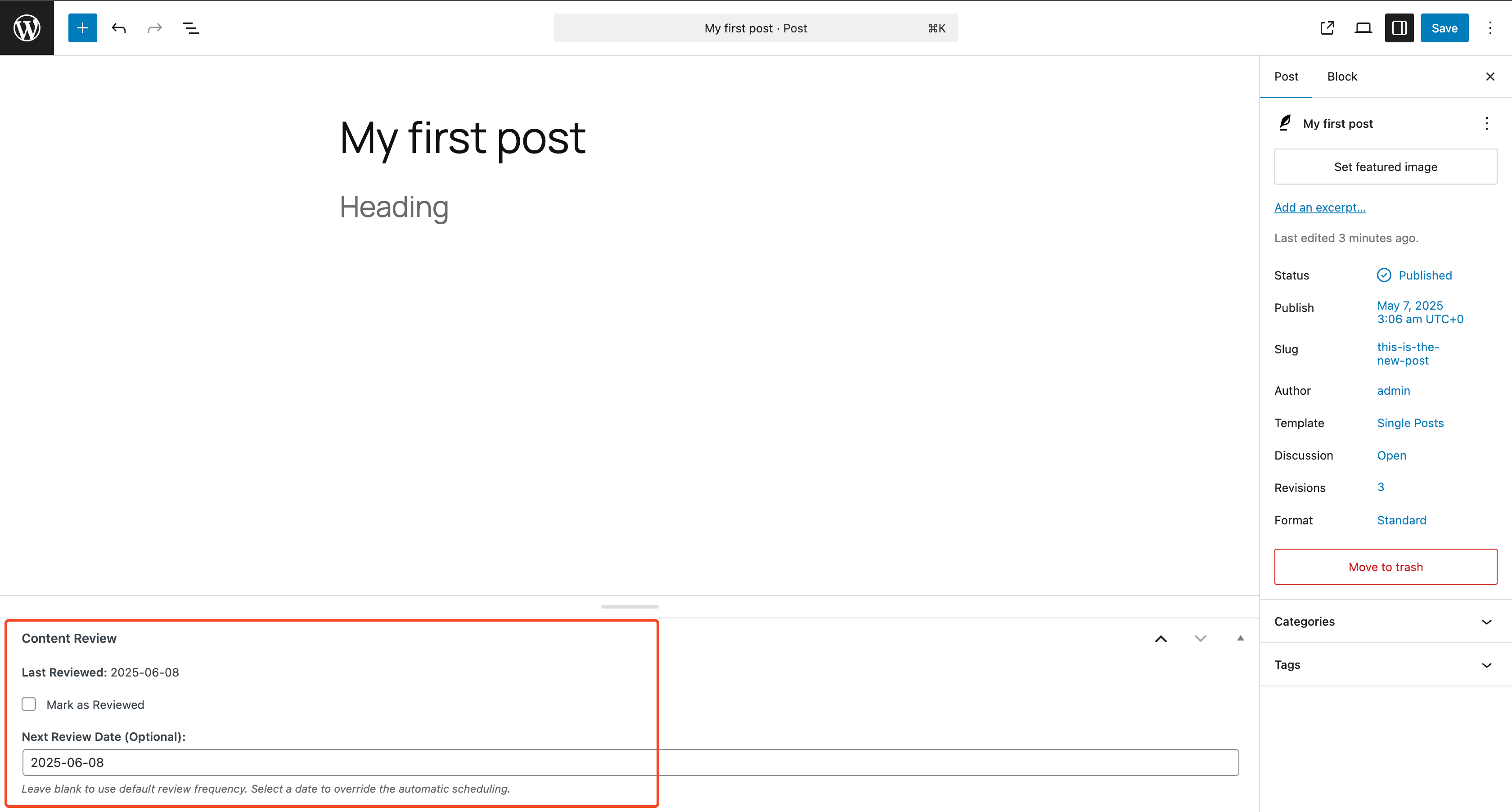
Post editor with «Mark as Reviewed» checkbox and custom date picker 
Email notification example
Установка
- Upload the
contentpulsefolder to the/wp-content/plugins/directory - Activate the plugin through the ‘Plugins’ menu in WordPress
- Configure settings under Settings > ContentPulse
- Check your dashboard for the new «Content Review Needed» widget
Часто задаваемые вопросы
-
How does the review frequency work?
-
If you set the frequency to 30 days, a post last updated on June 1st would appear for review on July 1st. The plugin counts from the last updated or last reviewed date, whichever is more recent.
-
Can I set different review dates for different posts?
-
Yes! When editing a post, you can set a custom «Next Review Date» that overrides the default frequency for that specific post.
-
What happens when I mark a post as reviewed?
-
The post is removed from the «needs review» list and won’t appear again until the review frequency period has passed (unless you set a custom review date).
-
Can I disable email notifications?
-
Yes, email notifications are optional. You can enable/disable them and set your preferred email address in Settings > ContentPulse.
-
Does this work with pages?
-
Currently, ContentPulse only works with blog posts, not pages. This keeps the focus on regularly updated content.
-
Will this slow down my website?
-
No, ContentPulse only runs in the WordPress admin area and uses efficient database queries. It has no impact on your front-end website performance.
Отзывы
Нет отзывов об этом плагине.
Участники и разработчики
«ContentPulse – Content Review Reminder» — проект с открытым исходным кодом. В развитие плагина внесли свой вклад следующие участники:
Участники
Перевести «ContentPulse – Content Review Reminder» на ваш язык.
Заинтересованы в разработке?
Посмотрите код, проверьте SVN репозиторий, или подпишитесь на журнал разработки по RSS.
Журнал изменений
1.0.0
- Initial release
- Dashboard widget for content review tracking
- Configurable review frequency
- Email notifications
- Custom review date scheduling
- Mark as reviewed functionality