
Описание
Ajax Load More is the most powerful infinite scroll, lazy load, and load more plugin for WordPress. Use it to automatically load posts, pages, custom post types, comments, and WooCommerce products without refreshing the page.
Build custom WordPress queries visually with the Ajax Load More Query/Shortcode Builder, then embed them anywhere using blocks, shortcodes, or template tags.
Ajax Load More is developer-friendly, performance-optimized, and compatible with popular plugins like WooCommerce, Advanced Custom Fields, and Elementor.
Особенности
- Query/Shortcode Builder — Create a custom Ajax Load More query in seconds by adjusting various WordPress query parameters included with the inuitive shortcode builder.
- Query Parameters — Query WordPress by many different content types. Query by Post Type, Category, Tags, Custom Taxonomies, Search Term, Date Query, Authors and more!
- Ajax Filtering — The Ajax Load More custom filtering method will allow you to filter and update your Ajax query results.
- Templates — Edit and extend the functionality of Ajax Load More by creating your own template to match the look and feel of your website.
- Multiple Instances — Include multiple instances of Ajax Load More on a single page, post or template.
- Multisite Compatibility — Manage Repeater Templates across all sites in your network.
- Setting Panel — Customize Ajax Load More by configuring the various plugin settings.
Check out the website for more information on the features and functionality of Ajax Load More.
Why Ajax Load More is the Best Infinite Scroll Plugin for WordPress
Ajax Load More differs from the other WordPress infinite scroll plugins because with ALM, you create the query for displaying the data. This gives you full control over the content you are loading and displaying to your users.
What’s New
- Data Prefetching — Load the next set of posts into memory before the user interacts with the Load More button or infinite scroll. This improves the precieved performance of Ajax Load More by reducing wait times for users.
- Filters Add-on — The Filters add-on provides front-end and admin functionality for building and managing Ajax based filters and facets.
- Query Loop — Enable infinite scroll or load more functionality for the WordPress Query Loop block.
- Pro Bundle — Access to all premium Ajax Load More add-ons in a single installation.
- Next Page Add-on — Infinite scroll multi-page WordPress content with Ajax Load More.
- Advanced Custom Fields — Compatibility and integration added for infinite scrolling Flexible Content, Gallery, Relationship and Repeater fields for Advanced Custom Fields.
- Progress Bars — Display a Progress Bar load indicator with each Ajax request.
- Scroll Container — Constraining infinite scroll to a parent container.
Типы содержимого
Ajax Load More can infinite scroll almost any content type WordPress offers — from blog posts to multipage content to WooCommerce products — Ajax Load More can handle it all.
Check out the examples below:
- Standard Posts
- Custom Post Types
- Pages
- Multipage Posts & Pages
- Single Posts
- Comments
- Advanced Custom Fields
Parameters
Ajax Load More accepts a variety of WordPress query and display parameters that are passed to WordPress via shortcode or PHP function/Template Tag.
These parameters allow you to customize the content of the infinite scroll experience by selecting query parameters such as Post Types, Taxonomies, Categories, Tags, Dates, etc… you can also control interactive properties such as button labels, scrolling options and transition styles.
Query/Shortcode Builder
The Ajax Load More Query/Shortcode Builder provides an intuitive and easy-to-use admin interface that transforms complex WordPress queries into manageable shortcodes.
Example Ajax Load More Shortcode
[ajax_load_more post_type="post, portfolio" posts_per_page="6" button_label="Load More"]
Examples & Demos
- Default — Out of the box functionality and styling.
- Advanced Custom Fields — Infinite scroll Advanced Custom Fields data with Ajax Load More.
- Attachments — Endless scroll post attachments.
- CSS Grid — Rendering Ajax Load More listings with CSS GridRe.
- Destroy After — Remove Ajax Load More functionality after ‘n’ number of pages.
- Event Listing — Ordering and listing events by custom field date.
- Filtering — Reset and filter an Ajax Load More instance.
- Facet Filtering — Implement a faceted search and filter experience for Ajax Load More
- Infinite Scroll — A look at the new loading functionality and styles.
- Images Loaded — Download images before displaying ajax loaded content.
- Masonry — Creating a flexible grid layout with Masonry JS.
- Multiple Instances — Include multiple Ajax Load More’ on a single page.
- Paging URLs — Generate unique paging URLs for every Ajax Load More query with the SEO add-on.
- Pause Loading — Posts will not load until initiated by the user.
- Preloaded Posts — Easily preload an initial set of posts before completing any Ajax requests to the server.
- Progress Bar — Display a progress bar load indicator with each Ajax request.
- Search Results — Returning results based on search terms.
- Scroll Container — Constrain Ajax Load More to a parent container.
- SEO & Paging — Combine these two add-ons to create one powerful navigation system.
- Slideshow Gallery — Create a gallery of posts with Ajax Load More and the Paging add-on.
- Table Layout — Ajax Load More will display query results in a table format.
Note: The Templates Add-On has been installed for use on each of our product demos.
Who Uses Ajax Load More?
Ajax Load More is perfect for developers, bloggers, and store owners who want to:
- Improve user experience by reducing page load times.
- Increase page views and ad revenue by keeping users on the page longer.
- Create a modern, seamless browsing experience.
- Simplify navigation on content-heavy sites.
- Enhance the look and feel of their website with custom templates and layouts.
- Easily integrate infinite scroll into any WordPress theme or plugin.
Дополнения
The following add-ons are available to etend and enhance the functionality of Ajax Load More.
- Cache: Improve website performance by caching the results of Ajax server requests.
- Call to Actions: Extend Ajax Load More with advertisement and call to action content blocks.
- Comments: Load and display WordPress blog comments using the core Ajax Load More infinite scroll functionality.
- Elementor: Add infinite scroll or load more to your Elementor Posts and WooCommerce listing widgets with Ajax Load More and the intuitive Elementor Widget Connector.
- Filters: Front-end and admin functionality for creating, managing and displaying Ajax Load More filters.
- Layouts: Predefined responsive layouts for Ajax Load More repeater templates.
- Next Page: Infinite scroll multipage WordPress content with Ajax Load More and the Next Page add-on.
- Paging: Replace the default lazy load/infinite scroll functionality of Ajax Load More with a numbered navigation system.
- Preloaded: Load an initial set of posts before sending any Ajax requests to your server.
- Query Loop: Infinite scroll the core WordPress Query Loop block
- SEO: Generate unique paging URLs with each Ajax Load More query.
- Single Post: Enable infinite scrolling of single posts on your WordPress post templates.
- Templates: Create and manage Repeater Templates on demand, as well as load templates directly from your theme directory.
- WooCommerce: Infinite scroll WooCommerce products with Ajax Load More.
Ajax Load More Pro
The Ajax Load Pro bundle that provides access to all current and future Ajax Load More add-ons in a single installation! Save over 60% when you purchase the Pro bundle.
Extensions
The following FREE extensions are available to provide compatibility with popular WordPress plugins and core features.
- Advanced Custom Fields: Display field type data with Ajax Load More.
- Relevanssi: Display Relevanssi search results with Ajax Load More.
- REST API: Enable compatibility with the WordPress REST API.
- SearchWP: Display SearchWP query results with Ajax Load More.
- Term Query: Infinite scroll WordPress Terms.
- Users: Lazy loading WordPress Users with Ajax Load More.
Callback Functions
Ajax Load More dispatches callbacks during various stages in the plugins lifecycle. Callback functions are dispatched directly from core Ajax Load More or one of the various add-ons.
Filter Hooks
Ajax Load More has a variety of WordPress filters in place that enable users to hook into Ajax Load More to insert or modify data.
Variables
Ajax Load More passes the following PHP variables to each repeater template — these template variables can help you style and transform your repeater templates.
- $alm_current — Returns the current item number in the current Ajax Load More loop and will reset to zero with every ‘Load More’ action.
- $alm_page — Returns the current page number.
- $alm_item — Returns the current item number within your loop.
- $alm_found_posts — Returns the total number of posts found within the entire WordPress query.
Plugin Links
Please Review Ajax Load More!
Your reviews make a big difference! Please consider taking the time to review my plugin. Your ratings and reviews help the plugin grow and provide the motivation needed to keep pushing it forward.
Скриншоты

Settings: Customize Ajax Load More by configuring the various plugin settings. 
Repeater Templates: Manage the front-end display and styling of Ajax loaded content. 
Templates: Unlock the ability to create an infinite number of Repeater Templates with the Templates add-on. 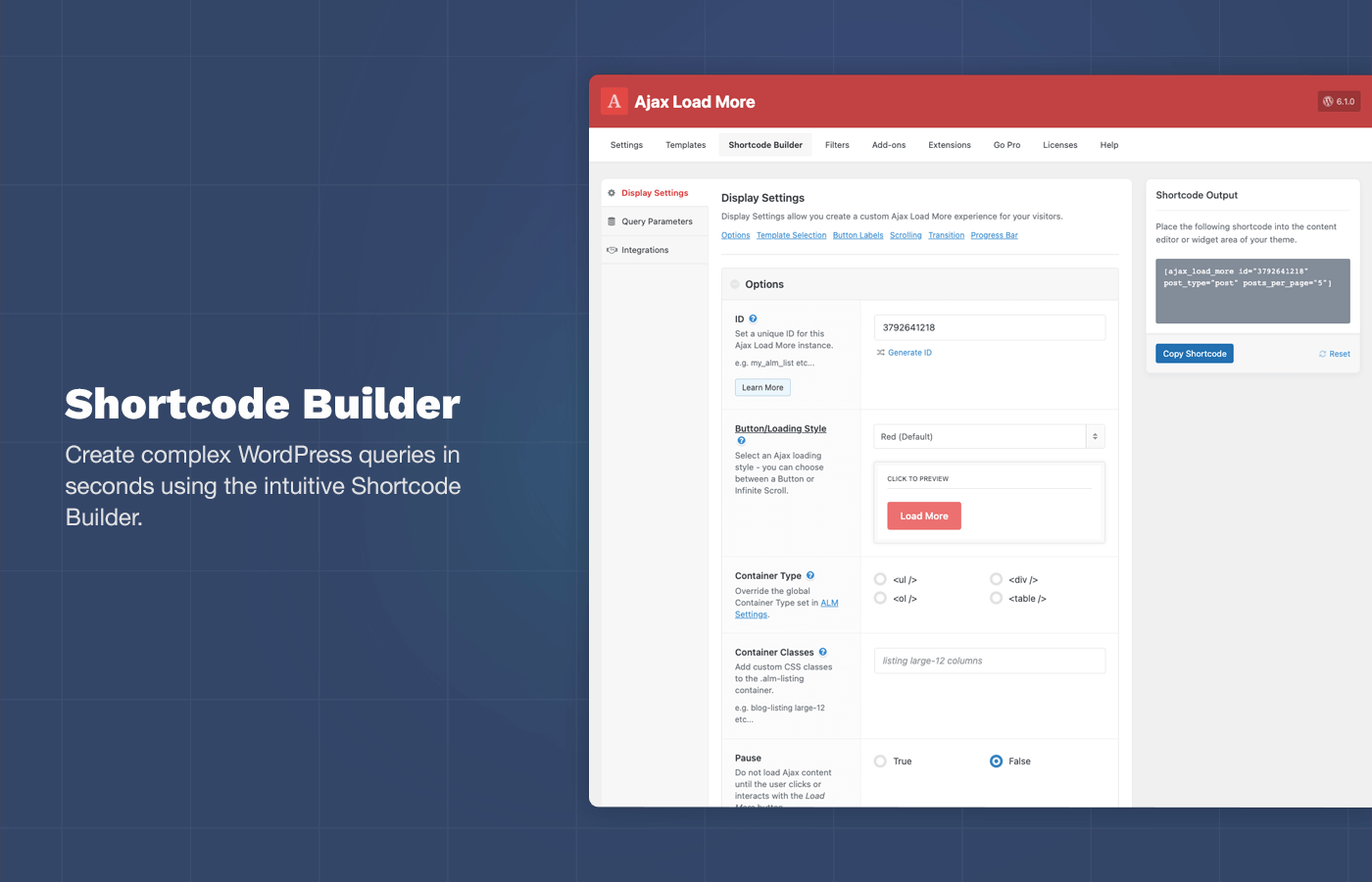
Shortcode Builder: Create complex WordPress queries in seconds using the intuitive Shortcode Builder. 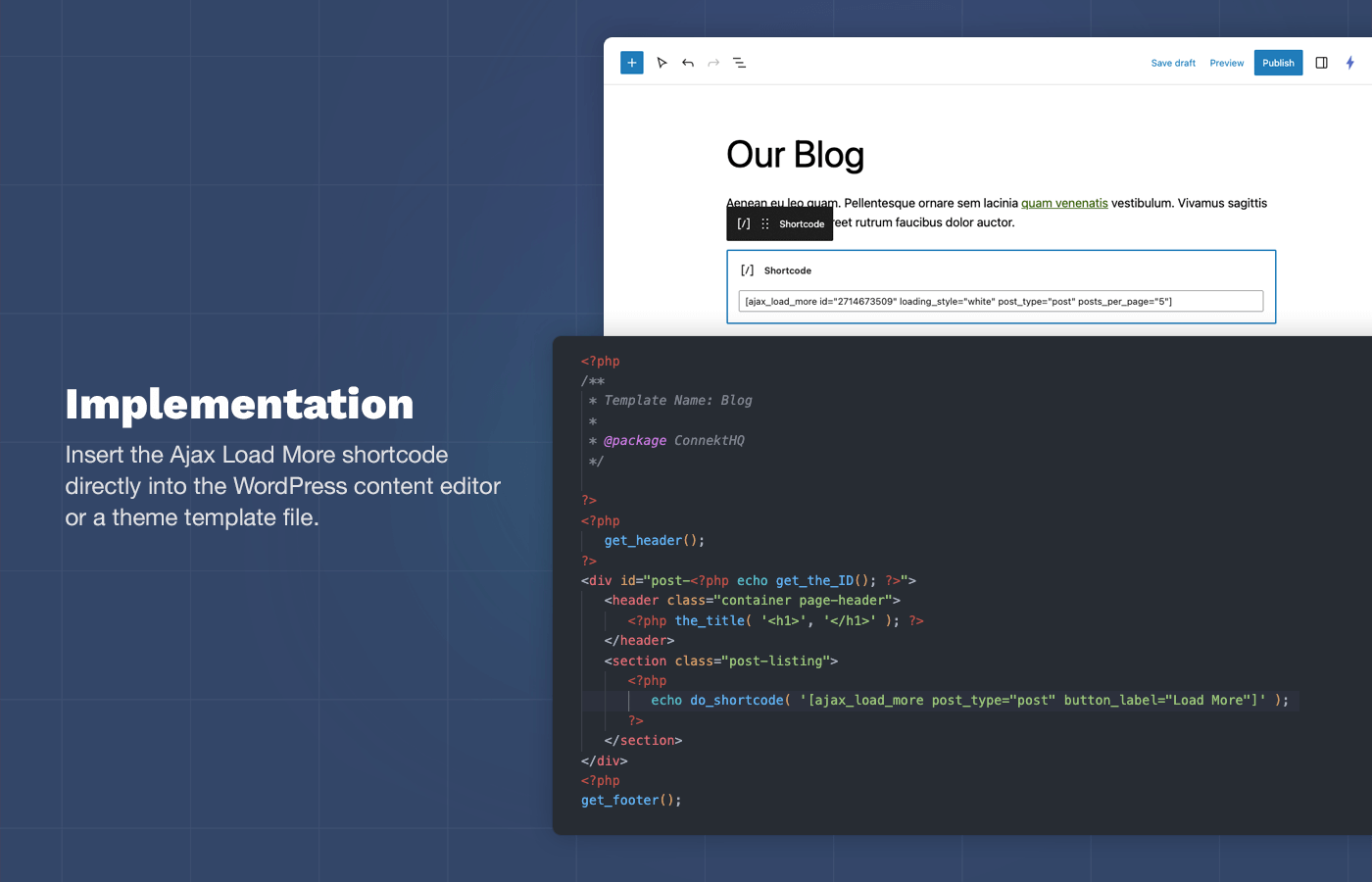
Implementation: Insert the Ajax Load More shortcode directly into the WordPress block editor or a theme template file.
Блоки
Этот плагин предоставляет 2 блока.
- Ajax Load More The ultimate infinite scroll and lazy load plugin for WordPress.
- Ajax Load More: Filters Enable filtering of an Ajax Load More instance.
Установка
How to install Ajax Load More.
Using The WordPress Dashboard
- Navigate to the ‘Add New’ in the plugins dashboard
- Search for ‘Ajax Load More’
- Click ‘Install Now’
- Activate the plugin on the Plugin dashboard
Uploading in WordPress Dashboard
- Navigate to the ‘Add New’ in the plugins dashboard
- Navigate to the ‘Upload’ area
- Select
ajax-load-more.zipfrom your computer - Click ‘Install Now’
- Activate the plugin in the Plugin dashboard
Using FTP
- Download
ajax-load-more.zip - Extract the
ajax-load-moredirectory to your computer - Upload the
ajax-load-moredirectory to the/wp-content/plugins/directory - Activate the plugin in the Plugin dashboard
Часто задаваемые вопросы
-
What are the steps to getting Ajax Load More to display on my website
-
- Create your shortcode
- Add the shortcode to your page, by adding it through the content editor or placing it directly within one of your template files.
- Load a page with your shortcode in place and watch Ajax Load More fetch your posts.
-
What are my server requirements?
-
Your server must be able to read/write/create files. Ajax Load More creates the default repeater on plugin activation and in order to modify the output we are required to write to the file as well.
-
Is the ajax functionality secure?
-
Yes, Ajax Load more uses admin-ajax and nonces in order to protect URLs and forms from being misused.
-
Can I make modifications to the plugin code?
-
Sure, but please be aware that if modifications are made it may affect future updates of the plugin.
-
Can I modify the repeater template?
-
Yes, visit the Repeater Template section in your WordPress admin.
-
How are my repeater templates saved?
-
Repeater template data is saved into your WordPress database as well as written directly to a repeater template .php file in the ajax-load-more plugin directory.
-
Can I use custom fields in a repeater?
-
Yes, but you will need to define $post at the top of the repeater before requesting your custom fields. Like so:
global $post;theImplementationGuidehttpstheImplementationGuidehttpstheImplementationGuidehttpstheImplementationGuidehttpstheImplementationGuidehttpstheImplementationGuidehttpstheImplementationGuidehttpstheImplementationGuidehttpstheImplementationGuidehttpstheImplementationGuidehttpstheImplementationGuidehttps -
Which browsers are supported?
-
- Chrome (Mac, PC, iOS, Android)
- Firefox (Mac, PC, iOS)
- Safari (Mac, iOS)
- Android
- MS Edge
-
How Can You Contribute?
-
Issues and pull requests can be submitted via GitHub.
Отзывы


Участники и разработчики
«Ajax Load More – Infinite Scroll, Load More, & Lazy Load» — проект с открытым исходным кодом. В развитие плагина внесли свой вклад следующие участники:
Участники

Перевести «Ajax Load More – Infinite Scroll, Load More, & Lazy Load» на ваш язык.
Заинтересованы в разработке?
Посмотрите код, проверьте SVN репозиторий, или подпишитесь на журнал разработки по RSS.
Журнал изменений
7.8.2 — January 28, 2026
- UPDATE: Various security fixes.
7.8.1 — January 9, 2026
- UPDATE: Updated core plugin to support Next Page version 1.10.0.
- UPDATE: Code cleanup and dependency updates.
7.8.0 — December 19, 2025
- NEW: Added prefetch functionality to Ajax Load More. Prefetching data will load the next set of posts into memory before the user interacts with the Load More button.
To enable prefetching, add theprefetch="true"parameter to your ALM shortcode. - UPDATE: Code cleanup and various UI/UX improvements throughout the plugin.
7.7.2 — December 11, 2025
- UPDATE: Updated SinglePosts fetch to use REST API endpoint to support custom post types.
- Updated Axios and other project dependencies to latest versions.
- UPDATE: WordPress 6.9 compatibility updates.
- FIX: Added fix for touchstart event listener to use passive option for better performance on touch devices.
7.7.1 — November 26, 2025
- UPDATE: Added cache support to REST API queries.
- UPDATE: Various code cleanup and refactoring.
7.7.0 — November 12, 2025
- UPGRADE NOTICE: Cache users must update to Cache 3.0 or greater when updating core Ajax Load More or the cache will no longer function.
- NEW: Added required updates and new functionality for new Cache add-on 3.0.
- UPDATE: Code cleanup and organization throughout core plugin.
7.6.3 — October 31, 2025
- HOTFIX: Fixed issue with Preloaded and Filter add-on facets not initializing correctly on page load.
7.6.2 — October 6, 2025
- FIX: Fixed issue with License page displaying incorrect products in some instances.
- UPDATE: Various UI/UX updates and improvements.
7.6.1 — September 17, 2025
- UPDATE: Added functionality required for latest Filters add-on updates.
- UPDATE: Various security fixes.
7.6.0.2 — September 13, 2025
- UPDATE: Additional tweaks and improvements to normalize the new loading styles.
7.6.0.1 — September 12, 2025
- NEW: Further optimization and modernized the Load More button and Infinite Scroll styles/animations with new SVG based spinners.
- UPDATE: Removed
button_loading_labelandprev_button_loading_labelparameters as these are no longer in used with the new loader styles.
7.6.0 — August 18, 2025
- NOTICE: This Ajax Load More update includes to the button animations and loading styles. It’s possible that your existing loading style may have be affected.
- NEW: Modernized the Load More button and Infinite Scroll styles/animations with new SVG based spinners.
- UPDATE: Automatically set
pause_overrideto true if loading style is infinite. - UPDATE: Removed
.moreclassname from Ajax Load More button. - UPDATE: Modernized and cleaned up CSS for various other ALM elements and features.
- FIX: Fixed issue with Query Loop add-on loading standard Ajax Load More in Block Editor due to changes in the Block Editor.
- FIX: Fixed accessibility issue when moving user focus with Preloaded active.
- FIX: Fixed issue with new Templates add-on throwing a PHP error if a template does not exist.
7.5.0 — July 23, 2025
- NEW: Added required updates for the new Templates add-on.
- FIX: Fixed template issue where alias was not live updating in the Templates admin.
- UPDATE: Various UI/UX updates, bug fixes, and improvements.
7.4.2 — June 10, 2025
- FIX: Fixed issue with registering the load_text_domain() function.
- UPDATE: Updated functions to get the querystring with the SEO and Single Posts Add-on. [DONE]
- UPDATE: Various updates UI/UX updates to the core plugin.
7.4.1 — June 6, 2025
- UPDATE: Updated license handling functionality to reduce failed attempted to activate licenses.
- UPDATE: Various code cleanup and UI updates throughout the plugin.
- UPDATE: Secuirty fixes.
7.4.0.1 — May 27, 2025
- HOTFIX: Quick hotfix for potential fatal error.
7.4.0 — May 27, 2025
- NEW: Added required updates for table layouts and paging add-on.
- NEW: Added required updates for background processing feature of the Filters add-on.
- UPDATE: Added support for iframe block editor and rendering Ajax Load More Block.
- FIX: Fixed issue with default values on archive templates adding a duplicate query param.
- FIX: Fixed issue with
load_plugin_textdomainwarning. - FIX: Fixed potential issue with core and filters ALM blocks throwing admin error.
- Fix: Fixed PHP warning due to registering the text domain.
- UPDATE: Various code cleanup and UI updates throughout the plugin.
7.3.1.3 — May 15, 2025
- UPDATE: Various security fixes.
7.3.1.2 — May 11, 2025
- HOTFIX: Revert change to fix
load_plugin_textdomainwarning. This update caused a fatal error. Sorry about that. Will fix the warning in the next release.
7.3.1.1 — May 10, 2025
- UPDATE: Various security fixes.
- UPDATE: Updated Axios NPM package.
- FIX: Fixed issue with
load_plugin_textdomainwarning.
7.3.1 — February 12, 2025
- UPDATE: Updated new Date Query feature to parse compare value. This was previously not functioning as expected. e.g. `[ajax_load_more date_query=»2024-01-01;2020-01-01″ date_query_compare=»>=;<=» date_query_relation=»OR»]
- NEW: Added date_query_column parameter to allow for querying the post_date or post_modified column. e.g. `[ajax_load_more date_query=»2020-01-01″ date_query_column=»post_modified»]
- HOTFIX: Fixed issue with conflicting
wp-block-queryclass the new Query Loop add-on.
7.3.0 — February 6, 2025
- NEW: Added Date Query support with
date_query,date_query_beforeanddate_query_afterparameters. - UPDATE: Various admin UI/UX updates and code cleanup throughout plugin.
7.2.0.1 — January 22, 2025
- HOTFIX: Fixed potential issue with the parsing of
meta_queryandtax_queryparameters when using Preloaded add-on.
7.2.0 — January 17, 2025
- NEW: Added required updates for the new Query Loop add-on.
- NEW: Added new
alm_single_post_querystringhook to remove the querystring from Single Post add-on URLs. - NEW: Added preview functionality for previewing an ALM instance while building a shortcode.
- NEW: Added new
templateparameter to the core ALM shortcode. This new parameter will normalize the template selection and replace therepeaterandtheme_repeaterparameters. - NEW: Added new ALM core parameters,
urls,prev_button_label,prev_button_loading_label, andprev_button_done_label. These new parameters can be used in the near future with various add-ons. - UPDATE: Various admin UI/UX updates throughout plugin.
- FIX: Fixed issue with Users extension showing mising license notice in admin.
7.1.4 — December 4, 2024
- UPDATE: Updated Axios HTTP library to latest version.
- UPDATE: Added feature to re-save default Repeater Template if template was deleted from the filesystem.
- UDPATE: Modified the
almdb columns to match upcoming Templates add-on requirements. - UPDATE: Added functionality required for Elementor Add-on update to support loading previous posts on paged results.
- UPDATE: Started integration with Query Loop block and Ajax Load More.
- FIX: Fixed z-index issue with ALM navigation in WP admin.
- FIX: Added fix for
load_plugin_textdomainphp notice. - FIX: Fixed issue with Preloaded amount being 0 and no post remaining.
- FIX: Fixed issue with Comments add-on and allowing for a default post ID.
- UPDATE: Code cleanup and other minor bug fixes.
- UPDATE: Various admin UI/UX updates.
7.1.3 — October 1, 2024
- UPDATE: Various security fixes.
7.1.2 — May 30, 2024
- FIX: Fixed issue with full article loading in Next Page add-on.
- UPDATE: Various security fixes.
7.1.1 — May 10, 2024
- UPDATE: Added required functionality and support to allow for Next Page add-on to be used with Single Posts for full article loading with split pages.
- UPDATE: Various UI/UX improvements for the plugin admin.
7.1.0.1 — March 21, 2024
- HOTFIX: Hotfix for missing
css_classesparameter in7.1.0release.
7.1.0 — March 21, 2024
- NEW: Added Ajax Load More block for the WordPress Block Editor. ALM instances are now able to be rendered inside the Block Editor.
- NEW: Added Ajax Load More Filters block for the WordPress Block Editor. When activated, ALM Filters can be rendered inside the Block Editor using the Filters block.
- NEW: Added new
wrapper_classesparameter that injects classnames onto the top levelajax-load-more-wrapcontainer. - NEW: Added new
alm_user_rolefilter to allow developers to change the user role required to access the Ajax Load More admin. Default isedit_theme_options. - UPDATE: Various security fixes with regards to accessing layouts and directory paths.
- UPDATE: Added support for caching Filter add-on facets with the Cache add-on.
- FIX: Fixed bug with Next Page add-on disabling the Load More button early when there were pages remaining.
- UDPATE: Various UI/UX updates throughout plugin admin and frontend.
7.0.3 — February 15, 2024
- FIX: Added fix for Paging add-on scrolling to top of listing on initial page load when
paging_scrollwastrue. - FIX: Fixed issue with undefined
post_countwhen loading Ajax Load More with Ajax/HTTP request.
7.0.2 — February 8, 2024
- NEW: Added ‘alm_licensing_sslverify’ hook to allow users to disable SSL verification when checking for updates.
- NEW: Added new Paging add-on parameter
paging_container_classesused for adding CSS classes to the paging HTML container. - NEW: Added support for Elementor Loop Grid widget when using Elementor add-on.
- FIX: Fixed issue with Elementor add-on potentially not disabling the Load More button when no content remains.
- SECURITY: Various security fixes for admin level plugin settings.
7.0.1 — January 23, 2024
- HOTFIX: Fixed issue with Filters add-on that would appear when using the Paging add-on. Filters would remain disabled after interacting with a filter due to a missing callback function.
- HOTFIX: Fixed issue with display of Single Posts data when being used with Elementor.
7.0.0 — January 16, 2024
…
6.0.0 — June 11, 2023
…
5.0.0 — March 8, 2019
…
4.0 — November 5, 2018
…
2.0 — June 20, 2014
- Ajax Load More