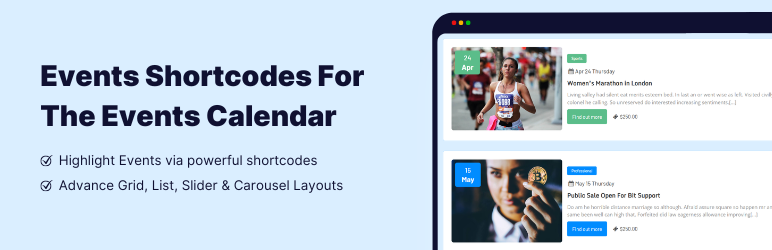

Descripziun
Events Shortcodes extends the functionality of The Events Calendar plugin by adding shortcode and Gutenberg block support for displaying events anywhere on your website. This events calendar extension allows you to insert event listings into pages, posts, landing pages, or custom sections using simple shortcode attributes or the integrated block editor interface.
If you are looking for The Events Calendar shortcode, this addon provides a simple and flexible solution. It helps you present events created with The Events Calendar plugin in multiple layouts including list view, timeline format, and minimal list styles that help visitors quickly understand event schedules and details. For users who need more advanced options, the Pro version adds additional layouts such as grid displays, carousels, sliders, and other dynamic event showcase styles that help create engaging event sections across different pages of your website.
👉 View Plugin Demos: (FREE)
Events List | Events Timeline | Events Minimal List
👉 View Plugin Demos: (PRO)
Events Grid | Events Accordion | Events Masonry | Highlighted Layout
Events Carousel | Events Slider | Events Filter Bar | View All Demos
Events Shortcodes Plugin Features
-
The Events Calendar Shortcode & Block
Insert events into any content area of your website using a dedicated Gutenberg events block or a simple shortcode for The Events Calendar. You can place an event feed inside posts, landing pages, or widgets without modifying your theme files.[events-calendar-templates category="all" template="default" style="style-1" date_format="default" start_date="" end_date="" limit="10" order="ASC" hide-venue="no" time="future" socialshare="no"]
-
Multiple Event Layouts & Styles
Choose between list, timeline, and minimal list layouts to showcase a list of events in different visual styles. These layouts help organize event dates, titles, and details in a structured format that works well for event pages, schedules, and activity listings. The Pro version adds additional layouts such as grid, carousel, slider, accordion, and masonry views. -
Date Filters in Shortcode
Filter events by date range or event type such as future events, past events, or all event archives. This allows you to create separate sections for upcoming schedules or previous event archives. You can also choose any date format to match your website’s regional settings. -
Event Category, Sorting & Limit
Display events from specific categories and control how they appear on the page. You can sort events in ascending or descending order and limit how many events are shown in each listing. This helps create focused event sections such as featured events, category-based listings, or homepage event highlights.
Events Shortcodes Pro Features
The Pro version extends the core functionality of the plugin by providing additional layouts, filtering options, and advanced display controls. These features help website owners create more interactive event sections and present event information in visually engaging formats.
Events Search Filter Bar
Add an advanced filter bar on the frontend that allows visitors to search and filter events directly from the page. Users can quickly search events based on categories, venues, organizers, or other available filters. This feature is useful for websites that publish a large number of events and want to provide an easy way for visitors to explore schedules and program listings.
Advanced Event Layouts
Access premium event layouts designed for modern websites. These layouts help present event information in different visual formats that can fit various page designs and website structures. Available layouts include Grid for structured event cards, Carousel for sliding event showcases, Masonry for dynamic grid arrangements, Accordion for compact event listings, and Calendar style displays for schedule-based views.
Display Events by Venue, Organizer, or Tag
The Pro version provides advanced filtering options that allow you to display specific groups of events based on event metadata. This helps you organize event listings across multiple pages and create more targeted event sections.
-
List of Events by Venue
Show events happening at a particular location. This is useful for venues, conference halls, coworking spaces, or community centers that host multiple events. -
List of Events by Organizer
Display events organized by a specific organizer or organization. This allows event platforms or multi-organizer websites to create dedicated event sections for each organizer. -
List of Events by Tag
Filter events using tags to create topic-based event lists such as workshops, webinars, meetups, or training sessions. -
Show Only Featured Events
Highlight selected events that you want to promote on your homepage or landing pages. Featured event lists help draw attention to important announcements, upcoming conferences, or special events.
Why Use Events Shortcodes with The Events Calendar?
- Many websites need a quick way to highlight upcoming activities on the front page. With this plugin, you can create homepage event sections that show the latest schedules, upcoming sessions, or featured programs to help visitors stay informed.
- Content creators and bloggers can embed schedule blocks inside articles, announcements, or event recap posts using shortcode. This makes it easy to connect written content with relevant schedules or upcoming activities.
- Upgrade The Events Calendar from a simple display to a modern events calendar. Instead of relying only on the default calendar view, this plugin introduces structured layouts such as lists and timelines that make event information easier to read and navigate.
- Since the plugin uses a shortcode, it works with almost any WordPress theme. You can show list of events on websites built with popular themes such as Astra, GeneratePress, OceanWP, Kadence, Blocksy, and Neve, as well as custom-developed themes.
- Using Events Shortcodes addon alongside The Events Calendar plugin gives you more control over how event information appears across your website. It improves your site’s event management and event display in an easy way.
Who Can Use Events Shortcodes?
This plugin is useful for many types of WordPress websites, including:
- Non-profit and charity websites that need to promote public events
- Business websites that publish workshops, webinars, or training sessions
- Conference and summit websites that need structured program listings
- Schools, colleges, and universities that share academic events
- Community groups that manage local meetups and activities
- Agencies and developers who need flexible event output inside custom layouts
More Addons For The Events Calendar
If you are building an event-based website using The Events Calendar plugin, you may also benefit from these additional addons developed by Cool Plugins. These addons help improve event presentation, create custom layouts, and integrate events with popular WordPress page builders. Together they allow you to build a more flexible and professional event management website without custom development.
-
Event Single Page Builder
Create fully customized single event pages. This addon allows you to control how event details appear on individual event pages, including sections for event descriptions, schedules, venue information, ticket details, and other event metadata. It helps website owners design event pages that match their branding, typography, and overall website layout. -
Event Speakers & Sponsors
Add dedicated sections for speakers and sponsors within event pages or event listings. This addon is especially useful for conferences, workshops, summits, and professional events where speaker profiles and sponsor information need to be presented clearly. It helps highlight guest speakers and showcase sponsor logos. -
Events Widgets for Elementor
Use Elementor widgets designed specifically for The Events Calendar to display event listings inside Elementor layouts. The widgets allow you to present events in list, grid, or carousel formats while taking advantage of Elementor’s visual page builder controls. This integration makes it easier for Elementor users to create dynamic event sections. -
Events Calendar Modules for Divi
Display event information inside Divi Builder layouts using dedicated event modules. These modules allow Divi users to insert event lists and other event-based elements directly within their page designs. It provides a seamless way to integrate event content into Divi-powered websites while maintaining full design control within the builder interface.
Other Plugins by Cool Plugins
Cool Plugins develops a range of WordPress plugins designed to extend popular tools and simplify website functionality without complex configuration. These plugins are used by website owners, developers, and agencies to add new features, automate tasks, and improve the overall user experience of WordPress websites.
- Cool Timeline – Create visually engaging vertical or horizontal timelines to present company history, project milestones, product journeys, or storytelling content on WordPress websites. The plugin allows you to organize chronological information in a structured timeline layout that improves readability and presentation.
- Cool FormKit – Extend Elementor forms with advanced features such as additional input fields, conditional logic, calculations, multi-step forms, and enhanced form styling options. This plugin helps Elementor users create more dynamic and functional forms without needing custom scripts or complex form builders.
- AutoPoly – Automate multilingual website translation for WordPress sites using Polylang. The plugin integrates AI-powered translation services to help convert content into multiple languages quickly, making it easier to manage multilingual websites.
- LocoAI – Enhance the Loco Translate plugin with AI-assisted translation capabilities. It allows users to translate WordPress themes and plugins more efficiently by using intelligent translation tools that help speed up localization workflows and improve translation accuracy.
Third-Party Services: To improve user experience this plugin offers optional usage tracking and optional feedback submission on deactivation. Data is sent only after explicit user consent. No hidden tracking is performed, and no frontend visitor or site user data is collected. For more details, please review our Data Usage Policy, TOS, and Privacy Policy. This plugin also utilizes the Codestar Framework (licensed under GPL) and Google Fonts to provide integrated typography options.
Disclaimer: Events Shortcodes For The Events Calendar plugin is developed and maintained by the Cool Plugins team and is not affiliated with, endorsed by, or officially connected to The Events Calendar plugin or its parent company, StellarWP. Some links in this plugin and readme file may be affiliate links, which means we may earn a commission at no additional cost to you.
Special thanks to the famous The Events Calendar ⇗ plugin authors for creating an awesome event plugin for events management.
✍ 200+ Reviews by Happy Users
★★★★★ Great Plugin and Great Support
Makes shortcodes so much easier to display. I’ve had to contact support in the past for a plugin, but Vishali with Cool Plugins went above and beyond to help me out with my issues. I highly suggest using their products.
★★★★★ Block based
I used it several years ago. Now I needed it again for a client. The best thing: It’s already block based with lot’s of customization. Great job, thanks! (It would be perfect to be able to select custom fonts that are being added through Kadence Custom Fonts plugin)
★★★★★ Highly recommended
Very fast and helpful support. The translation issue was resolved quickly, competently, and without complications. I am very satisfied with the plugin and the service. Highly recommended! 🙂
★★★★★ Great Plug-in : Simple & Efficient
Great plug-in, so simple to use, with huge effect! Event Calendar is great but really to poor in its free version. Great but I was about to stop it because of the lack of possibilities to make custom layouts. „Events Shortcodes For The Events Calendar“ plug-in solved part of this pb and I kept going with Event Cal. and now, I’m finaly willing to buy Events Calendar full version!
★★★★★ Great addon for the Events Calendar
Great tool to simplify and shorten your design/dev time
★★★★★ Great addon
With this addon it’s easy to create a modern and good looking view at your calendar events!
Maletgs dal visur

Events List Template – Display Events from The Events Calendar 
Events List Template Style 2 – Upcoming Events Layout 
Events List Template Style 3 – Custom Event List Design 
Minimal Events List Layout for Compact Event Display 
Events Shortcodes Plugin Settings Panel 
The Events Calendar Shortcode Block 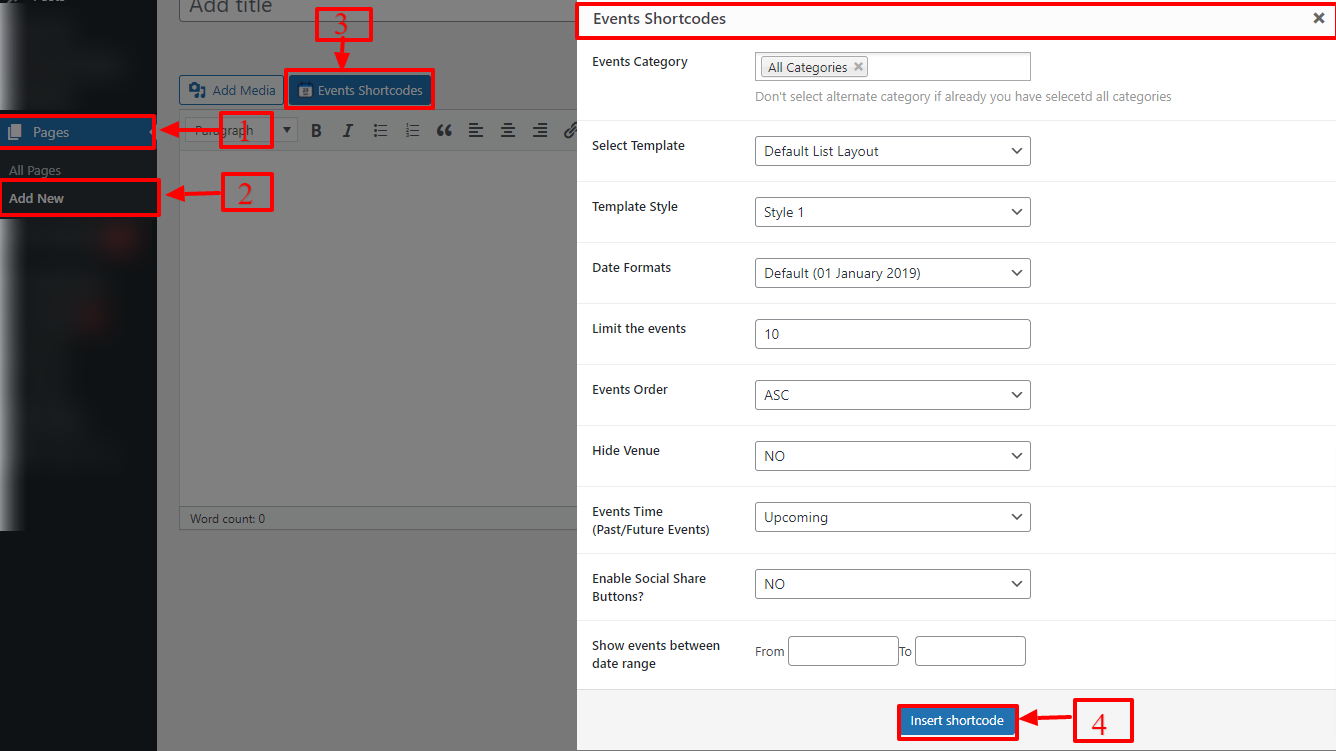
Shortcode Generator for The Events Calendar 
Gutenberg Block for The Events Calendar
Blocks
This plugin provides 1 block.
- Event Block Events Gutenberg Block For Create List Events In Block Editor.
Installaziun
Follow the steps below to install and use Events Shortcodes plugin.
1. Install Required Plugin
This plugin works only with The Events Calendar plugin.
- Go to Plugins Add New in your WordPress admin.
- Search for The Events Calendar.
- Install and activate it first.
2. Install Events Shortcodes Plugin
- Go to Plugins Add New.
- Search for Events Shortcodes for The Events Calendar.
- Click Install Now and then Activate.
3. Access Plugin Settings
- To manage plugin options and settings, go to:
WP Admin Events Addons Shortcode Settings
4. Customize Colors & Fonts
To change how events look on the frontend:
- Go to WP Admin Events Addons Shortcode Settings General Settings
- Adjust colors, fonts, and styling options.
- These settings apply to events shown using shortcode.
5. Add Custom CSS (Optional)
If you want to add your own styling:
- Go to WP Admin Events Addons Shortcode Settings Extra Settings
- Add your custom CSS and save changes.
6. Use Shortcode in Any Page or Post
-
You can find the shortcode and all available attributes here:
WP Admin Events Addons Shortcode Settings Shortcode Attributes -
Default Shortcode Example:
[events-calendar-templates category=“all“ template=“default“ style=“style-1″ date_format=“default“ start_date=““ end_date=““ limit=“10″ order=“ASC“ hide-venue=“no“ socialshare=“no“ time=“future“]
7. Use Events Block (Gutenberg Editor)
You can also display events using the block-based editor:
- Create or edit a page.
- Click Add Block (+) and search for Events Block.
- Insert the block into the page.
- Adjust settings from the block panel.
- Publish or update the page and preview it.
For detailed guides, check the full documentation of Events Shortcodes plugin.
FAQ
-
Does The Events Calendar support shortcodes by default?
-
No. The free version of events plugin does not provide built-in shortcodes to display events inside regular WordPress pages or posts.
By default, events created with The Events Calendar appear on the main calendar archive page and individual event pages. This works well for basic event websites, but many website owners want more flexibility to show events in different sections of their site.
For example, you may want to display:
- upcoming events on the homepage
- a small events list in the sidebar
- event schedules inside blog posts
- event sections on landing pages
- category-based event lists
This is where Events Shortcodes becomes useful. The plugin adds shortcode and Gutenberg block support so you can display events created with The Events Calendar anywhere on your website without modifying your theme files.
-
How can I display The Events Calendar events list using a shortcode?
-
You can easily display an events list by placing the shortcode on any page, post or widget area.
Example shortcode:
[events-calendar-templates category="all" template="default" style="style-1" limit="10" order="ASC" time="future"]Once the shortcode is added, WordPress will automatically render a list of events created with The Events Calendar plugin.
The shortcode includes several attributes that allow you to control how the events appear on the page. For example, you can customize:
- number of events displayed
- event order (ascending or descending)
- event categories
- layout style
- event date range
-
How can I show upcoming events from The Events Calendar on my homepage?
-
To show upcoming events, simply place the shortcode provided by Events Shortcodes addon inside your homepage and use this parameter in your shortcode attribute:
time="future"This tells the plugin to display only upcoming events. Displaying upcoming events helps visitors quickly see what events are scheduled next and encourages them to explore event details.
-
How can I use The Events Calendar inside Gutenberg block editor pages?
-
Events Shortcodes extension also includes a dedicated Gutenberg block that allows you to display events visually without writing shortcode manually.
To use it:
- Open any page or post in the WordPress editor
- Click Add Block (+)
- Search for Events Block
- Insert the block into the page
- Configure event display options from the block settings panel
The block allows you to control event layout, number of events, and other display settings directly inside the editor. This makes it easier for users who prefer a visual configuration instead of editing shortcode attributes.
-
What free layouts are available with the shortcode for The Events Calendar plugin?
-
The free version of Events Shortcodes provides multiple layouts that allow you to display events in different visual formats.
Available layouts include:
-
Events List layout – Displays events in a structured vertical list format that is ideal for schedules and announcements.
-
Events Timeline layout – Shows events in chronological order using a timeline design, which works well for highlighting sequences of activities.
-
Events Minimal List layout – A compact event list layout designed for smaller content areas such as sidebars or short event sections.
These layouts allow you to present event information clearly while maintaining the visual style of your website.
-
-
How can I show events Grid or Carousel using The Events Calendar shortcode?
-
The Pro version of Events Shortcodes plugin includes additional layouts designed for more dynamic event displays.
Available advanced layouts include:
- Grid layout for card-style event displays
- Carousel layout for sliding event sections
- Slider layout for featured event highlights
- Masonry layout for flexible event grids
- Accordion layout for compact event lists
- Highlighted event layouts
These layouts allow you to create more interactive event sections and visually engaging event showcases across your website.
-
How can I filter The Events Calendar events by category, date or event type?
-
The shortcode parameters allow you to filter events in many ways.
You can display events based on:
- event categories
- specific date ranges
- upcoming events
- past events
- all events
For example, you could create different sections such as:
- upcoming workshops
- past conference events
- category-specific event listings
- seasonal event schedules
The Pro version also includes a frontend Events Filter Bar that allows visitors to search and filter events directly from the page.
-
How can I control the number of events and events order in the shortcode?
-
The shortcode attributes allow you to control both the number of events displayed and the order in which they appear.
For example, you can:
- limit the number of events shown on a page
- sort events by date
- display events in ascending or descending order
- change how event dates are formatted
These options allow you to create sections such as past events, upcoming schedules or featured event highlights.
-
Does the shortcode support SEO-friendly schema markup for events?
-
Yes. The plugin uses event data generated by The Events Calendar plugin, which already includes structured event information.
Search engines can recognize event details such as:
- event title
- event date and time
- event venue
- organizer information
This structured data helps search engines better understand your event content and can improve how event pages appear in search results.
-
Can I add an events search and filter bar above the events list?
-
Yes. The Pro version of Events Shortcode plugin includes an Events Filter Bar feature that allows visitors to search and filter events directly on the page.
Visitors can filter events by:
- event category
- event venue
- event organizer
- other available filters
This feature is especially helpful for websites that publish many events, as it allows users to quickly find the events that interest them.
-
How can I display events like Today Events or This Week Events using shortcode?
-
You can customize shortcode parameters to display events based on specific date ranges.
For example, you can create sections such as:
- today’s events
- this week’s events
- upcoming events
- past events
-
Yes. Since the plugin outputs events through shortcode, you can display event lists inside WordPress sidebar widgets, footer widgets, or any widget area that supports shortcodes.
Simply place the shortcode inside a shortcode widget or block widget, and the events will automatically appear in that location. This is useful for displaying upcoming events in the sidebar or footer.
-
How can I display featured events from The Events Calendar on homepage?
-
The Pro version allows you to display featured events only using advanced shortcode filters.
This is useful for highlighting important events such as:
- conferences
- webinars
- workshops
- community meetups
Featured events can be displayed on the homepage or landing pages to attract attention and promote important upcoming events.
-
Is Events Shortcodes plugin compatible with most WordPress themes?
-
Yes. The plugin is designed to work with almost all modern WordPress themes because it uses shortcode and Gutenberg block output.
It works well with popular themes such as:
- Astra
- GeneratePress
- OceanWP
- Kadence
- Blocksy
- Neve
It can also be used with custom WordPress themes developed by agencies or developers.
-
Can I use Events Shortcodes with Elementor or Divi page builders?
-
Yes. Because the plugin uses shortcode and block output, it works with most WordPress page builders including:
- Elementor
- Divi
- Beaver Builder
- WPBakery
For deeper integration with specific builders, you can use dedicated addons:
-
How can I report security bugs?
-
You can report security bugs through the Patchstack Vulnerability Disclosure Program. The Patchstack team help validate, triage and handle any security vulnerabilities.
Report a security vulnerability.
Reviews


Contributors & Developers
“Events Shortcodes For The Events Calendar” is open source software. The following people have contributed to this plugin.
Contributors


Translate “Events Shortcodes For The Events Calendar” into your language.
Interested in development?
Browse the code, check out the SVN repository, or subscribe to the development log by RSS.
Changelog
2.6.2 | MAR 10, 2026
- Improved: Plugin dashboard header usability.
- Tested up to: The Events Calendar 6.15.17.1.
2.6.1 | FEB 26, 2026
- Fixed: Minor styling issues in event templates for improved UI consistency.
- Improved: Internal code structure for better performance.
2.6.0 | FEB 23, 2026
- Improved: Admin dashboard layout and usability within Events Addons settings.
- Improved: Internal logic handling event query processing and template rendering.
- Fixed: Compatibility issues reported by the “Plugin Check” plugin.
- Updated: Documentation in plugin readme.
- Tested up to: The Events Calendar version 6.15.16.
2.5.4 | FEB 11, 2026
- Improved: Minor code refinements.
2.5.3 | FEB 05, 2026
- Improved: Overall performance and stability of event plugin.
2.5.2 | NOV 18, 2025
- Improved: Styling adjustments for rating notice in plugin.
- Tested up to: The Events Calendar version 6.15.11.
2.5.1 | SEP 18, 2025
- Fixed: Google Fonts loading issue affecting event block typography.
- Improved: Other Events Calendar addons recommendations in plugin.
- Tested up to: The Events Calendar version 6.15.4.
2.5.0 | SEP 05, 2025
- Added: Arial font family support in event block typography settings.
- Added: Month header display option for event listing blocks.
- Added: Background color customization option for Minimal List event templates.
- Added: Translation support for month labels in event block.
- Fixed: Security issues reported during code review.
- Fixed: Minor CSS conflicts affecting event list styling.
- Fixed: Editor loading delay when displaying large event collections (50+ events).
- Improved: Internal event query handling and frontend rendering performance.
2.4.10 | SEP 02, 2025
- Updated: Internal plugin reference links.
2.4.9 | AUG 18, 2025
- Fixed: Security related issues identified in plugin code.
- Improved: Minor improvements in event listing logic.
- Tested up to: WordPress version 6.8.2.
- Tested up to: The Events Calendar version 6.14.2.
2.4.8 | JUN 24, 2025
- Updated: UTM parameters in plugin links.
- Updated: Plugin documentation.
2.4.7 | JUN 10, 2025
- Added: User opt-in option in plugin settings.
- Improved: Minor improvements in settings.
- Tested up to: The Events Calendar version 6.13.2.1.
2.4.6 | APR 18, 2025
- Fixed: Issue affecting plugin configuration panel.
2.4.5 | APR 17, 2025
- Tested up to: WordPress version 6.8.
- Tested up to: The Events Calendar version 6.11.2.
2.4.4 | NOV 22, 2024
- Added: Gutenberg block for inserting event listings inside the block editor.
- Fixed: load_plugin_textdomain() issue affecting translation loading.
- Tested up to: WordPress version 6.7.
- Tested up to: The Events Calendar version 6.8.2.
2.4.3 | SEP 18, 2024
- Tested up to: WordPress version 6.6.2.
- Tested up to: The Events Calendar version 6.6.4.2.
- Fixed: Minor security issues discovered during maintenance.
2.4.2 | JUL 23, 2024
- Tested up to: WordPress version 6.6.
- Tested up to: The Events Calendar version 6.6.0.
2.4.1 | MAY 07, 2024
- Added: “Get Started” onboarding page for new users.
- Fixed: Broken image links affecting Events List template styles 2 and 3.
- Fixed: Category slug filtering issue within WPBakery Page Builder.
- Updated: Shortcode parameter references inside plugin settings.
2.4.0 | JAN 31, 2024
- Improved: HTML markup and CSS structure for event template layouts.
- Improved: Default configuration values for styling options.
2.3.3 | NOV 07, 2023
- Fixed: Incorrect frontend text output within event display templates.
2.3.2 | NOV 06, 2023
- Fixed: Minor security issues.
- Fixed: Fatal error triggered by search element in Avada theme.
- Deprecated: Legacy shortcode generator.
2.3.1 | MAR 29, 2023
- Improved: Minor text corrections.
- Improved: Updated internal resource links.
- Improved: Admin dashboard performance.
- Improved: Feedback form workflow.
2.2.6 | MAR 02, 2023
- Improved: Minor documentation updates.
- Improved: Updated plugin reference links.
2.2.5 | DEC 05, 2022
- Added: “Find Out More” option in settings panel.
- Fixed: Time function parameter issue affecting event timing display.
2.2.4 | OCT 20, 2022
- Added: Google Fonts enable/disable control.
2.2.3 | SEP 23, 2022
- Fixed: Event title display issue with Divi theme integration.
- Fixed: Event status issue after The Events Calendar update.
- Fixed: Google Fonts loading issue.
2.2.2 | SEP 23, 2022
- Fixed: Translation related issues.
- Fixed: Google Fonts loading issue.
2.2.1 | APR 14, 2022
- Fixed: Minor compatibility issues.
2.2.0 | APR 08, 2022
- Fixed: Security issues.
- Improved: General code quality improvements.
2.1.0 | APR 07, 2022
- Fixed: Security issues.
- Updated: Codestar Framework dependency.
- Improved: Plugin code stability.
2.0.0 | APR 05, 2022
- Fixed: Major security issues.
- Improved: Overall plugin performance and architecture.
1.9.2 | OCT 21, 2021
- Compatibility: PHP 8 support added.
- Improved: Code organization.
- Fixed: Missing fields in shortcode generator.
1.9.1 | SEP 29, 2021
- Fixed: Minor bugs.
- Improved: Renamed settings framework.
1.9.0 | SEP 27, 2021
- Added: New shortcode generator tool.
- Improved: Minor code improvements.
- Removed: TinyMCE shortcode generator.
1.8.2 | SEP 16, 2021
- Fixed: Tiny color issue with PHP 5.6 compatibility.
- Compatibility: PHP 5.6 support added.
- Improved: Plugin folder organization.
1.8.1 | SEP 13, 2021
- Fixed: Typography migration issue.
1.8.0 | SEP 03, 2021
- Added: New Codestar settings framework panel.
- Removed: Titan Framework settings panel.
- Fixed: Major security issues.
- Added: Optimized event layouts and filtering options.
- Removed: Unused CSS files.
- Improved: Code structure, scripts, admin notices, and performance.
1.7.2 | AUG 25, 2021
- Fixed: Security issue in Titan Framework.
- Removed: Typography preview settings.
- Improved: Code quality for better performance.
1.7.1 | MAR 09, 2021
- Added: The Events Calendar Elementor widget notice.
- Fixed: Script localization issue.
1.7.0 | JAN 06, 2021
- Added: Minimal event list layouts.
- Added: Three styles for minimal layouts.
- Improved: Shortcode generator and block integration.
1.6.1 | OCT 30, 2020
- Added: Validation checks.
- Fixed: Conflict with Gravity Forms plugin.
1.6.0 | OCT 23, 2020
- Added: Events Calendar Addons dashboard to show all extensions.
- Updated: Plugin menu location under Events Addons settings.
- More details available in changelog.txt file inside the plugin folder.