

Descriere
Spluggy Dynamic Pricing & Discounts for WooCommerce is a WordPress plugin that helps store owners create flexible pricing and discount rules. You can apply discounts based on products, cart conditions, quantities, or user roles, and manage promotions from a simple rule-based interface.
This plugin is designed to help store owners manage pricing strategies using configurable discount rules.
FEATURES OF FREE DYNAMIC AND DISCOUNT RULES PLUGIN
- Create dynamic pricing rules
- Flexible discount types (Percentage and Fixed Amount)
- Import/Export rules easily
- Edit and Delete existing Rules
- Flexible discounts based on User Role and Products
- Discounts based on categories like Product, Cart, and Bulk
- Set priority of rules
- Set start and end dates/time for rules campaign
- Quickly search products
- Conditional based discounts
- View all Reports at one place ( Filter, Total discounts, Average discounts, Top performing discount rule, Order item )
DISCOUNTS BASED ON CATEGORIES — REAL-LIFE EXAMPLE
Product Discount — Apply Discounts to Specific Products
This feature allows you to apply targeted discounts to individual products using WooCommerce Discount Rules as part of a flexible dynamic pricing setup. You can create percentage-based or fixed-amount discounts, schedule promotions, and combine them with bulk discount strategies.
REAL-LIFE EXAMPLE
Imagine an online electronics store powered by WooCommerce that wants to run promotions during Black Friday. To run a promotional campaign, the store applies a 15% discount to the latest Bluetooth speakers while keeping other items—such as smartphones and laptops—at regular prices.
When customers visit the speaker’s product page, they immediately see the promotional pricing. At checkout, the discounted amount is applied automatically, providing a consistent pricing experience and providing a consistent pricing experience of the store’s dynamic pricing and discount strategy.
Cart Discount — Apply Discounts Based on Cart Total
This feature allows store owners to automatically apply discounts when a customer’s cart reaches a specific total. It works seamlessly with dynamic pricing, bulk discount strategies, and WooCommerce Discount Rules, giving stores flexible control over promotional offers in their WooCommerce setup.
REAL-LIFE EXAMPLE
Imagine an online store that wants to encourage customers to increase their order value. To achieve this, the store creates a rule where customers receive a $10 discount when their cart total exceeds $100.
As shoppers add products to their cart, they see a message showing how much more they need to spend to qualify for the discount. Once the cart total goes over $100, the discount is automatically applied at checkout. This not only enhances the shopping experience but also supports cart-based discount strategies through effective dynamic pricing.
Bulk Discount — Apply Discounts based on Quantity
This feature allows store owners to offer discounts based on the quantity of items a customer purchases. It integrates smoothly with dynamic pricing, WooCommerce, and WooCommerce Discount Rules, making it easy to set up tiered or volume-based pricing that encourages larger orders.
REAL-LIFE EXAMPLE
Imagine a WooCommerce store that wants to motivate customers to buy more units of a product. To achieve this, the store sets up a bulk discount rule where buying 3 or more of the same item automatically applies a 10% discount, and purchasing 5 or more applies a 15% discount.
When customers add multiple quantities to their cart, they immediately see the price adjustment based on the discount tier they qualify for. This type of quantity-based dynamic pricing helps support higher purchase quantities while offering shoppers a better value for buying in bulk.
Use Cases
Configure quantity-based pricing rules
Create pricing rules that adjust product prices based on purchase quantity, user roles, or other conditions.
Set up bulk discounts
Define bulk discount rules to apply reduced prices when customers purchase higher quantities of products.
Create discount rules for products or categories
Apply percentage-based or fixed discounts to specific products or categories using configurable rules.
Schedule time-based discounts
Set start and end dates for discounts to control when pricing rules are active.
Apply cart-based discounts
Create discount rules that apply when cart conditions such as subtotal or item count are met.
Capturi ecran
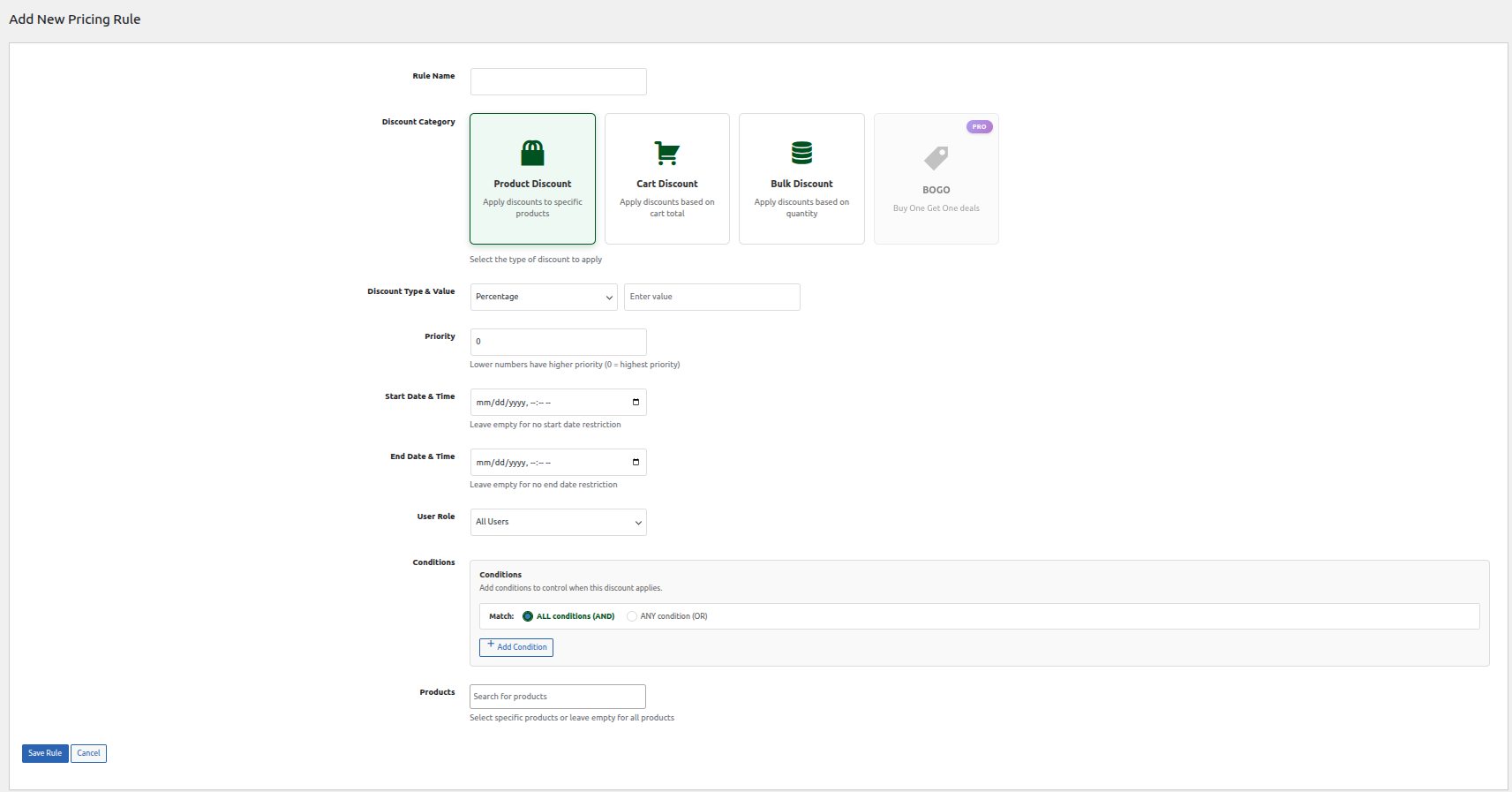
General Rules 
Import and Export 
Product Discount 
Bulk Discount 
Reports
Instalare
Automatic installation
Automatic installation is the easiest option, as WordPress handles the file transfer itself and you don’t need to leave your web browser. To do an automatic install of Spluggy Dynamic Pricing for WooCommerce, log in to your WordPress dashboard, navigate to the Plugins menu, and click Add New.
In the search field type „Spluggy Dynamic Pricing for WooCommerce” and click Search Plugins. Once you’ve found our plugin you can view details about it such as the point release, rating, and description. Most importantly, of course, you can install it by simply clicking „Install Now”.
Manual installation
The manual installation method involves downloading our Spluggy Dynamic Pricing for WooCommerce and uploading it to your webserver via your favorite FTP application.
Întrebări frecvente
-
Does the Spluggy Dynamic Pricing for WooCommerce plugin support import/export?
-
Yes, this plugin has both features listed in free version
-
Is it possible to add discount in percentage?
-
Yes, you can add discount in percentage too by mentioning particular value
-
Is the plugin easy to use?
-
The plugin is designed to be simple and can be used by non-technical users.
Recenzii

Contributori și dezvoltatori
„Spluggy Dynamic Pricing & Discounts for WooCommerce” este un software open-source. La acest modul au contribuit următoarele persoane.
Contributori
Tradu „Spluggy Dynamic Pricing & Discounts for WooCommerce” în limba ta.
Te interesează dezvoltarea?
Răsfoiește codul, vezi depozitarul SVN, sau abonează-te la jurnalul de dezvoltare prin RSS.
Istoric modificări
1.0.0- Released on 30 October 2025
- New: First Version
1.0.1- Released on 30 October 2025
- New: Update WP and WC
1.1.0 – Released on 31 October 2025
- New: latest WC [10.3.5] and WP [6.8.3].
- New: Product Bulk Discount Added.
- New: Free Gift Discount Added.
- New: Product Discount Added.
- New: Report of Discount Added.
1.2.0 – Released on 11 December 2025
- New: latest WC [10.4.0] and WP [6.9].
- New: Design upgrade for add new rule.
- Enhancement: Report Enhancement for bulk discount.
1.2.1 – Released on 20 December 2025
- New: latest WC [10.4.2] and WP [6.9].