
Alert fatigue is a real thing. When you’re building and scaling logging and alerting, it’s easy for things to escalate faster than you can respond or mature your systems. The more logs you ingest, the more detections you make, the more alerts you fire, the more overhead you add.
To make it worse, the better you get at detections, the more time you spend responding!
Management responds with more tools instead of more hands. Tools add opportunity but also increase complexity, and now you’re in even deeper as the only owner of the system that is firing alerts.
Automation and AI can help reduce fatigue and burden if you’re careful not to take your hands completely off the wheel. But where do you start?
That’s where I find myself, armed with tools and ability. Building an alert pipeline to standardize what an “Event” looks like for downstream systems. Everyone wants automation and AI, but it’s hard to scale or mature your security operations if you don’t first have stability and predictability in your data. Your team should know exactly what an “Event” looks like when it’s delivered to them.
I started with the concept of catching a webhook. But then what do I do with it? With some trial and error, I started building the rough outlines for a SOC or Alert pipeline.
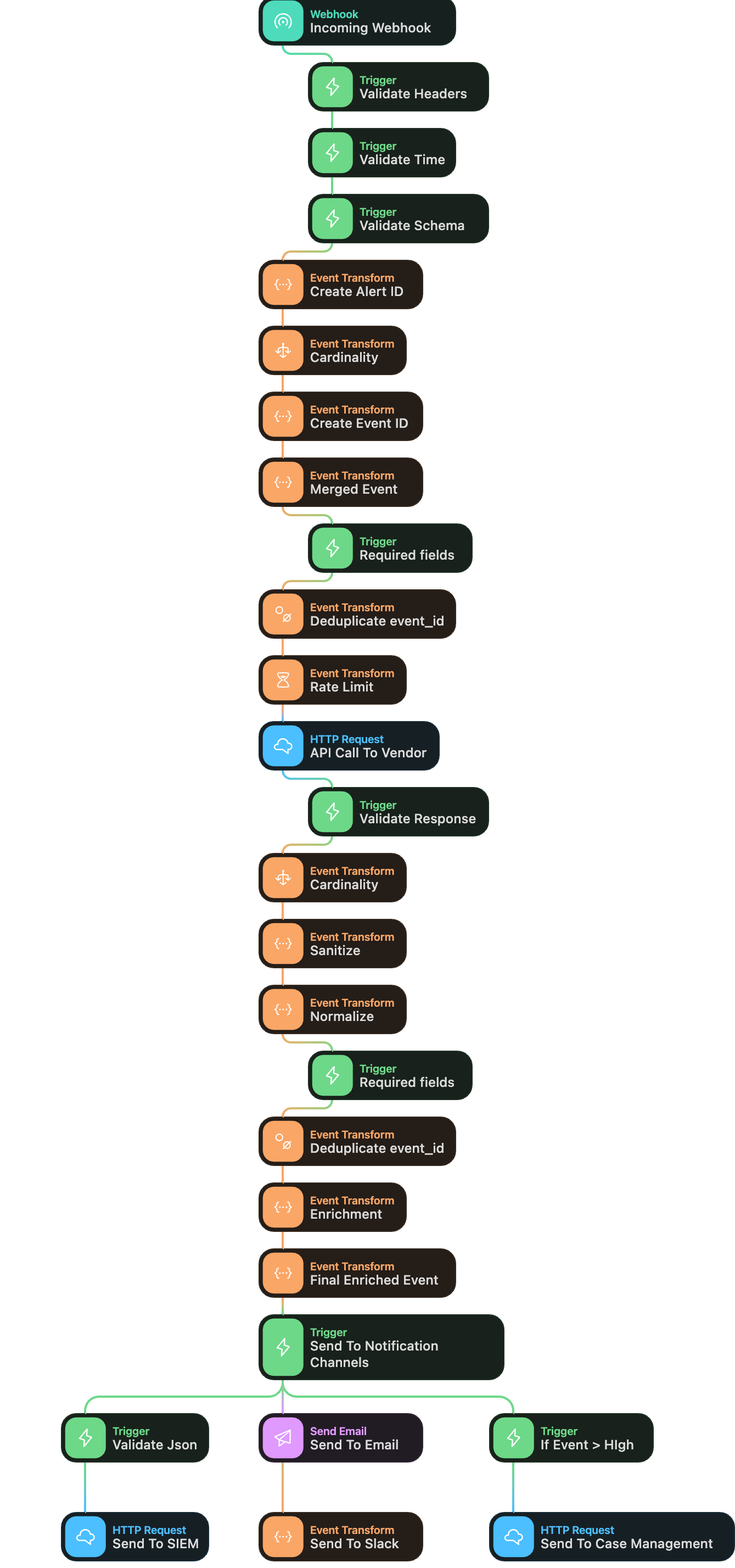
I attempted to create a flow that begins with validation. Validating headers or HMAC signatures. Is the response within an acceptable time window, so we avoid replay events? Is the content-type expected? Is the schema correct? Was it sent from an approved IP? Validation rules should confirm that this event is expected.
Once you have an expected event, it’s time to start processing it, making sure grouped or bulk events are broken out into individual events, so each event is processed through the pipeline.
You may not have a unique id to work with, or you’re dealing with multiple log sources that have different fields. So, create and insert an alert id for the root payload and an event id for each broken-out event.
Before you waste cycles or credits processing or enriching events, it’s time to check you have the required fields you need. If you don’t, fail quickly and fix your detection upstream to send it with the payload, or insert them before you continue.
Now that you have broken out individual events with unique ids and your required fields. It’s time to enrich. Make your calls to APIs or vendors and pull back your data. Validate the response like before. Break out the response into individual events if multiple results are found.
Sanitized the response if needed by down casing if you know downstream systems are case sensitive, escaping any special characters, reject unexpected fields. You should answer the question, is the response safe and valid to proceed?
Normalize the response. Is the time format in UTC and formatted the way you expect? If not, fix it now. Are fields empty that should have responses? Insert a default value if needed. End with data that is consistent.
Rinse and repeat with each API or vendor callout for enrichment data. Add your computer name and serial, last login times, user risk scores, IP/domain validation, etc.
At the end, you should have a merged final event, containing the alert data (what alert fired and why), the event data (individual event data), and enrichment data.
Now you can decide what to do with it. Send it to AI to validate your findings, provide a summary, or give it a criticality? Send it to your notification channels?
This alone doesn’t decrease the number of alerts, but it sets you up for better success. If you have a predictable enriched alert that hits your notification pipeline, you can make logical decisions. Maybe only high and critical alerts go to case management. Maybe team members can subscribe to emails if they want. Maybe there’s a Slack channel for each alert by severity. Team members can decide to mute or unmute as needed. Or if a certain confidence score is met, you send the event to your SOAR for auto-remediation.
Is any of this right? It’s an iterative process, but it’s a starting point.

