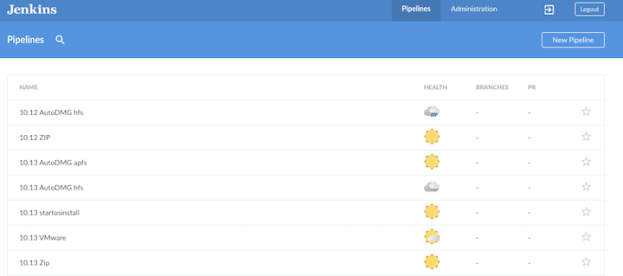
Each time Apple releases a new OS, it triggers a whole lot of building and testing. New AutoDMG images, new VM’s for testing, archiving of media, etc …
I use various ways to script and automate to get what I need. That is, until I realized this is exactly what Jenkins excels at. Anything I can automate, Jenkins can run for me, sometimes without any user interaction.
Currently when Apple post a new macOS High Sierra installer on the App Store. I Download it and build the following:
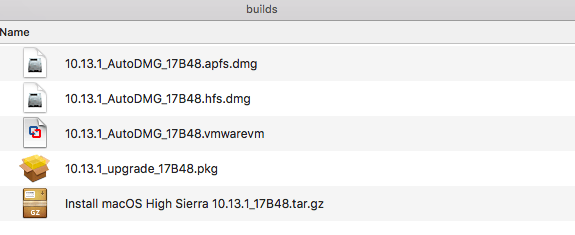
• zip archive of the installer
• hfs AutoDmg installer
• apfs AutoDmg installer
• vmware image for VMware Fusion
• macOS ‘upgrade’ pkg with startosinstall
Instead of me running five individual scripts, I have Jenkins running a series of chained tasks. The first task is to simply make a zip archive of the “macOS Install High Sierra.app”, after this task is successful the next downstream build is using the AutoDMG cli commands to build an “Out of the box” Apple installer for a DeployStudio workflow, followed by another AutoDMG cli to build an APFS installer.
Next with the help of vfuse, I take an AutoDMG installer and convert it into “vmware” image that I can use immediately for testing critical internal services and workflows like encryption, domain settings, printers, etc …. Lastly with the help of munkipkg, I take the original installer in the “/Applications” folder and build a new pkg that drops it into the “/tmp” folder on a new machine .Then a postintall script calls “sartosinsall” to perform an in-place upgrade.
All of these builds are running in the background on a Jenkins slave machine that is running macOS, and the end result should be a folder full of installers ready for testing.
The scripts are available on Github, but may need to be slightly modify for you’re environment.

