I’ve been toying with a virtual setup of puppet open source over the last week. My Puppet Master is Ubuntu 12.04, my Puppet Agent is Mac OS X 10.9.
I’ve been looking at puppet for over two years and have tried twice in the past to stand up a virtual machine and make it do something!!!. It usually ends with some crisis being more important and by the time I come back to puppet … I’m lost. I get frustrated and delete the VM’s. Rinse and repeat.
This time I”m up and running and my two big goals, both of which I accomplished, were too manage a local admin account, and install and manage printers for Mac OS X. Two things I can manage in several different ways, but I’d like to see if Puppet’s way is better/different. My thoughts are still out on that. I’m trying to consider how puppet could fit into my current workflows. But it is neat to watch puppet work. Which got me thinking. What kind of creative things can puppet do to manage a Mac OS X desktop?
If one of the things Puppet can manage are file resources, and plist are just formatted xml files. Can puppet manage plist for Mac OS X? So I decided to try something very simple. I want to turn off Java 7’s auto update feature. No matter how many times you turn it off, when you install a new version of Java, it’s re-checked. This is a good test because the plist only contains 1 entry.
Typically to disable auto updates, you can just open terminal and run:
sudo defaults write /Library/Preferences/com.oracle.java.Java-Updater.plist JavaAutoUpdateEnabled -false
But with puppet, I want to make sure of a couple things:
– The file “com.oracle.java.Java-Updater.plist” exist at /Library/Preferences/
– That the mode is set to 644
– The contents of the file contains the entire plist:
<?xml version="1.0" encoding="UTF-8"?>
<!DOCTYPE plist PUBLIC "-//Apple//DTD PLIST 1.0//EN" "http://www.apple.com/DTDs/PropertyList-1.0.dtd">
<plist version="1.0">
<dict>
    <key>JavaAutoUpdateEnabled</key>
    <false/>
</dict>
</plist>
so my puppet code looks like this:
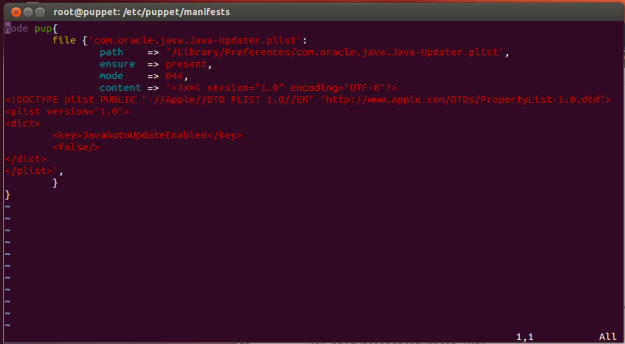
node pup{
        file {'com.oracle.java.Java-Updater.plist':
                path    => '/Library/Preferences/com.oracle.java.Java-Updater.plist',
                ensure  => present,
                mode    => 644,
                content => '<?xml version="1.0" encoding="UTF-8"?>
<!DOCTYPE plist PUBLIC "-//Apple//DTD PLIST 1.0//EN" "http://www.apple.com/DTDs/PropertyList-1.0.dtd">
<plist version="1.0">
<dict>
        <key>JavaAutoUpdateEnabled</key>
        <false/>
</dict>
</plist>',
        }
And after I run puppet on my node, I did a restart for good measure and then checked the auto update box. Which appears to have worked.

Pretty neat for a quick test. It has me thinking what else might Puppet be able to do?


