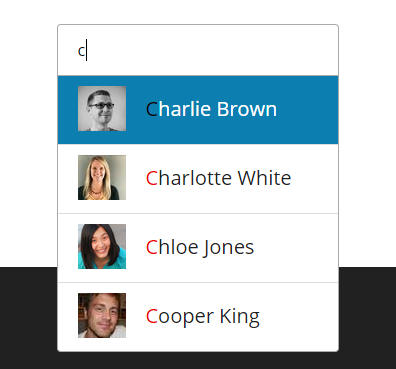
Description:
react-native-autocomplete-input is a lightweight autocomplete component for React Native applications. Written in TypeScript.
It provides a customizable autocomplete input that works across both iOS and Android platforms without requiring native dependencies.
Key Features
- 🚀 Pure JavaScript implementation with TypeScript support
- 📱 Cross-platform compatibility (iOS and Android)
- 🎨 Fully customizable styling for input and results list
- 🔄 Flexible data handling with array-based suggestions
- 📜 Supports both FlatList and custom renderers for results
- ⚡️ Lightweight with minimal dependencies
- 🛠️ Works with React Native’s latest versions
Use Cases
- Search functionality – Implement instant search with live suggestions as users type
- Form autocomplete – Help users quickly select from known values (countries, cities, etc.)
- Command palettes – Build command interfaces with smart suggestions
- Tagging systems – Assist users in selecting valid tags or categories
🛠️ Installation and Basic Usage
First, install the package:
npm install react-native-autocomplete-input
# or
yarn add react-native-autocomplete-input
Here’s a basic implementation:
import React, { useState } from 'react';
import { View, Text } from 'react-native';
import Autocomplete from 'react-native-autocomplete-input';
const MyComponent = () => {
  const [query, setQuery] = useState('');
  const data = ['Apple', 'Banana', 'Cherry'].filter(item =>
    item.toLowerCase().includes(query.toLowerCase())
  );
  return (
    <View style={{ flex: 1 }}>
      <Autocomplete
        data={data}
        value={query}
        onChangeText={setQuery}
        flatListProps={{
          keyExtractor: (_, idx) => idx.toString(),
          renderItem: ({ item }) => <Text>{item}</Text>,
        }}
      />
    </View>
  );
};
For Android, you’ll need to handle overflow with absolute positioning:
<View style={{ flex: 1 }}>
  <View style={styles.autocompleteContainer}>
    <Autocomplete {/* your props */} />
  </View>
</View>
const styles = StyleSheet.create({
  autocompleteContainer: {
    flex: 1,
    left: 0,
    position: 'absolute',
    right: 0,
    top: 0,
    zIndex: 1
  }
});
Configuration Options
| Prop | Type | Description |
|---|---|---|
data | Array | Array of suggestion items |
value | String | Current input value |
onChangeText | Function | Handler for text changes |
flatListProps | Object | Props passed to internal FlatList |
containerStyle | Style | Styles for outer container |
inputContainerStyle | Style | Styles for input container |
listContainerStyle | Style | Styles for results container |
renderTextInput | Function | Custom TextInput renderer |
renderResultList | Function | Custom results list renderer |
Frequently Asked Questions
Q: How do I handle large datasets?
A: Implement your own filtering logic outside the component and pass only visible results to the data prop.
Q: Can I use this with a ScrollView?
A: Yes, but you need to set keyboardShouldPersistTaps='always' on the ScrollView.
Q: How do I customize the appearance?
A: Use the various style props or provide custom renderers for complete control.