Analyze Server logs and design Grok Filters to display in Kibana

Hey folks,

I’m writing this article months after the last article. So today I’m going to write about Grok Filters designing. Before we continue the grok pattern I guess you have some an idea about basics in ELK stack. ELK is refer for for ElasticSearch, Logstash and Kibana. So what ELK doing is first check the log collections, do necessary processing and then inject to the Elastic search, ElasticSearch responsible for querying data and finally send those data Kibana to dashboard results. So today topic is related with how to write log data patterns that can be identified by Logstash. For that we can use Grok filters.

So let me explain the scenario first. There were different modules in our system which communicate each other and we got a requirement to analyses those log data for a reporting purpose. when I was analyzing those logs, I was able to find common log fields but the total count of log fields are different to each other. The main purpose of this task is to create a common Grok filter  to identify  all server logs and feed those data to the Kibana dashboard.

So I followed a simple format which need to be not complex, efficient and fail fast mechanism. So first thing is to configure FileBeat. FileBeat is responsible for grab logs from server and feed in to the Logstash. Here is an example.


input {
beats {
port => "5044"
}
}
filter{
grok {
match => { "message" => "%{TIMESTAMP_ISO8601:logDate} \[%{LOGLEVEL:logLevel}\] TIMESTAMP:%{NUMBER:timestamp},MODULE_NAME:%{NOTSPACE:moduleName},THREAD:%{INT:thread},PID:%{INT:processId},CLASS:%{NOTSPACE:className},METHOD_NAME:%{NOTSPACE:methodName},CUSTOMER_ID:%{NOTSPACE:customerId},APPLICATION_ID:%{NOTSPACE:applicationId},USER_ID:%{NOTSPACE:userId},SESSION_ID:%{NOTSPACE:sessionId},TURN_ID:%{NOTSPACE:turnId},LOG_MESSAGE:%{GREEDYDATA:logMessage}" }
}
if "_grokparsefailure" in [tags] {
grok {
match => { "message" => "%{TIMESTAMP_ISO8601:logDate} \[%{LOGLEVEL:logLevel}\] TIMESTAMP:%{NUMBER:timestamp},MODULE_NAME:%{NOTSPACE:moduleName},THREAD:%{INT:thread},PID:%{INT:processId},CLASS:%{NOTSPACE:className},METHOD_NAME:%{NOTSPACE:methodName},CUSTOMER_ID:%{NOTSPACE:customerId},APPLICATION_ID:%{NOTSPACE:applicationId},USER_ID:%{NOTSPACE:userId},SESSION_ID:%{NOTSPACE:sessionId},LOG_MESSAGE:%{GREEDYDATA:logMessage}" }
remove_tag => ["_grokparsefailure"]
}
}
if "_grokparsefailure" in [tags] {
grok {
match => { "message" => "%{TIMESTAMP_ISO8601:logDate} \[%{LOGLEVEL:logLevel}\] TIMESTAMP:%{INT:timestamp},MODULE_NAME:%{NOTSPACE:moduleName},THREAD:%{INT:thread},PID:%{INT:processId},CLASS:%{NOTSPACE:className},METHOD_NAME:%{NOTSPACE:methodName},EVENT_NAME:%{NOTSPACE:eventName},CUSTOMER_ID:%{NOTSPACE:customerId},APPLICATION_ID:%{NOTSPACE:applicationId},USER_ID:%{NOTSPACE:userId},LOG_MESSAGE:%{GREEDYDATA:logMessage}" }
remove_tag => ["_grokparsefailure"]
}
}
if "_grokparsefailure" in [tags] {
grok {
match => { "message" => "%{TIMESTAMP_ISO8601:logDate} \[%{LOGLEVEL:logLevel}\] TIMESTAMP:%{INT:timestamp},MODULE_NAME:%{NOTSPACE:moduleName},THREAD:%{INT:thread},PID:%{INT:processId},CLASS:%{NOTSPACE:className},METHOD_NAME:%{NOTSPACE:methodName},CUSTOMER_ID:%{NOTSPACE:customerId},APPLICATION_ID:%{NOTSPACE:applicationId},USER_ID:%{NOTSPACE:userId},LOG_MESSAGE:%{GREEDYDATA:logMessage}" }
remove_tag => ["_grokparsefailure"]
}
}
}
output {
#Output the filtered logs to elastic search
amazon_es {
index => "logstash-%{+YYYY.MM.dd}"
hosts =>
region =>
aws_access_key_id =>
aws_secret_access_key =>
template =>
retry_max_items =>
}
}

Here this is a basic example that I used to checked all the logs one after another. So here i check “_grokparsefailure” to check next pattern if the existing log pattern is not matching. “_grokparsefailure” is appear under [tags] if the first matching is not matched with the provided server log. You can test this on your local machine. For that first you need to download Logstash.

This is where I placed the Logstash
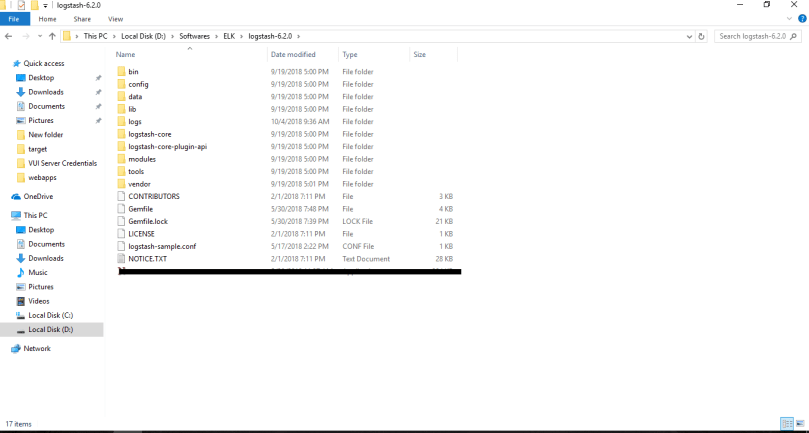
logstash directory.png

Now we need to few modifications on logstashConfiguration.conf file which mentioned earlier. Basically we are going to remove beat tag because we are not going to feed server logs through the FileBeat. So logs going to be inserted using command prompt and output can be configured to see in the console. So here is the customized logstash configuration.


input {
stdin {
}
}
filter{
grok {
match => { "message" => "%{TIMESTAMP_ISO8601:logDate} \[%{LOGLEVEL:logLevel}\] TIMESTAMP:%{NUMBER:timestamp},MODULE_NAME:%{NOTSPACE:moduleName},THREAD:%{INT:thread},PID:%{INT:processId},CLASS:%{NOTSPACE:className},METHOD_NAME:%{NOTSPACE:methodName},CUSTOMER_ID:%{NOTSPACE:customerId},APPLICATION_ID:%{NOTSPACE:applicationId},USER_ID:%{NOTSPACE:userId},SESSION_ID:%{NOTSPACE:sessionId},TURN_ID:%{NOTSPACE:turnId},LOG_MESSAGE:%{GREEDYDATA:logMessage}" }
}
if "_grokparsefailure" in [tags] {
grok {
match => { "message" => "%{TIMESTAMP_ISO8601:logDate} \[%{LOGLEVEL:logLevel}\] TIMESTAMP:%{NUMBER:timestamp},MODULE_NAME:%{NOTSPACE:moduleName},THREAD:%{INT:thread},PID:%{INT:processId},CLASS:%{NOTSPACE:className},METHOD_NAME:%{NOTSPACE:methodName},CUSTOMER_ID:%{NOTSPACE:customerId},APPLICATION_ID:%{NOTSPACE:applicationId},USER_ID:%{NOTSPACE:userId},SESSION_ID:%{NOTSPACE:sessionId},LOG_MESSAGE:%{GREEDYDATA:logMessage}" }
remove_tag => ["_grokparsefailure"]
}
}
if "_grokparsefailure" in [tags] {
grok {
match => { "message" => "%{TIMESTAMP_ISO8601:logDate} \[%{LOGLEVEL:logLevel}\] TIMESTAMP:%{INT:timestamp},MODULE_NAME:%{NOTSPACE:moduleName},THREAD:%{INT:thread},PID:%{INT:processId},CLASS:%{NOTSPACE:className},METHOD_NAME:%{NOTSPACE:methodName},EVENT_NAME:%{NOTSPACE:eventName},CUSTOMER_ID:%{NOTSPACE:customerId},APPLICATION_ID:%{NOTSPACE:applicationId},USER_ID:%{NOTSPACE:userId},LOG_MESSAGE:%{GREEDYDATA:logMessage}" }
remove_tag => ["_grokparsefailure"]
}
}
if "_grokparsefailure" in [tags] {
grok {
match => { "message" => "%{TIMESTAMP_ISO8601:logDate} \[%{LOGLEVEL:logLevel}\] TIMESTAMP:%{INT:timestamp},MODULE_NAME:%{NOTSPACE:moduleName},THREAD:%{INT:thread},PID:%{INT:processId},CLASS:%{NOTSPACE:className},METHOD_NAME:%{NOTSPACE:methodName},CUSTOMER_ID:%{NOTSPACE:customerId},APPLICATION_ID:%{NOTSPACE:applicationId},USER_ID:%{NOTSPACE:userId},LOG_MESSAGE:%{GREEDYDATA:logMessage}" }
remove_tag => ["_grokparsefailure"]
}
}
}
output {
stdout { codec => rubydebug }
}

Let’s see the pattern works or not 🙂

First go into  logstash-6.2.0 bin folder and place the logstash-sample.conf file inside bin folder.      logstash-smaple-config placement.png

Open command prompt and go to the bin folder and run following command
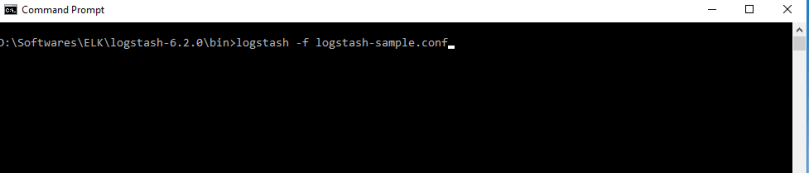
command for run logstash config file.png

It will take some time to configure grok filter in Logstash. Then after all done you can see following behavior.
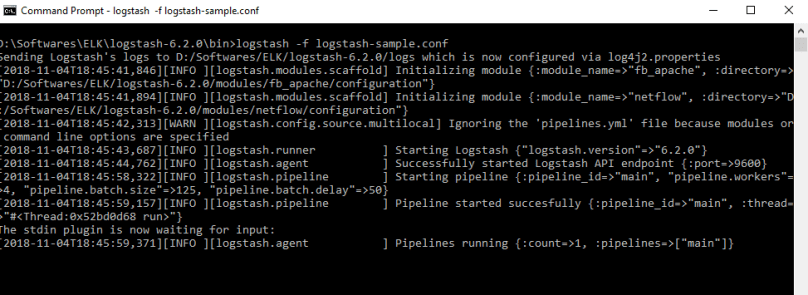
Waiting for logs input.png

Here I got some logs from server which cover all three patterns provided in the Grok filter. So just copy and paste following logs in the cmd (Here i have changed the server logs to show you that grok filter works fine as expected) .

2018-11-02 12:30:35.892 [DEBUG] TIMESTAMP:1541161835892,MODULE_NAME:MY_MODULE,THREAD:29,PID:32741,CLASS:com.test.websocket.stream.worker.gsa.GSAWSSessionWorker,METHOD_NAME:onTextMessage,CUSTOMER_ID:api.vui.customerid.46050eb9-44fc-491c,APPLICATION_ID:api.vui.appId.3324,USER_ID:api.vui.uid.bc3b3b77-88ed-4ae1-8d5c-6b18ac9bf6af,SESSION_ID:api.vui.session.50a457dd-8f68-4a08-a19d-8a1fbeff9a4e,TURN_ID:api.vui.tid.189f8d35-436e-4748-813c-4c839745e41b,LOG_MESSAGE:[thread-group: main, thread-id: 29] Received text payload with 819 length.
,tomcat_thread=http-nio-8080-exec-2,

2018-11-02 12:30:55.892 [DEBUG] TIMESTAMP:1541161836440,MODULE_NAME:MY_MODULE2,THREAD:29,PID:32741,CLASS:com.test.websocket.stream.worker.gsa.GSAWSSessionWorker,METHOD_NAME:onTextMessage,CUSTOMER_ID:api.vui.customerid.46050eb9-44fc-491c,APPLICATION_ID:api.vui.appId.3324,USER_ID:api.vui.uid.bc3b3b77-88ed-4ae1-8d5c-6b18ac9bf6af,SESSION_ID:api.vui.session.50a457dd-8f68-4a08-a19d-fns485nfd4,LOG_MESSAGE:[thread-group: main, thread-id: 29] Received text payload.
,tomcat_thread=http-nio-8080-exec-2,

So can see that all logs are well formatted and each log fields are identified by the Logstash through the Grok patterns.
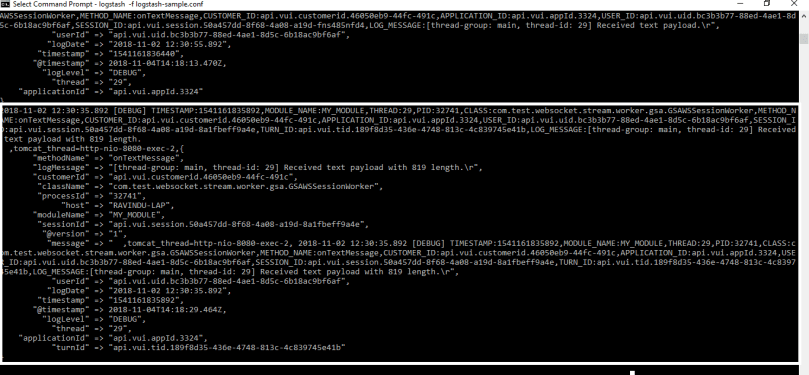
 

log matching with grok pattern.png

This is my first time using the grok filters. I faced several issues while find a matching solution to this scenario. So That’s why I thought to write this blog. Hope you get some idea about using grok filters configuration 🙂 .Thanks for reading .

Spring RetryTemplate Implementation

Spring Retry framework is  designed to automatically retry the failed operations to make processing more robust and less prone to failures. In simple words,  a retry is just a while loop: the RetryTemplate can just keep trying until it either succeeds or fails. Previously this Retry functionality was a part of Spring Batch 2.2.0 and later on it was pull out as a separate framework by Spring. Before jump into the code, Let’s get some basic idea about keywords.

RetryTemplate – Template class that simplifies the execution of operations with retry semantics. This template is implemented using  RetryOperations which has basic set of operations which can be executed with configurable retry behaviour.

SimpleRetryPolicy – Simple retry policy that retries a fixed number of times for a set of named exceptions (and subclasses). The number of attempts includes the initial try.

FixedBackOffPolicy – Implementation of BackOffPolicy that pauses for a fixed period of time before continuing. The time should be define with milliseconds.

RetryCallback – This is the which responsible for do the retry operations.

RecoveryCallback – Callback for stateful retry after all tries are exhausted.

Let’s jump to the example. First of all configure the RetryTemplate.


package com.example.retry.infrastructure.configuration;
import java.util.HashMap;
import java.util.Map;
import org.springframework.context.annotation.Bean;
import org.springframework.context.annotation.Configuration;
import org.springframework.retry.annotation.EnableRetry;
import org.springframework.retry.backoff.FixedBackOffPolicy;
import org.springframework.retry.policy.SimpleRetryPolicy;
import org.springframework.retry.support.RetryTemplate;
@EnableRetry
@Configuration
public class RetryTempleteConfiguration {
@Bean
public RetryTemplate retryTemplate() {
// Add Exception list which need to be retried.
Map<Class<? extends Throwable>, Boolean> retryOnExceptions = new HashMap<>();
retryOnExceptions.put(RuntimeException.class, true);
retryOnExceptions.put(IllegalArgumentException.class, true);
SimpleRetryPolicy retryPolicy = new SimpleRetryPolicy(3, retryOnExceptions); // Here 3 is no of retry attemps
// This define a pause time to retry operation
FixedBackOffPolicy backOffPolicy = new FixedBackOffPolicy();
backOffPolicy.setBackOffPeriod(1500); // value should be in milliseconds
RetryTemplate template = new RetryTemplate();
template.setRetryPolicy(retryPolicy);
template.setBackOffPolicy(backOffPolicy);
return template;
}
}

Now implement the Retry service


package com.example.retry.service;
import org.apache.logging.log4j.LogManager;
import org.apache.logging.log4j.Logger;
import org.springframework.beans.factory.annotation.Autowired;
import org.springframework.retry.RecoveryCallback;
import org.springframework.retry.RetryCallback;
import org.springframework.retry.RetryContext;
import org.springframework.retry.support.RetryTemplate;
import org.springframework.stereotype.Service;
@Service
public class RetryService {
Logger logger= LogManager.getLogger(getClass());
@Autowired
private RetryTemplate retryTemplate;
// Define the retry operation with return data type and the Exception which is going to throw.
final RetryCallback<String, Exception> retryCallback = new RetryCallback<String, Exception>() {
public String doWithRetry(RetryContext context) throws Exception {
System.out.println("retryCallback");
return "RETRIED";
}
};
// Define the recovery functionality here.
final RecoveryCallback<String> recoveryCallback = new RecoveryCallback<String>() {
public String recover(RetryContext context) throws Exception {
System.out.println("recoveryCallback");
return "RECOVERED";
}
};
public void executeService(){
try {
logger.info("retryTemplate execute start");
// Here i'm using the return type as String. you can use what ever object as a return type
String status= retryTemplate.execute(retryCallback, recoveryCallback);
logger.info("Response-"+status);
logger.info("retryTemplate execute end");
} catch (Exception e) {
logger.error("Error occoured", e);
}
}
}

ok, Retry implementation done. It’s very easy and you can customize the code what you want. So here i have define a very basic behavior of Retry framework. If you face scenarios like handling fail safe  like managing transactions, etc. you can use this in your solution.


Secure Email Service Implementation using JavaMail

Hi there, Today I thought to share Java Email service example which  I have done few years back. The purpose of sharing this article is to provide code example which support both text and attachment mails. Ill try to reduce the complexity of the code with proper method comments.

If you need more information about java mail, please refer the JavaMail Api Documentation. First of all, Let’s create a Spring configuration file to configure the JavaMail.


package com.example.secureemailconnector.infrastructure.configuration;
import java.util.Properties;
import javax.mail.PasswordAuthentication;
import javax.mail.Session;
import org.springframework.beans.factory.annotation.Value;
import org.springframework.context.annotation.Bean;
import org.springframework.context.annotation.Configuration;
@Configuration
public class JavamailConfiguration {
@Value("${email.configuration.transportprotocol}")
private String emailTransportProtocol;
@Value("${email.configuration.smtp.auth}")
private String emailAuthEnableStatus;
@Value("${email.configuration.smtp.host}")
private String emailHostValue;
@Value("${email.configuration.smtp.port}")
private String emailPortValue;
@Value("${email.configuration.smtp.starttls}")
private String emailStartTlsStatus;
@Value("${email.configuration.smtp.connectiontimeout}")
private Integer emailConnectionTimeout;
@Value("${email.configuration.smtp.timeout}")
private Integer emailTimeout;
@Value("${email.configuration.textencodetype}")
private String emailTextEncodeType;
@Value("${email.configuration.emailaccount.username}")
private String emailAccount;
@Value("${email.configuration.emailaccount.password}")
private String emailAccountPassword;
private static final String EMAIL_TRANSPORT_PROTOCOL_KEY = "mail.transport.protocol";
private static final String EMAIL_SMTP_AUTH_KEY = "mail.smtp.auth";
private static final String EMAIL_SMTP_HOST_KEY = "mail.smtp.host";
private static final String EMAIL_SMTP_PORT_KEY = "mail.smtp.port";
private static final String EMAIL_SMTP_STARTTLS_KEY = "mail.smtp.starttls.enable";
private static final String EMAIL_SMTP_CONNETIONTIMEOUT_KEY = "mail.smtp.connectiontimeout";
private static final String EMAIL_SMTP_TIMEOUT_KEY = "mail.smtp.timeout";
@Bean
public Session session() {
Properties emailProperties = new Properties();
emailProperties.put(EMAIL_TRANSPORT_PROTOCOL_KEY, emailTransportProtocol);
emailProperties.put(EMAIL_SMTP_AUTH_KEY, emailAuthEnableStatus);
emailProperties.put(EMAIL_SMTP_HOST_KEY, emailHostValue);
emailProperties.put(EMAIL_SMTP_PORT_KEY, emailPortValue);
emailProperties.put(EMAIL_SMTP_STARTTLS_KEY, emailStartTlsStatus);
emailProperties.put(EMAIL_SMTP_CONNETIONTIMEOUT_KEY, emailConnectionTimeout);
emailProperties.put(EMAIL_SMTP_TIMEOUT_KEY, emailTimeout);
Session session = Session.getDefaultInstance(emailProperties, new javax.mail.Authenticator() {
protected PasswordAuthentication getPasswordAuthentication() {
return new PasswordAuthentication(emailAccount, emailAccountPassword);
}
});
return session;
}
}

Here are the properties of JavaMail configurations


##################################
#### email configuration ######
##################################
email.configuration.transportprotocol=smtp
email.configuration.smtp.auth=true
email.configuration.smtp.host=smtp.gmail.com
email.configuration.smtp.port=587
email.configuration.smtp.starttls=true
email.configuration.smtp.connectiontimeout=60000
email.configuration.smtp.timeout=60000
email.configuration.noofretryattempts=3
email.configuration.textencodetype=base64
[email protected]
email.configuration.emailaccount.password=********

view raw

gistfile1.txt

hosted with ❤ by GitHub


Let’s jump to the Service implementation. First of all, let’s define the service


package com.example.secureemailconnector.domain.message;
public interface SecureEmailService {
public SecureEmailResponse sendEmail(SecureEmailRequest emailRequest);
}

now we can implement the service


package com.example.secureemailconnector.infrastructure.service;
import java.io.UnsupportedEncodingException;
import java.util.Date;
import javax.activation.DataHandler;
import javax.activation.DataSource;
import javax.mail.Address;
import javax.mail.AuthenticationFailedException;
import javax.mail.BodyPart;
import javax.mail.Message;
import javax.mail.MessagingException;
import javax.mail.Multipart;
import javax.mail.SendFailedException;
import javax.mail.Session;
import javax.mail.Transport;
import javax.mail.internet.AddressException;
import javax.mail.internet.InternetAddress;
import javax.mail.internet.MimeBodyPart;
import javax.mail.internet.MimeMessage;
import javax.mail.internet.MimeMultipart;
import javax.mail.internet.MimeUtility;
import javax.mail.util.ByteArrayDataSource;
import org.apache.commons.collections.CollectionUtils;
import org.apache.commons.lang.ArrayUtils;
import org.apache.commons.lang.StringUtils;
import org.apache.log4j.Logger;
import org.springframework.beans.factory.annotation.Autowired;
import org.springframework.beans.factory.annotation.Value;
import org.springframework.stereotype.Service;
import com.example.secureemailconnector.application.common.ConnectorUtil;
import com.example.secureemailconnector.domain.attachment.Attachment;
import com.example.secureemailconnector.domain.common.MessageEncodeType;
import com.example.secureemailconnector.domain.common.SecureEmailConnectorTimeoutException;
import com.example.secureemailconnector.domain.common.SecureEmailResponseCode;
import com.example.secureemailconnector.domain.message.SecureEmailRequest;
import com.example.secureemailconnector.domain.message.SecureEmailResponse;
import com.example.secureemailconnector.domain.message.SecureEmailService;
@Service
public class SecureEmailServiceImpl implements SecureEmailService {
// picking up the Session from JavaMailConfiguration class
@Autowired
public Session session;
@Value("${email.configuration.textencodetype}")
private String textEncodeType;
@Value("${email.configuration.noofretryattempts}")
private Integer maxNoOfRetryAttempts;
private static final String HEADER_MESSAGE_ID_KEY = "Message-ID";
private static final String HEADER_CONTENT_ENCODING_KEY = "Content-Transfer-Encoding";
private static final String MULTIPART_RELATED = "related";
private static final String MULTIPART_ALTERNATIVE = "alternative";
private final Logger logger = Logger.getLogger(getClass());
@Override
public SecureEmailResponse sendEmail(final SecureEmailRequest emailRequest) {
SecureEmailResponse secureEmailResponse = null;
String messageId = null;
String thirdPartyExecutionTime = null;
long executionStartTime = 0;
long executionEndTime = 0;
try {
// create MimeMessage
MimeMessage mimeMessage = BuildMimeMessage(emailRequest);
messageId = emailRequest.getMessageId();
logger.info("Sending email to recipient. [Email Id]-" + messageId);
executionStartTime = System.nanoTime();
// send MimeMessage
Transport.send(mimeMessage);
// Caculate the execution time
executionEndTime = System.nanoTime();
logger.info("Email sent successfully. [Email Id]-" + messageId);
thirdPartyExecutionTime = ConnectorUtil.calculateExcutionTimeInMilies(executionStartTime, executionEndTime);
// Build the response
secureEmailResponse = buildSecureEmailResponse(SecureEmailResponseCode.SUCCESS, null);
secureEmailResponse.setThirdPartyExcutionTime(thirdPartyExecutionTime);
} catch (UnsupportedEncodingException unsupportedEncodingException) {
logger.error("Unsupported text encoding type found. [Email Id]-" + messageId, unsupportedEncodingException);
throw new RuntimeException("Unsupported encoding type found.", unsupportedEncodingException);
} catch (AddressException adressException) {
logger.error("Unsupported email address type found. [Email Id]-" + messageId, adressException);
throw new IllegalArgumentException("Unsupported email address found.", adressException);
} catch (AuthenticationFailedException authenticationFailedException) {
logger.error("Authentication failed while authorizing the email account. [Email Id]-" + messageId,
authenticationFailedException);
// Add failure details to SecureMailResponse
secureEmailResponse = buildSecureEmailResponse(SecureEmailResponseCode.AUTHENTICATION_FAILED,
authenticationFailedException.getMessage());
} catch (SendFailedException sendFailedException) {
logger.error("Email send failed due to unresponsive secure email service. [Email Id]-" + messageId,
sendFailedException);
if (!ArrayUtils.isEmpty(sendFailedException.getValidUnsentAddresses())) {
logger.info("Prepare to resend the unsent email");
// Handle failure scenarios and create SecureMailResponse
secureEmailResponse = buildEmailResponseIfUnsentAddresesFound(sendFailedException, emailRequest);
} else if (!ArrayUtils.isEmpty(sendFailedException.getInvalidAddresses())) {
secureEmailResponse = buildEmailResponseIfInvalidAddresesFound(sendFailedException);
} else {
secureEmailResponse = buildSecureEmailResponse(SecureEmailResponseCode.SEND_FAILED,
sendFailedException.getMessage());
}
} catch (MessagingException messagingException) {
logger.error("Error occoured while sending email. MessageId-" + messageId, messagingException);
throw new SecureEmailConnectorTimeoutException("Messaging error occoured while sending email.",
messagingException);
}
return secureEmailResponse;
}
protected MimeMessage BuildMimeMessage(final SecureEmailRequest emailRequest) throws MessagingException,
UnsupportedEncodingException, AddressException {
MimeMessage mimeMessage = new MimeMessage(session);
// Build MimeMessage Multipart
Multipart parentMultiPartWithTextAndAttachment = buildMimeMessageMultipart(emailRequest, mimeMessage);
// set MultiPart to MimeMessage
mimeMessage.setContent(parentMultiPartWithTextAndAttachment);
// save changes
mimeMessage.saveChanges();
return mimeMessage;
}
// Add Subject and date details to the mail
protected void setSubjectAndDateToMimeMessage(final SecureEmailRequest emailRequest, MimeMessage mimeMessage)
throws MessagingException {
mimeMessage.setSubject(emailRequest.getMessageSubject());
mimeMessage.setSentDate(new Date());
}
protected Multipart buildMimeMessageMultipart(final SecureEmailRequest emailRequest, final MimeMessage mimeMessage)
throws MessagingException, UnsupportedEncodingException, AddressException {
// set headers
setMimeMessageHeaders(emailRequest.getMessageId(), mimeMessage);
// set recipients
setMimeMessageRecipients(emailRequest, mimeMessage);
// Set Date and Subject
setSubjectAndDateToMimeMessage(emailRequest, mimeMessage);
// set text/html to MultiPart
Multipart textHtmlMultiPart = addTextHtmlMultipart(emailRequest.getMessageEncodeType(),
emailRequest.getMessage());
// set text/html MultiPart to MimeBodyPart
MimeBodyPart textHtmlBodyContendPart = addMimeBodyPartWithTextHtmlContend(textHtmlMultiPart);
// create new MultiPart and set derive MultiPart base MultiPart
Multipart parentMultiPartWithTextAndAttachment = addMultiPartWithBothTextAndAttachment(textHtmlBodyContendPart,
emailRequest);
return parentMultiPartWithTextAndAttachment;
}
private void setMimeMessageHeaders(final String messageId, final MimeMessage mimeMessage)
throws MessagingException, UnsupportedEncodingException {
mimeMessage.setHeader(HEADER_MESSAGE_ID_KEY, messageId);
mimeMessage.setHeader(HEADER_CONTENT_ENCODING_KEY, MimeUtility.encodeText(textEncodeType));
}
private void setMimeMessageRecipients(final SecureEmailRequest emailRequest, final MimeMessage mimeMessage)
throws MessagingException, AddressException {
mimeMessage.setFrom(new InternetAddress(emailRequest.getMessageFrom()));
mimeMessage.setRecipient(Message.RecipientType.TO, new InternetAddress(emailRequest.getMessageTo()));
if (StringUtils.isNotBlank(emailRequest.getMessageCCTo())) {
mimeMessage.setRecipient(Message.RecipientType.CC, new InternetAddress(emailRequest.getMessageCCTo()));
}
}
// Build text support
private Multipart addTextHtmlMultipart(final MessageEncodeType messageEncodeType, final String message_body)
throws MessagingException {
BodyPart bodyPart = new MimeBodyPart();
bodyPart.setContent(message_body, messageEncodeType.getValue());
bodyPart.setDisposition(BodyPart.INLINE);
Multipart textHtmlMultiPart = new MimeMultipart(MULTIPART_ALTERNATIVE);
textHtmlMultiPart.addBodyPart(bodyPart);
return textHtmlMultiPart;
}
// There was a requirment to support html contends. So add supporting to html contend
private MimeBodyPart addMimeBodyPartWithTextHtmlContend(final Multipart textHtmlMultiPart)
throws MessagingException {
MimeBodyPart textHtmlBodyContendPart = new MimeBodyPart();
textHtmlBodyContendPart.setContent(textHtmlMultiPart);
return textHtmlBodyContendPart;
}
// Provide both text and attachment support
private Multipart addMultiPartWithBothTextAndAttachment(final MimeBodyPart textHtmlBodyContendPart,
final SecureEmailRequest emailRequest) throws MessagingException {
Multipart parentMultiPartWithTextAndAttachment = new MimeMultipart(MULTIPART_RELATED);
parentMultiPartWithTextAndAttachment.addBodyPart(textHtmlBodyContendPart);
if (CollectionUtils.isNotEmpty(emailRequest.getAttachmentFilesByteArray())) {
for (Attachment attachmentFile : emailRequest.getAttachmentFilesByteArray()) {
BodyPart attachmentBodyPart = new MimeBodyPart();
String filename = attachmentFile.getFileName();
DataSource source = new ByteArrayDataSource(attachmentFile.getData(),
attachmentFile.getAttachmentEncodeType());
attachmentBodyPart.setDataHandler(new DataHandler(source));
attachmentBodyPart.setFileName(filename);
parentMultiPartWithTextAndAttachment.addBodyPart(attachmentBodyPart);
}
}
return parentMultiPartWithTextAndAttachment;
}
private SecureEmailResponse buildSecureEmailResponse(final SecureEmailResponseCode responseCode,
final String rawOutput) {
SecureEmailResponse secureEmailResponse = new SecureEmailResponse(responseCode, responseCode.getValue());
if (StringUtils.isNotBlank(rawOutput)) {
secureEmailResponse.setRawOutput(rawOutput);
}
return secureEmailResponse;
}
private SecureEmailResponse buildEmailResponseIfInvalidAddresesFound(final SendFailedException sendFailedException) {
Address[] invalidAddresses = sendFailedException.getInvalidAddresses();
SecureEmailResponse secureEmailResponse = new SecureEmailResponse(SecureEmailResponseCode.SEND_FAILED,
"Invalid email address found. [Email address]-" + invalidAddresses.toString());
secureEmailResponse.setRawOutput(sendFailedException.getMessage());
return secureEmailResponse;
}
private SecureEmailResponse buildEmailResponseIfUnsentAddresesFound(final SendFailedException sendFailedException,
final SecureEmailRequest emailRequest) {
SecureEmailResponse secureEmailResponse = null;
String unsentEmailAddress = retrieveUnsentEmailAddress(sendFailedException.getValidUnsentAddresses());
// Here manage retry attrmpts if unsent email address was found.If the max count exceeded, then there won't be any attempts.
if (StringUtils.isNotBlank(unsentEmailAddress)) {
int noOfAttempt = 0;
while (secureEmailResponse == null && noOfAttempt < maxNoOfRetryAttempts) {
try {
++noOfAttempt;
emailRequest.setMessageTo(unsentEmailAddress);
MimeMessage mimeMessage = BuildMimeMessage(emailRequest);
logger.info("Resending email to the recipient. [Email Id]-" + emailRequest.getMessageId());
Transport.send(mimeMessage);
logger.info("Email resent successful. [Email Id]-" + emailRequest.getMessageId());
secureEmailResponse = buildSecureEmailResponse(SecureEmailResponseCode.SUCCESS, null);
break;
} catch (Exception e) {
logger.error("Error occoured while resending the email.No of attempts tried-" + noOfAttempt
+ " Prepare to re-attemp the email sending.");
}
}
if (secureEmailResponse == null) {
secureEmailResponse = buildSecureEmailResponse(SecureEmailResponseCode.SEND_FAILED,
"Email send failed due to invalid email account. [Email address]-" + unsentEmailAddress);
}
} else {
secureEmailResponse = buildSecureEmailResponse(SecureEmailResponseCode.SEND_FAILED,
sendFailedException.getMessage());
}
return secureEmailResponse;
}
private String retrieveUnsentEmailAddress(final Address[] validUnsentAddresses) {
String unsentEmailAddress = null;
for (Address unsentAddress : validUnsentAddresses) {
unsentEmailAddress = unsentAddress.toString();
break;
}
return unsentEmailAddress;
}
}

So that’s it 🙂 . I followed this format because i had a requirement to support Text,Html contends and Attachments accordingly as the user’s choice. Also I have added some additional features like managing retry attempts if unsent email address found, managing different status codes according to the success/failure response, etc. I hope you may get an idea that how to integrate several email features in a one service. So thanks buddies, and see you all with a new blog post. Happy coding 🙂 …!!

Asynchronous Rest Services

Hi All, In this blog article I’m going to explian about different ways to implement asynchronous rest services. The purpose of this article is to provide code examples and give you a basic idea about how to implement a non-blocking rest service.

For the moment I’m using a Spring controller called “ClientLogsManagementController”  to explain about non-blocking rest services. Let’s start from the beginning.

Rest Service – ResponseEntity Implementation


package com.example.rest.controller;
import javax.servlet.http.HttpServletRequest;
import org.apache.logging.log4j.Level;
import org.apache.logging.log4j.LogManager;
import org.apache.logging.log4j.Logger;
import org.springframework.http.HttpStatus;
import org.springframework.http.ResponseEntity;
import org.springframework.stereotype.Controller;
import org.springframework.util.Assert;
import org.springframework.web.bind.annotation.RequestBody;
import org.springframework.web.bind.annotation.RequestMapping;
import org.springframework.web.bind.annotation.RequestMethod;
import com.example.domain.logging.LoggingRequest;
import com.example.domain.logging.LoggingResponse;
import com.example.util.logging.LoggingUtil;
/**
* This is a sample rest controller which used to manage client logs on server side. LoggingRequest and loggingUtil are
* custom classes.
*
* @author ravindu.s
*
*/
@Controller
@RequestMapping("/log")
public class ClientLogsManagementController {
private static final Logger logger = LogManager.getLogger(ClientLogsManagementController.class);
@RequestMapping(value = "/loggingrequest", method = RequestMethod.POST)
public ResponseEntity<LoggingResponse> logClientAttributes(@RequestBody LoggingRequest request,
HttpServletRequest servletRequest) {
try {
Assert.notNull(request, "LoggingRequest cannot be null");
Assert.hasText(request.getLogLevel(), "Log Level not matched");
Assert.hasText(request.getLogMessage(), "Log Message required");
Level loggerLevel = Level.valueOf(request.getLogLevel());
// LoggingUtil is a custom utility class which manage logs on server side
logger.log(loggerLevel, LoggingUtil.constructGenericLogMessage(request.getLogMessage(),
request.getAdditionalLogAttributes()));
return new ResponseEntity<populateLoggingResponse()>(HttpStatus.OK);
} catch (IllegalArgumentException illegalArgumentException) {
// LoggingUtil is a custom utility class which manage logs on server side
logger.error(
LoggingUtil.constructGenericErrorLogMessage("Invalid inputs found-", illegalArgumentException));
return new ResponseEntity<populateFailureLoggingResponse(e)>(HttpStatus.BAD_REQUEST);
} catch (Exception exception) {
// LoggingUtil is a custom utility class which manage logs on server side
logger.error(LoggingUtil.constructGenericErrorLogMessage("Internal error Occoured-", exception));
return new ResponseEntity<populateFailureLoggingResponse(e)>(HttpStatus.INTERNAL_SERVER_ERROR);
}
}
// Create LoggingResponse for the demo purpose
public LoggingResponse populateLoggingResponse(){
logger.info("Creating LoggingResponse");
return new LoggingResponse();
}
// Create failure LoggingResponse for the demo purpose
public LoggingResponse populateFailureLoggingResponse(Exception e){
logger.info("Creating Failure LoggingResponse");
return new LoggingResponse(new Error(e.getMessage(), e));
}
}

When execute this rest service, the LoggingUtil class generate logs as follows.

2018-07-01 10:01:16.876 [Mobile.Logging.Service] ClientLogsManagementController [INFO] Mobile transaction completed,
,tomcat_thread=main
2018-07-01 10:01:16.897 [Mobile.Logging.Service] ClientLogsManagementController [INFO] Creating LoggerResponse
,tomcat_thread=main

As you can see, LoggerResponse is still created in the same worker thread that’s calling the controller function. So what happens when access /log/loggingrequest controller url, first Spring mvc lookup the dispatcher-servlet.xml inside spring mv project and then route to “ClientLogsManagementController-> logClientAttributes” responseEntity method.
To do this routing it uses one of it’s ‘executor’ threads. Here Spring doesn’t just create a new thread for every request but instead uses a pool with worker threads (named ‘tomcat_thread=main‘) that handle these requests.

But here is the problem, what happen if the request is blocked for a long time? Then other workers will be wait until receive a response from this rest service, Therefore
there should be a way to implement non blocking executors.

Callable Rest services

An easy solution for this is to wrap our response in a Callable. Spring automatically knows that when it receives a callable, it should be executed on a different thread. Let’s take a look at the controller.


package com.example.rest.controller;
import java.util.concurrent.Callable;
import javax.servlet.http.HttpServletRequest;
import org.apache.logging.log4j.Level;
import org.apache.logging.log4j.LogManager;
import org.apache.logging.log4j.Logger;
import org.springframework.http.HttpStatus;
import org.springframework.http.ResponseEntity;
import org.springframework.stereotype.Controller;
import org.springframework.util.Assert;
import org.springframework.web.bind.annotation.RequestBody;
import org.springframework.web.bind.annotation.RequestMapping;
import org.springframework.web.bind.annotation.RequestMethod;
import org.springframework.web.bind.annotation.ResponseBody;
import com.example.domain.logging.LoggingRequest;
import com.example.domain.logging.LoggingResponse;
import com.example.util.logging.LoggingUtil;
/**
* This is a sample rest controller which used to manage client logs on server side. LoggingRequest and loggingUtil are
* custom classes.
*
* @author ravindu.s
*
*/
@Controller
@RequestMapping("/log")
public class ClientLogsManagementController {
private static final Logger logger = LogManager.getLogger(ClientLogsManagementController.class);
LoggingRequest failureLoggingResponse=null;
@RequestMapping(value = "/loggingrequest", method = RequestMethod.POST)
public @ResponseBody Callable<ResponseEntity<LoggingResponse>> logClientAttributes(@RequestBody LoggingRequest request,
HttpServletRequest servletRequest) {
try {
Assert.notNull(request, "LoggingRequest cannot be null");
Assert.hasText(request.getLogLevel(), "Log Level not matched");
Assert.hasText(request.getLogMessage(), "Log Message required");
Level loggerLevel = Level.valueOf(request.getLogLevel());
// LoggingUtil is a custom utility class which manage logs on server side
return new Callable<ResponseEntity<LoggingResponse>>() {
@Override
public ResponseEntity<LoggingResponse> call() throws Exception {
return new ResponseEntity<LoggingResponse>(populateLoggingResponse(), HttpStatus.OK);
}
};
} catch (IllegalArgumentException illegalArgumentException) {
// LoggingUtil is a custom utility class which manage logs on server side
logger.error(
LoggingUtil.constructGenericErrorLogMessage("Invalid inputs found-", illegalArgumentException));
failureLoggingResponse= populateFailureLoggingResponse(illegalArgumentException);
return new Callable<ResponseEntity<LoggingResponse>>() {
@Override
public ResponseEntity<LoggingResponse> call(){
return new ResponseEntity<LoggingResponse>(failureLoggingResponse, HttpStatus.BAD_REQUEST);
}
};
} catch (Exception exception) {
// LoggingUtil is a custom utility class which manage logs on server side
logger.error(LoggingUtil.constructGenericErrorLogMessage("Internal error Occoured-", exception));
failureLoggingResponse= populateFailureLoggingResponse(exception);
return new Callable<ResponseEntity<LoggingResponse>>() {
@Override
public ResponseEntity<LoggingResponse> call(){
return new ResponseEntity<LoggingResponse>(failureLoggingResponse, HttpStatus.INTERNAL_SERVER_ERROR);
}
};;
}
}
// Create LoggingResponse for the demo purpose
public LoggingRequest populateLoggingResponse(){
logger.info("Creating LoggingResponse");
return new LoggingRequest();
}
// Create failure LoggingResponse for the demo purpose
public LoggingRequest populateFailureLoggingResponse(Exception e){
logger.info("Creating Failure LoggingResponse");
return new LoggingRequest();
}
}

When we run this service under http://localhost:8080/rest/log/loggingrequest, log appears like this

2018-07-01 10:19:05.960 [Mobile.Logging.Service] ClientLogsManagementController [INFO] Mobile transaction completed,
,tomcat_thread=main
2018-07-01 10:19:05.982 [Mobile.Logging.Service] ClientLogsManagementController [INFO] Creating LoggerResponse
,tomcat_thread=MvcAsync1

As you can see, now the asynchronous service execution run in different thread called “MvcAsync1′. So like wise you can implement asynchronous services as you wish.

Junit Test Case example


package com.example.integration.logging;
import static org.springframework.test.web.servlet.request.MockMvcRequestBuilders.asyncDispatch;
import static org.springframework.test.web.servlet.request.MockMvcRequestBuilders.post;
import static org.springframework.test.web.servlet.result.MockMvcResultHandlers.print;
import static org.springframework.test.web.servlet.result.MockMvcResultMatchers.content;
import static org.springframework.test.web.servlet.result.MockMvcResultMatchers.status;
import java.util.HashMap;
import java.util.Map;
import org.junit.Before;
import org.junit.Test;
import org.junit.runner.RunWith;
import org.springframework.beans.factory.annotation.Autowired;
import org.springframework.http.HttpHeaders;
import org.springframework.http.MediaType;
import org.springframework.test.context.ContextConfiguration;
import org.springframework.test.context.junit4.SpringJUnit4ClassRunner;
import org.springframework.test.context.web.WebAppConfiguration;
import org.springframework.test.web.servlet.MockMvc;
import org.springframework.test.web.servlet.MvcResult;
import org.springframework.test.web.servlet.result.MockMvcResultMatchers;
import org.springframework.test.web.servlet.setup.MockMvcBuilders;
import com.example.common.BaseApplicationTest;
import com.example.common.TestConstant;
import com.example.logging.LogFieldType;
import com.example.logging.LoggingRequest;
import com.example.rest.controller.ClientLogsManagementController;
@RunWith(SpringJUnit4ClassRunner.class)
@WebAppConfiguration
@ContextConfiguration(locations = {"classpath:spring/test-application-context.xml"})
public class ClientLogsManagementControllerTest extends BaseApplicationTest {
private MockMvc mockMvc;
@Autowired
private ClientLogsManagementController clientLogsManagementController;
@Before
public void setup() {
this.mockMvc = MockMvcBuilders.standaloneSetup(clientLogsManagementController).build();
}
@Test
public void testClientLogging() throws Exception {
LoggingRequest request = buildLoggingRequest();
this.mockMvc
.perform(post(VALID_LOGGING_URL).content(convertRequestObjectToJson(request))
.contentType(MediaType.APPLICATION_JSON_UTF8))
.andDo(print()).andExpect(MockMvcResultMatchers.status().isOk());
}
@Test
public void testClientLoggingNonBlocking() throws Exception {
LoggingRequest request = buildLoggingRequest();
MvcResult mvcResult = this.mockMvc.perform(post(VALID_LOGGING_URL).content(convertRequestObjectToJson(request))
.contentType(MediaType.APPLICATION_JSON_UTF8).headers(httpHeaders))
.andExpect(MockMvcResultMatchers.request().asyncStarted())
.andReturn();
this.mockMvc.perform(asyncDispatch(mvcResult)).andDo(print())
.andExpect(status().isOk());
}
private LoggingRequest buildLoggingRequest() {
LoggingRequest request = new LoggingRequest();
request.setLogLevel(TestConstant.LOG_LEVEL);
request.setLogMessage(TestConstant.LOG_MESSAGE);
// Add additional logs
Map<String, String> additionalLogAttributes = new HashMap<>();
additionalLogAttributes.put(LogFieldType.SERVICE_NAME.name(), TestConstant.SERVICE_NAME);
additionalLogAttributes.put(LogFieldType.APP_VERSION.name(), TestConstant.APP_VERSION);
request.setAdditionalLogAttributes(additionalLogAttributes);
return request;
}
}

Happy coding 🙂

Amazon Transcribe Service Java Implementation

Hi there, this is my second blog post regarding the Amazon Transcribe Service implementation. So what is Amazon Transcribe Service? Amazon Transcribe is an automatic speech recognition (ASR) service that makes it easy for developers to add speech-to-text capability to their applications. Using the Amazon Transcribe API, you can analyze audio files stored in Amazon S3 and have the service return a text file of the transcribed speech. For more information you can refer Amazon Transcribe developer documentation. So for the moment I implemented a service to upload a file to Amazon S3 and get a uploaded file url. Then creates a Amazon Transcribe service to speech to text recognition and get the transcribe text. Let’s start.

Amazon S3 Service

package com.test.aws;

import java.io.ByteArrayInputStream;
import java.io.File;
import java.io.IOException;
import java.net.MalformedURLException;
import java.net.URL;
import java.util.Iterator;

import javax.sound.sampled.AudioFileFormat;
import javax.sound.sampled.AudioFormat;
import javax.sound.sampled.AudioInputStream;
import javax.sound.sampled.AudioSystem;

import org.apache.commons.codec.binary.Base64;

import com.amazonaws.AmazonClientException;
import com.amazonaws.AmazonServiceException;
import com.amazonaws.auth.AWSCredentials;
import com.amazonaws.auth.AWSStaticCredentialsProvider;
import com.amazonaws.auth.BasicAWSCredentials;
import com.amazonaws.services.s3.AmazonS3;
import com.amazonaws.services.s3.AmazonS3ClientBuilder;
import com.amazonaws.services.s3.model.CannedAccessControlList;
import com.amazonaws.services.s3.model.ListVersionsRequest;
import com.amazonaws.services.s3.model.ObjectListing;
import com.amazonaws.services.s3.model.PutObjectRequest;
import com.amazonaws.services.s3.model.S3ObjectSummary;
import com.amazonaws.services.s3.model.S3VersionSummary;
import com.amazonaws.services.s3.model.VersionListing;

/**
 *
 * @author ravindu.s
 *
 */
public class AmazonS3ServiceImpl {

    private static String AUDIO_NAME = "my-audio";

    private static String BASE_BUCKET_NAME = "my-audio-bucket";

    private static final String CLIENT_ID = "AKIXXDRDEXXXXXXXXXX";

    private static final String CLIENT_SECRET = "PaoXXp/2WT+TXXji/cLVJwPi/XXXXXX";

    private static final String S3_EAST_ENDPOINT = "https://s3.us-east-1.amazonaws.com/";

    private static final String S3_REGION = "us-east-1";

    public String uploadAudioFile(String encodedText) {

        URL s3BucketUrl=null;

        try {
            AWSCredentials credentials = new BasicAWSCredentials(CLIENT_ID, CLIENT_SECRET);

            AmazonS3 s3client = AmazonS3ClientBuilder.standard()
                    .withCredentials(new AWSStaticCredentialsProvider(credentials)).withRegion(S3_REGION).build();

            String bucketName = BASE_BUCKET_NAME;
            s3client.createBucket(bucketName);

            File file = convertToAudioFile(encodedText);
            s3client.putObject(new PutObjectRequest(bucketName, file.getName(), file)
                    .withCannedAcl(CannedAccessControlList.PublicRead));

            s3BucketUrl = getS3AudioUrl(BASE_BUCKET_NAME, file.getName());

        } catch (AmazonServiceException serviceException) {
            System.out.println("Error occoured -" + serviceException.getErrorMessage());

        } catch (AmazonClientException clientException) {
            System.out.println("Error occoured -" + clientException.getMessage());

        } catch (Exception e) {
            System.out.println("Error occoured -" + e.getMessage());

        }

        return s3BucketUrl.toString();

    }

    private URL getS3AudioUrl(String bucketName, String fileName) throws MalformedURLException {
        return new URL(new StringBuilder(S3_EAST_ENDPOINT).append(bucketName).append("/").append(fileName).toString());
    }

    private File convertToAudioFile(String encodedText) {

        File file = null;
        try {
            byte[] decodedString = Base64.decodeBase64(new String(encodedText).getBytes("UTF-8"));

            AudioFormat frmt = new AudioFormat(16000, 16, 1, true, false);

            AudioInputStream ais = new AudioInputStream(new ByteArrayInputStream(decodedString), frmt,
                    decodedString.length / frmt.getFrameSize());

            file = File.createTempFile(AUDIO_NAME, ".wav");
            file.deleteOnExit();
            AudioSystem.write(ais, AudioFileFormat.Type.WAVE, file);

        } catch (IOException e) {
            System.out.println(e);
        }

        return file;

    }

    public static void deleteBucket() {

        AWSCredentials credentials = new BasicAWSCredentials(CLIENT_ID, CLIENT_SECRET);

        AmazonS3 s3client = AmazonS3ClientBuilder.standard()
                .withCredentials(new AWSStaticCredentialsProvider(credentials)).withRegion(S3_REGION).build();

        try {
            ObjectListing object_listing = s3client.listObjects(BASE_BUCKET_NAME);
            while (true) {
                for (Iterator iterator = object_listing.getObjectSummaries().iterator(); iterator.hasNext();) {
                    S3ObjectSummary summary = (S3ObjectSummary) iterator.next();
                    s3client.deleteObject(BASE_BUCKET_NAME, summary.getKey());
                }

                // more object_listing to retrieve?
                if (object_listing.isTruncated()) {
                    object_listing = s3client.listNextBatchOfObjects(object_listing);
                } else {
                    break;
                }
            }
            ;

            VersionListing version_listing = s3client
                    .listVersions(new ListVersionsRequest().withBucketName(BASE_BUCKET_NAME));
            while (true) {
                for (Iterator iterator = version_listing.getVersionSummaries().iterator(); iterator.hasNext();) {
                    S3VersionSummary vs = (S3VersionSummary) iterator.next();
                    s3client.deleteVersion(

                            BASE_BUCKET_NAME, vs.getKey(), vs.getVersionId());
                }

                if (version_listing.isTruncated()) {
                    version_listing = s3client.listNextBatchOfVersions(version_listing);
                } else {
                    break;
                }
            }

            s3client.deleteBucket(BASE_BUCKET_NAME);
        } catch (AmazonServiceException e) {
            System.err.println(e.getErrorMessage());
            System.exit(1);
        }
    }
}

Amazon Transcribe Service

package com.test.aws;

import com.amazonaws.ClientConfiguration;
import com.amazonaws.auth.AWSCredentials;
import com.amazonaws.auth.AWSStaticCredentialsProvider;
import com.amazonaws.auth.BasicAWSCredentials;
import com.amazonaws.client.builder.AwsClientBuilder;
import com.amazonaws.services.transcribe.AmazonTranscribe;
import com.amazonaws.services.transcribe.AmazonTranscribeClientBuilder;
import com.amazonaws.services.transcribe.model.Media;
import com.amazonaws.services.transcribe.model.StartTranscriptionJobRequest;
import com.amazonaws.services.transcribe.model.StartTranscriptionJobResult;
/**
 *
 * @author ravindu.s
 *
 */
public class AmazonTranscribeServiceImpl {

    public static void callTranscribeService(){

        AWSCredentials awsCredentials= new BasicAWSCredentials("AKIAIGXMGZAO324W7R6Q", "jeKAdGtsUJX3L8mMx/X+6qP+4Jcs4fctlri1H3hv");

        ClientConfiguration clientConfig = new ClientConfiguration();
        clientConfig.setConnectionTimeout(60000);
        clientConfig.setMaxConnections(100);
        clientConfig.setSocketTimeout(60000);

        AmazonTranscribe transcribeClient = AmazonTranscribeClientBuilder.standard().withCredentials(
                new AWSStaticCredentialsProvider(awsCredentials)).withEndpointConfiguration(
                new AwsClientBuilder.EndpointConfiguration("https://transcribe.us-east-1.amazonaws.com/","us-east-1")).withClientConfiguration(clientConfig).build();
        StartTranscriptionJobRequest request=buildRequest();
        StartTranscriptionJobResult response= transcribeClient.startTranscriptionJob(request);
        System.out.println(response.getTranscriptionJob().getTranscriptionJobStatus());
    }

    private static StartTranscriptionJobRequest buildRequest() {
        StartTranscriptionJobRequest request=new StartTranscriptionJobRequest();
        request.setMediaSampleRateHertz(16000);
        request.setMediaFormat("wav");
        request.setLanguageCode("en-US");
        request.setTranscriptionJobName("JOB-001");
        Media media=new Media();
        media.setMediaFileUri("https://s3.us-east-1.amazonaws.com/my-audio-bucket/my-audio8171579702418162024.wav");
        request.setMedia(media);

        return request;
    }
}

Dependencies

Spring version – 4.3.14.RELEASE
JDK version – 1.8
aws-java-sdk-core – 1.11.271
aws-java-sdk-s3 – 1.11.271
aws-java-sdk-transcribe – 1.11.271

Happy coding 🙂

Spring RestTemplate with TSLv1.2

Hi there, This is my very first blog post which i’m going to share with you about the Rest Template. Why we called it as “Template”. The reason behind this is, Spring framework follow the Template design pattern to do the curtain, special operations in automatic way ( Open connection, Close connection, Transaction handling, obtain for pool, etc). So here I’m going to share my with you about how to configure the Spring Rest Template with several custom configurations.

Sample Java Code

import java.io.FileInputStream;
import java.io.IOException;
import java.security.KeyManagementException;
import java.security.KeyStore;
import java.security.KeyStoreException;
import java.security.NoSuchAlgorithmException;
import java.security.SecureRandom;
import java.security.UnrecoverableKeyException;
import java.security.cert.CertificateException;

import javax.net.ssl.KeyManagerFactory;
import javax.net.ssl.SSLContext;

import org.apache.http.client.HttpClient;
import org.apache.http.config.Registry;
import org.apache.http.config.RegistryBuilder;
import org.apache.http.conn.socket.ConnectionSocketFactory;
import org.apache.http.conn.ssl.AllowAllHostnameVerifier;
import org.apache.http.conn.ssl.SSLConnectionSocketFactory;
import org.apache.http.impl.client.CloseableHttpClient;
import org.apache.http.impl.client.HttpClients;
import org.apache.http.impl.conn.PoolingHttpClientConnectionManager;
import org.springframework.beans.factory.annotation.Value;
import org.springframework.context.annotation.Bean;
import org.springframework.context.annotation.Configuration;
import org.springframework.http.client.HttpComponentsClientHttpRequestFactory;
import org.springframework.web.client.RestTemplate;

/**
 *
 * @author ravindu.s
 *
 */
@Configuration
public class RestTemplateConfiguration {

    private final String KEY_STORE_TYPE = "JKS";

    private final String CERTIFICATE_TYPE = "SunX509";

    private final String AUTHENTICATION_METHOD = "TLSv1.2";

    @Value("${request.read.timeout}")
    private String restTemplateReadTimeout;

    @Value("${request.connection.timeout}")
    private String restTemplateConnectionTimeout;

    @Value("${request.gateway.maxperroot}")
    private Integer max_per_root;

    @Value("${request.gateway.maxconnectioncount}")
    private Integer max_connection_count;

    @Value("${request.security.trustStorePath}")
    private String trustStorePath;

    @Value("${request.security.trustStorePassword}")
    private String trustStorePassword;

    @Bean
    public RestTemplate restTemplate() throws Exception {

        RestTemplate restTemplate = new RestTemplate();

        HttpComponentsClientHttpRequestFactory factory = new HttpComponentsClientHttpRequestFactory();
        factory.setHttpClient(getHttpClient());
        factory.setReadTimeout(Integer.parseInt(restTemplateReadTimeout));
        factory.setConnectionRequestTimeout(Integer.parseInt(restTemplateConnectionTimeout));
        restTemplate.setRequestFactory(factory);

        return restTemplate;

    }

    private HttpClient getHttpClient() throws NoSuchAlgorithmException {

        KeyStore trustStore = null;
        KeyManagerFactory keyManagerFactory = null;
        try {
            trustStore = KeyStore.getInstance(KEY_STORE_TYPE);
            trustStore.load(new FileInputStream(trustStorePath), trustStorePassword.toCharArray());
            keyManagerFactory = KeyManagerFactory.getInstance(CERTIFICATE_TYPE);
            keyManagerFactory.init(trustStore, trustStorePassword.toCharArray());
        } catch (KeyStoreException | NoSuchAlgorithmException | CertificateException | IOException
                | UnrecoverableKeyException e) {

            throw new RuntimeException(e);
        }

        SSLContext sslContext = null;
        try {
            sslContext = SSLContext.getInstance(AUTHENTICATION_METHOD);
            sslContext.init(keyManagerFactory.getKeyManagers(), null, new SecureRandom());
        } catch (KeyManagementException | NoSuchAlgorithmException e) {

            throw new RuntimeException(e);
        }

        SSLConnectionSocketFactory connectionFactory = new SSLConnectionSocketFactory(sslContext,
                new AllowAllHostnameVerifier());

        Registry socketFactoryRegistry = RegistryBuilder. create()
                .register("https", connectionFactory).build();

        PoolingHttpClientConnectionManager connectionManager = new PoolingHttpClientConnectionManager(
                socketFactoryRegistry);
        connectionManager.setDefaultMaxPerRoute(max_per_root);
        connectionManager.setMaxTotal(max_connection_count);

        CloseableHttpClient httpClient = HttpClients.custom().setConnectionManager(connectionManager).build();

        return httpClient;
    }
}

Property file

###############################################
## Spring RestTemplate properties     #
###############################################
request.read.timeout=60000
request.connection.timeout=60000
request.gateway.maxconnectioncount=200
request.gateway.maxperroot=100

###############################################
## SSL Configuration                 #
###############################################
request.security.trustStorePath=D://SSLFolder/truststore.jks
request.security.trustStorePassword=abc12345

Happy coding 🙂