

OSMC vs LibreELEC: What’s the Best Media Center System?
Using a Raspberry Pi for a media center setup is a great choice. It’s small, silent, and can easily turn any TV into a smart TV by using Kodi on it: a free media player application where you can play your files and install many apps like Netflix, YouTube, etc. There is not much choice for the player, but which operating system should you use? OSMC? LibreELEC? Or even Raspberry Pi OS? That’s what this article is about, I tested all of them and will share the pros and cons with you.
As a whole, LibreELEC is the best solution for dedicating a Raspberry Pi to a media center setup. It’s the lightest system, with regular updates and some slight additions in Kodi making it easier to use. Other options like OSMC should only be considered if the Raspberry Pi will also handle other tasks.
In the following of this article, I will explain in detail how I came to this advice, and which you should pick depending on your goals.
If you’re feeling lost in all the Raspberry Pi jargon, I’ve got something to help you out. I’ve created a free glossary that explains all the essential terms and abbreviations in a way that’s easy to understand. It’s a great resource to have by your side. Get your free copy here.
OSMC vs LibreELEC: The Basics
OSMC and LibreELEC share the same goal: install a minimal operating system to run Kodi automatically when you boot your Raspberry Pi. OSMC is based on Debian, while LibreELEC is a Linux-based operating system created only to run Kodi.
By the way, Kodi is a standard application you can install on any distribution, and on any operating system (it’s available on Linux, Windows, Android, etc.). This application features an intuitive interface that works well on a TV, even with a remote, to watch movies, listen to music, or show pictures.
I already have several tutorials on this website about Kodi, so I won’t give too many details here, you can read them if you need more:
- How to watch Netflix and other streaming services on Kodi?
- Ultimate guide to NordVPN on Raspberry Pi (Kodi & Raspbian)
- How to Use YouTube API Keys with the Kodi add-on?
But basically, you just need to understand that these two systems (OSMC and LibreELEC) have been created to make your life easier. You install them, boot your Raspberry Pi, and you are in Kodi directly. You almost never see the underlying distribution, that’s why it’s a difficult choice.
For the main usage (watching Netflix, for example), you won’t see any difference. But in the next parts, I will take the time to explain the slight differences you may encounter during the installation and your daily usage, and why one solution is better than the other.
If you want to see them in action, you can watch this video, which is a summary of the current article:
You can get answers from real experts in minutes.
Get help with your setup
By the way, I have a whole series of videos for community members on this topic. If you’re just getting started or want to take your media setup to the next level, you might want to check it out.
OSMC vs LibreELEC: Installation
Both OSMC and LibreELEC offer easy installation methods to set up your Raspberry Pi. You can either use their SD card creator, download the image and flash it with another tool or directly use Raspberry Pi Imager where they are included in the OS list.
When you open the download page on their websites, they both push the first option: a device installer to flash the latest version of their system to your SD card.
I find that the installer from OSMC is slightly better, as you can configure your network connection directly, which would be easier than doing it on your TV. There are other options to customize your setup, like the Raspberry Pi model, OSMC version, and installation support (SD, USB, NFS, etc.).

So, a good point for OSMC about this, but eventually the installation process is not the most important. It could be the best installer, if the experience after that is horrible, you won’t keep it. Let’s find out the other differences!
You can download these tools from the official websites, here are the direct links:
The installer is the first thing you’ll see. You need to scroll a bit to find the Raspberry Pi images that you can flash with Etcher, RPI Imager, or any other tool. Make sure to download the file corresponding to your Raspberry Pi model.
Bonus tip: When I started, the hardest part wasn’t the setup, it was figuring out what to build next. I ended up creating a list of 75+ project ideas with links and difficulty, so it’s easier to just pick something and try it. Grab the list here.

If you want a clearer path than jumping from tutorial to tutorial, my book gives you a step-by-step roadmap to really understand your Raspberry Pi.
Check the book hereBy the way, another issue with LibreELEC is that it seems to not like Chrome/Windows users :-). All of their download links did not work on my PC, and the image available in Imager was out-of-date with a broken Wi-Fi configuration.
A quick tip: Using Raspberry Pi Imager might seem the easiest option to install OSMC or LibreELEC, but if you want the latest version, it’s not a good choice. While testing this for you, I found that a LibreELEC update that has been released one month ago was not yet available in Raspberry Pi Imager.
OSMC vs LibreELEC: First Boot
On first boot, LibreELEC and OSMC will start with a setup wizard to configure the basic options: hostname, languages, etc. Overall, the LibreELEC wizard is more intuitive and better integrated into the Kodi interface, but both offer similar options.
As a whole, the first boot experience with LibreELEC is way better. It starts up quickly and opens an intuitive wizard to configure everything: hostname, localization, enable SSH and Samba if needed. It will also ask you to change the default password if you enable SSH, which is a good practice for security reasons.

LibreELEC also includes a step to configure your network connection in this installer. As they don’t have the option in their SD card creator, it’s a good idea, even if it’s generally easier to type the password on your computer.
On the other hand, OSMC will take a while to show you anything on the first boot. You’ll get a weird screen telling you that it’s “installing files” for a bit. I don’t really know why it requires so much time when the system is only 200 MB, but anyway, you have to be patient here.

And yes, I never liked the configuration menu on OSMC. I remember the first time I used it, I was completely lost. I even picked the wrong country and time zone because I didn’t know how to use the correct option. Now, I’m used to it and understand that there are menus and submenus, but it’s not the best experience.

For example, if you are in India, you need to first click on “India” and then choose the corresponding city. I tend to use the keyboard arrows in this wizard because the mouse has a weird behavior when you hover over the first list.
So, LibreELEC is the winner in the first boot experience, but it’s still not the main criteria. Once the setup is done, are there other differences?
OSMC vs LibreELEC: About Updates
As a whole, LibreELEC tends to be updated more frequently, keeping up with hardware and software updates better overall. OSMC is often a little behind on these points.
The best example I can share about this is after the release of the Raspberry Pi 4 and Pi 5. Less than a month after the new models were announced, LibreELEC released an alpha version that you could use. The stable version was released 3 months later (November 2019). At the same time, OSMC users had to wait 2 years to use their favorite system on a Raspberry Pi 4 (August 2021).
With Kodi updates it’s not as clear, with OSMC more recently supporting Kodi versions sooner. For example, Kodi’s 21.2 update was released at the end of January 2025. OSMC supported the new version with a release a month or so after, with LibreELEC taking a half year to provide an update.
| OSMC | LibreELEC | |
|---|---|---|
| Raspberry Pi 4 (released June 2019) support | August 2021 | November 2019 |
| Kodi 19.3 update | November 26, 2021 | November 3, 2021 |
| Raspberry Pi 5 (released October 2023) support | January 2024 | October 2023 |
| Kodi 21.2 update | March 2025 | August 2025 |
It might not be a major concern for you, as the new Kodi releases generally don’t feature a complete overhaul that you don’t want to miss. You can always update later. But in my opinion, it shows that OSMC has fixed the slow development issues they had in the past.
If you’re just setting up your media center, I would recommend starting with LibreELEC, to get hardware support faster and avoid any problems in the long run.
Note: In the past, I tried to flash an image of OSMC on a USB key, but it didn’t work. LibreELEC works fine with USB storage. That’s another clue that there is probably an issue with the OSMC development. I noticed that you can choose USB in the OSMC wizard, so it should be doable, but that’s weird that it doesn’t work manually.
OSMC vs LibreELEC: Is There Any Difference in Kodi?
As a general rule, Kodi is the same application whatever operating system is used. OSMC and LibreELEC feature slight changes in the interface, mainly additions, but overall, it doesn’t matter which distribution is installed.
During my test, I got Kodi 21.2 in both cases. OSMC suggests a different theme on default, but you can choose to use the same as on LibreELEC during the first boot wizard. At first glance, there is no difference in the Kodi interface.
After browsing in the different submenus, and configuring a few things, you’ll eventually notice some slight differences:
Check this: Don't buy a new SD card until your read this.
- LibreELEC adds a custom submenu in the configuration section. It will help with the configuration of the system, updates, network connections or Bluetooth devices. There, you can also find additional options for services you enabled on the first boot (Samba and SSH).

- OSMC has something similar, named “My OSMC” in the main menu. It will help you to add other services, do the updates or display the system information.
Another thing I like about LibreELEC is that they added some additional repositories, to make it easier to install new plugins to enhance your experience. Kodi is the base to play movies/music, but you will eventually install new apps, like Netflix or YouTube. It will be easier to do this with LibreELEC.

Same thing if you use Samba to copy files from your computer to your Raspberry Pi (Samba is a file sharing service). With LibreELEC, you can directly access the files in the different submenus (Videos, Pictures, Music, etc.), while with OSMC they won’t show up, you have to add the samba folder first.
As a whole, LibreElec made some good changes to improve your Kodi experience. Everything is more intuitive and ready to use, while OSMC gives you a minimal setup. You can always add the same things, but those are extra steps you don’t have to worry about if you use LibreELEC.
Bonus tip: When I started, the hardest part wasn’t the setup, it was figuring out what to build next. I ended up creating a list of 75+ project ideas with links and difficulty, so it’s easier to just pick something and try it. Grab the list here.
Note: Want to see the differences between Kodi on Raspberry Pi OS vs. LibreELEC vs. OSMC? I have a video on this topic just for community members. Join here to watch, and get access to 30+ other lessons for Raspberry Pi along with many other benefits!
OSMC vs LibreELEC: Performance
In terms of performance, LibreELEC is slightly better than OSMC. The LibreELEC image is almost half the size of the OSMC one, and the LibreELEC system includes the minimum to run Kodi while OSMC is based on Debian, a more general-use system.

But to be clear, I didn’t notice any difference while I was using both of them. The two systems start up in about 20s on my Raspberry Pi 4, and once in the Kodi interface, you won’t be able to tell which system you are using.
If you have an older Raspberry Pi model, maybe it’s better to pick LibreELEC, as it should be a bit faster. But aside from that, it doesn’t really matter. If you’re going to watch a 2-hour movie, you probably don’t care whether it took 35s or 42s to start everything up.
OSMC vs LibreELEC: Doing More with These Distributions
As LibreELEC is using a minimal Linux system to run Kodi and only Kodi, it’s not the best choice if you want to use the Raspberry Pi for other things. OSMC is based on a minimal Debian image, where it will be easier to install other services.
You can enable SSH on LibreELEC, but once connected you won’t be able to do anything. It’s really a minimalist distribution, you can’t install new packages and most commands aren’t available.
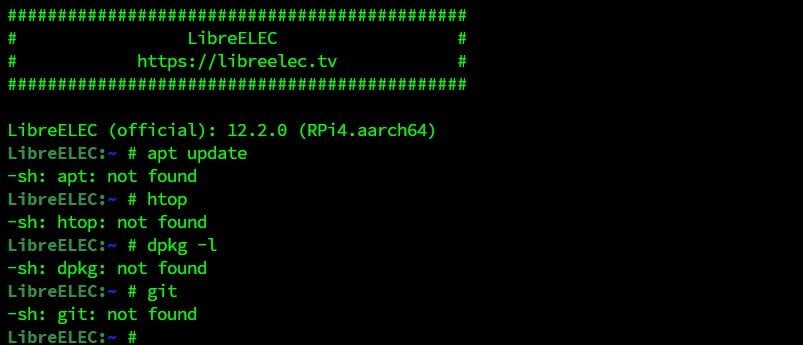
If your goal is to have a basic setup for your media center, but also keep the Raspberry Pi running for other services or to run scripts, LibreELEC is absolutely not a good choice. In this case, OSMC (or any other distribution) would be way better.
Side note though, in the LibreELEC add-ons repository that is configured by default, you’ll find some additional services you can install. For example, you can install MySQL server or docker from there. So, there are some ways to run other apps on LibreELEC, I just don’t know how far you can go by doing everything in the Kodi interface.
And obviously, another thing to consider is to use a completely different system if Kodi is not necessarily the main goal. As I told you in the introduction, Kodi can be installed on most distributions and operating systems, so you can use Raspberry Pi OS (even the Lite version) or DietPi, install and configure Kodi on it and then add any additional services you want.
DietPi is probably the best alternative for this. During the installation, you’ll select Kodi and all the other apps you need. It will install everything for you, as explained in this article.
Something not working? Don't waste hours going in circles. Ask in the RaspberryTips Community and get help from people who've already figured it out. Get unstuck now.
Should You Use OSMC or LibreELEC?
I hope you read the whole article because there are some slight differences between these two options that will change my recommendation depending on your goals. But here is a summary:
You might also like: I've tested hundreds of Linux apps, here are the ones I recommend.
As a whole, LibreELEC is a better option if the Raspberry Pi is dedicated to media-center usage. More intuitive, better performances, and generally more up-to-date. OSMC has some interesting points if you’ll use the Raspberry Pi for other services, as it’s based on Debian so you can install anything else easily on it.
| Main criteria | Recommendation |
|---|---|
| Dedicated media-center | LibreELEC |
| Other uses intended for Raspberry Pi | OSMC |
| Performance (e.g., on older Raspberry Pi models) | LibreELEC |
And remember that Kodi can run on any operating system. So if my goal is to host Nextcloud, run some Python scripts and from time to time watch a movie, I’ll probably start with DietPi or Raspberry Pi OS Lite, configure the server part, and then install Kodi on top of it. I will not use LibreELEC or OSMC at all.
Side-note: For your convenience, I created a page on this website with a list of all images for the Raspberry Pi, with download and tutorial links. Make sure to check it or even bookmark it if you try different systems.
Feel free to check my other tutorials to learn more on this topic:
- The Ultimate Guide to Install Kodi on Raspberry Pi (OSMC)
- How to Install Retropie on OSMC? (Raspberry Pi tutorial)
- How to watch Netflix and other streaming services on Kodi?
By the way, if you just want to watch Netflix on Raspberry Pi OS from time to time, there is no need to use OSMC or LibreELEC, you can do this directly in Chromium, as explained in the linked article.
And other solutions to consider may include Plex or Jellyfin, which are good alternatives to Kodi.
Not getting the same result?
Even when you follow every step, small differences in OS version, hardware or config can change the outcome. Instead of wasting time guessing, get help from people who have already fixed the same kind of issue.
- Get help on your exact issue
- Access step-by-step videos for tricky setups
- Browse the website without ads


