
How to Ride Rapid Transit
Rapid Transit is MBCTA’s app-based rideshare service for Macon-Bibb County.
Instead of waiting at a fixed bus stop, riders request an on-demand shared ride inside the active Rapid Transit service area. Enter your pickup location and destination, confirm your ride, and be ready when your vehicle arrives.
Rapid Transit can help riders get to work, school, medical appointments, shopping, the airport, and other destinations inside the current service area.
To get Started
1. Download

Step 1. Get the App
Download the Rides on Demand app from the Apple App Store or Google Play.
After the app is installed:
-
- Create your account.
- Add your contact information.
- Set up your rider profile.
- Choose Rapid Transit as your service.
Once your account is ready, you can start requesting rides inside the Rapid Transit service area.
 (opens in a new tab)
 (opens in a new tab)
2. Request
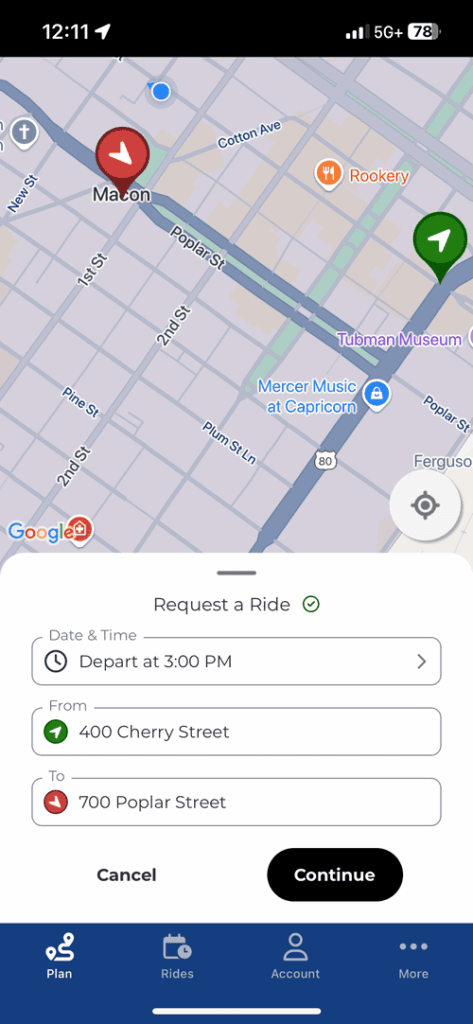
Step 2. Request your Ride
Open the Rides on Demand app and enter:
-
- Your pickup location
- Your destination
- The date and time you want to travel
The app will show available ride options if your pickup and destination are inside the Rapid Transit service area.
You can ride within one active zone or between active zones, as long as both locations are inside the current Rapid Transit service area.
Review your trip information, confirm your ride, and watch for updates in the app.
3. Watch

Step 3: Watch for Your Ride
Once your ride is confirmed, you can use the Rides on Demand app to follow your vehicle’s progress as it travels to your pickup location. The app will provide trip updates so you can see when your vehicle is on the way and be ready when it arrives. Please watch the app, stay near your pickup location, and be prepared to board when your Rapid Transit vehicle arrives.
4. Ride

Step 4: Get In and Ride
Your Rapid Transit trip may include other passengers traveling in the same general direction.
Because Rapid Transit is a shared service, your vehicle may make other pickups or drop-offs along the way. This helps MBCTA provide flexible, affordable on-demand transportation to more riders across the service area.
Your driver will take you to your destination inside the Rapid Transit service area.
Service Hours
Rapid Transit currently operates:
Monday–Saturday
6:00 AM – 9:00 PM
Rapid Transit does not currently operate on Sundays.
Fares
Rapid Transit fares are:
$5 per person
$8 per person from 6:00 PM – 9:00 PM
Fares are per person, per one-way ride.
Where Rapid Transit Serves
Rapid Transit serves Macon-Bibb County through active service zones.
A zone is simply an area where Rapid Transit is currently available. Riders can travel within one zone or between active zones, as long as both the pickup and destination are inside the current Rapid Transit service area.
For current service areas, visit the Rapid Transit Service Areas page.
Airport Trips
Rapid Transit serves Middle Georgia Regional Airport. See: Service to Middle Georgia Regional Airport
Riders can request trips to or from MGRA as long as both the pickup and destination are inside the current Rapid Transit service area.
For airport trips, bring only luggage you can safely manage. As a general guide, plan for one suitcase and one carry-on item.
Accessibility
Rapid Transit vehicles are wheelchair accessible.
Service animals are permitted.
TRS users may call 711.
Need Help?
If you need help booking a ride or have questions about Rapid Transit, call MBCTA at:
(478) 803-2521, option 1
Get Started
Download the Rides on Demand app, enter your pickup and destination, and request a ride inside the Rapid Transit service area.