
On Windows 10, the standard qualcoder with vlc does not run. I added a qualcoder_non_av folder so that Windows users who get an error with vlc can use this version instead. This version does not allow audio/video coding or viewing.
I think the key problem is some programs are written for 32 bit architecture and some are written for 64 bit architecture.
This means: If you have a 32 bit python installed and a 64 bit vlc installed (or vice-versa, a 64 bit python and 32 bit vlc) QualCoder will not run as the two architectures do not talk to each other.
The easiest solution is to install a vlc bit version that matches the python bit version. This should then allow QualCoder to first run and open, and secondly to work with audio and video.
This image shows I am running Python in 32 bit architecture:

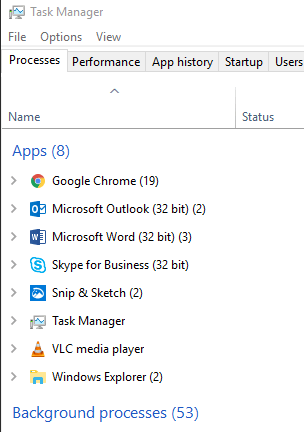
This image, from the task manager, shows vlc is running as 64 bit architecture. If it was 32 bit is would be noted as such in brackets.


 The code selection tree may be hidden on the left-hand side of the window, you can drag this across with the mouse. Similarly, you can drag the matrix to fill the screen.


