If you read this, perhaps you already tried once to switch to from CPython to PyPy and you realized that matplotlib is not working. Or someone else sent you here to don’t waste your time :D.
In this post I will guide you, step by step to compile yourself matplotlib for CPython 2.7 and PyPy with all necessary dependencies.
1. Install all necessary system packages:
sudo apt-get install gstreamer-1.0 libgstreamer-plugins-base1.0 doxygen gtk+2.0 freeglut3-dev
2. Install PyPy 5.8 from https://pypy.org/download.html and activate pip for it by running pypy -m ensurepip
3. Install numpy
pypy -m pip install numpy
4. Download latest sources of matplotlib from GitHub (it will take a while for all ~300 MB):
git clone https://github.com/matplotlib/matplotlib.git
5. Download wxpython-cffi:
hg clone https://bitbucket.org/amauryfa/wxpython-cffi
6. Download wxWidgets sources and extract it:
wget https://github.com/wxWidgets/wxWidgets/releases/download/v3.0.3/wxWidgets-3.0.3.tar.bz2
tar -xjf wxWidgets-3.0.3.tar.bz2
7. Set some paths:
export WXWIN=/your/path/wxWidgets-3.0.3
which doxygen (usually /usr/bin/doxygen)
export DOXYGEN=/your/path/doxygen
8. Build wxWidgets
cd wxpython-cffi
pypy build.py dox (this should finish with success)
pypy build.py build_wx
9. Build wxPython
pypy build.py etg --generator=cffi --nodoc (you should get some errors)
open file wx/core.pi and comment all lines from 27712 to 27720(inclusive) and save
run the build conmand again:
pypy build.py etg --generator=cffi --nodoc
pypy build.py cffi_gen
10. Prepare to build matplotlib
ln -s /your/path/wxpython-cffi/cffi/ /your/path/pypy/site-packages/wx-2.8
from folder wxpython-cffi/cffi copy folders wx, wrapper_lib to/your/path/pypy/site-packages/
from folder wxpython-cffi/cffi copy files *.so to pypy/site-packages/wx/
test the wx module with this command:
pypy -c "import wx"
it will print out some warnings but is OK
cd ../matplotlib
cp setup.cfg.template setup.cfg
Open to edit setup.cfg and go near the end of file
Uncomment tkagg and set it to False (tkagg = False)
Uncomment wxagg and set it to True (wxagg = True)
Uncomment backend and set it to WXAgg (backend = WXAgg)
Save and exit
Open to edit lib/matplotlib/backends/backend_wx.py and, from line 1803 remove the inheritance wx.Printout to look like this: `class PrintoutWx():`
Also comment line 1805
Add below 1805: self.title = title
Save and exit
Download file https://raw.githubusercontent.com/wxWidgets/wxPython/master/wxversion/wxversion.py and copy in your pypy/site-packages/
The step with wx.Printout is needed because it seems that this version of wxPython doesn’t have this class implemented yet.
11. Build matplotlib
pypy setup.py build
pypy setup.py install
12. Cleanup
remove the symbolic link wx-2.8
13. Finish
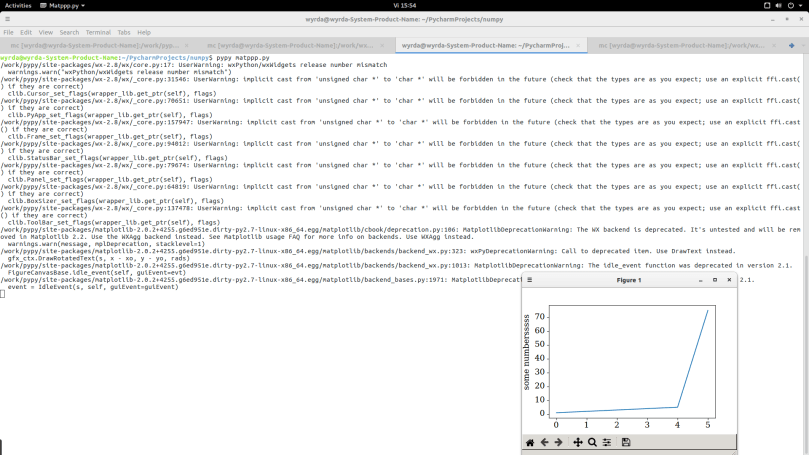
And you are ready to go! OK, there will be some warning and errors but at least is a starting point for improvement.
Everything in one script:
This file contains hidden or bidirectional Unicode text that may be interpreted or compiled differently than what appears below. To review, open the file in an editor that reveals hidden Unicode characters.
Learn more about bidirectional Unicode characters
| #!/bin/bash | |
| #usage: ./install_matplotlib.sh pypy_path | |
| pypy_path="$(readlink -f $1)" | |
| pypy_binary="$pypy_path/bin/pypy" | |
| script_path="$(dirname $(readlink -f $0))" | |
| apt-get install gstreamer-1.0 libgstreamer-plugins-base1.0 doxygen gtk+2.0 freeglut3-dev | |
| $pypy_binary -m ensurepip | |
| $pypy_binary -m pip install numpy | |
| cd "$script_path" | |
| git clone https://github.com/matplotlib/matplotlib.git | |
| hg clone https://bitbucket.org/amauryfa/wxpython-cffi | |
| wget https://github.com/wxWidgets/wxWidgets/releases/download/v3.0.3/wxWidgets-3.0.3.tar.bz2 | |
| tar -xjf wxWidgets-3.0.3.tar.bz2 | |
| export WXWIN="$(readlink -f wxWidgets-3.0.3)" | |
| export DOXYGEN="$(which doxygen)" | |
| cd wxpython-cffi | |
| $pypy_binary build.py dox | |
| $pypy_binary build.py build_wx | |
| $pypy_binary build.py etg –generator=cffi –nodoc | |
| sed -i -e '27712,27720 s/^/#/' "$script_path/wxpython-cffi/wx/core.pi" | |
| $pypy_binary build.py etg –generator=cffi –nodoc | |
| $pypy_binary build.py cffi_gen | |
| ln -s $(readlink -f cffi) "$pypy_path/site-packages/wx-2.8" | |
| cp -r "$script_path/wxpython-cffi/cffi/wx" "$pypy_path/site-packages/wx" | |
| cp -r "$script_path/wxpython-cffi/cffi/wrapper_lib" "$pypy_path/site-packages/wrapper_lib" | |
| cp $script_path/wxpython-cffi/cffi/*.so "$pypy_path/site-packages/wx/" | |
| $pypy_binary -c "import wx" | |
| cd "$script_path/matplotlib" | |
| cp setup.cfg.template setup.cfg | |
| sed -i -e '76 s/.*/tkagg = False/' setup.cfg | |
| sed -i -e '78 s/.*/wxagg = True/' setup.cfg | |
| sed -i -e '91 s/.*/backend = WXAgg/' setup.cfg | |
| sed -i -e '1797 s/.*/class PrintoutWx():/' "$script_path/matplotlib/lib/matplotlib/backends/backend_wx.py" | |
| sed -i -e '1805 s/.*/\tself.title = title/' "$script_path/matplotlib/lib/matplotlib/backends/backend_wx.py" | |
| cd "$pypy_path/site-packages" | |
| wget https://raw.githubusercontent.com/wxWidgets/wxPython/master/wxversion/wxversion.py | |
| cd "$script_path/matplotlib" | |
| $pypy_binary setup.py build | |
| $pypy_binary setup.py install | |
| rm "$pypy_path/site-packages/wx-2.8" |
By Gabriel Munteanu, gabriel.munteanu [at] rinftech [dot] com
 Python Files
Hi,
Cheers for this changing the apt-get line to have sudo is definitely a worthwhile tweak.
I tried this, but wasn’t able to get matplotlib working, when I tried any of the examples in matplotlib/tutorials I got errors like this –
$ python artists.py
/home/stu/.virtualenvs/pypy-nightly-trunk/site-packages/wx/core.py:17: UserWarning: wxPython/wxWidgets release number mismatch
warnings.warn(“wxPython/wxWidgets release number mismatch”)
/home/stu/.virtualenvs/pypy-nightly-trunk/site-packages/wx/_core.py:31546: UserWarning: implicit cast from ‘unsigned char *’ to ‘char *’ will be forbidden in the future (check that the types are as you expect; use an explicit ffi.cast() if they are correct)
clib.Cursor_set_flags(wrapper_lib.get_ptr(self), flags)
Traceback (most recent call last):
File “artists.py”, line 142, in
import matplotlib.pyplot as plt
File “/home/stu/.virtualenvs/pypy-nightly-trunk/site-packages/matplotlib-2.1.0rc1+110.g963f91300.dirty-py2.7-linux-x86_64.egg/matplotlib/pyplot.py”, line 113, in
_backend_mod, new_figure_manager, draw_if_interactive, _show = pylab_setup()
File “/home/stu/.virtualenvs/pypy-nightly-trunk/site-packages/matplotlib-2.1.0rc1+110.g963f91300.dirty-py2.7-linux-x86_64.egg/matplotlib/backends/__init__.py”, line 60, in pylab_setup
[backend_name], 0)
File “/home/stu/.virtualenvs/pypy-nightly-trunk/site-packages/matplotlib-2.1.0rc1+110.g963f91300.dirty-py2.7-linux-x86_64.egg/matplotlib/backends/backend_wxagg.py”, line 12, in
from . import backend_wx
File “/home/stu/.virtualenvs/pypy-nightly-trunk/site-packages/matplotlib-2.1.0rc1+110.g963f91300.dirty-py2.7-linux-x86_64.egg/matplotlib/backends/backend_wx.py”, line 1818
SyntaxError: return outside function
LikeLike
Any chance you could update the backend_wx.py changes for newer matplotlib, i.e. instead of sed use patch?
LikeLike