Archive
Python Regular Expression Testing Tool
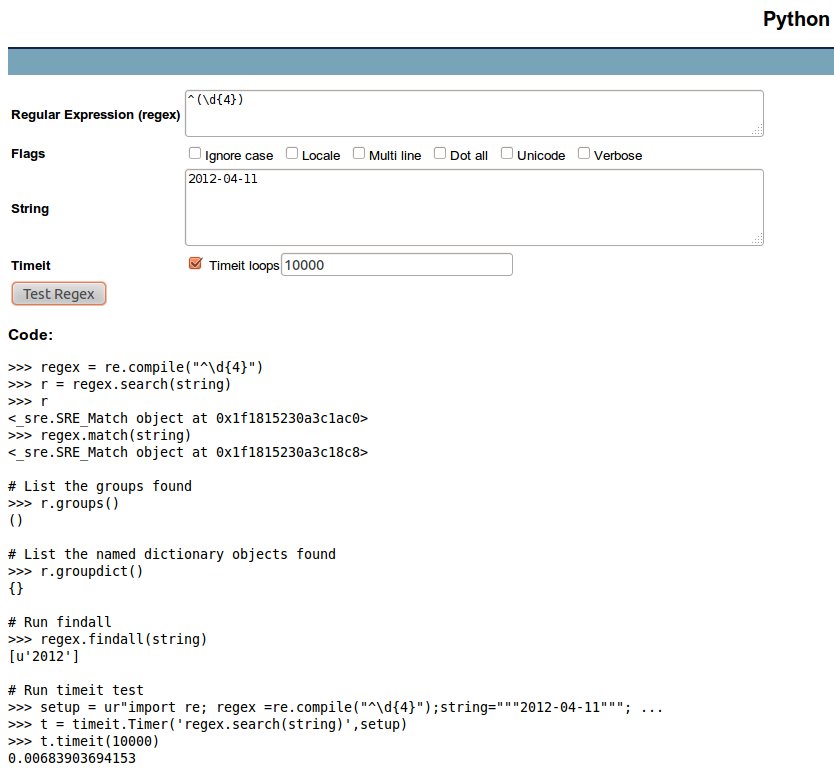 See http://www.pythonregex.com/. Cool stuff, it also generates source code. Happiness!
For a screenshot, click on the image on the right side.
Pythex: a real-time regexp editor
Pythex is a real-time regular expressions editor for Python. Just paste in a test string and start writing your regular expression. Pythex will mark in green the part of the test string that is covered by your regexp. Useful stuff!
Related
/ discussion /
Rename multiple files
Problem
I scanned in 66 pages that are numbered from 11 to 76. However, the scanning software saved the files under the names Scan10032.JPG, Scan10033.JPG, …, Scan10097.JPG. I want to rename them to reflect the real numbering of the pages, i.e. 11.jpg, 12.jpg, …, 76.jpg.
Solution
#!/usr/bin/env python

import glob
import re
import os

files = glob.glob('*.JPG')  # get *.JPG in a list (not sorted!)
files.sort()                # sort the list _in place_
cnt = 11                    # start new names with 11.jpg

for f in files:
    original = f                                    # save the original file name
    result = re.search(r'Scan(\d+)\.JPG', f)        # pattern to match
    if result:                                      # Is there a match?
        new_name = str(cnt) + '.jpg'                # create the new name
        print "%s => %s" % (original, new_name)     # verify if it's OK
        # os.rename(original, new_name)             # then uncomment to rename
        cnt += 1                                    # increment the counter
Comments are inside the source code.
If you need a simpler rename (like removing a part of the file names), you can also use the rename command. In this post I give an example for that.

 Python Adventures
You must be logged in to post a comment.