Archive
Get the RottenTomatoes rating of a movie
Problem
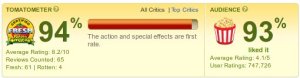
In the previous post we saw how to extract the IMDB rating of a movie. Now let’s see the same thing with the RottenTomatoes website. Their rating looks like this:
Solution
Download link: https://github.com/jabbalaci/Movie-Ratings. Source code:
#!/usr/bin/env python

# RottenTomatoesRating
# Laszlo Szathmary, 2011 ([email protected])

from BeautifulSoup import BeautifulSoup
import sys
import re
import urllib
import urlparse

class MyOpener(urllib.FancyURLopener):
    version = 'Mozilla/5.0 (Windows; U; Windows NT 6.1; en-US; rv:1.9.2.15) Gecko/20110303 Firefox/3.6.15'

class RottenTomatoesRating:
    # title of the movie
    title = None
    # RT URL of the movie
    url = None
    # RT tomatometer rating of the movie
    tomatometer = None
    # RT audience rating of the movie
    audience = None
    # Did we find a result?
    found = False

    # for fetching webpages
    myopener = MyOpener()
    # Should we search and take the first hit?
    search = True

    # constant
    BASE_URL = 'http://www.rottentomatoes.com'
    SEARCH_URL = '%s/search/full_search.php?search=' % BASE_URL

    def __init__(self, title, search=True):
        self.title = title
        self.search = search
        self._process()

    def _search_movie(self):
        movie_url = ""

        url = self.SEARCH_URL + self.title
        page = self.myopener.open(url)
        result = re.search(r'(/m/.*)', page.geturl())
        if result:
            # if we are redirected
            movie_url = result.group(1)
        else:
            # if we get a search list
            soup = BeautifulSoup(page.read())
            ul = soup.find('ul', {'id' : 'movie_results_ul'})
            if ul:
                div = ul.find('div', {'class' : 'media_block_content'})
                if div:
                    movie_url = div.find('a', href=True)['href']

        return urlparse.urljoin( self.BASE_URL, movie_url )

    def _process(self):
        if not self.search:
            movie = '_'.join(self.title.split())

            url = "%s/m/%s" % (self.BASE_URL, movie)
            soup = BeautifulSoup(self.myopener.open(url).read())
            if soup.find('title').contents[0] == "Page Not Found":
                url = self._search_movie()
        else:
            url = self._search_movie()

        try:
            self.url = url
            soup = BeautifulSoup( self.myopener.open(url).read() )
            self.title = soup.find('meta', {'property' : 'og:title'})['content']
            if self.title: self.found = True

            self.tomatometer = soup.find('span', {'id' : 'all-critics-meter'}).contents[0]
            self.audience = soup.find('span', {'class' : 'meter popcorn numeric '}).contents[0]

            if self.tomatometer.isdigit():
                self.tomatometer += "%"
            if self.audience.isdigit():
                self.audience += "%"
        except:
            pass

if __name__ == "__main__":
    if len(sys.argv) == 1:
        print "Usage: %s 'Movie title'" % (sys.argv[0])
    else:
        rt = RottenTomatoesRating(sys.argv[1])
        if rt.found:
            print rt.url
            print rt.title
            print rt.tomatometer
            print rt.audience
Usage:
The constructor has an optional parameter, which is True by default (search=True). It means that first we use the search function of the RT website and then we try to follow the first link. If search=False, the script tries to access the movie page directly. If it fails, then it falls back to the first case, i.e. it will try to find the movie via search.
Which version is better? It depends :) If there are several movies with the same title, then with search=True you will get the latest movie. If search=False, then you will usually get the oldest movie with that title.
For instance, for me “Star Wars” means episode 4, thus with the title “star wars”, search=False will return the relevant hit. But for “up in the air”, I would like to get the movie from 2009, not from 1940, thus in this case search=True would be better.
If you are in doubt, use the default case, i.e. search=True.
Related links
Update (20110329):
You will find the latest version of the script at https://github.com/jabbalaci/Movie-Ratings.
[ @reddit ]
Get the IMDB rating of a movie
Problem
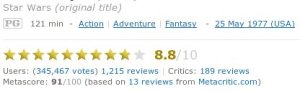
You want to get the IMDB rating of a movie. For instance, you have a large collection of movies, and you want to figure out their ratings. An IMDB rating looks like this:
 Solution
Here is a script that extracts the rating of a movie from IMDB. The script was inspired by the work of Rag Sagar.
Download link: https://github.com/jabbalaci/Movie-Ratings. Source code:
#!/usr/bin/env python

# ImdbRating

import os
import sys
import re
import urllib
import urlparse

from mechanize import Browser
from BeautifulSoup import BeautifulSoup

class MyOpener(urllib.FancyURLopener):
    version = 'Mozilla/5.0 (Windows; U; Windows NT 6.1; en-US; rv:1.9.2.15) Gecko/20110303 Firefox/3.6.15'

class ImdbRating:
    # title of the movie
    title = None
    # IMDB URL of the movie
    url = None
    # IMDB rating of the movie
    rating = None
    # Did we find a result?
    found = False

    # constant
    BASE_URL = 'http://www.imdb.com'

    def __init__(self, title):
        self.title = title
        self._process()

    def _process(self):
        movie = '+'.join(self.title.split())
        br = Browser()
        url = "%s/find?s=tt&q=%s" % (self.BASE_URL, movie)
        br.open(url)

        if re.search(r'/title/tt.*', br.geturl()):
            self.url = "%s://%s%s" % urlparse.urlparse(br.geturl())[:3]
            soup = BeautifulSoup( MyOpener().open(url).read() )
        else:
            link = br.find_link(url_regex = re.compile(r'/title/tt.*'))
            res = br.follow_link(link)
            self.url = urlparse.urljoin(self.BASE_URL, link.url)
            soup = BeautifulSoup(res.read())

        try:
            self.title = soup.find('h1').contents[0].strip()
            self.rating = soup.find('span',attrs='rating-rating').contents[0]
            self.found = True
        except:
            pass

# class ImdbRating

if __name__ == "__main__":
    if len(sys.argv) == 1:
        print "Usage: %s 'Movie title'" % (sys.argv[0])
    else:
        imdb = ImdbRating(sys.argv[1])
        if imdb.found:
            print imdb.url
            print imdb.title
            print imdb.rating
Related links
- Get the RottenTomatoes rating of a movie
- IMDbPY provides lots of possibilities if you want to retrieve and manage IMDB data. Undoubtedly, IMDbPY is a more professional (but heavier) solution. Can be installed via PyPI.
Update (20110329):
You will find the latest version of the script at https://github.com/jabbalaci/Movie-Ratings.
[ @reddit ]
Related posts (update 20120222)
- Get IMDB ratings without any scraping (at the end of this post you’ll find a much shorter Python code too)

 Python Adventures
You must be logged in to post a comment.