vulture is available in neomake
Recently I started to use neovim (here is my story). I mainly edit Python codes so I looked around and collected some useful plugins (here is my init.vim file). One of these plugins is neomake, an asynchronous :make using Neovim’s job-control functionality (it also works in ordinary vim, but without the asynchronous benefits).
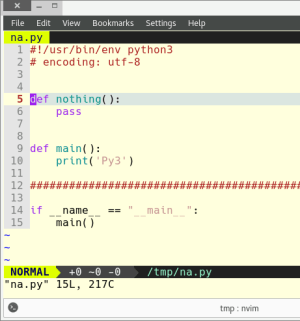
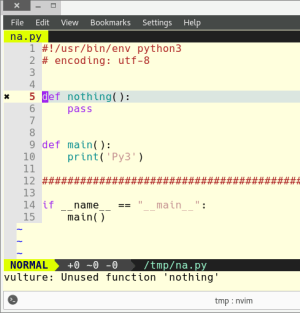
I had a little contribution to neomake and that’s what I want to write about in this post. I sent a pull request to include vulture as a Python maker. Vulture finds unused classes, functions and variables in your code. Let’s see two screenshots without and with vulture:
Without vulture:
With vulture:
init.vim settings
Here is my corresponding settings that enables vulture too:
Plug 'neomake/neomake'
" {{{
    " neomake is async => it doesn't block the editor
    " It's a syntastic alternative. Syntastic was slow for me on python files.
    " $ sudo pip2/pip3 install flake8 -U
    " $ sudo pip2/pip3 install vulture -U
    let g:neomake_python_enabled_makers = ['flake8', 'pep8', 'vulture']
    " let g:neomake_python_enabled_makers = ['flake8', 'pep8']
    " E501 is line length of 80 characters
    let g:neomake_python_flake8_maker = { 'args': ['--ignore=E115,E266,E501'], }
    let g:neomake_python_pep8_maker = { 'args': ['--max-line-length=100', '--ignore=E115,E266'], }

    " run neomake on the current file on every write:
    autocmd! BufWritePost * Neomake
" }}}
“import tkinter” fails
Problem
Under Manjaro I wanted to use the turtle module but I got this error:
File "square.py", line 1, in <module>
    import turtle
  File "/usr/lib/python2.7/lib-tk/turtle.py", line 107, in <module>
    import Tkinter as TK
  File "/usr/lib/python2.7/lib-tk/Tkinter.py", line 39, in <module>
    import _tkinter # If this fails your Python may not be configured for Tk
ImportError: libtk8.6.so: cannot open shared object file: No such file or directory
Solution
sudo pacman -S tk
Ubuntu 14.04
I had the same problem under Ubuntu when I tried to use matplotlib on a remote server.
sudo apt install python3-tk
Installing a Flask webapp on a Digital Ocean (or Linode, etc.) Ubuntu box
How to install a Flask webapp on a Digital Ocean VPS that has Ubuntu Linux on it: https://github.com/jabbalaci/DigitalOceanFlask.
This writing of mine appeared in Import Python Weekly Newsletter No. 65.
gunicorn from upstart fails to start
Today I was trying to put together these: ubuntu + nginx + gunicorn + start gunicorn from upstart + flask + virtualenv. After a whole afternoon, I managed to do it. I will write a detailed post about it, but now I just want to concentrate on one part, which was the most problematic.
Problem
I wanted to start gunicorn from upstart. So I issued the following command:
$ sudo service gunicorn start
gunicorn start/running, process 21415
$ sudo service gunicorn status
gunicorn stop/waiting
Each time I tried to launch it, it failed.
Solution
First of all, I didn’t know where the upstart log files were located. I know, it’s lame, but after a few hours I relized that it’d be a good idea to google it… So, the log files are in this folder:
/var/log/upstart
The log of gunicorn is here:
/var/log/upstart/gunicorn.log
Now, I started to monitor the end of this file in another terminal with “tail -f /var/log/upstart/gunicorn.log“. With this information I could easily find the error. I put here my solution and then I add some explanation:
# /etc/init/gunicorn.conf
#
description "Gunicorn daemon for a Flask project"

start on (local-filesystems and net-device-up IFACE=eth0)
stop on runlevel [!12345]

# If the process quits unexpectadly trigger a respawn
respawn

setuid demo
setgid demo

script
. "/home/demo/.virtualenvs/myproj/bin/activate"
cd /home/demo/projects/myproj/api
exec gunicorn --name="my project" --bind=127.0.0.1:9000 --config /etc/gunicorn.d/gunicorn.py api:app --pid=gunicorn_from_nginx.pid
end script
And you know what caused the problem? Instead of “.” I tried to use “source”. This is what I found in every tutorial. But as it turned out, this script is executed with “/bin/sh“, not with “/bin/bash“, and sh doesn’t know source. Geez…
The normal user on this machine is called “demo“. My Flask project is within a virtual environment. You can create a script block and the steps within are executed with “sh”. So first we “source” the virtual environment, then enter the directory where the Python script to be executed is located (here “api” is the name of the folder, and in there I have a file called “api.py“, which contains the “app” variable). gunicorn is also installed in the virtual environment! You don’t need to install it globally with “sudo“!
Nginx is listening on port 80 and every connection that arrives there are forwarded to this gunicorn instance on port 9000. But I’ll write about it a bit later.
Appendix
The content of “/etc/gunicorn.d/gunicorn.py“:
"""gunicorn WSGI server configuration."""
from multiprocessing import cpu_count
from os import environ


def max_workers():
    return cpu_count() * 2 + 1

max_requests = 1000
worker_class = 'gevent'
workers = max_workers()
pretty JSON output with Flask-RESTful
Problem
Flask-RESTful is an awesome way to write REST APIs. In debug mode, its output is nicely indented, easy to read. However, in production mode the JSON is compressed and hard to read.
If debug is False, how to have a nicely formatted output?
Solution
from flask import Flask
from flask_restful import Api

app = Flask(__name__)
api = Api(app)

if production:
    print("# running in production mode")
    HOST = '0.0.0.0'
    DEBUG = False
    # START: temporary help for the UI developers, remove later
    settings = app.config.get('RESTFUL_JSON', {})
    settings.setdefault('indent', 2)
    settings.setdefault('sort_keys', True)
    app.config['RESTFUL_JSON'] = settings
    # END
else:
    print("# running in development mode")
    HOST='127.0.0.1'
    DEBUG = True

# ...

if __name__ == '__main__':
    app.run(debug=DEBUG, host=HOST, port=1234)
Note that here I use the development server shipped with Flask, which is not suitable for real production. So this solution is between development and production.
detect duplicate keys in a JSON file
Problem
I want to edit a JSON file by hand but I’m afraid that somewhere I introduce a duplicate key by accident. If it happens, then the second key silently overwrites the first one. Example:
$ cat input.json
{
    "content": {
        "a": 1,
        "a": 2
    }
}
Naive approach:
import json

with open("input.json") as f:
    d = json.load(f)

print(d)

# {'content': {'a': 2}}
If there is a duplicate key, it should fail! But it remains silent and you have no idea that you just lost some data.
Solution
I found the solution here.
import json

def dict_raise_on_duplicates(ordered_pairs):
    """Reject duplicate keys."""
    d = {}
    for k, v in ordered_pairs:
        if k in d:
           raise ValueError("duplicate key: %r" % (k,))
        else:
           d[k] = v
    return d

def main():
    with open("input.json") as f:
        d = json.load(f, object_pairs_hook=dict_raise_on_duplicates)

    print(d)
Now you get a nice error message:
Traceback (most recent call last):
  File "./check_duplicates.py", line 28, in <module>
    main()
  File "./check_duplicates.py", line 21, in main
    d = json.load(f, object_pairs_hook=dict_raise_on_duplicates)
  File "/usr/lib64/python3.5/json/__init__.py", line 268, in load
    parse_constant=parse_constant, object_pairs_hook=object_pairs_hook, **kw)
  File "/usr/lib64/python3.5/json/__init__.py", line 332, in loads
    return cls(**kw).decode(s)
  File "/usr/lib64/python3.5/json/decoder.py", line 339, in decode
    obj, end = self.raw_decode(s, idx=_w(s, 0).end())
  File "/usr/lib64/python3.5/json/decoder.py", line 355, in raw_decode
    obj, end = self.scan_once(s, idx)
  File "./check_duplicates.py", line 13, in dict_raise_on_duplicates
    raise ValueError("duplicate key: %r" % (k,))
ValueError: duplicate key: 'a'
If your json file has no duplicates, then the code aboce nicely prints its content.
Fallout 3 Computer Hack
In Fallout 3 there is a minigame where you need to hack computers. I made a simple script to do these hacks easily. Here is a running example:
$ ./crack.py example.txt
Words and scores:
-----------------
traveling  5
swiveling  5
wandering  4
spreading  4
desperate  3
telephone  3
sterilize  3
deformity  3
september  2
belonging  2

Tip: it's a good idea to start with the word that has the highest score.

Guessed word: traveling
Number of matches: 1
The password is one of these words:  ['desperate', 'september', 'deformity']

Guessed word: desperate
Number of matches: 3
The password is:  deformity
The script can be found on GitHub.
getting started with Kivy
Intro
“Kivy is an open source library for developing multi-touch applications. It is cross-platform (Linux/OSX/Windows/Android/iOS) and released under the terms of the MIT License.
It comes with native support for many multi-touch input devices, a growing library of multi-touch aware widgets and hardware accelerated OpenGL drawing. Kivy is designed to let you focus on building custom and highly interactive applications as quickly and easily as possible.” (source)
Problem
How to install it in a virtual environment? I could install it but when I wanted to create a basic app, it dropped some error messages (“pygame or sdl missing”).
Solution
Instead of Pygame I chose the SDL way. So under Manjaro I had to install globally the following packages:
sudo pacman -S gstreamer sdl2_ttf sdl2_mixer sdl2_image
Maybe gstreamer is not necessary, I’m not sure.
I suggest working with Kivy in a Python 2 virtual environment. Why? If you want to build your app for Android, then you can use the buildozer tool. However, at the moment it doesn’t support Python 3 :( I’m sure it’ll change but at the moment stick with Python 2.
Then, in your virtual environment, install these:
pip install cython
pip install kivy
Let’s try if it works. Activate your virt. env. and launch the Python interpreter in it. Then try this code:
>>> from kivy.app import App
>>> App().run()
If you get a blank window with black background, then everything is fine.
Links
- https://kivy.org, Kivy HQ
- Creating Apps in Kivy, a nice and short introductory book
find out a github user’s (hidden) email address
Problem
You want to contact someone on GitHub but (s)he doesn’t indicate his/her email on the profile page. What to do?
Solution
Figure it out :) The manual steps are indicated here. I made a Python script of it that can be found here: https://github.com/jabbalaci/Bash-Utils/blob/master/github_user_email.py .
Usage example:
$ ./github_user_email.py
Github info (username or repo. link): https://github.com/jabbalaci/Bash-Utils
[email protected]
If you want to hide your email address, then here are some tips.

 Python Adventures
You must be logged in to post a comment.