moving from unipath to pathlib
Unipath is a very nice 3rd-party library for an object-oriented approach to Python file/directory operations. Just look at this sane API:
>>> from unipath import Path
>>> p = Path("/usr/lib/python2.5/gopherlib.py")
>>> p.parent
Path("/usr/lib/python2.5")
>>> p.name
Path("gopherlib.py")
>>> p.ext
'.py'
>>> p.stem
Path('gopherlib')
>>> q = Path(p.parent, p.stem + p.ext)
>>> q
Path('/usr/lib/python2.5/gopherlib.py')
>>> q == p
True
However, a very similar module landed in Python 3 called pathlib. It is almost the same as unipath but since it’s in the standard library, I think I’ll switch to it. It means one less external dependency, which is always a good thing.
Let’s see what it looks like:
>>> from pathlib import Path
>>> p = Path("/usr/lib/python2.5/gopherlib.py")
>>> p.parent
PosixPath('/usr/lib/python2.5')
>>> p.name
'gopherlib.py'
>>> p.suffix    # !!! called suffix, not ext !!!
'.py'
>>> p.stem
'gopherlib'
>>> q = Path(p.parent, p.stem + p.suffix)
>>> q
PosixPath('/usr/lib/python2.5/gopherlib.py')
>>> q == p
True
One important difference though. Unipath’s Path is a subclass of str, thus whenever a function needs a string, you can pass a Path object. However, it’s not true for pathlib’s PosixPath. It means that if you need the string representation of a PosixPath, you need to convert it manually.
Example:
>>> import os
>>> from pathlib import Path
>>> p = Path("/usr/lib/python2.5/gopherlib.py")
>>> os.path.exists(p)
Traceback (most recent call last):
  File "<stdin>", line 1, in <module>
  File "/usr/lib/python3.5/genericpath.py", line 19, in exists
    os.stat(path)
TypeError: argument should be string, bytes or integer, not PosixPath
>>> os.path.exists(str(p))    # here
False
Some other features
>>> from pathlib import Path
>>> Path.home()
PosixPath('/home/jabba')    # Were you also fed up with os.path.expanduser('~') ?
>>> p = Path('/tmp/na.txt')
>>> p.chmod(0o644)
>>> p.exists()
True
>>> p.is_file()
True
>>> p.is_dir()
False
>>>
>>> p = Path('/tmp/ehh.txt')
>>> p.exists()
False
>>> p.touch()    # At last! We have `touch` in the stdlib!
>>> p.exists()
True
Painless read from / write to file
>>> p = Path('my_text_file')
>>> p.write_text('Text file contents')    # newline is NOT added automatically
18
>>> p.read_text()
'Text file contents'
More details in the official docs.
Links
validate an IP address (either IPv4 or IPv6)
Problem
You want to validate an IP address. However, it can be either IPv4 or IPv6.
Solution
Python 3 has a built-in module for this: ipaddress. Example:
>>> ipaddress.ip_address('192.168.0.1')
IPv4Address('192.168.0.1')
>>> ipaddress.ip_address('2001:db8::')
IPv6Address('2001:db8::')
If the IP is invalid, you get a ValueError exception.
Bash-Utils updated
I have several projects on GitHub (link) but some of them are either abandoned or outdated. So I want to review and update all of them.
I started this process with Bash-Utils. The Python 2 codebase was moved entirely to Python 3. The old Python 2 source is tagged and available under the “release” link, but I won’t touch that anymore. Only the current version (Python 3) will be updated. The README file is converted to Markdown, and new scripts are also documented.
Today I added a script called “rep.py” that allows you to execute a bash command several times. Example:
$ rep 3 echo hello
hello
hello
hello
It will execute “echo hello” three times.
update all packages with pip in your virtual environment
Problem
You want to update all installed packages in your virtual environment.
Solution
$ pip install pip-review
$ pip-review --local --interactive
Tip from here.
Type text to an application from a script
Problem
Today I saw a nice motivational video: Girl does push ups for 100 days time lapse. Great, let’s do the same! I sit in front of my computer several hours a day, so some pushups won’t hurt :) But how to track the days?
I use Trello for some TODO lists, and it allows you to create a checklist. When you type a text and press Enter, a new checklist item is created. But typing “Day 1<Enter>”, “Day 2<Enter>”, … “Day 100<Enter>” is too much, I would die of boredom by the end… How to automate the input?
Solution
Under Linux there is a command called “xdotool” that (among others) lets you programmatically simulate keyboard input. “xdotool key D” will simulate pressing “D”, “xdotool key KP_Enter” is equivalent to pressing the Enter, etc.
Here is the script:
#!/usr/bin/env python3
# coding: utf-8

import os
from time import sleep

PRE_WAIT = 3

REPEAT = 100
WAIT = 0.3

def my_type(text):
    for c in text:
        if c == " ":
            key = "KP_Space"
        elif c == "\n":
            key = "KP_Enter"
        else:
            key = c
        #
        cmd = "xdotool key {}".format(key)
        os.system(cmd)

def main():
    print("You have {} seconds to switch to the application...".format(PRE_WAIT))
    sleep(PRE_WAIT)
    #
    for i in range(1, REPEAT+1):
        text = "Day {}\n".format(i)
        my_type(text)
        print("#", text)
        sleep(WAIT)

##############################################################################

if __name__ == "__main__":
    main()
Create a checklist in Trello, start adding a new item, launch this script and switch back to Trello. The script will automatically create the items for the days.
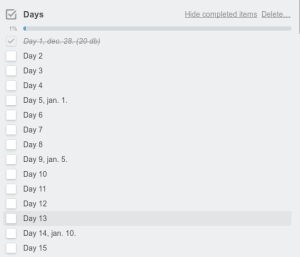
screenshot
In the screenshot the dates were added manually. As you can see, I could do 20 pushups the very first day. Not bad :)
Update (20170302)
If you want to figure out the key code of a key, then start “xev -event keyboard” and press the given key. For instance, if you want xdotool to press “á” for you, the command above will tell you that the key code of “á” is “aacute“, thus the command to generate “á” is “xdotool key aacute“.
To avoid the special key codes, here is another idea: copy the text to the clipboard (see the command xsel for instance), then paste it with xdotool key "shift+Insert".
replace characters in a string
Problem
You have a string, and you want to replace some characters to some other characters. The first thing that pops into mind is “replace”:
>>> s = "ebbe"
>>> s.replace('e', 'a')
'abba'
But what if you need to replace 1s to 0s and 0s to 1s in “100”? The result, in this case, should be “011”.
Solution
A straightforward solution would be to use a “temporary variable”, in this case a third kind of character:
>>> s = "100"
>>> s.replace('1', 't').replace('0', '1').replace('t', '0')
'011'
A more elegant way is to use “translate”:
>>> s = "100"
>>> s.translate(str.maketrans('01', '10'))
'011'
More info here: https://docs.python.org/3/library/stdtypes.html#str.maketrans .
split a string into equal length substrings
Problem
Having a string, split it up to equally long substrings. Example: “110010110100” -> “11”, “00”, “10”, “11”, “01”, “00”.
Solution
>>> s = "110010110100"
>>> [s[i:i+2] for i in range(0, len(s), 2)]
['11', '00', '10', '11', '01', '00']
I found it here.
pytumblr with Python 3 support
Problem
I wanted to use the pytumblr library from Python 3 but this library is Python 2 only :( And the repo is quite abandoned. Someone asked Python 3 support more than a year ago and nothing happened.
Solution
As I had a large Python 3 project and I wanted to integrate Tumblr support in it, I decided to modify the library to support Python 3. The result is here: https://github.com/jabbalaci/pytumblr . I only needed to upload photos, so I worked on that part only. But with this version you can upload photos to Tumblr under Python 3.
[matplotlib] create figures on a remote server
Problem
On a remote server of mine I wanted to create some nice figures with matplotlib. It worked well on localhost but it failed on the server. First, tkinter was missing. Second, there was a problem with $DISPLAY.
Solution
To install tkinter, check out this earlier post.
The second problem is caused by a missing X server. On a remote server usually there is no graphical interface. To solve it, just add these two lines to the top of your program:
import matplotlib as mpl
mpl.use('Agg')
Example
Before:
#!/usr/bin/env python3
# coding: utf-8

import pylab
import numpy as np

def main():
    x = np.arange(-3.14, 3.14, 0.01)
    y = np.sin(x)
    pylab.plot(x, y, "b")
    pylab.savefig("out.png")

##############################################################################

if __name__ == "__main__":
    main()
After:
#!/usr/bin/env python3
# coding: utf-8

import matplotlib as mpl
mpl.use('Agg')

import pylab
import numpy as np

def main():
    x = np.arange(-3.14, 3.14, 0.01)
    y = np.sin(x)
    pylab.plot(x, y, "b")
    pylab.savefig("out.png")

##############################################################################

if __name__ == "__main__":
    main()
Output:

sorted containers
“SortedContainers is an Apache2 licensed sorted collections library, written in pure-Python, and fast as C-extensions.”
Hmm, next time I need a sorted dict, I will try it.
As /u/fernly pointed it out:
“‘ordered’ means ‘insertion order’. For a sorted dict see the excellent sortedcontainers module. This provides dicts, lists, and sets that return keys in sequence (including, you can supply a key() func for custom sorting), and maintain the sequence under deletions and insertions, with low overhead. This functionality is still not in the std library.” (source)

 Python Adventures
You must be logged in to post a comment.