Archive
string distances
See the Jellyfish project: “Jellyfish is a python library for doing approximate and phonetic matching of strings“.
Jellyfish implements the following algorithms: Levenshtein Distance, Damerau-Levenshtein Distance, Jaro Distance, Jaro-Winkler Distance, Match Rating Approach Comparison, Hamming Distance.
See the project page for more info.
compile lxml on Ubuntu 16.04
Problem
lxml doesn’t want to compile on Ubuntu 16.04.
Solution
$ sudo apt install libxml2-dev libxslt1-dev python-dev zlib1g-dev
I was getting the error “/usr/bin/ld: cannot find -lz“. It turned out that the package zlib1g-dev was the cure…
Note that this is for Python 2. For Python 3 you might need to install the package python3-dev.
installing a Flask webapp on a Digital Ocean Ubuntu 16.04 box using Systemd
I’ve updated my Digital Ocean Flask notes on GitHub. Now it includes information about installing a Flask webapp on a Digital Ocean Ubuntu 16.04 box using Systemd.
Flask RESTful POST JSON
Problem
Using Flask-RESTful, I needed an API endpoint that accepts JSON data.
Solution
I found the solution here: http://stackoverflow.com/questions/22273671/flask-restful-post-json-fails. You can copy / paste that code. Note that the JSON data is POSTed to your API endpoint, thus you need to implement the post() method.
However, how to test it?
1) using cURL:
$ curl -i -H "Content-Type: application/json" -H "Accept: application/json" -X POST -d "{\"Hello\":\"Karl\"}" http://domain/your_api_endpoint
Damn, that’s compicated, right? Is there an easier way?
2) using httpie:
You can install httpie with your favorite package manager. Then:
$ http POST http://domain/your_api_endpoint Hello=Karl
get the tweets of a user and save them in CSV
remove tags from HTML
Problem
You have an HTML string and you want to remove all the tags from it.
Solution
Install the package “bleach” via pip. Then:
>>> import bleach
>>> html = "Her <h1>name</h1> was <i>Jane</i>."
>>> cleaned = bleach.clean(html, tags=[], attributes={}, styles=[], strip=True)
>>> html
'Her <h1>name</h1> was <i>Jane</i>.'
>>> cleaned
'Her name was Jane.'
Tip from here.
for / else and try / except / else
Problem
What is that “else” in a for loop? And that “else” in an exception handler?
Solution
They can be confusing but in this thread I found a perfect way to remember what they mean. Asdayasman suggests that we should always annotate these “else” branches:
for _ in []:
    ...
else:  # nobreak
    ...

try:
    ...
except:
    ...
else:  # noexcept
    ...
To be honest, IMO it is best to avoid for / else completely.
email notification from a script
Problem
You want to send an email to yourself from a script.
Solution
You can find here how to do it from a Bash script. That solution uses the mailx command.
Here is a simple Python wrapper for the mailx command:
#!/usr/bin/env python3
# coding: utf8

import os

DEBUG = True
# DEBUG = False

class NoSubjectError(Exception):
    pass

class NoRecipientError(Exception):
    pass

def send_email(to='', subject='', body=''):
    if not subject:
        raise NoSubjectError
    if not to:
        raise NoRecipientError
    #
    if not body:
        cmd = """mailx -s "{s}" < /dev/null "{to}" 2>/dev/null""".format(
            s=subject, to=to
        )
    else:
        cmd = """echo "{b}" | mailx -s "{s}" "{to}" 2>/dev/null""".format(
            b=body, s=subject, to=to
        )
    if DEBUG:
        print("#", cmd)
    #
    os.system(cmd)

def main():
    send_email(to="[email protected]",
               subject="subject")
    #
    send_email(to="[email protected]",
               subject="subject",
               body='this is the body of the email')

#############################################################################

if __name__ == "__main__":
    main()
You can also find this code as a gist.
a simple GUI pomodoro timer
For managing my TODO lists, I use a sheet of paper where I make a list of tasks to do. A few days ago I started to use the pomodoro technique, which helps a lot to actually DO those tasks :)
As I don’t have a tomato-shaped kitchen timer (yet!), I wrote a simple GUI timer that you can find on github.
Update (20160608)
Here is an online timer: http://www.timeanddate.com/timer/. It can play a sound, and you can also launch several timers if you want. Thanks Jeszy for the link.
vulture is available in neomake
Recently I started to use neovim (here is my story). I mainly edit Python codes so I looked around and collected some useful plugins (here is my init.vim file). One of these plugins is neomake, an asynchronous :make using Neovim’s job-control functionality (it also works in ordinary vim, but without the asynchronous benefits).
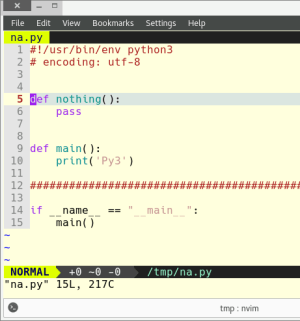
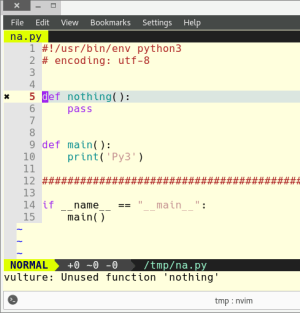
I had a little contribution to neomake and that’s what I want to write about in this post. I sent a pull request to include vulture as a Python maker. Vulture finds unused classes, functions and variables in your code. Let’s see two screenshots without and with vulture:
Without vulture:
With vulture:
init.vim settings
Here is my corresponding settings that enables vulture too:
Plug 'neomake/neomake'
" {{{
    " neomake is async => it doesn't block the editor
    " It's a syntastic alternative. Syntastic was slow for me on python files.
    " $ sudo pip2/pip3 install flake8 -U
    " $ sudo pip2/pip3 install vulture -U
    let g:neomake_python_enabled_makers = ['flake8', 'pep8', 'vulture']
    " let g:neomake_python_enabled_makers = ['flake8', 'pep8']
    " E501 is line length of 80 characters
    let g:neomake_python_flake8_maker = { 'args': ['--ignore=E115,E266,E501'], }
    let g:neomake_python_pep8_maker = { 'args': ['--max-line-length=100', '--ignore=E115,E266'], }

    " run neomake on the current file on every write:
    autocmd! BufWritePost * Neomake
" }}}

 Python Adventures
You must be logged in to post a comment.