Archive
Python-related videos indexed so you can find it
Example: PyCon US 2012
Product of the elements in a list
Design goal: should be just one line, without using explicit iteration over the list.
Sum of the elements:
>>> li = [2,3,5]
>>> sum(li)
10
Product of the elements:
>>> li = [2,3,5]
>>> from operator import mul
>>> reduce(mul, li)
30
Digits of PI (Part 2)
On the Python mailing list I got some great answers on how to generate the digits of PI. Here I sum them up.
Solution 1
Tichodroma forwarded me to http://mail.python.org/pipermail/edu-sig/2006-July/006810.html.
Quote:
Here's a generator I coded up based on a paper by Gibbons: It's simple to code, but I think you have to read the paper to figure out what it's doing. (I just translated some code, so I really can't tell you :-) In the paper, this was done in a lazy functional language. I was mostly interested to see how it would translate to a Python generator. # pi.py -- imlementation of Gibbons' spigot algorithm for pi # John Zelle 4-5-06 def pi_digits(): """generator for digits of pi""" q,r,t,k,n,l = 1,0,1,1,3,3 while True: if 4*q+r-t < n*t: yield n q,r,t,k,n,l = (10*q,10*(r-n*t),t,k,(10*(3*q+r))/t-10*n,l) else: q,r,t,k,n,l = (q*k,(2*q+r)*l,t*l,k+1,(q*(7*k+2)+r*l)/(t*l),l+2) Here it is in action: >>> import pi >>> digits = pi.pidigits() >>> for i in range(30): print digits.next(), ... 3 1 4 1 5 9 2 6 5 3 5 8 9 7 9 3 2 3 8 4 6 2 6 4 3 3 8 3 2 7 >>> Since this uses long ints, it slows down considerably after a few thousand digits. You might want to use psyco when generating really "deep" digits. --John
It generates the digits of PI one after the other. It works well bit if you want lots of digits, it gets really slow.
Solution 2
E. Woiski suggested using the library SymPy.
sudo apt-get install python-sympy
>>> from sympy.mpmath import mp
>>> mp.dps = 1000   # number of digits
>>> +mp.pi    # str(mp.pi)
Very fast and simple. The only problem might be that you need to install sympy.
Solution 3 (update, 20121128)
One of my students called G. Szegedi came up with this solution:
from bigfloat import precision
import bigfloat

str_pi = str(bigfloat.atan2(+0.0,-0.0,precision(1000)))
With the bigfloat package you can do high precision floating-point arithmetic.
Digits of PI (Part 1)
Problem
You want to work with the digits of PI. Why? For instance you want a new job (screenshot here if it got removed since then).
Solution
I like simple solutions. So instead of generating the digits, I simply fetched the data from the web. This is a fast, efficient, and painless approach of the problem :) Visit http://newton.ex.ac.uk/research/qsystems/collabs/pi/, where you can download several data files.
For the lazy pigs
I made a script that downloads the data, parses them, and returns the digits as a string. Here it is.
Usage (get the first 30 digits of PI after the dot):
#!/usr/bin/env python

from jabbapylib.math import pi

def main():
    digits = pi.get_digits_of(pi.PI3)    # get 10^3 = 1000 digits
    print digits[:30]

if __name__ == "__main__":
    main()
Output:
141592653589793238462643383279
jabbapylib is here
Quick Python Script Explanation for Programmers
At http://coffeeghost.net/pybat/python_cheatsheet.png, I found the following cheat sheet:

Python Regular Expression Testing Tool
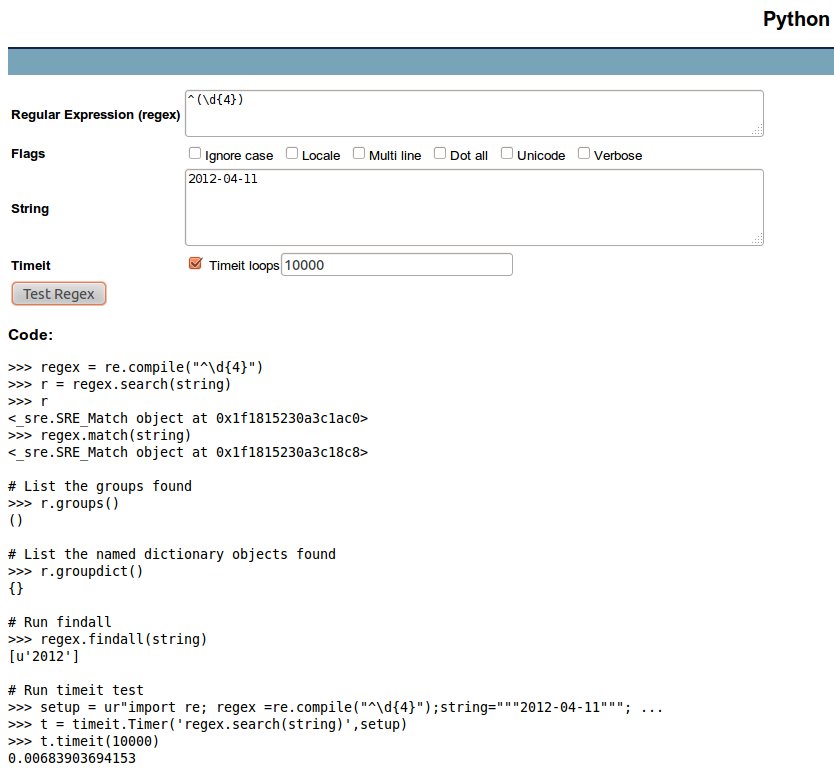 See http://www.pythonregex.com/. Cool stuff, it also generates source code. Happiness!
For a screenshot, click on the image on the right side.
Python’s strftime directives
Python’s strftime directives is a thing that I don’t always need, but when I do, I get frustrated finding it on the net. So here is a shortcut: http://strftime.org/.
I also copy/paste it here for future references:
%a 	Locale’s abbreviated weekday name.
%A 	Locale’s full weekday name.
%b 	Locale’s abbreviated month name.
%B 	Locale’s full month name.
%c 	Locale’s appropriate date and time representation.
%d 	Day of the month as a decimal number [01,31].
%f 	Microsecond as a decimal number [0,999999], zero-padded on the left
%H 	Hour (24-hour clock) as a decimal number [00,23].
%I 	Hour (12-hour clock) as a decimal number [01,12].
%j 	Day of the year as a decimal number [001,366].
%m 	Month as a decimal number [01,12].
%M 	Minute as a decimal number [00,59].
%p 	Locale’s equivalent of either AM or PM.
%S 	Second as a decimal number [00,61].
%U 	Week number of the year (Sunday as the first day of the week) as a decimal number [00,53]. All days in a new year preceding the first Sunday are considered to be in week 0.
%w 	Weekday as a decimal number [0(Sunday),6].
%W 	Week number of the year (Monday as the first day of the week) as a decimal number [00,53]. All days in a new year preceding the first Monday are considered to be in week 0.
%x 	Locale’s appropriate date representation.
%X 	Locale’s appropriate time representation.
%y 	Year without century as a decimal number [00,99].
%Y 	Year with century as a decimal number.
%Z 	Time zone name (no characters if no time zone exists).
%% 	A literal '%' character.
</pre>%a 	Locale’s abbreviated weekday name.
%A 	Locale’s full weekday name.
%b 	Locale’s abbreviated month name.
%B 	Locale’s full month name.
%c 	Locale’s appropriate date and time representation.
%d 	Day of the month as a decimal number [01,31].
%f 	Microsecond as a decimal number [0,999999], zero-padded on the left
%H 	Hour (24-hour clock) as a decimal number [00,23].
%I 	Hour (12-hour clock) as a decimal number [01,12].
%j 	Day of the year as a decimal number [001,366].
%m 	Month as a decimal number [01,12].
%M 	Minute as a decimal number [00,59].
%p 	Locale’s equivalent of either AM or PM.
%S 	Second as a decimal number [00,61].
%U 	Week number of the year (Sunday as the first day of the week) as a decimal number [00,53]. All days in a new year preceding the first Sunday are considered to be in week 0.
%w 	Weekday as a decimal number [0(Sunday),6].
%W 	Week number of the year (Monday as the first day of the week) as a decimal number [00,53]. All days in a new year preceding the first Monday are considered to be in week 0.
%x 	Locale’s appropriate date representation.
%X 	Locale’s appropriate time representation.
%y 	Year without century as a decimal number [00,99].
%Y 	Year with century as a decimal number.
%Z 	Time zone name (no characters if no time zone exists).
%% 	A literal '%' character.
urllib.quote, urllib.unquote
>>> import urllib
>>> urllib.quote('hello world')
'hello%20world'
>>> urllib.unquote('hello%20world')
'hello world'
produce the output of Unix’s date command
Problem
You want to get the same output as Unix’s date command but you don’t want to make an external call. How to produce this output in pure Python?
Solution
I posed this question today on the python-list and I got the following answer from Chris R.:
From POSIX (http://pubs.opengroup.org/onlinepubs/009695399/utilities/date.html):

When no formatting operand is specified, the output in the POSIX locale shall be equivalent to specifying:

   date "+%a %b %e %H:%M:%S %Z %Y"

Therefore:
   from time import strftime
   print strftime("%a %b %e %H:%M:%S %Z %Y")

But note that `date` is locale-sensitive; imitating that would be a
bit more complicated.
Thus, the code snippet:
from time import strftime
print strftime("%a %b %e %H:%M:%S %Z %Y")
# sample output:
# Thu Apr  5 23:55:56 CEST 2012

 Python Adventures


You must be logged in to post a comment.