Archive
Python Weekly newsletter
“A free weekly newsletter featuring curated news, articles, new releases, jobs etc related to Python.”
Sample here.
Radio Free Python
“Radio Free Python is a monthly podcast focused on the Python programming language and its community.
- Each episode will start with the news. However, since there isn’t that much breaking news from month to month, this will often veer into a sort of magazine-format news, introducing a specific topic and going over its history as well as current events.
- After the news, each episode will feature an interview with some notable Python luminary.
- Following the interview will be either a Link or Project Highlight, an Editorial, or both, depending on time and inspiration.“
BeautifulSoup with CssSelect? Yes!
(20131215) This post is out-of-date. BeautifulSoup 4 has built-in support for CSS selectors. Check out this post.
A few days ago I started to explore lxml (it’s been on my list for a long time) and I really like its CSS selector. As I used BeautifulSoup a lot in the past, I wondered if it were possible to add this functionality to BS. I made a quick search on Google and here is what I found: https://code.google.com/p/soupselect/.
“A single function, select(soup, selector), that can be used to select items from a BeautifulSoup instance using CSS selector syntax. Currently supports type selectors, class selectors, id selectors, attribute selectors and the descendant combinator.”
Just what I needed :) You can also patch BS and integrate this new functionality:
>>> from BeautifulSoup import BeautifulSoup as Soup
>>> import soupselect; soupselect.monkeypatch()
>>> import urllib
>>> soup = Soup(urllib.urlopen('http://slashdot.org/'))
>>> soup.findSelect('div.title h3')
[</pre>
<h3>...
Turning Vim into a modern Python IDE
For text editing I use vim. When writing Python code and the script is short, vim is OK. However, if it’s a larger project, then I prefer an IDE (PyDev for instance).
Today at reddit someone directed me to the post Turning Vim into a modern Python IDE by Jonh Anderson. I will give it a try :)
Getting started with numpy, scipy, matplotlib
Installing matplotlib
sudo apt-get install tcl8.5-dev tk8.5-dev
sudo pip install matplotlib
Sort a list of objects by an attribute / function value
Problem
You have a list of objects that you would like to sort by an attribute.
Solution
import operator
countries.sort(key=operator.attrgetter("population"), reverse=False)
Here countries is a list of Country objects. In the Country class there is an attribute called “population“. It will sort the countries in ascending order by the number of population.
Update (20110911)
Of course, you can also sort a list of objects by the value of a function. For instance, you have a class Student and the grades are stored in a list. You want to sort the students by the average of their grades. This value is calculated by the function get_avg_grade().
import operator
# students is a list of Student objects
students.sort(key=operator.methodcaller("get_avg_grade"), reverse=False)
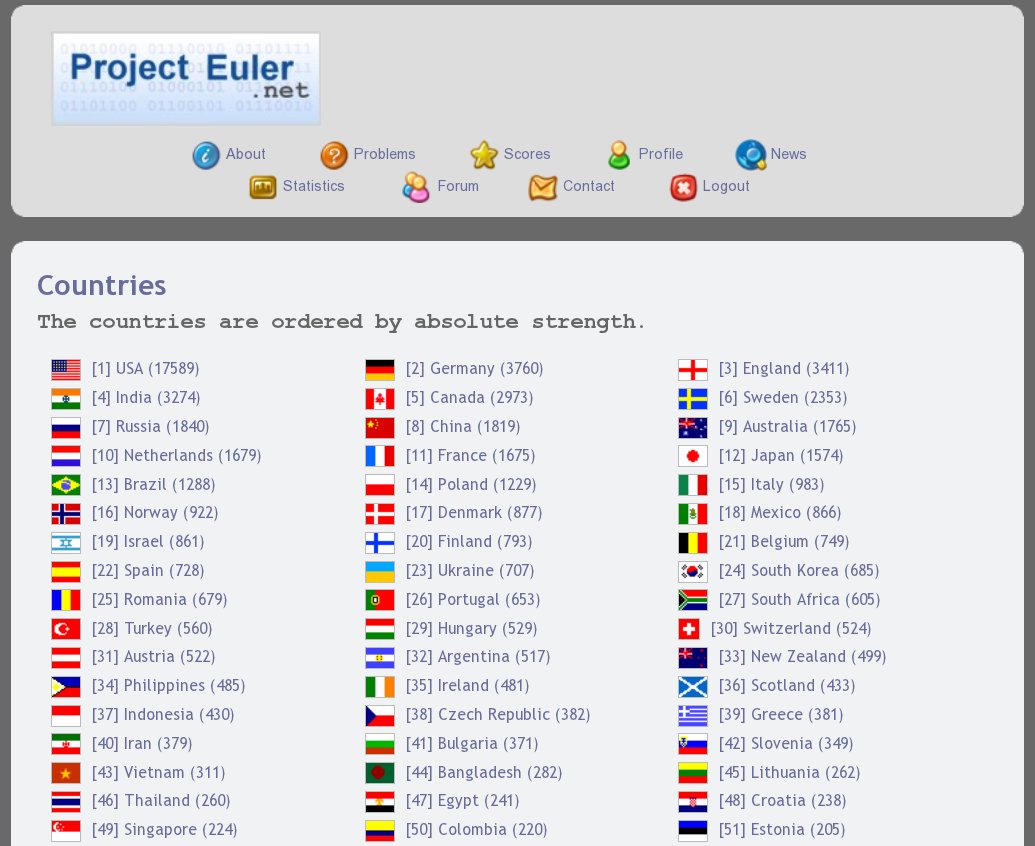
New statistics page for Project Euler: sort countries by strength
I’ve made a little script that analyzes the statistics page of Project Euler and makes a new stat. page where the countries are sorted by strength. A country is considered to be strong if it has lots of participants.
By default, the site PE shows the countries in alphabetical order. Note that you have to log in to the site to see the stat. page.
Download
The current version of the script is available here, in the project_euler_countries/ folder.
Screenshot
A Python code that prints out an exact copy of itself
A quine is a computer program which takes no input and produces a copy of its own source code as its only output.
Here is a classical one written in C (reddit comments).
Today I saw its Python equivalent, written by theepicsnail (link):
x="x={0}{1}{0}; print x.format(chr(34),x)"; print x.format(chr(34),x)
In action:
>>> x="x={0}{1}{0}; print x.format(chr(34),x)"; print x.format(chr(34),x)
x="x={0}{1}{0}; print x.format(chr(34),x)"; print x.format(chr(34),x)

 Python Adventures
You must be logged in to post a comment.