Table of Contents
When you install the PublishPress Authors, the plugin will automatically attempt to create profiles for all existing post authors.
PublishPress Authors also allows you to create author profiles automatically for new and existing users. This allows you to create profiles for users who have not yet written posts.
Automatically Create Author Profiles for New Users #
- Go to Authors > Settings.
- Choose roles in the “Automatically create author profiles” box. For example, in the image below, I want author profiles for all new Administrators and Editors.
This option will automatically create author profiles when new users are created in these roles.

Automatically Create Author Profiles for Existing Users #
If your site already has existing users who have not written posts, you can also use this option to quickly create profiles for those users.
- Choose the user roles in the “Automatically create author profiles” option
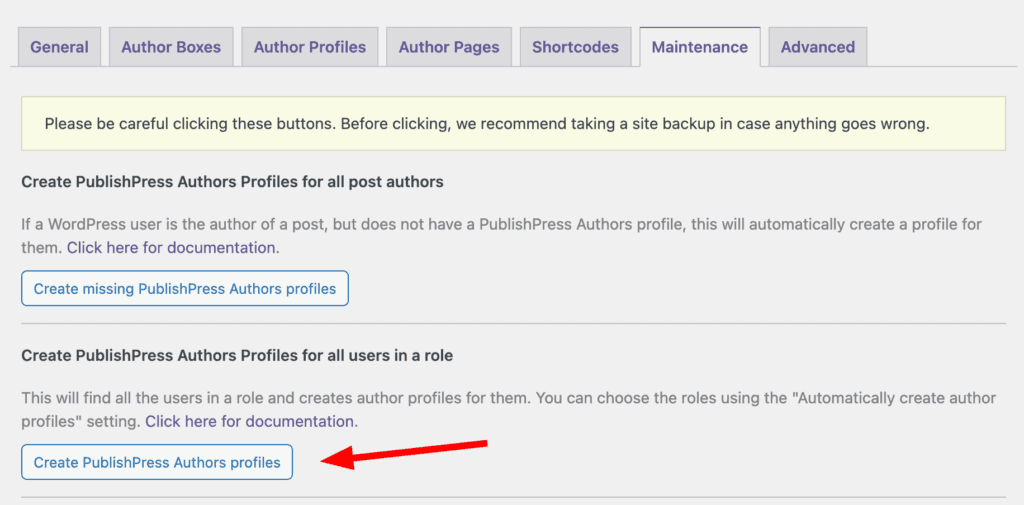
- Click the “Maintenance” tab.
- Click “Create PublishPress Authors Profile” button in the Maintenance tab. So if you have selected “Administrator” and “Editor” in the “Automatically create author profiles” option, this will create author profiles for any users who have not yet written posts.