

Descrição
TZ Google Map widget you can easy to display multiple address in one map. You can enter your Latitude and Longitude and choose icon or image from local.
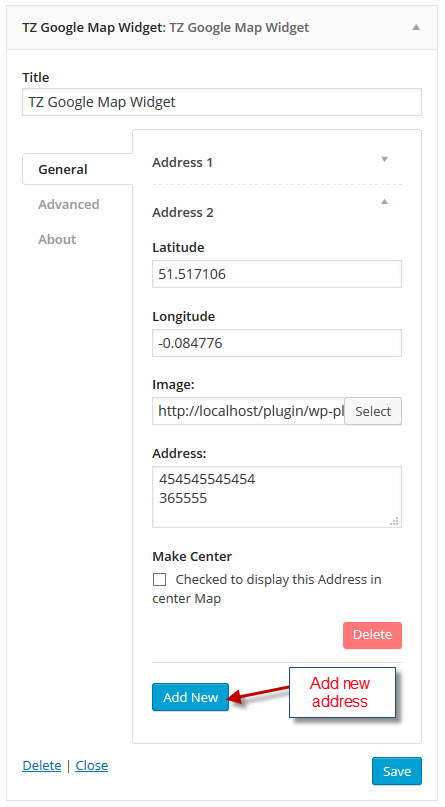
General
- Enter your Latitude.
- Enter your Longitude.
- Choose image from local.
- Address: Access HTML code.
- Make center: You can check to set this address display center map.
Advanced
- Map Height: Enter your height value (default: 450).
- Map Color: Color type “hue” and gamma “1”.
- Map Zoom: Default value (10).
- ScrollWheel.
- navControl.
- MapTypeControl.
- ScaleControl.
- Draggable.
Ecrãs
/trunk/screenshot-1.jpg 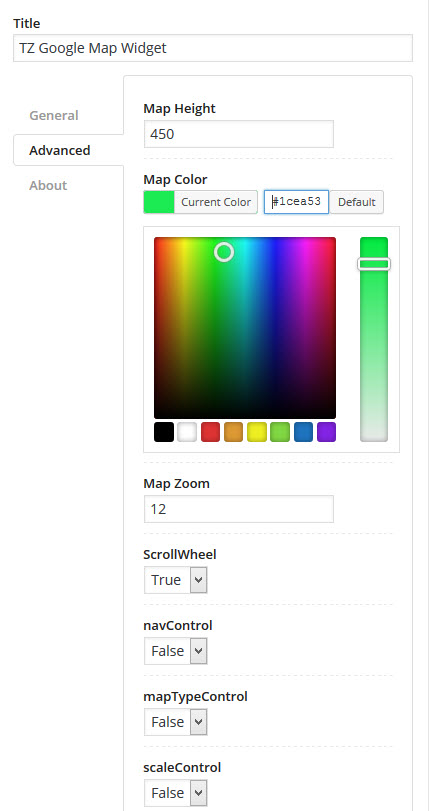
/trunk/screenshot-2.jpg 
/trunk/screenshot-3.jpg
Instalação
- Go to the menu ‘Plugins’ -> ‘Add new’ and search for ‘TZ Google Map’
- Click ‘install’ and active.
Perguntas frequentes
- How to add multiple address?
-
In “General” tab you can see button “add new” and click it to create new address.
- How to display address in center map?
-
Example you have 3 address display in map. You can choose address 1 or address 2 or address 3 display in center.
You go to TZ Google Map widget in “General” tab you click to address(1) you will see option “Make Center” and checked in it.
Avaliações
Este plugin não tem avaliações.
Contribuidores e programadores
“TZ Google Map” é software de código aberto. As seguintes pessoas contribuíram para este plugin:
Contribuidores

Traduza o “TZ Google Map” para o seu idioma.
Interessado no desenvolvimento?
Consulte o código, consulte o repositório SVN, ou subscreva o registo de alterações por RSS.
Registo de alterações
1.0.0
- Start Version