

Descrição
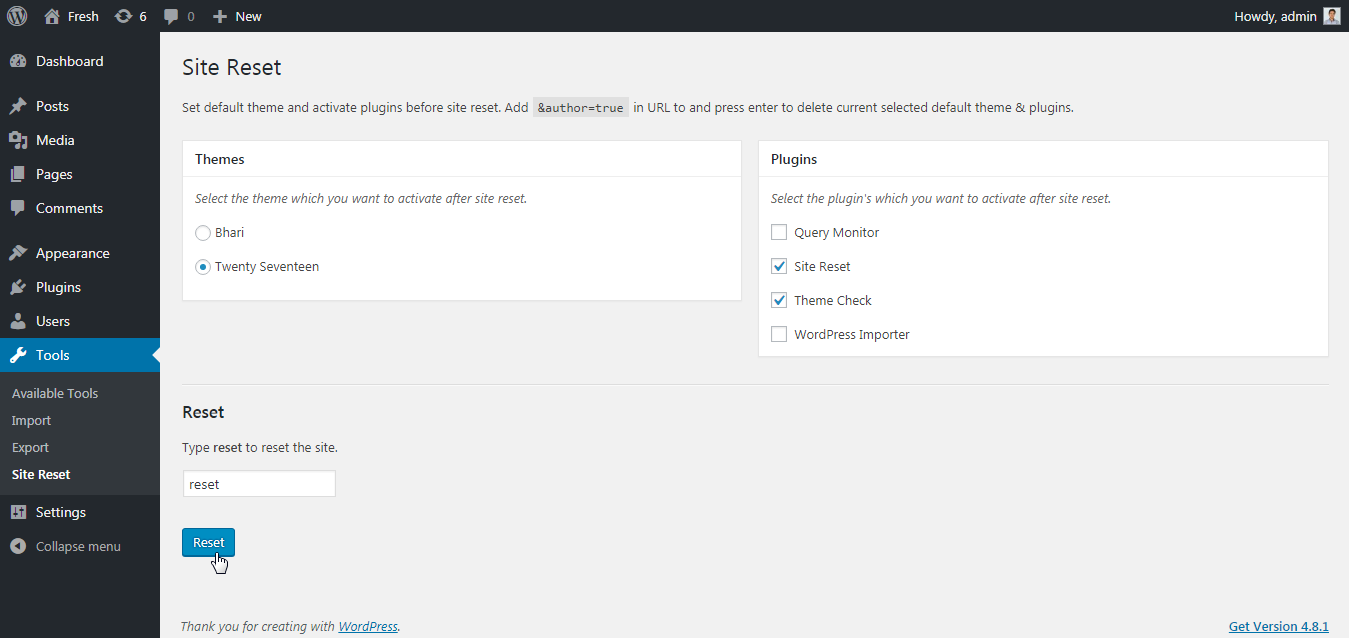
Select your favorite theme and active plugin’s which you want to see after site reset.
Note: ‘Reset Complete Site’ plugin not support multisite.
How to use?
- Goto
tools -> Site Reset. - Select theme which you want to activate after site reset.
- Select plugins which you want to activate after site reset.
- Type
resetin input box - From popup confirmation box select
Ok - Done! Your site will be reset with your selected theme and plugins.
Extend Site Reset plugin on Github
Ecrãs
Instalação
- Install the
Site Resetplugin either via the WordPress plugin directory, or by uploading the files to your server atwp-content/plugins. - After activating, you can reset the site from
/wp-admin/tools.php?page=site-reset
Perguntas frequentes
-
Multisite Support?
-
No! Currently we not support multisite reset. So, Do not use ‘Site Reset’ on multisite.
Avaliações

15 Abril, 2020
This plugin is magic. It works like a charm. You can reset the complete site and still keep a few plugins and one theme active, so you can set up a new site, while you reset your current site.
Contribuidores e programadores
“Reset Complete Site” é software de código aberto. As seguintes pessoas contribuíram para este plugin:
Contribuidores
Traduza o “Reset Complete Site” para o seu idioma.
Interessado no desenvolvimento?
Consulte o código, consulte o repositório SVN, ou subscreva o registo de alterações por RSS.
Registo de alterações
1.2.1
- Improvement – Compatibility to WordPress 5.7.
1.2.0
- New: Added settings page link into the plugin actions link.
1.1.0
- New: Added filter
site_reset_default_settingsto change the default settings.
1.0.1
- Fix: PHP error from plugin listing page.
1.0.0
- Initial release.