
PSM Multi-Currency For WooCommerce
Enable your WooCommerce store to accept payments in multiple currencies with real-time accuracy and location-based detection.

If your store only displays one currency, you’re losing international customers. Manual price conversions and checkout confusion lead directly to abandoned carts. PSM Multi-Currency for WooCommerce eliminates these barriers instantly. Our plugin automatically shows prices in your customer’s local currency, using real-time exchange rates to build trust and drive conversions. Turn your store into a seamless global marketplace—no complexity, just more sales.

Effortless Currency Management & Display
The intuitive interface of PSM Multi-Currency for WooCommerce lets you manage all your currencies in one place. Add new currencies in seconds and choose how exchange rates are handled—either with hands-free automatic updates or on-demand manual control. It’s global pricing, simplified.
Fine-Tune Every Price for Maximum Impact
Go beyond automation and take full strategic control of your international pricing. PSM Multi-Currency for WooCommerce advanced tools empower you to optimize every detail for better margins and higher conversions.
Protect Your Profitability: Set your own custom exchange rates or add a percentage-based fee to any currency. This covers your conversion costs and locks in your profit margin on every single international sale.
Implement Smart Rounding: Automatically round prices to create clean, psychologically appealing price points. Convert a calculated price like
$20.34into an attractive$19.99with rules that round up, down, or to the nearest value.Perfect Your Price Presentation: Customize every detail of the price display, including decimal points and thousands separators. Our instant live preview shows you exactly how prices will look to your customers before you save.


A Seamless Switch for a Superior Experience
Empower your customers to shop their way with an elegant currency switcher that feels like a natural part of your store.
Frictionless Journey: The selected currency stays active across your entire site—from product pages and the cart all the way to the final checkout.
Total Design Control: Customize the switcher to integrate perfectly with your brand. You control its appearance, what it displays (flags, currency names, symbols), and how it looks.
Flexible Placement: Add the switcher to your menu, as a widget in a sidebar or footer, or place it anywhere on a page using a simple shortcode.
Unlimited Placement Options
Display a fully customized currency switcher anywhere you want. PSM Multi-Currency for WooCommerce provide seamless options for modern WordPress workflows, so you never have to compromise on placement or style.
Elementor & Gutenberg Ready: Natively built for your favorite tools. Simply drag and drop our dedicated Elementor widget or Gutenberg block right into your layouts.
Flexible Shortcode: For pixel-perfect control or placement outside of builders, generate a simple shortcode to display the switcher anywhere.
Full Customization, Always: No matter which method you choose—block, widget, or shortcode—you can customize the switcher contents.


Your Checkout, Your Rules.
Configure a checkout experience that maximizes conversions and simplifies your operations. You decide exactly how your customers pay using PSM Multi-Currency for WooCommerce.
Choose Your Checkout Method: Let customers pay in their chosen local currency for a seamless experience, OR revert all checkouts to your store’s base currency for simpler accounting.
Define Accepted Currencies: Even if you display prices in 20 currencies, you can choose to allow actual checkout transactions in only a select few (e.g., USD, €EUR, £GBP) to streamline your payment processing.
Assign Payment Gateways by Currency: Increase trust by offering local payment options. You can show or hide payment gateways based on the selected currency—for example, offer a specific European bank transfer method only to customers paying in Euros.
Intelligent Automation for a Hands-Free Store
Put your international pricing on autopilot with powerful, flexible automation tools of PSM Multi-Currency for WooCommerce that ensure accuracy and create a seamless customer experience.
Automated Exchange Rate Syncing Keep your prices perfectly in sync without any manual effort.
Choose Your Provider: Select from a list of trusted and reliable exchange rate API providers.
Set Your Schedule: Enable automatic updates and decide the frequency—from hourly to daily—to maintain the level of accuracy your business requires.
Set It and Forget It: Once configured, your exchange rates stay up-to-date automatically.
Smart Currency Detection Give every visitor a seamless welcome from their very first visit.
Instant Local Pricing: Our system automatically detects a visitor’s location via their IP address and displays prices in their local currency.
Reliable Geolocation: For maximum accuracy, you can choose from multiple high-quality geolocation API providers to power this feature.

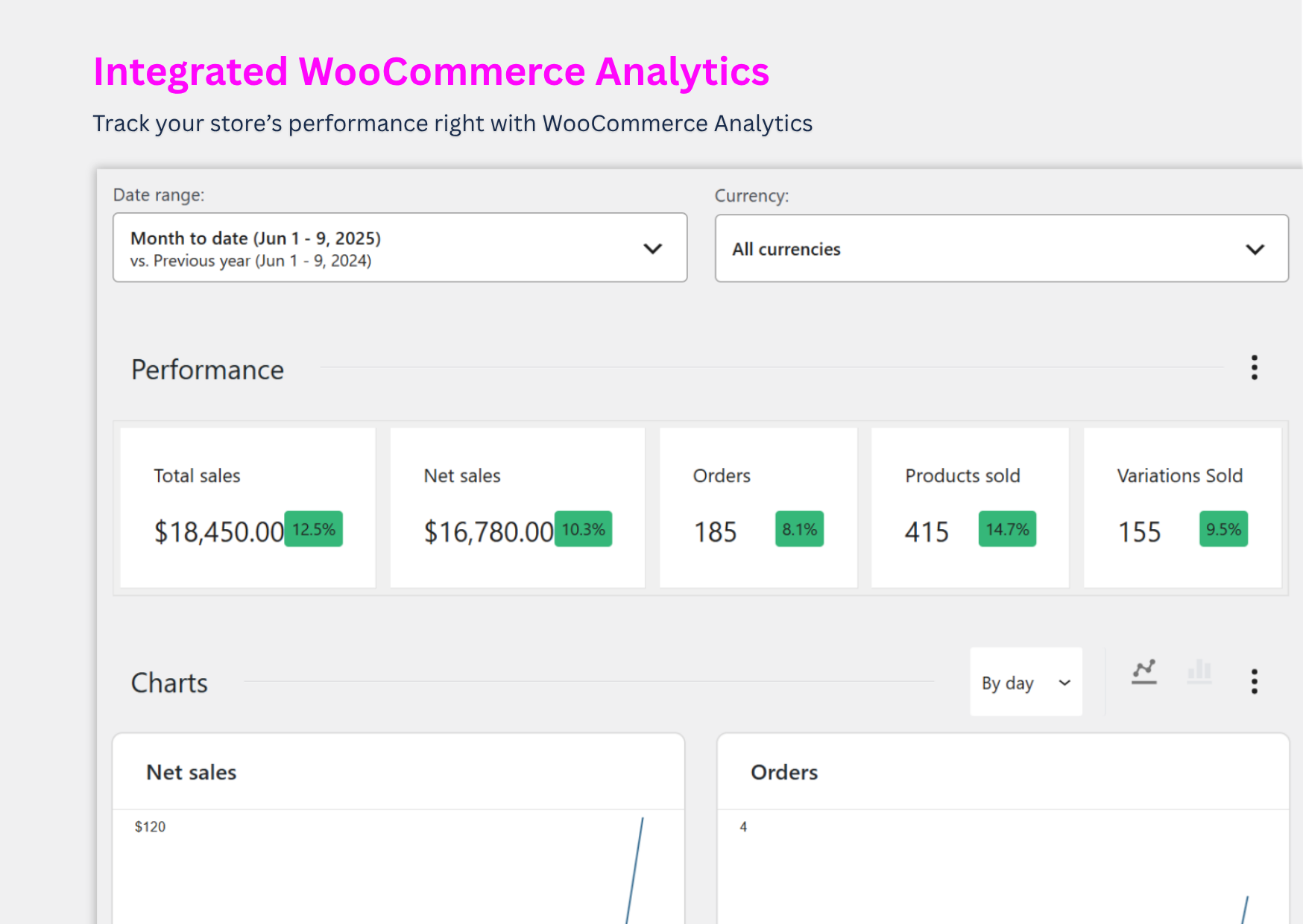
Unlock True Global Sales Insights with PSM Multi-Currency for WooCommerce
Stop guessing. Our plugin integrates a powerful currency filter directly into your WooCommerce analytics, transforming raw data into a clear roadmap for strategic growth.
Analyze by Market: Isolate your sales reports to view performance in any specific currency. Instantly see how your promotions in Japan are performing in JPY or track your UK sales in £GBP.
Get a Unified Overview: With a single click, convert all sales back to your store’s base currency. Get one accurate, consolidated report of your total revenue for simplified financial planning.
Make Data-Driven Decisions: Identify your most profitable regions, understand international purchasing trends, and allocate your marketing budget with confidence.

WooCommerce Subscriptions

WooCommerce Product Bundles

WooCommerce One Page Checkout

WooCommerce Name Your Price

Product Add-On for WooCommerce

Table Rate Shippings for WooCommerce

Role Based Pricing for WooCommerce

Compatible with Cache Plugins

WPML

Polylang

Checkout Field Editor for WooCommerce

Per Product Shipping for WooCommerce

Advanced Flat Rate Shipping Method for WooCommerce

Measurement Price Calculator for WooCommerce

Table Rate Shipping Method by Flexible Shipping
Simple, Transparent Pricing
Stay in control with easy manual renewals — no subscription traps!
Personal
Perfect for getting started with a single online store.-
1 Site Licence
-
1 Year Plugin Updates
-
1 Year Priority Support
-
All Features Included
Business
Ideal for managing multiple WooCommerce projects.-
5 Sites Licence
-
1 Year Plugin Updates
-
1 Year Priority Support
-
All Features Included
Agency
The ultimate package for developers and agencies.-
20 Sites Licence
-
1 Year Plugin Updates
-
1 Year Priority Support
-
All Features Included
Lifetime
One payment, lifetime updates for a single site.-
1 Site Licence
-
Lifetime Plugin Updates
-
Lifetime Priority Support
-
All Features Included
* Renewal price may vary as per current price at the time or renewal.
* 1 Site indicates one WordPress installation.
Screenshots
Admin View

User View


FAQs
Does it support payment in the selected currency?
Yes, PSM Multi-Currency for WooCommerce allow customers to checkout in their selected currency, provided your payment gateway supports that currency.
Will currency rates update automatically?
Yes, PSM Multi-Currency for WooCommerce plugin fetches real-time exchange rates and updates them automatically at regular intervals to ensure pricing accuracy.
Can users manually switch between currencies?
Definitely. A currency switcher can be added to your site via shortcode or widget, letting users choose their preferred currency.
Is there a limit to how many currencies I can add?
There is no hard-coded limit with PSM Multi-Currency for WooCommerce. You can add as many currencies as needed, but keep usability in mind for the frontend display.
Can I disable a currency without deleting it?
Currently, this screen only allows editing or deleting a currency. A toggle to enable/disable a currency might be available in future updates or under the Display settings.
Why can’t I delete the base currency?
The base currency (typically the one with the exchange rate set to 1) is used as the primary store currency. You must set a new base currency before removing the current one.
How is the exchange rate set?
You can set the exchange rate:
- Manually, by entering a custom value in the “Rate” column.
- Automatically, by clicking the “Refresh exchange rates” button, which fetches live rates from your selected API (configured under the Advanced settings tab).
What does the “Preview” column show?
The “Preview” column shows a formatted price example in each listed currency, helping you verify the correct symbol, decimal placement, and formatting.
How do I add a new currency?
To add a new currency:
- Go to WP Admin > PSM Plugins > Multi Currency > Currencies.
- Click the green “+ Add new currency” button.
- Select the currency, set its rate, symbol, fee, and save.
Is PSM Multi-Currency for WooCommerce compliant with GDPR?
Yes, absolutely! PSM Multi-Currency is fully GDPR-compliant. It does not collect or store any personal data, so you can use it with complete peace of mind.
Is PSM Multi-Currency for WooCommerce compatible with multi-language plugins like WPML or Polylang?
Yes! PSM Multi-Currency Pro is fully compatible with popular multi-language plugins such as WPML and Polylang. We’re also actively working to support additional multilingual solutions in future updates.
I don’t have a PayPal account. Can I still purchase the PSM Multi-Currency for WooCommerce plugin?
Yes, absolutely! Even if you don’t have a PayPal account, you can still pay securely using your debit or credit card through the PayPal checkout gateway — no PayPal account is required.