
Foreman
See every app and what it's using in plain English, and end or slow down the one that's hogging your Mac.
Visit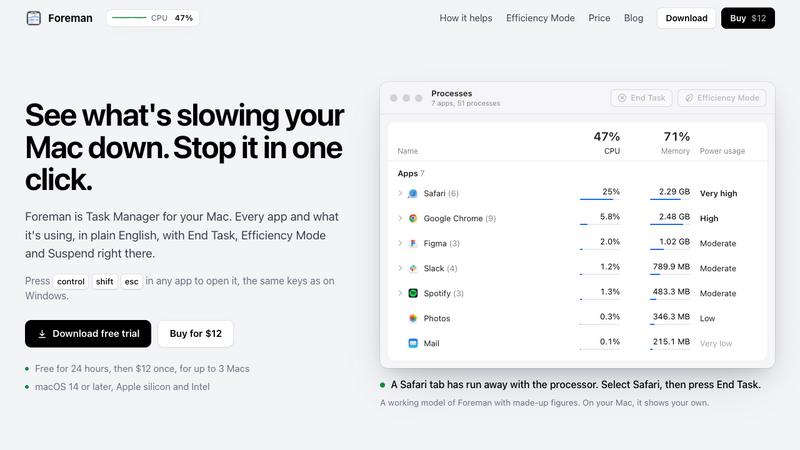
About Foreman
Foreman is a Windows-style Task Manager for the Mac. Press Control Shift Escape in any app to open it and see every app and what it's using, in plain English, with End Task, Efficiency Mode and Suspend right there.
Six pages in the sidebar: Processes, Performance with live graphs for CPU, memory, disk, Wi-Fi and GPU, App History, Startup Apps (including leftovers of deleted apps), Details and Services. System processes get a plain description beside their real name.
Efficiency Mode lets an app you need open run slowly in the background, on the efficiency cores of Apple silicon, and at full speed again when you switch to it. A live readout sits in the menu bar.
Free for 24 hours, then $12 once for up to 3 Macs. macOS 14 or later, Apple silicon and Intel.
Explore more in this category:
Similar to Foreman

Free QR digital menu in 31 languages with live table ordering, kitchen display system (KDS), guest calls, bill split, kiosk mode, and loyalty.


Fundraising platform for nonprofits with donations, campaigns, donor CRM, events, automated communications, reporting, and more.

A notepad calculator that reads plain text and gives instant answers as you type, free on Mac, iOS, Windows, Linux, Android and Web.

Find, qualify, and capture high-quality local business leads effortlessly.

Upload a bank statement, get the month booked and reconciled. Accounting software that does the books.

VD6S is a free online YouTube video downloader that supports HD, 4K and up to 8K downloads. Save videos in MP4 or audio in multiple formats.

All-in-One Managed IT Platform on Credits — Hosting, VPS, AI Agents, Business Email & Software Development