
Introduction
This is a variant of a similar past problem: draw something interesting, using a sequence of joined straight line segments, without ever lifting your pen. Or in this case, with one continuous thread.
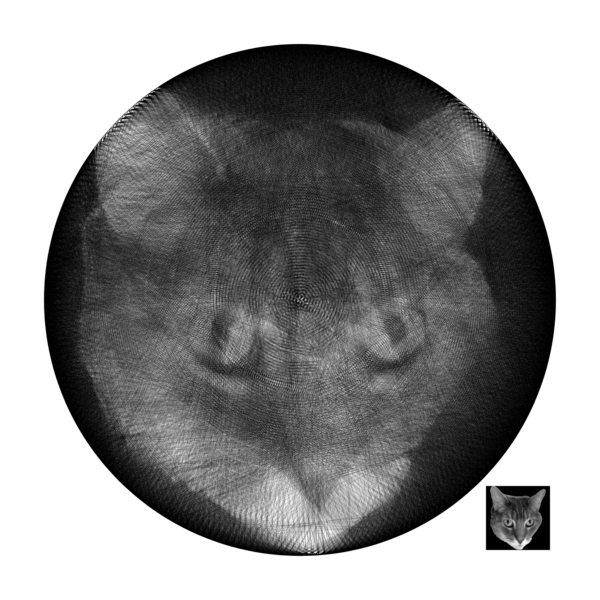
As far as I can tell, the first realization of this particular idea was in 2016, when artist Petros Vrellis [1] arranged 200 pins evenly spaced around a 28-inch-diameter circular rim, and wound kilometers of thread stretched in straight line chords from one pin to the next, in a carefully determined order, to yield an image similar to the one shown below (created by me).

Vrellis has not published any details of their algorithm, but since then, numerous others have done similar work. The most common approach has been a sequential greedy algorithm, starting with a grayscale input image and a blank white output image, rendering each thread chord in the output as a pixel-approximated line segment, at each iteration selecting a next pin so that the resulting chord makes the most improvement to the result.
Most of these approaches had a quirk that didn’t appeal to me: they effectively treat the thread as if it were not actually opaque, so that overlapping thread chords increase the darkness of the corresponding pixels in the output image (or in some cases, reduce the “remaining” darkness of the pixels in the input as each new thread overlaps them). That is, dark thread on top of dark thread yields an even darker intersection.
The motivation for this post is to explore the alternative described in 2018 by Birsak et. al. [2], who instead upscaled the input image to a higher-resolution output, with each input pixel corresponding to a 

I thought it would be interesting to implement just this upscaling idea, but to otherwise skip the complexity of the other aspects of their algorithm (involving iterative solving of an integer programming problem, extracting an Eulerian trail from the resulting unordered set of chords, weighting more important regions of the target image, etc.), sticking to the simple sequential greedy approach of selecting consecutive chords. I was pleased with the results: less than 200 lines of C++ code (available on GitHub), that generates nice-looking images in just a few minutes.
Implementation
The program takes four arguments: the input image filename, the upscaling block size, the number of pins, and the output image filename. For example, to use 16×16-pixel output blocks per input pixel, with 256 pins:
string_art input.pgm 16 256 output.pgm
Image files use the easy-to-parse Netpbm format, specifically the 8-bit grayscale binary “P5” format.
Initially, the output image “canvas” is all white. Starting at an arbitrary pin, we iteratively select the best next pin to wind the thread across. For each candidate chord, we use Bresenham’s algorithm to visit each pixel on the chord. The score for that chord is simply the average– over each of the intersected blocks that would change as a result– of the difference between the target gray level of the input pixel and the (potential) new fraction of black pixels in the block. Intuitively, we measure how important it is to continue to darken the intersected blocks of pixels.
Evaluating the score for each possible next chord, we select the one with maximum score, that is, that makes the largest average improvement to the blocks it would modify. We stop when that best average improvement is negative, that is, when we would make the image worse by continuing.
Results
The figure below shows the results for several example images. The top row is the 512×512 grayscale input (source Birsak [2]). The middle row is the Birsak algorithm output, using a block size 

For my own project, I used the same 256 pins, but a 384×384 input image, and a higher resolution block size 
References:
- Vrellis, Petros, A new way to knit (2016). http://artof01.com/vrellis/works/knit.html
- Birsak, M., Rist, F., Wonka, P., & Musialski, P., String Art: Towards Computational Fabrication of String Images, Computer Graphics Forum, 37(2) 2018, 263–274, doi:10.1111/cgf.13359
 Possibly Wrong