

Opis
TZ Google Map widget you can easy to display multiple address in one map. You can enter your Latitude and Longitude and choose icon or image from local.
General
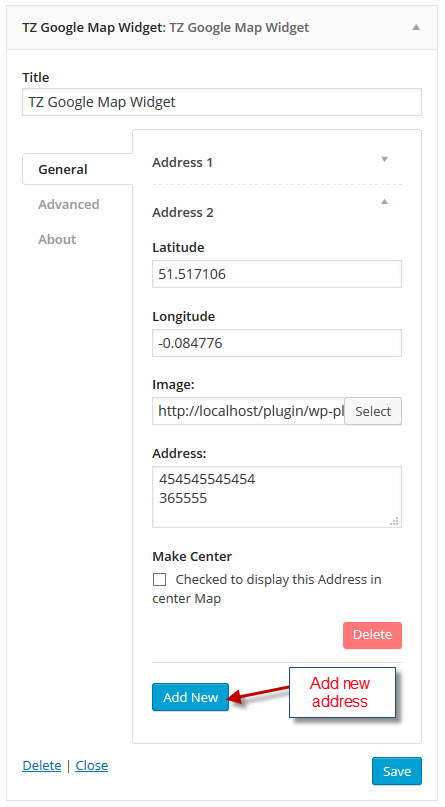
- Enter your Latitude.
- Enter your Longitude.
- Choose image from local.
- Address: Access HTML code.
- Make center: You can check to set this address display center map.
Advanced
- Map Height: Enter your height value (default: 450).
- Map Color: Color type „hue” and gamma „1”.
- Map Zoom: Default value (10).
- ScrollWheel.
- navControl.
- MapTypeControl.
- ScaleControl.
- Draggable.
Zrzuty ekranu
/trunk/screenshot-1.jpg 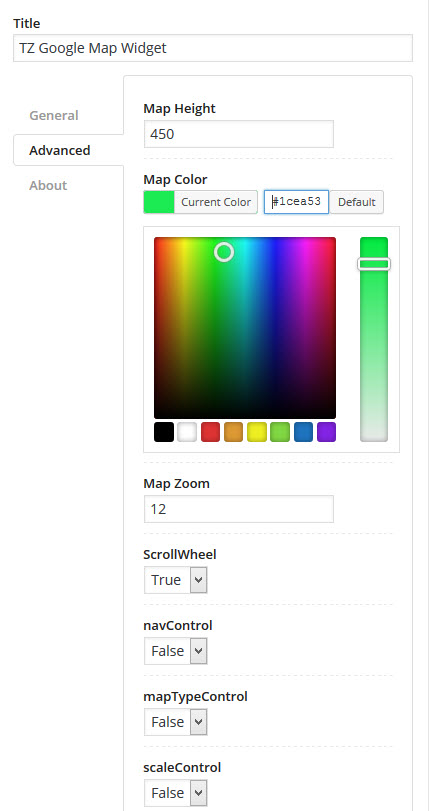
/trunk/screenshot-2.jpg 
/trunk/screenshot-3.jpg
Instalacja
- Go to the menu 'Plugins’ -> 'Add new’ and search for 'TZ Google Map’
- Click 'install’ and active.
Najczęściej zadawane pytania
- How to add multiple address?
-
In „General” tab you can see button „add new” and click it to create new address.
- How to display address in center map?
-
Example you have 3 address display in map. You can choose address 1 or address 2 or address 3 display in center.
You go to TZ Google Map widget in „General” tab you click to address(1) you will see option „Make Center” and checked in it.
Recenzje
Wtyczka nie ma jeszcze żadnej recenzji.
Kontrybutorzy i deweloperzy
„TZ Google Map” jest oprogramowaniem open source. Poniższe osoby miały wkład w rozwój wtyczki.
Zaangażowani

Przetłumacz wtyczkę “TZ Google Map” na swój język.
Interesuje cię rozwój wtyczki?
Przeglądaj kod, sprawdź repozytorium SVN lub czytaj dziennik rozwoju przez RSS.
Rejestr zmian
1.0.0
- Start Version