
Opis
Google Analytics is a great tool, but requires some technical capabilities to understand it. This plugin takes some very basic,
although important, data from Google Analytics (using the Google Analytics export API) and displays the information
on your blog/site to WP administrators or users if you assign them privileges to see it. The data provided by this plugin is:
- Pageviews
- Average Time On Page
- Bounce Rate
- Exit Rate
- Referring Sites
- Keywords
Advanced form tracking capabilities include:
- Monitor your forms more closely
- See how long visitors are taking each step of your form
- See what visitors input into each form regardless of hitting submit
- Better understand form abandonment
This feature uses Google Analytics Event Tracking to store and retrieve data.
Please consider donating a link to SEO Strategy or Atlanta SEO if you
like this plugin.
NOTE: This plugin does not install the default Google Analytics code on your site, you should already have that installed for this to work.
Zrzuty ekranu

This screenshot shows the On Site Google Analytics toolbar with the referring sites active 
This screenshot shows the On Site Google Analytics toolbar with the keywords active 
This screenshot shows how to configure the plugin 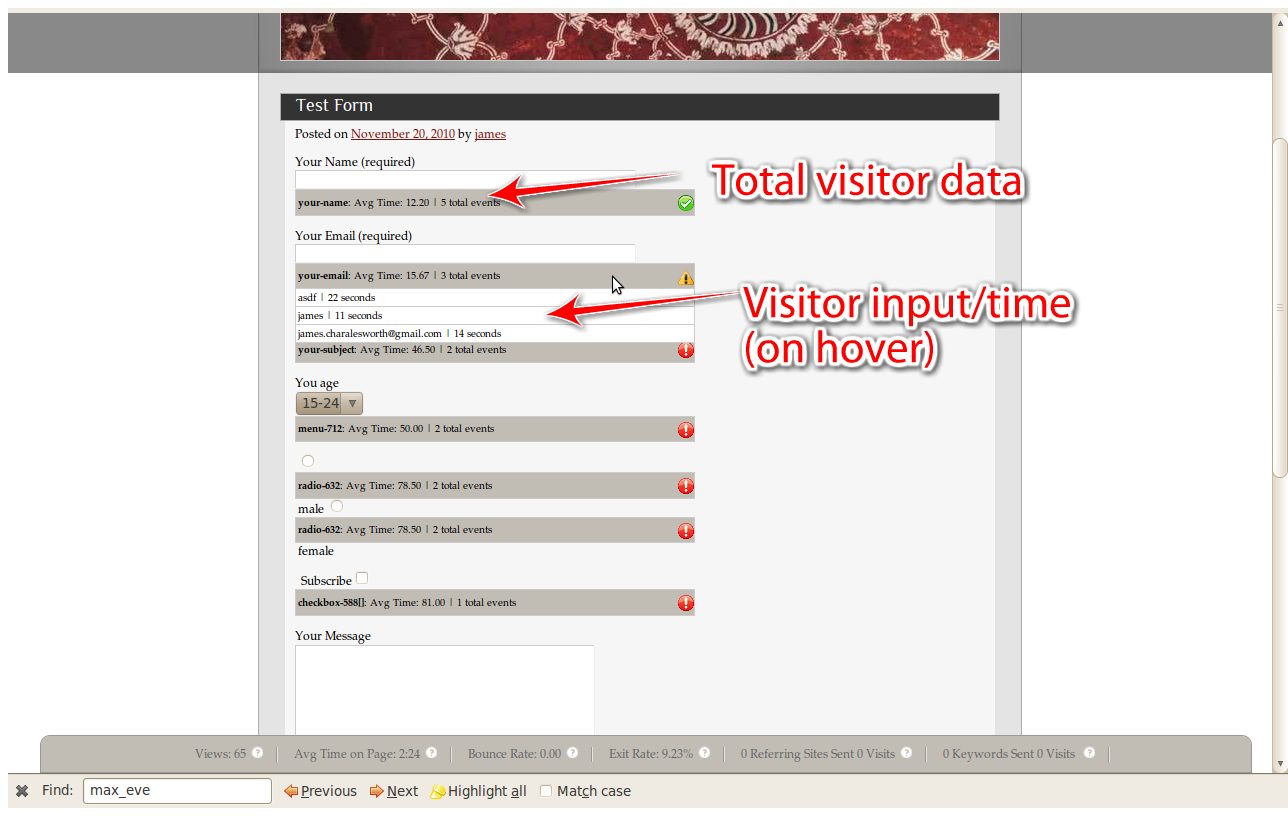
This screenshot shows advanced form tracking capabilities
Instalacja
This section describes how to install the plugin and get it working.
e.g.
- Download and unzip the plugin to the
/wp-content/plugins/directory - Activate the plugin through the 'Plugins’ menu in WordPress
Najczęściej zadawane pytania
- After activation im getting an error stating that my settings are not set properly
-
Click „Settings” on the WordPress left navbar and select Onsite Google Analytics. From there enter your Google username, password, and profile ID
- On the Settings page, I can’t select my Google Analytics Profile ID
-
First enter your username and password and then click out of the password box and your Google Analytics profiles for the your username will populate.
Recenzje
Wtyczka nie ma jeszcze żadnej recenzji.
Kontrybutorzy i deweloperzy
„Seoatl On Site Google Analytics” jest oprogramowaniem open source. Poniższe osoby miały wkład w rozwój wtyczki.
Zaangażowani
Przetłumacz wtyczkę “Seoatl On Site Google Analytics” na swój język.
Interesuje cię rozwój wtyczki?
Przeglądaj kod, sprawdź repozytorium SVN lub czytaj dziennik rozwoju przez RSS.
Rejestr zmian
0.4.0
*Added advanced form tracking for all forms
0.3.0
*Now using Authsub tokens for secure authentication (no longer have to give the app your password)
0.2.0
*fixed object bug causing it break
0.1.0
- This is the first release.