

Opis
Login Security with Telegram Alerts is your comprehensive solution for fortifying WordPress login security and staying informed about critical site activities. It actively combats brute-force attacks, enhances user authentication with multi-factor options, and provides real-time alerts directly to your Telegram. Scalable for any site size, from personal blogs to large enterprises, it ensures your WordPress site remains secure and you’re always in the loop.
Key Features:
Login Security with Telegram Alerts is packed with powerful features designed to give you peace of mind and full control over your site’s access.
Brute-Force Protection: Automatically blocks suspicious IP addresses after a configurable number of failed login attempts, effectively preventing dictionary attacks and credential stuffing.
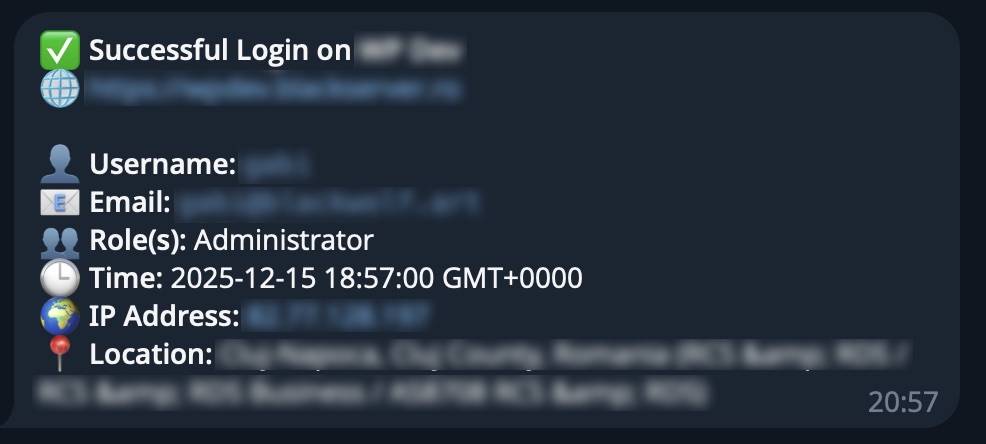
Real-time Telegram Notifications: Receive instant alerts for failed login attempts and successful logins, delivered directly to your chosen Telegram channel, group, or private chat. This provides immediate awareness of critical site events, enabling prompt action.
Comprehensive Activity Logging: Maintains detailed records of both failed and successful login events, capturing critical information such as IP addresses, usernames, login times, and user agents. This log is invaluable for auditing and identifying suspicious patterns.
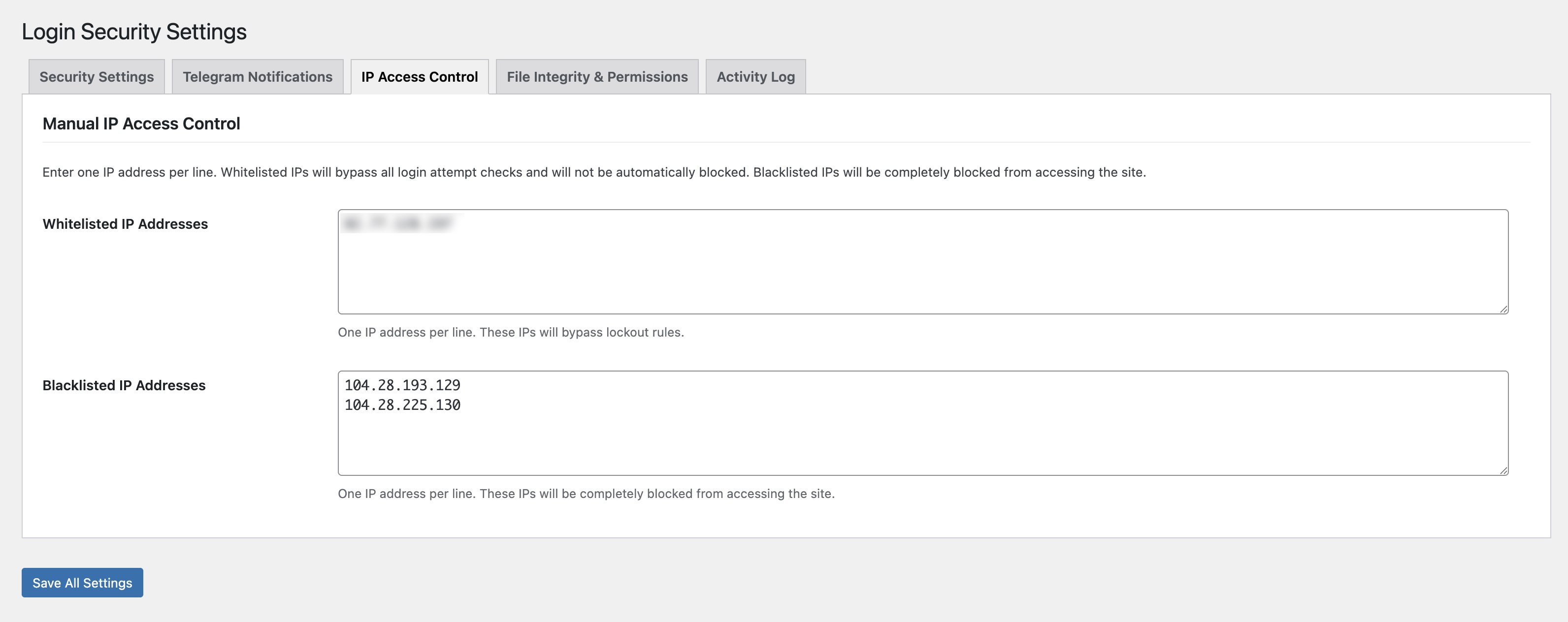
IP Management: Block or unblock IP addresses directly from the Activity Log with one-click actions. Administrators can manually manage IP blacklists and whitelists from the plugin’s settings page.
WordPress Core Files Integrity Check: Verify that WordPress core files haven’t been tampered with by comparing them against official checksums from WordPress.org.
File Permissions Management: Automatically check and fix file permissions to match WordPress security standards, ensuring your installation follows best practices.
Custom Admin URL: Hide your wp-admin login URL by creating a custom access point, adding an extra layer of security by obscurity.
Geolocation Integration: Includes location data in Telegram notifications, adding crucial context to security alerts and aiding in the investigation of suspicious activities.
User-Friendly Admin Interface: An intuitive, tabbed settings page contributes to a clean and easy-to-use experience.
Why Choose Login Security with Telegram Alerts?
Comprehensive Security: Provides advanced features that actively defend your site against common and persistent threats.
Instant Awareness: Critical updates are delivered directly to Telegram, facilitating immediate action and providing peace of mind to site administrators.
User-Friendly: Engineered for quick setup, often achievable in minutes, with an intuitive interface that makes configuration accessible to users of all technical levels.
Performance Optimized: Built with efficiency in mind, ensuring that robust security measures do not compromise site speed.
Dedicated Support: A passionate team is committed to providing prompt and helpful support, aiming to ensure users maximize the plugin’s potential.
Compatibility & Requirements:
WordPress Version: 5.0 or higher (Tested up to 6.9)
PHP Version: 7.2 or higher (PHP 7.4+ recommended for optimal performance and security)
Performance Considerations:
Login Security with Telegram Alerts is designed with performance in mind:
Efficient API Calls: When interacting with external services like Telegram’s API, the plugin uses WordPress’s built-in HTTP API for reliable and performant requests, minimizing impact on page load times.
Optimized Database Interactions: Designed to minimize database queries and employs best practices for data storage and retrieval, ensuring your site’s database remains lean and responsive.
Lightweight Codebase: Development emphasizes avoiding bloated scripts and unnecessary assets, ensuring the plugin adds minimal overhead to site resources.
Security Best Practices:
Beyond merely claiming to be „secure,” Login Security with Telegram Alerts implements rigorous security measures:
Nonces: All critical actions and forms within the plugin utilize WordPress Nonces to protect against Cross-Site Request Forgery (CSRF) attacks.
Input Sanitization: All user input is rigorously sanitized before processing or storage to prevent malicious code injection, such as Cross-Site Scripting (XSS) attacks.
Output Escaping: Data displayed on both the frontend and backend is properly escaped to prevent XSS vulnerabilities.
Capability Checks: Access to plugin functionalities is strictly controlled by checking user capabilities using current_user_can(), preventing unauthorized users from performing actions they are not permitted to.
Regular Audits: The plugin’s codebase undergoes regular scanning and updates to address emerging security vulnerabilities.
Internationalization (i18n):
Login Security with Telegram Alerts is fully internationalized, allowing for seamless translation into any language. All strings are meticulously wrapped in gettext functions, and a dedicated text domain (login-security-with-telegram-alerts) ensures compatibility with WordPress’s robust translation system.
Third-Party Services
This plugin may connect to external services to provide certain features:
Telegram API (api.telegram.org)
– Used for: Sending security notifications to your configured Telegram bot
– Triggered when: You enable Telegram notifications and configure a bot token and chat ID
– Privacy Policy: https://telegram.org/privacy
– Terms: https://telegram.org/tos
IP Geolocation (ip-api.com)
– Used for: Looking up geographical location of login attempts
– Triggered when: Geolocation is enabled in settings (optional feature)
– Privacy Policy: https://ip-api.com/docs/legal
– Data sent: IP addresses only
All external service connections are optional and only occur when explicitly enabled by the administrator. No data is sent without your configuration and consent.
Zrzuty ekranu




Instalacja
Easy Setup (Recommended):
Go to your WordPress Dashboard.
Navigate to Plugins > Add New.
Search for „Login Security with Telegram Alerts”.
Click „Install Now” and then „Activate”.
Once activated, go to Login Security in your WordPress admin menu (under Settings).
Telegram Integration: Follow the on-screen instructions to obtain your Telegram Bot API Token and Chat ID. Enter these into the plugin settings.
Configure your desired security settings (e.g., failed login limits) and notification preferences.
Save changes. The setup is complete.
Manual Installation:
Download the plugin .zip file from WordPress.org.
Upload the plugin directory (login-security-telegram-alerts) to the /wp-content/plugins/ directory via FTP/SFTP.
Activate the plugin through the 'Plugins’ screen in WordPress.
Proceed with steps 5-8 from „Easy Setup” above.
Troubleshooting:
If issues are encountered, ensure that WordPress and PHP versions meet the minimum requirements.
Verify that the Telegram Bot API Token and Chat ID are correctly entered. The „Send Test Telegram Message” button in settings can be used for verification.
Check for potential plugin conflicts by temporarily deactivating other plugins.
For further assistance, please refer to the FAQ section or the dedicated support forums.
Najczęściej zadawane pytania
Q: What is Login Security with Telegram Alerts for?
A: Login Security with Telegram Alerts is a comprehensive WordPress security plugin primarily focused on preventing brute-force attacks, logging login activity, and providing real-time notifications of critical site events to Telegram.
Q: Is Login Security with Telegram Alerts free?
A: Yes, the Login Security with Telegram Alerts plugin is absolutely free to use and provides robust security features.
Q: How does Login Security with Telegram Alerts protect against brute-force attacks?
A: It limits the number of failed login attempts from a single IP address. After a configurable threshold is reached, the IP is temporarily blocked, preventing automated password guessing attacks.
Q: Can I customize the Telegram notifications?
A: Yes, you can enable/disable specific notification types (e.g., failed logins, successful logins) from the plugin settings.
Q: What is a Telegram Bot API Token and Chat ID?
A: The Telegram Bot API Token is a unique key for a Telegram bot, enabling it to send messages. The Chat ID identifies the specific user, group, or channel to which messages will be sent. Instructions for obtaining these are provided within the plugin settings.
Q: Is this plugin compatible with [specific theme/plugin]?
A: Login Security with Telegram Alerts is designed for broad compatibility with standard WordPress themes and plugins. If a specific compatibility issue arises, please report it on the support forum.
Q: Where can I get support?
A: For free support, please visit the WordPress.org support forums.
Recenzje
Wtyczka nie ma jeszcze żadnej recenzji.
Kontrybutorzy i deweloperzy
„Login Security with Telegram Alerts” jest oprogramowaniem open source. Poniższe osoby miały wkład w rozwój wtyczki.
Zaangażowani
Przetłumacz wtyczkę “Login Security with Telegram Alerts” na swój język.
Interesuje cię rozwój wtyczki?
Przeglądaj kod, sprawdź repozytorium SVN lub czytaj dziennik rozwoju przez RSS.
Rejestr zmian
1.0.0 –
- Initial Release of Login Security plugin
- Brute-Force Protection with configurable attempt limits
- Telegram Notifications for failed and successful logins
- Comprehensive Activity Logging with filtering
- IP Management with Block/Unblock functionality
- Manual IP Blacklist and Whitelist
- WordPress Core Files Integrity Check
- File Permissions Check and Fix tool
- Custom Admin URL for enhanced security
- Geolocation integration for login notifications
- Clean and intuitive admin interface