

Opis
Library Management System (LMS) is a WordPress plugin that helps you run your library from the admin panel and on the frontend. Manage books, users, branches, bookcases, sections, and full borrow/return workflows with late fines and reporting. Whether you run a small community library or a school/college library, the free version gives you the core tools to operate efficiently.
Why Choose Library Management System?
📚 Complete Library Control — Organize your collection with categories, bookcases, and sections. Add books with details (name, ISBN, author, publication, cover image, stock) and manage your catalogue from one dashboard.
👥 User & Branch Management — Manage library branches and LMS users with contact details. Keep track of who borrowed what and from which branch.
📖 Borrow & Return — Process book checkout and returns with configurable loan periods. Track every transaction and return condition (normal, damaged, late). Calculate and manage late fines from the return list.
📊 Reports & Export — Generate detailed reports with filters and export to PDF, print, or CSV. See borrow history, return history, and key metrics at a glance.
🌐 Public Library Page — Display your book collection on the frontend with the [owt7_library_books] shortcode. Visitors can browse books; logged-in users get a single book page view. Pagination and filters keep the listing tidy.
⚙️ Flexible Settings — Configure borrow days, late fines, country, currency, and shortcode options. Multilingual support (English, Hindi, Italian, Spanish, French) and test data import help you get started quickly.
🛡️ WordPress-Native — Built with WordPress standards: capability checks, nonces, and sanitization. No coding required to use or customize.
Perfect For
✔ Schools and Colleges
✔ Small community libraries
✔ Institutions that need a simple, reliable library system
✨ Free Version — What You Get ✨
Dashboard & Organization
* Central dashboard with key stats: total books, stock, users, borrows, returns, and quick links to books, users, bookcases, reports, and settings
* Manage categories, bookcases, and sections to organize your physical layout
* Assign books to sections and keep your catalogue structured
Book Management
* Add and edit books with name, ISBN, author, publication, cover image, and stock
* Manage multiple book copies with accession numbers for individual physical copies
* List books with filters; view single book page on the frontend
* Test data import tool to try sample categories, books, and users
Users & Branches
* Manage user branches and LMS users with contact details
* Dedicated Library User LMS role with a separate dashboard experience for library patrons
* Link users to branches for clearer reporting
Transactions
* Borrow and return books with a fixed 30-day loan period in the free version
* Track checkout and return status; record return conditions (normal, damaged, late)
* Late fine calculation and management from the return list
* Generate late fine receipts for fee collection records
* Full borrow and return history
Reports
* Export DataTables data to PDF, CSV, and Excel for day-to-day record keeping
Frontend & Shortcodes
* Shortcode [owt7_library_books] to display the book collection on any page
* Book listing with pagination
* Single book page view for detailed book information
* Public LMS page for guests and logged-in users to browse, with filters and display settings
Settings & Localization
* Configure late fines, country, currency, labels/texts, public page display, and admin theme options
* Multilingual support: English, Hindi, Italian, Spanish, and French
* Manage labels/texts for a personalized experience
Limitations of the Free Version
The free edition is designed for smaller libraries and has the following limits:
- Quantity limits: Up to 30 categories, 30 bookcases, 30 sections, 30 user branches; up to 30 books and 30 LMS users
- Single book per checkout: One book can be borrowed per transaction (Pro: multiple books per checkout)
- Public page: Frontend display controls are more limited than Pro, with fewer advanced layout and workflow options
- No data backup/restore: Backup and restore tool is available in Pro only
- Data tools stay limited: Free includes basic import/export support, while Pro expands data management, backup/restore, and advanced workflows
- Fixed loan period: The free version uses a fixed 30-day loan period (Pro: configurable loan periods)
- No WordPress user sync: One-click sync of WP users into LMS is Pro only
- No self-checkout/self-return: Users cannot checkout or return books themselves from the frontend (Pro: self-checkout and self-return with optional admin approval)
- No request workflow: Users cannot submit borrow/return requests from the frontend (Pro: request and approval workflow)
- No clone or bulk operations: Clone and bulk delete/activate/deactivate for bookcases, sections, categories, and books are Pro only
- Single librarian: Multi-librarian and role-based permissions are Pro features
- No WooCommerce book store: Selling eBooks via WooCommerce is available in the full Pro version
Upgrading to Basic Premium removes quantity limits and adds multi-book borrow/return, data backup, CSV import, and more. The Full Pro version adds WordPress user sync, self-checkout/return, clone, bulk operations, multi-librarian support, and WooCommerce integration.
Basic Premium Features
➜ Unlimited categories, bookcases, sections, books, branches, and users
➜ Borrow and return multiple books per transaction
➜ Data backup tool (export and import)
➜ CSV data import
➜ Public LMS page with category and availability filters
➜ Multilingual support across all versions (English, Hindi, Italian, Spanish, French)
➜ Full customizable settings (borrow days, fines, country, currency, shortcodes)
Contact [email protected] to learn more about Basic Premium.
Full Pro Add-ons
➜ Sync WordPress users to LMS in one click
➜ Self-checkout and self-return from the frontend (with optional admin approval)
➜ Library User portal: Books List, My Books, Returned Books
➜ User request-to-borrow workflow
➜ Clone and bulk operations (delete, activate, deactivate) for bookcases, sections, categories, books
➜ Multi-librarian support with role permissions
➜ Sell PDF/eBooks via WooCommerce store
Additional Notes
We would be happy to assist you anytime.
If you are interested in paid service, feel free to contact me via email [email protected] or drop me a query in our website https://onlinewebtutorblog.com/
Zrzuty ekranu

Dashboard of LMS 
Users List 
User Branches List 
Add New User 
Add New User Form Validation 
Add New Branch 
List of Books 
Add New Book 
Borrow a Book 
Free Version Settings 
Country and Currency Settings 
Free Vs Pro LMS 
LMS in Hindi Language 
Add New Book in Hindi Language 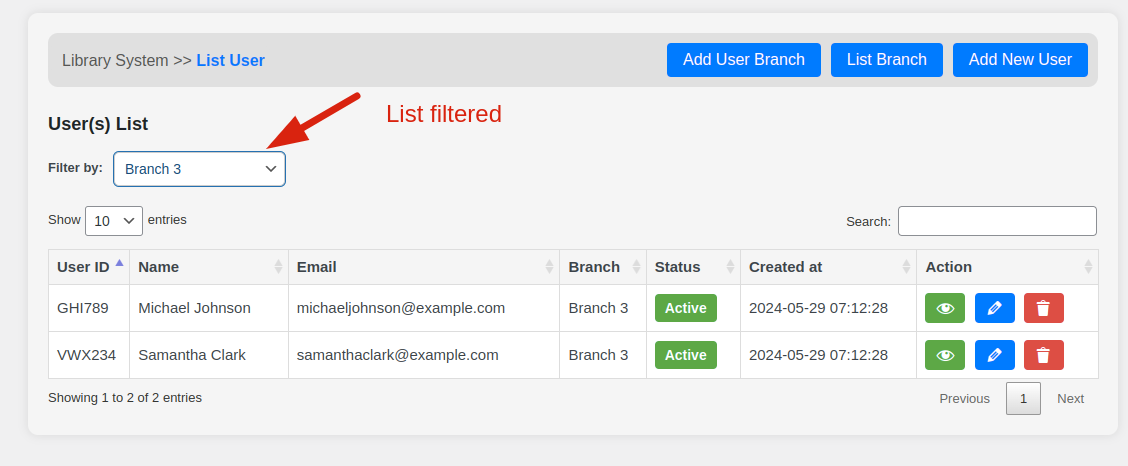
Filter User By Branch 
Books Borrow History 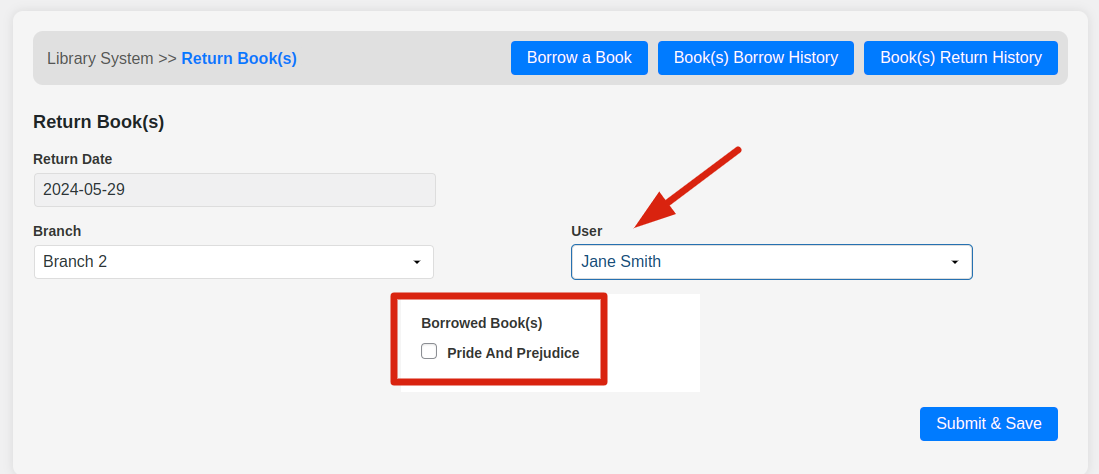
Book Return Form 
Book Return History 
Plugin Data Backup 
All LMS Settings 
Data Backup Feature 
All LMS Books on Frontend 
Single Book view Page 
Books listing on Public Page via Shortcode 
Shortcode to Display Books 
Single Book Page View 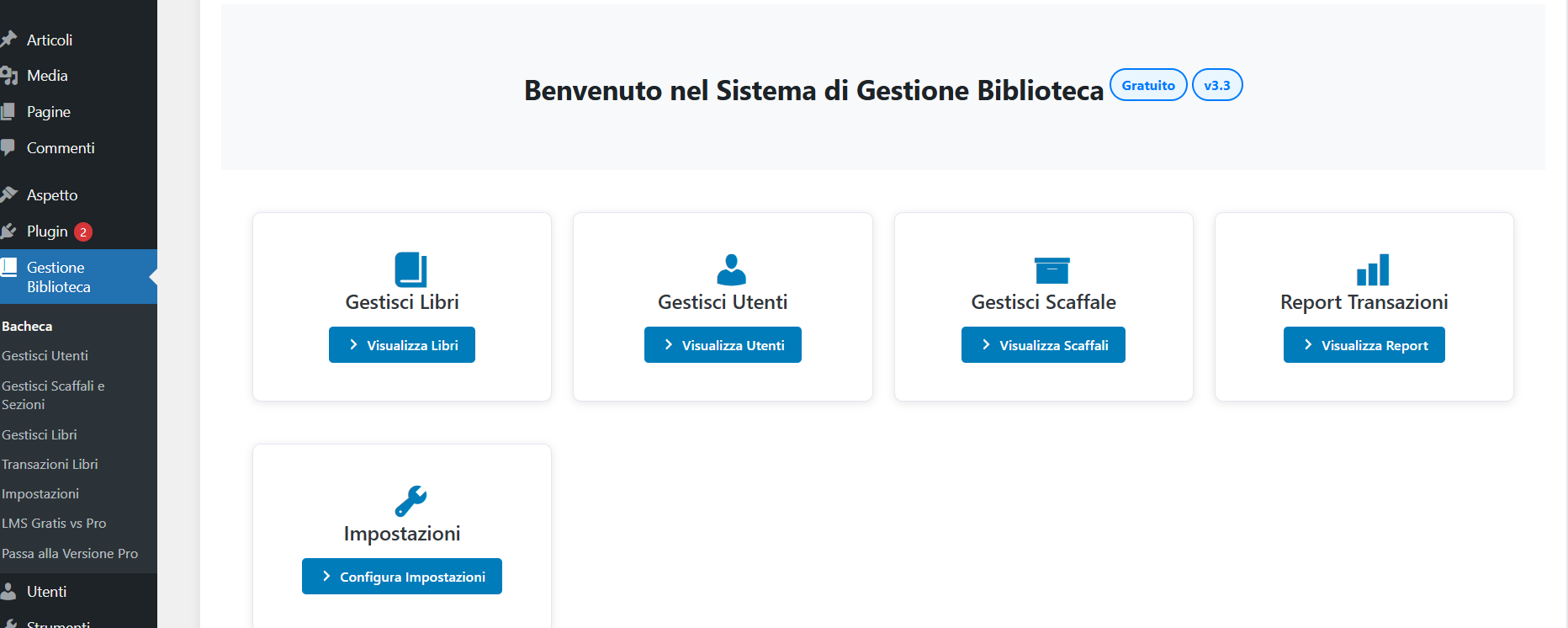
Available in Italian Language 
Available in Spanish Language
Instalacja
From your WordPress dashboard
1. Visit ‘Plugin > Add new’.
2. Search for ‘Library management system’.
3. Activate Library management system from your Plugins page.
From WordPress.org
1. Search, select and download „Library management system”.
2. Activate the plugin through the ‘Plugins’ menu in WordPress Dashboard.
Najczęściej zadawane pytania
-
Is LMS plugin free of cost for lifetime?
-
The plugin will always be available for Free. There are no hidden charges. We do have 2-tiers of premium versions of LMS (Basic, and Full). You can buy to use it with full features and functionalities.
-
Is the LMS plugin compatible with other WordPress themes and plugins?
-
Yes. It works with standard WordPress themes and plugins and should not conflict with your existing setup.
-
If you have license key verification issues with your premium LMS setup. Please make sure your website runs with https:// (SSL Certification must be Enabled).
-
The plugin is free to download. To purchase its premium basic version, please do an enquiry mail to Email: [email protected], you will get reply and proceed accordingly to buy the extra addon features.
-
LMS comes with 2-tier Premium Levels: Basic and Full. The Basic tier removes quantity limits and adds multi-book borrow/return, data backup, and CSV import. The Full version adds WordPress user sync, self-checkout/return, clone and bulk operations, multi-librarian support, and WooCommerce integration.
-
What are the limits of the free version?
-
The free version allows up to 30 categories, bookcases, sections, and branches; up to 40 books and 40 LMS users. You can borrow one book per transaction. See the „Limitations of the Free Version” section above for the full list and how Pro expands on it.
-
Can I use the plugin on multiple sites?
-
No, you can use the plugin according to the license key for a specific WordPress site.
-
Do I need to know any coding to use this plugin?
-
No, we have built Library management system to be extremely easy to use and manage.
-
Do you provide support?
-
Yes. Our LMS support team is available. You can send your query to the email address mentioned above ([email protected]).
-
Is plugin data backup feature available?
-
Yes, but it is available in a Pro version of the LMS plugin. By using this, you can take plugin data backup anytime and restore it in future to the same website or a different website.
Recenzje


Kontrybutorzy i deweloperzy
„Library Management System” jest oprogramowaniem open source. Poniższe osoby miały wkład w rozwój wtyczki.
Zaangażowani
Wtyczka „Library Management System” została przetłumaczona na 3 języki. Podziękuj tłumaczom za ich wkład.
Przetłumacz wtyczkę “Library Management System” na swój język.
Interesuje cię rozwój wtyczki?
Przeglądaj kod, sprawdź repozytorium SVN lub czytaj dziennik rozwoju przez RSS.
Rejestr zmian
3.5
- Fee receipts: New fee receipt concept for late fines and payments—track and issue receipts for library fees from the return list and reports
- Library User (LMS) role: New dedicated user role „Library User LMS” for patrons—restricted access to Books List, My Books, and Returned Books for a clear, role-based experience
- Book copies & accession numbers: Support for multiple copies per book with unique accession numbers—manage and track individual physical copies alongside your catalogue
- Dashboard: Refined layout and quick-access links for books, users, bookcases, reports, and settings
- UI: Updated admin and frontend styles for a cleaner, more consistent experience across library pages
- Security: Strengthened capability checks and input sanitization on borrow/return and user management flows
- Performance: Optimized book listing and report queries for faster load times on larger catalogues
- UX: Improved single book page and public library shortcode display with better responsive behavior
3.4
- Added Spanish Translation
- Database Schema Fix: Updated table structures to support multilingual data entry (English, Hindi, Italian, Spanish)
- Increased VARCHAR field sizes for name fields (users, books, categories, branches, bookcases) to VARCHAR(255) for proper multilingual character support
- Added automatic database migration function to convert existing tables to utf8mb4 charset and update column sizes
- Enhanced multilingual support: All text input fields now properly store and display data in English, Hindi, Italian, and Spanish languages
3.3
- Design Updated
- New Translation Added – Italian
3.2.1
- Added more free credit limits to use plugin
- Shortcode is available to display books on Frontend
- Single book page is also available
- Added More Plugin Screenshots
- Updated „Upgrade to Pro” Screen
- Added CSS for Single Book Page View
- Added WP_Editor for Textarea in Add / Edit Book
- Add Book Page View Preview Link to Edit Book Page
- Book Filter by Category Issue Fixed
3.2
- Added Security to plugin functions handler
- LMS Cards designs updated
- Added Code to escape unwanted characters entry with data for Italian language.
3.1
- Updated 'Upgrade Feature Screen’: Added Sync WordPress Users to LMS
- Updated 'Upgrade Feature Screen’: Self Checkout / Self Return by User from Frontend
- Updated 'Upgrade Feature Screen’: Borrowed Books / Returned Books list for Users
- Updated 'Upgrade Feature Screen’: Users can Request to Borrow Book
- Updated 'Upgrade Feature Screen’: Data Clone Function for any module like Bookcases, Sections, Categories, Books, etc
- Updated 'Upgrade Feature Screen’: Bulk Data Operation for Delete, Move to Active Status, Inactive Status for any module like Bookcases, Sections, Categories, Books, etc
- Updated 'Upgrade Feature Screen’: Multi-Librarian Support
- Updated 'Upgrade Feature Screen’: Sell PDF eBooks with WooCommerce store
3.0
- Feature – Added WooCommerce Integration
- Feature – Enhanced User History Management
2.5
- Fix – Improved Transaction Tracking
- Fix – Enhanced Reporting Options
2.0
- Feature – Multilingual Support
1.0
- Initial release.