

Opis
When creating a menu under the „Appearance -> Menus” tab it allows you to double click to expand and collapse a menu tree.
This is particularly useful for large menus or menus with many different sub trees that take up screen space.
Minimized menus will be saved as a cookie so when you return they should be minimized again.
Requirements
- Javascript is required.
- A browser that supports the :after CSS selector is required to show the minimized indicators (IE7 and IE8 may not show them).
Future releases:
- Images to show collapsed menus rather than just a blue marker.
- Double-click visual feedback.
- your ideas!
Zrzuty ekranu
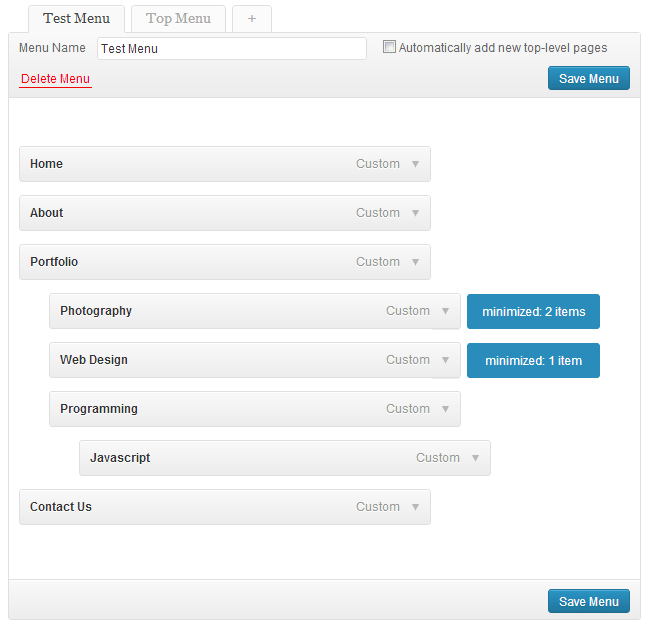
The edit menu screen with a couple menus collapsed.
Instalacja
Drop into either your /mu-plugins/ directory, or your plugins directory and activate it.
- Upload the
expandable-menusdirectory to the/wp-content/plugins/directory, or the/wp-content/mu-plugins/directory. - Activate the plugin through the 'Plugins’ menu in WordPress (if placed in the the
/wp-content/plugins/directory) - Create a menu with some children elements and double click the parent.
Najczęściej zadawane pytania
- None yet
- Why isn’t this working?
-
- Have you tried double clicking? A lot of people dont understand you have to double click to minimize as there wasn’t initially an indicator telling you to do so.
Recenzje

2018-10-03
This very simple yet very useful plugin still works after all these years (WP 4.9!). I can’t understand why this is not a built-in feature of WordPress 🙁

2017-01-18
2 odpowiedzi
This plugin solves a problem that should be build into WP
When you have many menu-items in appearance > menusyou really need to be able to Expand and collapse menu items …. and this plugin will do the trick … but hasn’t been updatet for 4 years … and there is a bug
But a friendly WP-user ( @dannyUnitel ) did find the bug and made an „easy to do” fix …. https://wordpress.org/support/topic/some-fixes-ive-made/
and with his changes it works 🙂
// Lars
PS. I hope that @maxaud will update his plugin some day soon 🙂
Thanks @dannyunitel

2016-09-03
Works as promised. Thank you!!!!
Styling needs a little love.

2016-09-03
If you have ever tried to drag a newly added page across a slew of other pages in your menu page to get to the proper location, you will definitely appreciate a way to collapse the menus and save a bunch of time.
One thing I discovered on my server is that after a certain number of menu items, wordpress stopped adding a new page to the end. Turns out there is a php problem with passing these parameters. If you create a file named „.user.ini” that has the following contents:
max_input_vars = 3000;
And place that file in your public_html folder, the problem is solved.

2016-09-03
With a large custom menu adding pages in the menus section has been painful. Wonderful to be able to add pages and rearrange things with ease.
I don’t know how I missed this plugin before (possibly the name doesn’t help – expanded is the norm, I was looking to collapse) but I’m so glad it still works with 4.3.
I agree with the first review – am surprised it’s not a native feature, each time I’ve updated WP I’ve looked to see if it has been added.
Kontrybutorzy i deweloperzy
„Expandable Menus” jest oprogramowaniem open source. Poniższe osoby miały wkład w rozwój wtyczki.
Zaangażowani
Przetłumacz wtyczkę “Expandable Menus” na swój język.
Interesuje cię rozwój wtyczki?
Przeglądaj kod, sprawdź repozytorium SVN lub czytaj dziennik rozwoju przez RSS.
Rejestr zmian
1.0
- First Release.
1.1
- Fixed icon alignment issue.
2.0
- Revamped javascript.
- Supports over 200 menus now.
- Different indicators on hover and when minimized
- Saves minimized menus in a cookie so you don’t have to minimize every time the page is loaded.
2.1
- Addresses a javascript error, see support forum.