

Opis
DocAccess is an accessibility service from CivicPlus that automatically makes PDF documents and other files on your website accessible to people with disabilities. This is the official DocAccess plugin: install it, flip the switch, and the DocAccess service handles the rest.
This plugin does not process documents itself. It adds a small helper script to your pages that lets the DocAccess service (operated by CivicPlus at docaccess.com) discover document links and make them accessible to your visitors. An active DocAccess account with your domain registered is required.
How it works:
- Install and activate the plugin
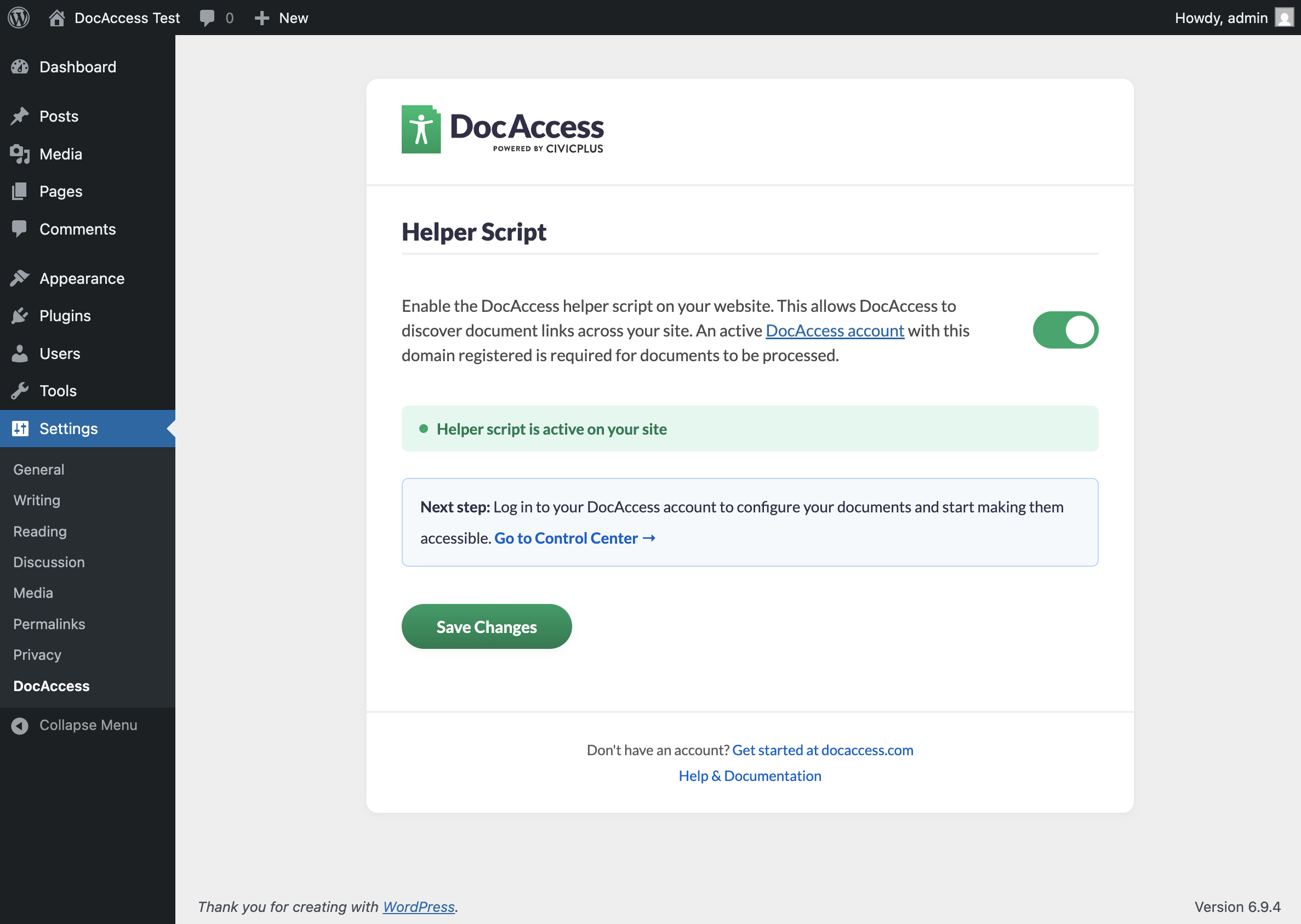
- Go to Settings > DocAccess
- Toggle the switch to enable
- Log in to your DocAccess account at docaccess.com to configure your documents
Features:
- One-click setup — no code editing required
- Automatic document link discovery on all pages
- Accessible document viewer for your visitors
- Lightweight — adds a single async script with zero impact on page speed
- Fully accessible and keyboard navigable settings page
Requirements:
An active DocAccess account from CivicPlus is required. Your website domain must be registered in your DocAccess dashboard. Visit docaccess.com to get started.
External services
This plugin relies on the DocAccess service, operated by CivicPlus, to provide its functionality. When you enable the plugin’s toggle, the plugin loads a helper script from docaccess.com on the front end of your site. The helper script then communicates with the DocAccess service on behalf of your visitors.
The plugin and helper script connect to the following endpoints on docaccess.com (operated by CivicPlus):
1. Helper script (docaccess.com)
- What it is: The DocAccess helper script (
docbox.js), used to discover document links and serve the accessible document viewer. - When it runs: On every page load on the front end of your site, but only after you toggle DocAccess on in the plugin settings. The script is not loaded when DocAccess is toggled off.
- What is sent: A standard HTTP request to docaccess.com to fetch the script. The request includes information your browser normally sends with any third-party script request (IP address, user agent, referring page).
2. Domain configuration (docaccess.com)
- What it is: A read-only configuration file describing how DocAccess should behave on your domain (e.g., whether the domain is registered, which file patterns to look for).
- When it runs: Once per page load, when the helper script initialises.
- What is sent: Your site’s hostname (e.g.,
example.com), so the service can return the configuration for that domain.
3. Document link intake (docaccess.com/api/v2/documents/intake/url)
- What it is: The DocAccess document intake endpoint, used to register newly discovered document links so they can be processed for accessibility.
- When it runs: When the helper script finds a document link (PDF, DOCX, etc.) on a page that has not yet been seen.
- What is sent: The URL of the document link and the URL of the page it was found on. No visitor personal data is sent.
All three endpoints are operated by CivicPlus, Inc. at docaccess.com. Use of these services is governed by the DocAccess terms and privacy policy:
- DocAccess Terms of Service: https://docaccess.com/terms-of-service
- DocAccess Privacy Policy: https://docaccess.com/privacy-policy
The fonts used on the plugin’s settings page (Lato) are bundled with the plugin and served locally — no font CDN or other third-party host is contacted by this plugin.
Zrzuty ekranu
Instalacja
- Upload the
docaccessfolder to/wp-content/plugins/ - Activate the plugin through the Plugins menu
- Go to Settings > DocAccess
- Toggle the switch to enable the helper script on your site
- Log in to your DocAccess account at docaccess.com/app to configure your documents
Najczęściej zadawane pytania
-
Who makes DocAccess?
-
DocAccess is a product of CivicPlus. This plugin is the official integration published by the CivicPlus team. „DocAccess” is a trademark of CivicPlus, Inc.
-
Do I need a DocAccess account?
-
Yes. The plugin adds the DocAccess helper script to your site, which allows the DocAccess service to discover document links. An active account with your domain registered is required for documents to be processed. Visit docaccess.com to sign up.
-
Will this slow down my site?
-
No. The script loads asynchronously and has no impact on your page load time.
-
Can I disable DocAccess temporarily?
-
Yes. Go to Settings > DocAccess and toggle the switch off. The script will stop loading immediately.
-
What does the helper script do?
-
The helper script discovers document links (PDFs and other files) on your pages and sends the document URL and the page URL it was found on to the DocAccess service. Once configured in your DocAccess dashboard, visitors can access documents through an accessible viewer.
Recenzje
Wtyczka nie ma jeszcze żadnej recenzji.
Kontrybutorzy i deweloperzy
„DocAccess” jest oprogramowaniem open source. Poniższe osoby miały wkład w rozwój wtyczki.
Zaangażowani
Przetłumacz wtyczkę “DocAccess” na swój język.
Interesuje cię rozwój wtyczki?
Przeglądaj kod, sprawdź repozytorium SVN lub czytaj dziennik rozwoju przez RSS.
Rejestr zmian
1.0.1
- Bundled the Lato font locally instead of loading it from Google Fonts (no third-party font CDN request from the settings page).
- Added an „External services” section to the readme documenting all calls the plugin and its helper script make to docaccess.com.
- Clarified in the description and FAQ that DocAccess is a product of CivicPlus and that this is the official plugin.
1.0.0
- Initial release
- One-click enable/disable toggle
- Automatic script injection on all pages
- Branded settings page with DocAccess design
- Full keyboard navigation and accessibility support