

Opis
Najpopularniejsza wtyczka do wyszukiwania produktów w WooCommerce. Oferuje użytkownikom dobrze zaprojektowany, zaawansowany pasek wyszukiwania AJAX z sugestiami wyszukiwania na żywo.
Domyślnie WooCommerce oferuje bardzo proste rozwiązanie wyszukiwania, bez wyszukiwania produktów na żywo, a nawet kodów SKU. FiboSearch (dawniej Ajax Search dla WooCommerce) oferuje zaawansowane wyszukiwanie z sugestiami na żywo.
Kto nie lubi natychmiastowych podpowiedzi w trakcie wpisywania tekstu? W 2025 roku klienci oczekują inteligentnego wyszukiwania produktów. Najnowsze badania UX Baymard Institute pokazują, że funkcja autouzupełniania wyszukiwania, autopodpowiedzi i błyskawicznego wyszukiwania jest obecnie oferowana w 96% największych witryn e-commerce. To niezbędna funkcja dla każdego biznesu internetowego, który nie może sobie pozwolić na utratę klientów. Dlaczego? FiboSearch pomaga użytkownikom oszczędzać czas i ułatwia zakupy. W rezultacie FiboSearch realnie zwiększa sprzedaż.
Funkcje
✅ Wyszukiwanie według tytułu produktu, długiego i krótkiego opisu
✅ Wyszukiwanie według kodu SKU
✅ Pokaż obrazek produktu w bieżących wynikach wyszukiwania
✅ Pokaż cenę produktu w bieżących wynikach wyszukiwania
✅ Pokaż opis produktu w bieżących wynikach wyszukiwania
✅ Pokaż SKU w bieżących wynikach wyszukiwania
✅ Najpierw urządzenia mobilne – specjalny tryb wyszukiwania mobilnego dla lepszego UX
✅ Panele szczegółów z rozszerzonymi informacjami – przycisk „Dodaj do koszyka” z polem ilości i rozszerzonymi danymi produktu wyświetlanymi po najechaniu na bieżącą sugestię
✅ Łatwa implementacja w Twoim motywie – osadź wtyczkę za pomocą krótkiego kodu, jako element menu lub jako widżet
✅ Wyszukiwanie terminów – wyszukiwanie kategorii produktów i znaczników
✅ Historia wyszukiwania – bieżąca historia wyszukiwania jest wyświetlana, gdy użytkownik kliknie/naciśnie pasek wyszukiwania, ale jeszcze nie wpisał zapytania.
✅ Limit wyświetlanych sugestii – liczba jest konfigurowalna
✅ Minimalna liczba znaków wymagana do wyświetlenia sugestii – liczba jest konfigurowalna
✅ Lepsze sortowanie – inteligentny algorytm zapewnia jak największą dokładność wyświetlanych wyników
✅ Obsługa strony wyników wyszukiwania WooCommerce – po wpisaniu Enter użytkownicy otrzymują te same wyniki, co w pasku wyszukiwania FiboSearch
✅ Grupowanie natychmiastowych wyników wyszukiwania według typu – wyświetlanie np. najpierw pasujących kategorii, a następnie pasujących produktów
✅ Obsługa Google Analytics
✅ Obsługa wielu języków, w tym WPML, Polylang i qTranslate-XT
✅ Personalizacja paska wyszukiwania i podpowiedzi autouzupełniania – etykiety, kolory, preloader, obrazek i wiele więcej
Wypróbuj wersję PRO
FiboSearch jest również dostępny w wersji Pro, z nowoczesną wyszukiwarką opartą na odwróconym indeksie. FiboSearch Pro działa do 10 razy szybciej niż wersja darmowa lub inne popularne rozwiązania wyszukiwania dla WooCommerce.
Przejdź na wersję PRO i zwiększ sprzedaż!
Funkcje PRO
✅ Ultraszybka wyszukiwarka oparta na odwróconym indeksie – działa bardzo szybko, nawet z ponad 100 000 produktów
✅ Wyszukiwanie przybliżone – działa nawet z drobnymi literówkami
✅ Wyszukiwanie w polach własnych z dedykowaną obsługą ACF
✅ Wyszukiwanie w atrybutach
✅ Wyszukiwanie w kategoriach. Obsługuje miniaturki kategorii.
✅ Wyszukiwanie w znacznikach
✅ Wyszukiwanie w markach (obsługujemy WooCommerce Brands, Perfect Brands dla WooCommerce, Brands dla WooCommerce, YITH WooCommerce Brands). Obsługuje miniaturki marek.
✅ Wyszukiwanie według kodu SKU produktu – wyświetla również produkty zmienne w wyszukiwaniu na żywo po wpisaniu dokładnie pasującego kodu SKU
✅ Wyszukiwanie wpisów – wyświetla również pasujące wpisy w wyszukiwaniu na żywo
✅ Wyszukiwanie stron – wyświetla również pasujące wpisy w wyszukiwaniu na żywo
✅ Synonimy
✅ Warunkowe wykluczenie produktów
✅ Zgodność z TranslatePress
✅ Profesjonalna i szybka pomoc w osadzeniu lub zastąpieniu paska wyszukiwania w motywie
✅ i więcej…
✅ ZOBACZ WSZYSTKIE FUNKCJE PRO FUNKCJE!
Prezentacja
Zobacz, jak to działa u innych: Prezentacja.
Uwagi
Wszelkie sugestie i komentarze są mile widziane. Zachęcamy do kontaktu za pośrednictwem formularza kontaktowego.
Zrzuty ekranu

Sugestie wyszukiwania z panelem szczegółów 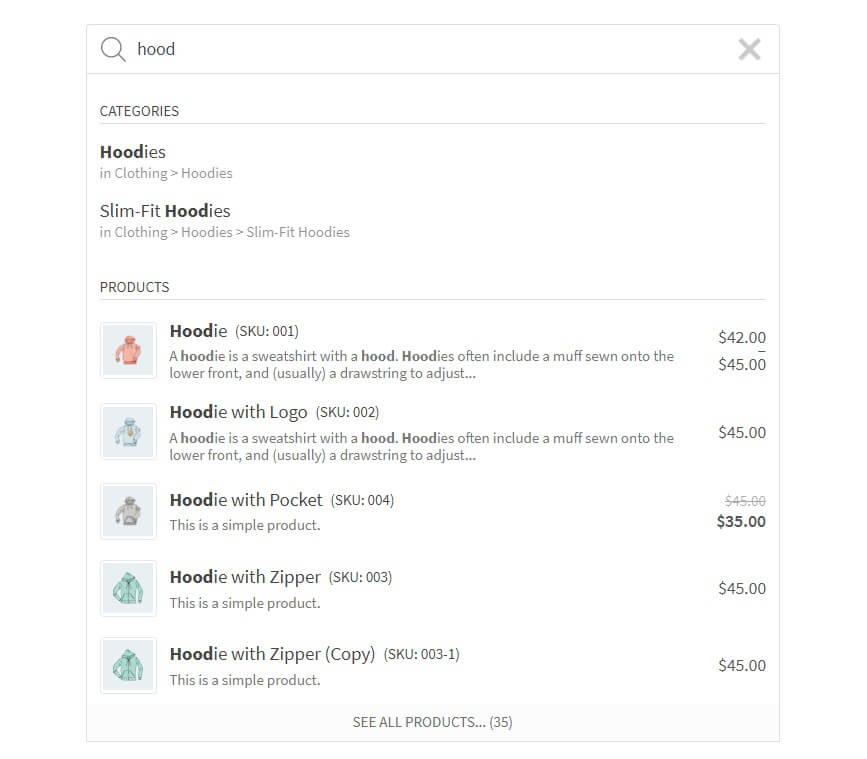
Sugestie wyszukiwania 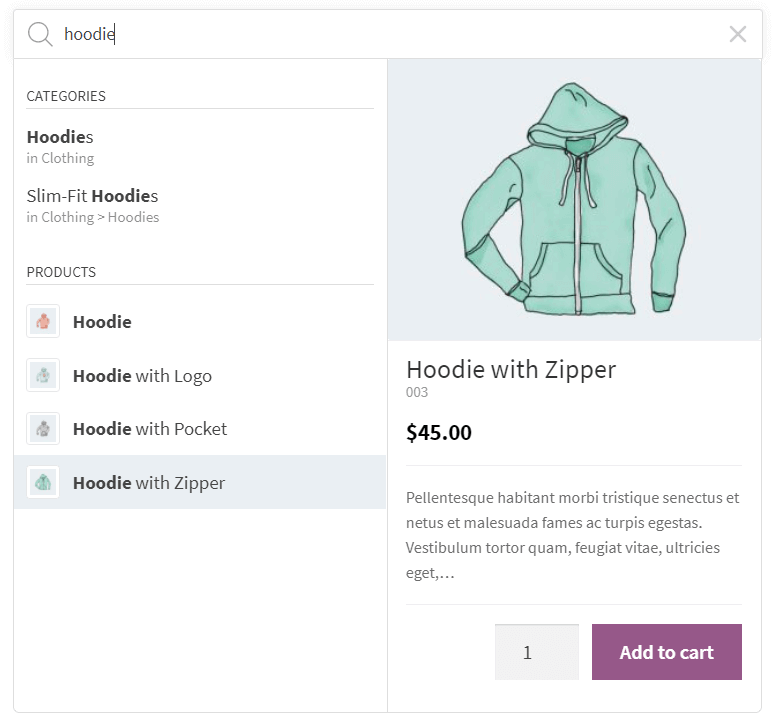
Sugestie wyszukiwania z panelem szczegółów 
Sugestie wyszukiwania (styl wyszukiwania Pirx) 
Sugestie wyszukiwania (styl kompaktowy wyszukiwania Pirx) 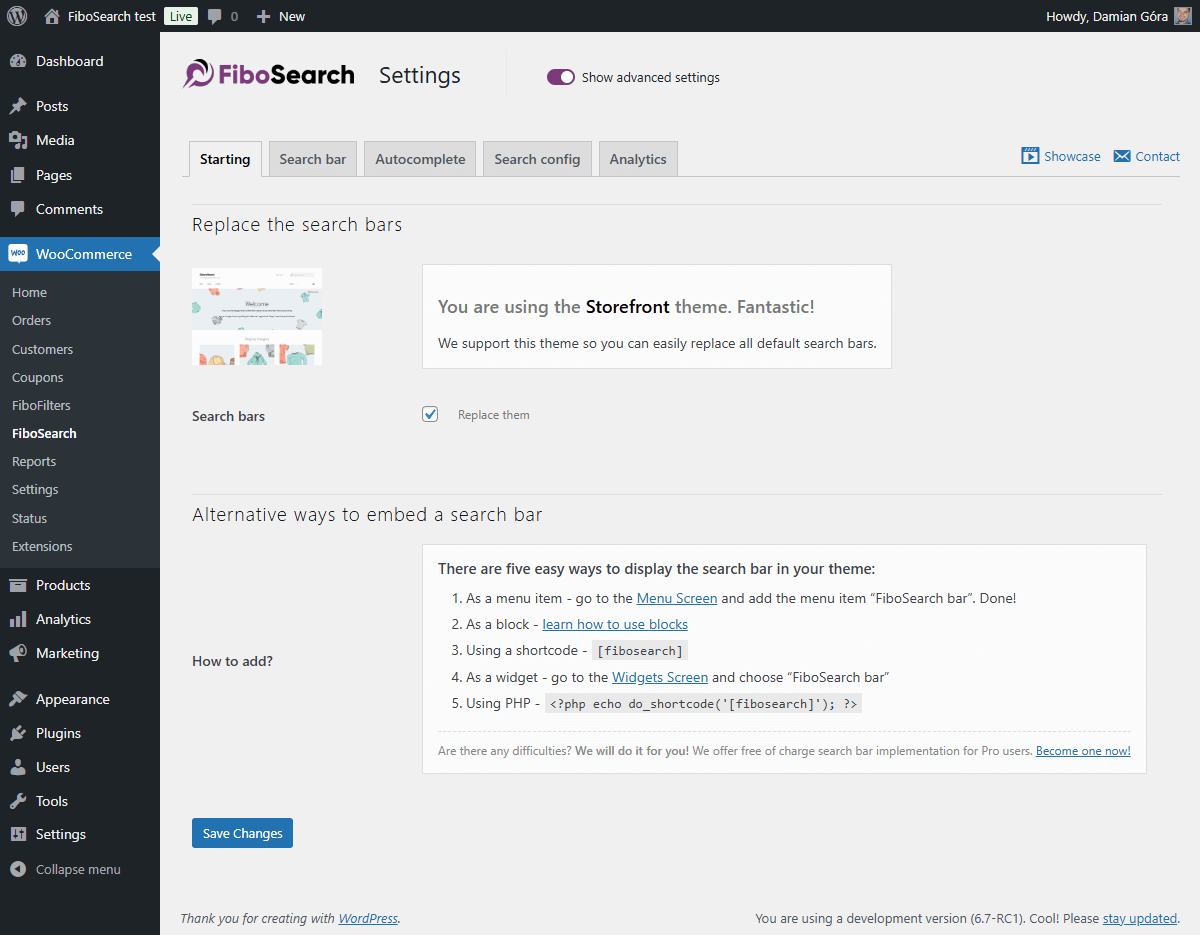
Przykładowa strona ustawień (karta startowa) 
Przykładowa strona ustawień (karta paska wyszukiwania) 
Przykładowa strona ustawień (karta Autouzupełnianie) 
Przykładowa strona ustawień (karta Analityka wyszukiwania)
Bloki
Wtyczka dodaje 2 bloki.
- FiboSearch AJAX (live) search form for WooCommerce
- FiboSearch navigation item AJAX (live) search form for WooCommerce
Instalacja
- Zainstaluj wtyczkę z poziomu Kokpitu lub prześlij katalog
ajax-search-for-woocommercewraz z całą jego zawartością do katalogu/wp-content/plugins/. - Włącz wtyczkę w menu „Wtyczki” w WordPressie.
- Przejdź do
WooCommerce FiboSearchi ustaw swoje preferencje. - Osadź pasek wyszukiwania w swoim motywie.
Najczęściej zadawane pytania
-
Jak osadzić pasek wyszukiwania w moim motywie?
-
Istnieje wiele prostych sposobów wyświetlania paska FiboSearch w Twoim motywie:
– Zastąpienie istniejącego paska wyszukiwania jednym kliknięciem – możliwe w przypadku dziesiątek popularnych motywów
– Jako element menu – w panelu administracyjnym WordPress przejdź doWygląd Menui dodajPasek wyszukiwania Fibojako element menu
– Użycie krótkiego kodu[fibosearch]– Jako widżet – w panelu administracyjnym WordPress przejdź do
Wygląd Widżetyi wybierzFiboSearch
– Jako blok – dowiedz się, jak korzystać z bloków i FiboSearch jednocześnie
– Używanie PHP<?php echo do_shortcode('[fibosearch]'); ?>– Zrobimy to za Ciebie! – oferujemy darmową implementację paska wyszukiwania dla użytkowników Pro. Zostań jednym z nich już teraz!
Lub wstaw tę funkcję do pliku PHP (często służy ona do wstawiania formularza do plików szablonów stron):
-
Jak zastąpić istniejący pasek wyszukiwania w moim motywie FiboSearch?
-
Przygotowaliśmy zamiennik paska wyszukiwania jednym kliknięciem dla następujących motywów:
- Storefront
- Divi
- Flatsome
- OceanWP
- Astra
- Avada
- Sailent
- i 46 innych… Zobacz pełną listę zintegrowanych motywów w naszej dokumentacji.
Jeśli chcesz zastąpić pasek wyszukiwania w innym motywie, skontaktuj się z naszym zespołem wsparcia.
Pomożemy Ci bezpłatnie zastąpić pasek wyszukiwania w Twoim motywie po aktualizacji do wersji Pro. -
Tak, możesz! Przejdź do
Wygląd Menu. Zobaczysz nową pozycję menu o nazwie „FiboSearch”. Wybierz ją i kliknij „Dodaj do menu”. Gotowe! -
Jak mogę zadać pytanie?
-
Możesz wysłać zgłoszenie na stronie wtyczki, a zespół wsparcia wkrótce się z Tobą skontaktuje. Odpowiadamy również na pytania na Forum wsparcia WordPress.
-
Czy oferujecie wsparcie w zakresie dostosowywania?
-
W zależności od używanego motywu, pasek wyszukiwania czasami wymaga drobnych poprawek wyglądu. Gwarantujemy szybkie poprawki CSS dla wszystkich użytkowników wtyczek Pro, ale pomagamy również użytkownikom wtyczek darmowych.
-
Gdzie mogę znaleźć ustawienia wtyczki?
-
W kokpicie WordPress przejdź do
WooCommerce FiboSearch. Strona ustawień FiboSearch jest podmenu menu WooCommerce. -
Dla kogo przeznaczona jest wersja wtyczki Pro?
-
Wersja Pro jest przeznaczona dla wszystkich sprzedawców internetowych, którzy chcą zwiększyć sprzedaż udostępniając swoim klientom niezwykle szybką i inteligentną wyszukiwarkę.
Główną różnicą między wersjami Pro i bezpłatną jest szybkość i zakres wyszukiwania. Wersja Pro posiada nową, szybką i inteligentną wyszukiwarkę. W niektórych sklepach internetowych oferujących dużą liczbę produktów, szybkość wyszukiwania można zwiększyć nawet 10-krotnie, zapewniając użytkownikom zupełnie nowe wrażenia.
Wersja Pro jest przeznaczona dla wszystkich sklepów WooCommerce, w których podpowiedzi autouzupełniania działają zbyt wolno.
Więcej informacji i porównanie funkcji wersji Pro i bezpłatnej można znaleźć tutaj: Pełne porównanie – Pro kontra bezpłatna.
Recenzje


Kontrybutorzy i deweloperzy
„FiboSearch – wyszukiwanie Ajax dla WooCommerce” jest oprogramowaniem open source. Poniższe osoby miały wkład w rozwój wtyczki.
Zaangażowani

Wtyczka „FiboSearch – wyszukiwanie Ajax dla WooCommerce” została przetłumaczona na 14 języków. Podziękuj tłumaczom za ich wkład.
Przetłumacz wtyczkę “FiboSearch – wyszukiwanie Ajax dla WooCommerce” na swój język.
Interesuje cię rozwój wtyczki?
Przeglądaj kod, sprawdź repozytorium SVN lub czytaj dziennik rozwoju przez RSS.
Rejestr zmian
1.32.2, January 05, 2026
- ADDED: Integration with the Themify Builder Pro plugin
- ADDED: Integration with the FOX WooCommerce Currency Switcher plugin
- FIXED: Improved visibility checks for products
- FIXED: Added nonce validation in an AJAX action
- FIXED: Improved detection of visibility plugin integrations
1.32.1, December 15, 2025
- FIXED: The Details panel inside the results wrapper didn’t expand to match the width of the search bar
- FIXED: Improved input handling in TheGem theme integration
- FIXED: The search didn’t work when the „Load JavaScript deferred” feature in WP Rocket was enabled
- FIXED: No search results appeared when using a multilingual setup and the exact SKU match function was triggered
- REFACTOR: Implemented a more consistent and unified PHP code style
1.32.0, November 17, 2025
- ADDED: Integration with the Bacola theme.
- ADDED: Debugger view for active plugin integrations
- ADDED: Helper function for retrieving plugin information
- ADDED: Option to make the search endpoint return only product IDs
- ADDED: Greek language files
- FIXED: Mobile search bar display issue in the WoodMart theme
- FIXED: Compatibility issue in the Bricks theme. The “Enable AJAX add to cart” option now works properly with the FiboSearch details panel
- FIXED: Search replacement issue on the Flatsome theme 404 page
- FIXED: Support for diacritic and accent characters in search and scoring calculation
- FIXED: Infinite loop on mobile devices caused by an Impreza theme event conflict
- FIXED: Improved CSS styles for the details panel in the Bricks theme
- FIXED: Limited the number of suggestions in preview settings to a maximum of 15 items
- FIXED: Removed unnecessary banners from the settings page
- FIXED: Replaced preloader with the correct search bar or icon in Elementor editor preview
- FIXED: HTML semantic issue in category suggestions caused by an unescaped
>character in titles - FIXED: Deprecated PHP
8.3and8.4warnings - FIXED: Protection against external CSS styles (e.g., targeting the
.woocommerceclass) overriding the details panel width - TWEAK: Added a prefix to the Freemius placeholder class to prevent potential conflicts
- TWEAK: Moved Freemius SDK to the vendor directory
- TWEAK: Cleaned up code style
- TWEAK: Passed additional data to filters to improve customization of search results display
- REFACTOR: Moved indexer logs to a separate database table
- UPDATED: Updating the
.potfile - UPDATED: Freemius SDK
1.31.0, July 16, 2025
- ADDED: Info about Elementor widget
- ADDED: Documentation links to Search in SKU and GUID
- ADDED: Add filter to conditionally disable analytics recording (e.g. by IP, phrase, lang)
- ADDED: Add the ARIA label to the search icon for accessibility improvement
- ADDED: Option to skip plugin loading on search page by adding the
nofibosearch=1parameter to the URL - ADDED: Troubleshooting — tests for the minimum required versions of themes and plugins with available integrations
- ADDED: New filter to optionally show “Products” headline when only product suggestions are returned
- ADDED: Filter to always show “See all products” button in autocomplete
- ADDED: Filter to disable inline styles from the
Personalizationclass - ADDED: CSS adjustments in Uncode theme — centered the search bar in the menu
- FIXED: Managing initial search bar interactivity before the main script has loaded
- FIXED: Incorrect language code in speech recognition
- FIXED: Removed the
.woocommerceclass from the FiboSearch bar widget - FIXED: Prevent JS error when
getFormWrapperreturns undefined or emptyjQueryobject - FIXED: Deprecated:
Automatic conversion of false to array(PHP >= 8.1) - FIXED: Styling issues in the Enfold theme
- FIXED: There was an error in the SQL syntax that occurred during the plugin uninstallation process
- FIXED: Escape double quotes in
optionsRawto preventJSON.parseerrors - TWEAK: Moved the JS 'fibosearch/show-details-panel’ event to just before the preloader is hidden
- TWEAK: Code styling adjustments
- TWEAK: Hiding unwanted banner on settings page
- TWEAK: Optimized database queries
- REFACTOR: Removed Listeo theme integration
- UPDATED: Updating the
.potfile - UPDATED: Freemius SDK
1.30.0, January 27, 2025
- ADDED: “Bricks theme” integration – support for “Products” element on the search results page
- ADDED: “Bricks theme” integration – incorrect order of results on the search results page
- ADDED: Integration with the “Discontinued Product Stock Status for WooCommerce” plugin
- ADDED: The link to edit the FiboSearch bar in Customizer
- ADDED: The
xbutton was added to the review request notice - FIXED: Missing data in the “Details Panel” for product variations
- FIXED: Resolved an error when attempting to insert FiboSearch blocks in the block editor
- FIXED: Eliminated duplicate search results in autocomplete
- FIXED: Enabled searching for products whose variations are all out of stock but have the “allow backorders” status
- FIXED: WCAG “Links do not have a discernible name”
- FIXED: WPML integration – no results when option „use translation if available or fallback to default language” is used
- FIXED: Flatsome theme integration – can’t search in mobile overlay view when search is activated from the mobile menu
- FIXED: Incorrect display of the FiboSearch form when it is embedded in the shop page description
- FIXED: Mobile search in the menu does not work when the Divi Mobile plugin is active
- FIXED: Unnecessary header “Search results for…” when there are no results for post types other than products
- FIXED: Google PageSpeed Insights – avoid non-composited animations
- FIXED: Search icon padding when the search icon is a part of the main menu
- TWEAK: Theme integration is not loaded when the minimal version condition is not met
- TWEAK: Improved clearing of plugin data on uninstall
- TWEAK: Hiding unwanted banner on the settings page
- TWEAK: Remove the “(beta)” suffix from the “User search history” option
- REFACTOR: Remove the “Grouped results” option
- UPDATED: The
.potfile - UPDATED: Freemius SDK
1.29.0, October 29, 2024
- ADDED: Integration with the Listeo theme
- ADDED: New troubleshooting test – warning when “Ajax Search Lite” or “Ajax Search Pro” plugins are active
- ADDED: WCAG improvements – possibility to select and open a search icon using the keyboard
- ADDED: Search icon preloader. In some rare cases, a user can wait longer to display the search icon or search bar. Instead of an empty place, a placeholder is displayed
- FIXED: Generatepress theme integration – incorrect mobile overlay on the checkout in the Generatepress theme
- FIXED: A better way of calculating window width when the breakpoint is checked
- TWEAK: Hiding the XStore theme documentation button on the settings page
- UPDATED: The
.potfile. - UPDATED: Freemius SDK
1.28.1, June 28, 2024
- FIXED: Removed the phrase “polyfill.io” from the JavaScript code comment. FiboSearch has never linked to this compromised library, but some security tools recognize this JavaScript comment as a potential link to malware. All reports are false positive.
- FIXED: PHP deprecated notice in
\DgoraWcas\Helpers::keyIsValid - FIXED: Unnecessary display of warning in Troubleshooting when products are displayed using a widget from “JetSmartFilters”
1.28.0, May 27, 2024
- ADDED: New search bar style – a compact version of a “Pirx” style
- ADDED: Integration with the “Cartzilla theme”
- ADDED: Integration with the “Rey theme”
- ADDED: Placeholders to display custom content for new suggestion types like taxonomy, posts, pages, and product variation
- FIXED: “Woodmart theme” – unable to close the mobile menu after exiting the mobile search overlay
- FIXED: “Flatsome theme” – disappearing search bar on mobile phones
- FIXED: “Flatsome” – cannot change search bar style to Pirx
- FIXED: “Divi theme” – shortcodes are not rendered in the description in the Details Panel for pages
- FIXED: “XStore theme” – the integration doesn’t replace all search forms
- FIXED: Force disabling transition effect on search input to avoid unexpected layout bouncing
- FIXED: Allowing to calculate score including one and two-character words
- FIXED: Better recognition of iOS
- FIXED: Uncode theme – the search icon doesn’t show on the header
- TWEAK: Removed OPcache invalidation for the shortcode template file
- UPDATED: The .pot file
- UPDATED: Freemius SDK to v2.7.2
1.27.0, January 31, 2024
- ADDED: Integration with the “Betheme theme”
- ADDED: Highlight words in search results with Greek letters regardless of accent
- ADDED: Support for “Full-width Search” in the “XStore theme”
- FIXED: Multiple search containers on mobile in the “Astra theme” integration
- FIXED: No focus on search input for mobile devices in the “Astra theme” integration
- FIXED: Allow an HTML
<i>tag in suggestion titles and headlines - FIXED: Multilingual support is active even for one language
- FIXED: Overriding the search icon and form in the header was not working properly in the “WoodMart integration”
- FIXED: Missing filters from “Advanced AJAX Product Filters” plugin in the “Divi theme”
- FIXED: Replace
%for more stable format%%in asprintffunction - FIXED: An unwanted modal after closing the search overlay on mobile in the “Flatsome theme”
- FIXED: Missing colors after updating the “Bloksy theme” to 2.x
- FIXED: Incorrect calculation of a product’s position in search results when it contains Greek letters
- FIXED: Incorrect term language detection in the WPML plugin. Replacing
term_idwithterm_taxonomy_id - FIXED: Unwanted ampersand entity in the product description of search results
- UPDATED: Requires PHP: 7.4
- UPDATED: The
.potfile - UPDATED: Polish translation
- UPDATED: Freemius SDK v2.6.2
1.26.1, October 19, 2023
- FIXED: Details panel – wrong HTML format of stock status element
1.26.0, October 17, 2023
- ADDED: Integration with “Bricks builder”
- ADDED: Integration with “Brizy builder”
- FIXED: Calc score by comparing every word of the search phrase instead of all search phrase
- FIXED: WooCommerce Wholesale Prices plugin – invalid search results e.g. not hidden products and categories in the search results
- FIXED: Flatsome – when there are more search icons, only one is replaced
- FIXED: WPRocket – in some cases search fields/icons are not replaced immediately after the page load
- FIXED: Highlight matched words instead of the whole search phrase
- TWEAK: Allowing access to the
Personalizationclass viaDGWT_WCAS()function - TWEAK: HUSKY – Products Filter Professional for WooCommerce plugin – disable the test in the Troubleshooting module for newer versions of this plugin
- REFACTOR: Replace
.click()withtrigger('click'),.focus()withtrigger('focus'),.blur()withtrigger('blur') - REFACTOR: Replace
jQuery.fn.mouseup()with$(document).on('mouseup') - REFACTOR: Replace
jQuery.isFunction()withtypeof fn === 'function' - UPDATED: Freemius SDK v2.5.12
1.25.0, July 06, 2023
- ADDED: Possibility to search for taxonomy terms regardless of accents in a phrase or term name
- ADDED: Added some new filters to change URLs of results in autocomplete and details panel
- FIXED: Warnings due to
open_basedirrestrictions - FIXED: Integration with the Impreza theme – broken AJAX pagination for Grid element
- FIXED: Integration with the TheGem theme – missing search results when the “Layout Type” option is set to “Products Grid”
- FIXED: Integration with the Divi theme – mobile overlay not showing up
- FIXED: Stronger sanitization of the details panel output
- UPDATED: Freemius SDK v2.5.10
- UPDATED: Polish translation
1.24.0, May 25, 2023
- ADDED: Integration with the “Minimog” theme
- ADDED: Posts, pages, and taxonomy terms are included in the FiboSearch Analytics module
- ADDED: Taking into account a new feature of the dark theme in the Nave theme
- ADDED: Possibility to change the color of a search bar underlay. Only for the Pirx style
- ADDED: New search widget and extended search results for Elementor
- ADDED: TheGem theme – “Header Builder” support
- FIXED: Wrong position of search icons in the history search module
- FIXED: Broken suggestions layout and detailed panel visibility when the “Minimum characters” option is set to less than 1
- FIXED: Compatibility with PHP 8.1
- FIXED: Hide unnecessary modules when constant
DGWT_WCAS_ANALYTICS_ONLY_CRITICALis set to true in the FiboSearch Analytics module - FIXED: Incorrect display of information about constants on the debug page
- FIXED: Other minor bugs in the FiboSearch Analytics module
- FIXED: Integration with the Astra theme – support for version 4.1.0 of the Astra Addon
- FIXED: Integration with the Minimog theme – wrong position of the search history wrapper
- FIXED: Integration with the Enfold theme – the search engine icon disappears when the page finishes loading
- FIXED: A HTML tag
<br>was unnecessarily stripped in the description in the details panel - FIXED: The voice search feature – overlapping icons and disabling functionality on Safari
- UPDATED: French translation
- UPDATED: Freemius SDK v2.5.8
- TESTS: Two integration tests that check saving phrases in a database table
- TESTS: Fix assertion in “Analytics/Critical searches without result”
- REFACTOR: Change order if set settings defaults. Now the defaults are set after calling the
dgwt/wcas/settingsfilter - SECURITY: Added escaping for a “Search input placeholder” option