

ਵੇਰਵਾ
You can easily add AdSense ads to your site, and you can edit the component. You can use size selection and other settings easily without requiring code information.
Producer
It is prepared by Program indir.
ਸਕਰੀਨਸ਼ਾਟ

Widgets 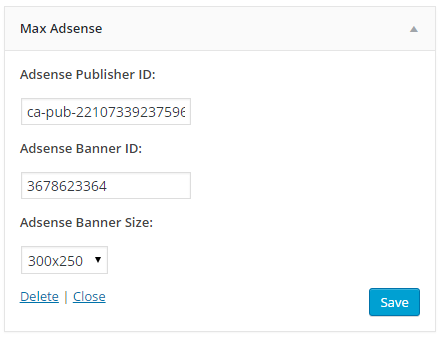
Max Adsense Widget
ਸਥਾਪਤੀਕਰਨ
This section describes how to install the plugin and get it working.
e.g.
- Upload
maxadsenseto the/wp-content/plugins/directory - Activate the plugin through the ‘Plugins’ menu in WordPress
- Admin Panel -> Appearance -> Widgets -> Max Adsense
- Add max plugin, and fill in the blanks
ਅਕਸਰ ਪੁੱਛੇ ਜਾਂਦੇ ਸਵਾਲ
- How to activate add-ons?
-
Admin Panel -> Appearance -> Widgets -> Max Adsense
- What ID’s and Size?
-
Example Adsense Code:
Adsense Publisher ID: ca-pub-22xxx33xxx96x4
Adsense Banner ID: 3x7xx23x64
Adsense Banner Size: 300×250
ਸਮੀਖਿਆਵਾਂ
There are no reviews for this plugin.
ਯੋਗਦਾਨੀ ਤੇ ਵਿਕਾਸਕਾਰ
“Max Adsense” is open source software. The following people have contributed to this plugin.
ਯੋਗਦਾਨੀ
“Max Adsense” ਦਾ ਆਪਣੀ ਭਾਸ਼ਾ ਵਿੱਚ ਅਨੁਵਾਦ ਕਰੋ।
ਵਿਕਾਸ ਕਾਰਜ ਵਿੱਚ ਰੁਚੀ ਰੱਖਦੇ ਹੋ?
Browse the code, check out the SVN repository, or subscribe to the development log by RSS.
ਤਬਦੀਲੀ-ਚਿੱਠਾ
1.0
- Attachments prepared.