

ਵੇਰਵਾ
WordPress 5.9 added a new language selector to allow users to switch languages from a dropdown on the login screen if more than one language is enabled on your WordPress installation. This plugin provides a quick and easy way to prevent this language selector from appearing.
It is a very simple plugin which is provided for ease of use: you need only to install and activate the plugin and it will prevent the language dropdown from appearing on the login screen of your site.
Alternatively, you can also achieve the same effect by adding the following line of code to the functions.php file in your theme:
add_filter( 'login_display_language_dropdown', '__return_false' );
ਸਕਰੀਨਸ਼ਾਟ
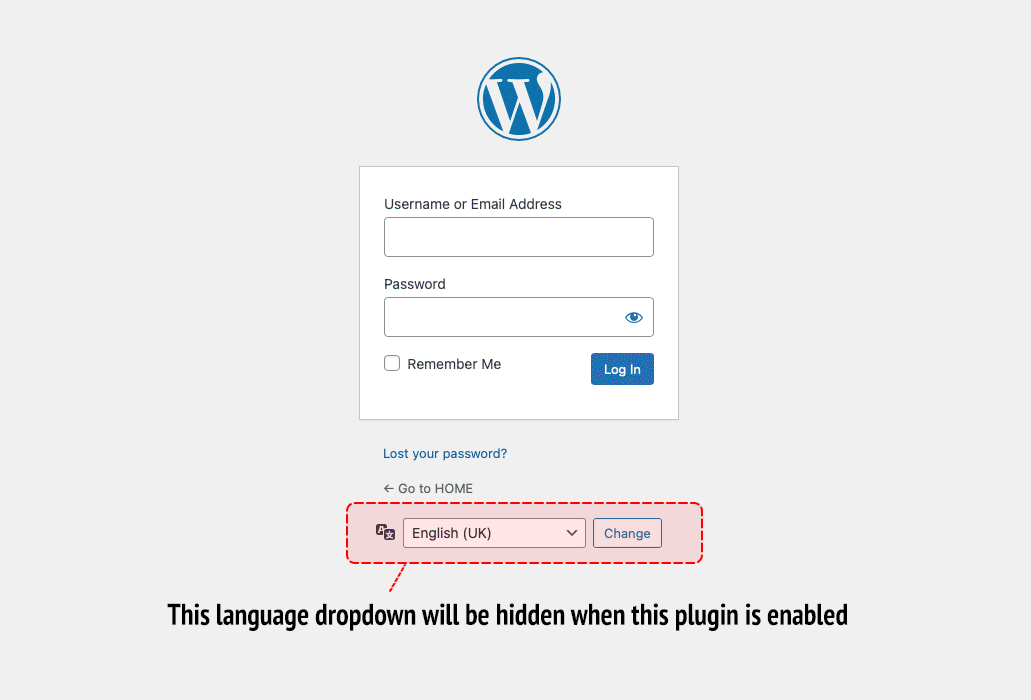
This screen shot shows the language dropdown that will be hidden when this plugin is enabled.
ਸਥਾਪਤੀਕਰਨ
- Upload the plugin package to the plugins directory of your site, or search for “Disable Login Language Selector” in the WordPress plugins directory from the Plugins section of your WordPress dashboard.
- Once uploaded or installed you must activate the plugin from the Plugins section of your WordPress dashboard.
- The language selector should no longer appear on the login screen of your site.
ਅਕਸਰ ਪੁੱਛੇ ਜਾਂਦੇ ਸਵਾਲ
-
What does this plugin do?
-
WordPress 5.9 added a new language selector to allow users to switch languages from a dropdown on the login screen if more than one language is enabled on your WordPress installation. This plugin provides a quick and easy way to prevent this language selector from appearing.
It is a very simple plugin which is provided for ease of use: you need only to install and activate the plugin and it will prevent the language dropdown from appearing on the login screen of your site.
Alternatively, you can also achieve the same effect by adding the following line of code to the
functions.phpfile in your theme:add_filter( 'login_display_language_dropdown', '__return_false' ); -
Why would I use this plugin?
-
If you have more than one language active on your website the language selector that was added in WordPress 5.9 will be visible on your login screen. If you don’t want this language selector to be visible then using this plugin will stop it from appearing.
There are several reasons why you may have more than one language active on your website but do not want the language selector to be visible to site users:
Perhaps you have a custom language selector in place already as part of an existing theme or plugin, so the WordPress language selector is not required.
Or perhaps as is common, WordPress was installed with the default language set as English (United States). In these cases enabling a subsequent language would result in there being more than one language active, for example English (United States) and English (UK), therefore enabling the language selector regardless of whether you want to have multiple language options available to site users.
-
I have installed the plugin but I still see the language selector
-
Check that the plugin has been correctly uploaded, installed and activated.
ਸਮੀਖਿਆਵਾਂ


ਯੋਗਦਾਨੀ ਤੇ ਵਿਕਾਸਕਾਰ
“Disable Login Language Selector” is open source software. The following people have contributed to this plugin.
ਯੋਗਦਾਨੀ
“Disable Login Language Selector” has been translated into 1 locale. Thank you to the translators for their contributions.
“Disable Login Language Selector” ਦਾ ਆਪਣੀ ਭਾਸ਼ਾ ਵਿੱਚ ਅਨੁਵਾਦ ਕਰੋ।
ਵਿਕਾਸ ਕਾਰਜ ਵਿੱਚ ਰੁਚੀ ਰੱਖਦੇ ਹੋ?
Browse the code, check out the SVN repository, or subscribe to the development log by RSS.
ਤਬਦੀਲੀ-ਚਿੱਠਾ
1.0.1
- No functional changes, this update simply modifies the short description in plugin file to match what is written in the readme file description
1.0
- Initial plugin build.
- Added PayPal donation link