

ਵੇਰਵਾ
AIWU turns WordPress into an AI automation hub: connect ChatGPT, Gemini, Claude and other models, build workflows like in n8n, run chatbots, generate content, control your site via MCP — all from one place.
So, here are 7 reasons people actually use AIWU:
- Your AI hub inside WordPress. Connect OpenAI, Claude, Gemini, Perplexity, DeepSeek, OpenRouter. Use your own datasets with fine-tuning and embeddings (RAG) to train and customize AI models.
- Visual Workflow Automation (n8n-style, but native). Build no-code automations with drag & drop. Connect WordPress, WooCommerce, Slack, Telegram, Gmail, Outlook, calendars, databases, webhooks and AI models. No external servers. No usage platforms. Everything runs on your site.
- AI Chatbot that knows your business. Set up in minutes, understands your business, recommends products and posts in real time — a fully customizable AI Chatbot in design, logic and tone.
- Content Generation Tools for SEO at Scale. Autoblogging from RSS, bulk article generation, field generation for posts and WooCommerce products, internal linking, and a magic AI editor inside WordPress.
- AI Forms that think. Build intelligent forms, quizzes and calculators that send user input to AI, trigger logic and power complex automation scenarios.
- MCP for ChatGPT, Claude, and more. Control your site by talking to AI. Create pages, edit posts, manage products, users and settings through MCP-enabled assistants.
- Developer API. REST, JS and PHP APIs to build your own agents, tools, integrations and custom workflows on top of AIWU.
One Powerful Plugin That Replaces Dozens:
AI Workflow Automation Builder – Build AI Agents with Drag & Drop
Automate content, marketing, support, WooCommerce and any custom process.
- Design workflows visually. Connect triggers, logic and actions in a drag & drop editor.
- Connect your tools and AI: WordPress, WooCommerce, Slack, Telegram, Gmail, Outlook, Google Calendar, Google Drive, Google Meet, Microsoft Teams, Zoom, Discord, MySQL, SMTP, WebHooks, OpenAI, Claude, Gemini, Perplexity, DeepSeek, OpenRouter and more.
👉 Learn more about Workflow Builder
💡 Browse Workflow Templates
AI ChatBot for 24/7 Customer Support & Sales
AI ChatBot that captures leads 24/7, handles 95% of support questions, and converts visitors into customers—automatically, in any language, while you sleep.
- Setup in 2 minutes. Install, add API key, launch. Works out of the box.
- Knows your business. AI ChatBot scans your website, posts and products to understand context automatically.
- Real-time recommendations. AI ChatBot suggests products and posts with beautiful cards while chatting.
- Fully customizable. Match your brand with custom colors, fonts, layout, logic and tone.
- Advanced AI training. Use Fine-Tuning and Embeddings (RAG) for higher accuracy.
- Built-in analytics. Track AI ChatBot conversations, engagement and performance.
Content & SEO Automation Tools – Create and Optimize at Scale
Generate, optimize and manage content at scale without losing quality, control or your brand voice.
- Bulk Content Generation. Create hundreds of SEO-optimized posts in one go, with full control over every field — titles, content, categories, tags, images, meta and custom fields.
- RSS Autoblogging. Automatically turn RSS feeds into SEO-optimized posts, with full control over structure, frequency and publishing.
- WooCommerce Product Content. Generate and update product titles, descriptions, images, tags, categories and reviews in bulk.
- Smart Internal Linking. Automatically add contextual paragraphs with embedded internal links to improve site structure, navigation and SEO.
- Bulk Update Existing Posts. Rewrite or fill missing fields (titles, excerpts, meta, images, tags, custom fields) across hundreds of posts.
- AI Copilot in the Editor. Rewrite, expand, shorten, translate and improve text directly inside the WordPress editor with one click.
AI Forms – Build Smart Forms That Think and Decide
Turn static forms into intelligent experiences that understand user input, make decisions with AI and drive conversions. Use AI forms for lead qualification, surveys, ROI calculators, onboarding and support scenarios.
- Multiple field types. Text, number, email, select, checkbox, radio, file upload, textarea and hidden fields — everything you need to build AI forms, quizzes and calculators.
- AI-powered logic. Analyze answers, generate personalized results, recommendations and next steps.
- Conditional flows and chaining. Show or hide fields, connect multi-step forms and build quizzes, calculators and assessments.
MCP (Model Context Protocol) Integration
Connect Claude, ChatGPT or any MCP-compatible AI to manage your WordPress site through natural language.
- Works with any MCP-compatible AI provider. Claude AI, ChatGPT, and other assistants that support MCP.
- 35+ WordPress tools: Create Posts, Manage Pages, Edit Products, Upload Media, Control Users, Update Taxonomy, Configure Settings and more.
- 2 min setup. Enable MCP in AIWU Settings Create connector in your AI Start chatting.
👉 Learn more about MCP Integration
AI Providers & API Settings – Full Control, No Extra Fees
AIWU works with your own API keys, so you choose the models, control costs, and avoid usage limits or markups.
- OpenAI (ChatGPT)
- Google Gemini
- Claude AI
- Perplexity AI
- DeepSeek
- OpenRouter
Build it your way, connect the AI you trust, and let your WordPress site run smarter every day 🧡
ਸਕਰੀਨਸ਼ਾਟ

Workspace 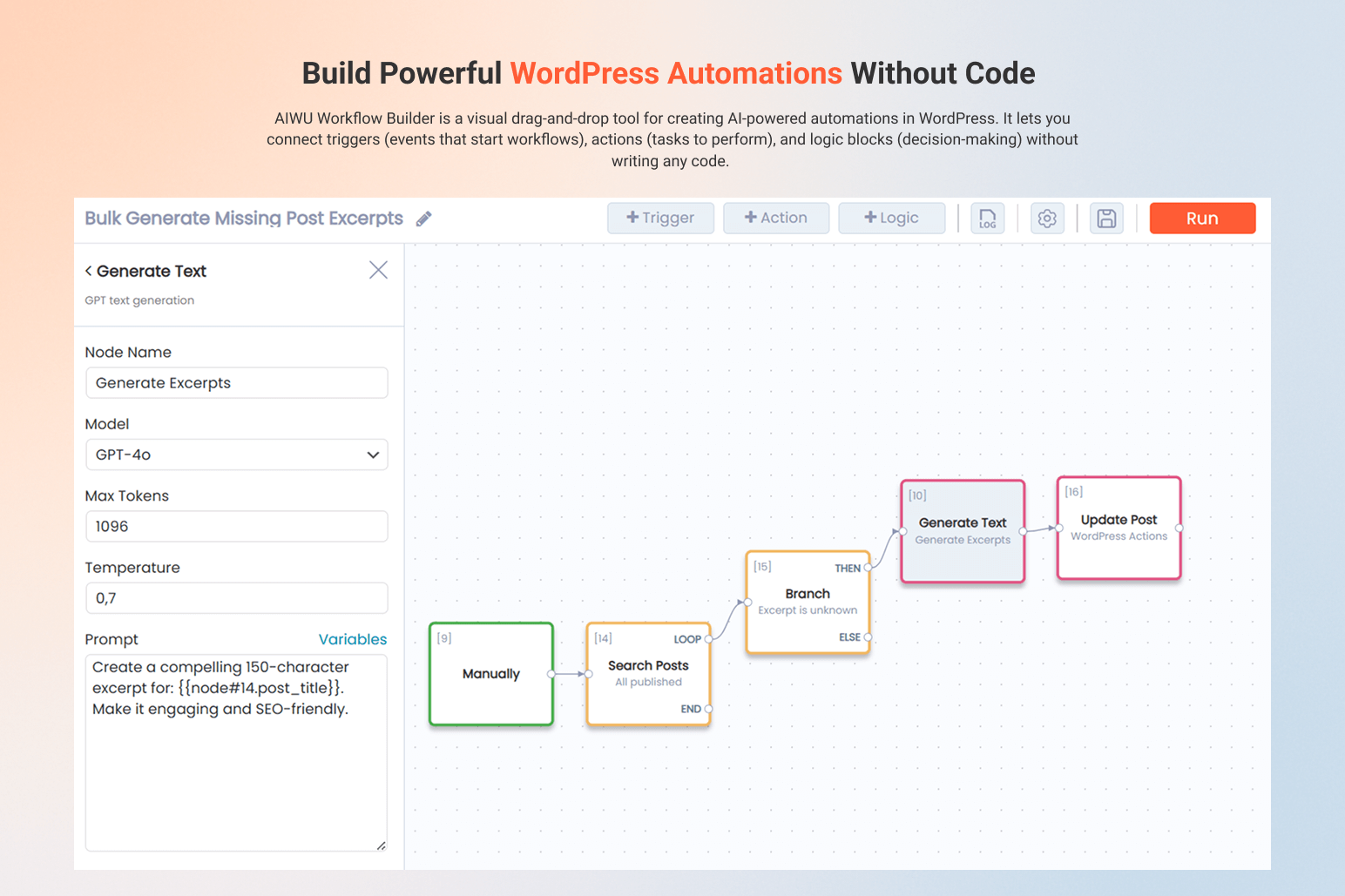
AI Workflow Builder 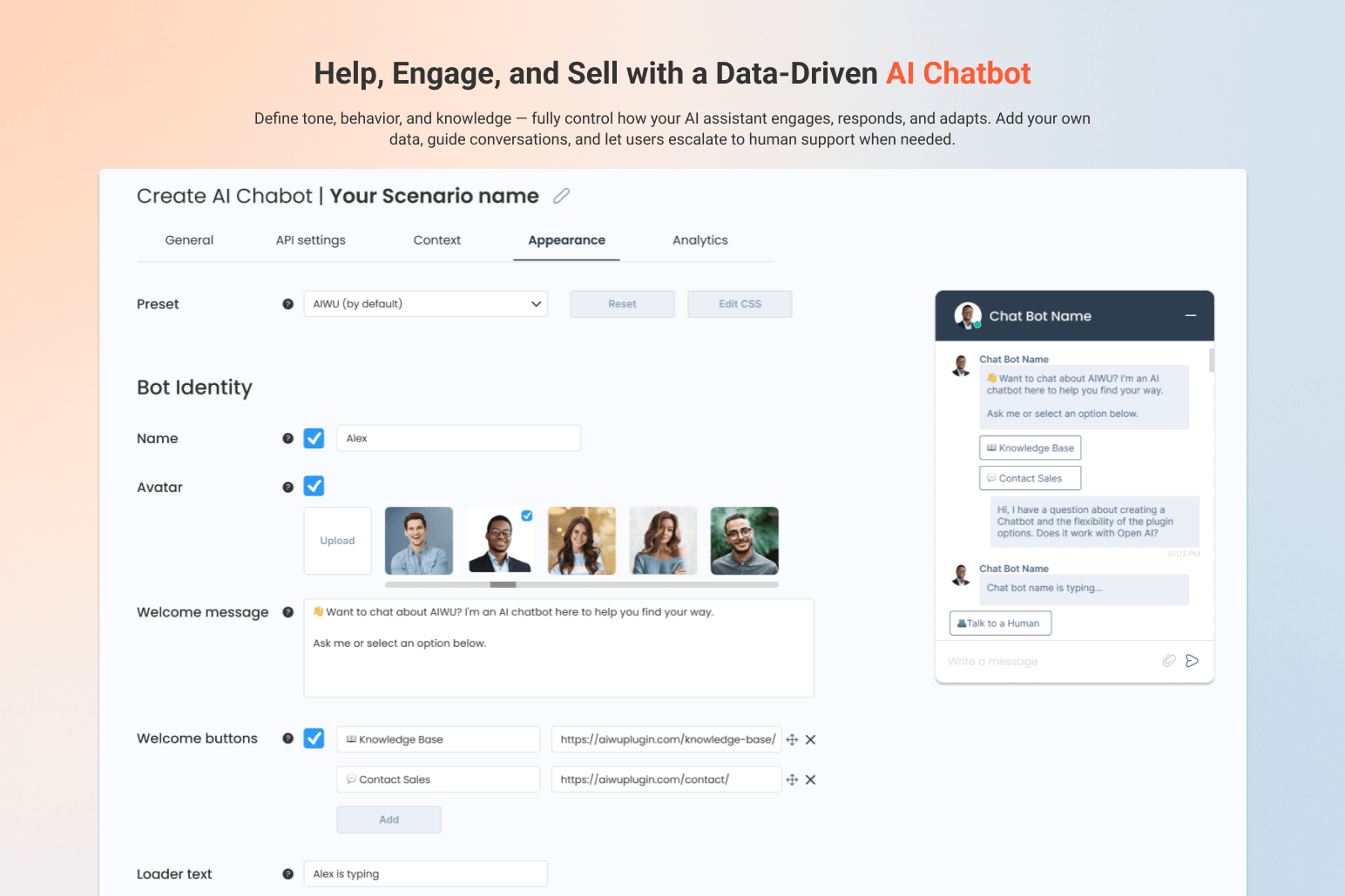
AI ChatBot 
Auto Content Creation – RSS-Based 
WooCommerce AI Product Fields Generator 
AI SEO Auto Linker – Smart Content Crosslinking 
AI ChatBot – Context Setup 
AI Image Generator – Create Beautiful Images Automatically 
AI Bulk Post Editor – Refresh & Optimize Any Fields 
AI Copilot – Instantly Enhance, Fix, and Rewrite Text Inside WordPress 
AI Provider Control – Use Your Own API Keys, No Limits 
Scenarios – Full Control Over All AI Operations 
Custom Prompts – Full Control with Dynamic Variables 
Analytics – Track Token Usage, Costs, and Performance 
AI Forms 
MCP Integration
ਸਥਾਪਤੀਕਰਨ
A) VIA FTP
A download zip archive with AIWU – Workflow Automation, AI Chatbot & Content Generator plugin
Extract files
Copy the folder with the plugin
Open via FTP folder \wp-content\plugins\
Paste plugin folder into here
Go to admin panel => Plugins => AIWU – Workflow Automation, AI Chatbot & Content Generator press activate
B) DIRECT UPLOAD VIA ADMIN AREA
A download zip archive with plugin
Go to admin panel => Plugins => Add new
Choose the archive with a plugin and upload it
Wait until you get the notification installation went successfully
Press Activate button
C) VIA WORDPRESS REPOSITORY
Navigate to admin panel => Plugins => Add new
Type “AIWU – Workflow Automation, AI Chatbot & Content Generator” in the search field
Choose our plugin from the list and click “Install”
Wait until you get the notification installation went successfully
Press Activate button
ਅਕਸਰ ਪੁੱਛੇ ਜਾਂਦੇ ਸਵਾਲ
-
What is AIWU?
-
AIWU is an AI automation platform for WordPress that combines workflow automation, AI chatbots, content generation, AI forms, MCP integration and multi-model AI support in one plugin.
-
Is AIWU an AI chatbot plugin for WordPress?
-
Yes. AIWU includes a fully customizable AI Chatbot that can be trained on your content, recommend products, answer questions, capture leads and support visitors in real time.
-
How does AIWU recommend products and posts in the chatbot?
-
AIWU uses function calling and real-time context from your WordPress and WooCommerce data. The AI Chatbot can search products, posts, categories and metadata, call internal functions, and return relevant recommendations as interactive cards directly in the conversation. This allows the chatbot to act as a true sales and content assistant, not just a text responder.
-
Can I build automation workflows like in n8n or Zapier?
-
Yes. AIWU includes a visual drag & drop Workflow Builder (n8n-style) that runs natively inside WordPress and lets you automate content, WooCommerce, marketing, support and custom processes. Learn more about Workflow Builder
-
Which AI models does AIWU support?
-
AIWU works with OpenAI (ChatGPT), Claude, Google Gemini, Perplexity, DeepSeek and OpenRouter. You can use your own API keys and choose different models for different tasks and workflows.
-
Can I use my own data to train the AI?
-
Yes. AIWU supports fine-tuning and embeddings (RAG), so you can train AI models on your own website content, documents and datasets.
-
What is MCP and how does it work with WordPress?
-
MCP (Model Context Protocol) allows AI assistants like ChatGPT or Claude to directly control your WordPress site via natural language: create pages, edit posts, manage WooCommerce products, users and settings. Learn more about MCP Integration
-
Can AIWU generate content and automate SEO?
-
Yes. AIWU can generate posts in bulk, run RSS autoblogging, optimize content, add internal links, update existing posts and automate WooCommerce product content.
-
Does AIWU work with WooCommerce?
-
Yes. You can generate and update product titles, descriptions, images, categories, tags, reviews and automate WooCommerce workflows with AI and visual automation.
-
Can I create AI-powered forms and quizzes?
-
Yes. AIWU includes an AI Forms Builder to create smart forms, surveys, quizzes and calculators with conditional logic and AI-generated results. Learn more about AI Forms
-
Is AIWU a SaaS or does it run inside WordPress?
-
AIWU runs entirely inside your WordPress site. There is no external SaaS, no middle platform and no usage credits from us. You only use your own AI provider API keys.
-
Is AIWU suitable for developers?
-
Yes. AIWU provides REST API, JavaScript API, PHP helpers and MCP support to build custom AI agents, automations and integrations. Explore Developer API
-
Can I build AI agents with AIWU?
-
Yes. Using the Workflow Builder, MCP integration and Developer API, you can create AI agents that interact with your site, tools and data.
-
Does AIWU replace multiple plugins?
-
Yes. AIWU combines AI chatbot, workflow automation, content generation, SEO automation, AI forms, WooCommerce AI and MCP into one unified platform.
-
Do I need coding skills to use AIWU?
-
No. Most features are no-code and work through visual builders and templates. Developers can extend everything using APIs if needed.
ਸਮੀਖਿਆਵਾਂ


ਯੋਗਦਾਨੀ ਤੇ ਵਿਕਾਸਕਾਰ
“AIWU – Workflow Automation, AI Chatbot & Content Generator” is open source software. The following people have contributed to this plugin.
ਯੋਗਦਾਨੀ
“AIWU – Workflow Automation, AI Chatbot & Content Generator” ਦਾ ਆਪਣੀ ਭਾਸ਼ਾ ਵਿੱਚ ਅਨੁਵਾਦ ਕਰੋ।
ਵਿਕਾਸ ਕਾਰਜ ਵਿੱਚ ਰੁਚੀ ਰੱਖਦੇ ਹੋ?
Browse the code, check out the SVN repository, or subscribe to the development log by RSS.
ਤਬਦੀਲੀ-ਚਿੱਠਾ
1.4.4 (16/01/2026)
– AI ChatBot: Real-time product and post recommendations with Function Calling
– Workflow Builder: New integrations (Google Drive, Google Calendar, Google Meet, Microsoft Teams, Zoom)
– OpenRouter AI provider support added
– Performance improvements and bug fixes
1.4.2 (13/11/2025)
– Code fix
– Webhook block
1.4.1 (10/11/2025)
– New AI models
– New automation blocks
1.4.0 (29/10/2025)
– Workflow AI Builder (n8n analog for WP)
1.3.3 (20/10/2025)
– Claude and GPT MCP integration info
1.3.1 (01/09/2025)
– New interface and form builder bug fixes
1.2.12 (21/08/2025)
– AI form integration
– Claude MCP bug fixed
1.2.6 (05/05/2025)
– Minor issues fixed
1.2.5 (04/27/2025)
– Magic Wand added
1.2.4 (04/10/2025)
– Fix AI Image Generation
– ChatBot style feature added
1.2.3 (03/27/2025)
– Add DeepSeek Integration
– Add WooCommerce Fields Generation
1.2.0 (03/11/2025)
– Add: AI ChatBot Live Chat
– Compatible with latest JS
– Minor issues fix
1.1.0 (02/04/2025)
– Add: Smart AI Content Crosslinking
– Add: Bulk Field Generation for Existing Posts
– Add: Alt text generation