
Description
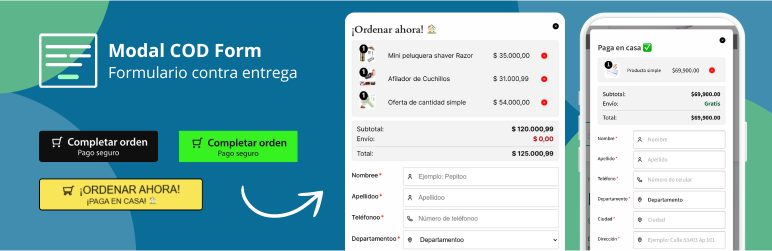
Modal COD Form for WooCommerce transforms the traditional WooCommerce checkout process into a simplified experience using a modal form. Ideal for stores handling Cash on Delivery (COD) payments and dropshippers.
Main features
- Customizable modal form – Replaces the Add to cart” button with a checkout modal
- Compatible with simple and variable products – Works with all WooCommerce product types
- Full integration with WooCommerce – Maintains all native cart and order functionality
- Flexible shipping – Supports free shipping or native WooCommerce methods
- Shortcodes included – Add purchase buttons on any page
- Full customization – Fully customizable colors, texts, styles, and layout
- Optional fields – Enable/disable fields according to your needs
- Menu cart icon – Shortcode to display a cart icon in navigation
Included functionalities
- Checkout form in modal
- Customizable customer information fields
- Integration with WooCommerce shipping system
- Landing page shortcode:
[modalcodf_add_to_cart_button id="123"] - Menu cart icon shortcode:
[modalcodf_menu_cart] - Support for terms and conditions
- Button and style customization
- Automatic base country configuration
Use cases
- Dropshipping – Optimized form for fast conversion
- COD Stores – Perfect for Cash on Delivery payments
- Landing pages – Use shortcodes to create sales pages
- Simplified Checkout – Reduces steps in the purchasing process
Configuration
- Install and activate WooCommerce
- Install and activate Modal COD Form
- Go to WooCommerce > Settings > COD Form
- Customize your form according to your needs
- Ready to use!
Available Shortcodes
Purple button for landing pages:
[modalcodf_add_to_cart_button id=”123″]
Menu cart icon:
[modalcodf_menu_cart color=”#000000″]
Technical Support
For technical support and suggestions, contact us at [email protected]
Support
To get technical support or report issues:
- Email: [email protected]
- Detailed description: Always provide a detailed description of the problem
- System information: Include WordPress version, WooCommerce version, and theme used
Privacy Policy
This plugin does not collect, store, or transmit any personal user data. All form information is processed solely through WooCommerce following its standard privacy policies.
Additional Info
This plugin was developed specifically to simplify the checkout process for stores handling Cash on Delivery, providing an optimized experience for both sellers and buyers.
Developed by Cristian Leguizamón – crleguizamon
Screenshots

Purchase form button 
Modal COD Form 
Modal COD Form with states 
General settings section 
Design settings section 
Design settings section 2 
Button design settings section 
Form text settings section 
Shopping cart settings section 
Shortcode section 
Custom purchase button 
Modal COD Form footer
Installation
Automatic Installation
- Go to Plugins > Add New in your WordPress dashboard
- Search for Modal COD Form for woocommerce”
- Install and activate the plugin
- Go to WooCommerce > Settings > COD Form to configure
Manual Installation
- Download the plugin ZIP file
- Go to Plugins > Add New > Upload Plugin
- Select the ZIP file and click Install Now”
- Activate the plugin
- Go to WooCommerce > Settings > COD Form to configure
Requirements
- WordPress 5.0 or higher
- WooCommerce 3.0 or higher
- PHP 7.4 or higher
FAQ
-
Does it work with all WordPress themes?
-
Yes, the plugin is designed to work with any theme that is compatible with WooCommerce. The modal styles are independent of the theme.
-
Can I use the plugin without WooCommerce?
-
No, this plugin requires WooCommerce to function correctly as it extends its functionality.
-
Does it work with variable products?
-
Yes, the plugin is fully compatible with WooCommerce variable products. The modal will display the corresponding variation options.
-
Can I customize the form design?
-
Absolutely. You can customize colors, texts, fields, layout, and much more from the settings page.
-
How do I get a product ID for shortcodes?
-
Go to WooCommerce > Products, select the desired product. In the browser URL you will see something like
post=123. The number123is the product ID. -
Does the plugin affect my site’s SEO?
-
No, the plugin does not affect SEO. It only modifies the checkout experience while keeping the entire WooCommerce structure intact.
-
Can I disable form fields?
-
Yes, in the settings you can enable/disable fields such as email, address 2, order notes, etc.
Reviews


Contributors & Developers
“Modal COD Form for woocommerce” is open source software. The following people have contributed to this plugin.
Contributors
“Modal COD Form for woocommerce” has been translated into 1 locale. Thank you to the translators for their contributions.
Translate “Modal COD Form for woocommerce” into your language.
Interested in development?
Browse the code, check out the SVN repository, or subscribe to the development log by RSS.
Changelog
1.0.5.2
- Added: Option to disable Last Name field in payment form
- Added: Option to disable State field in payment form
- Added: Option to disable City field in payment form
- Improved: JavaScript validation now skips shipping method selection when State field is disabled
- Improved: Automatic free shipping when State field is disabled
- Improved: Backend validation updated to handle optional Last Name, State, and City fields
- Improved: Order creation now properly handles missing optional fields
- Added: JavaScript internationalization support for error messages
- Added: Translatable strings for Please select a shipping method” and Please select the product options”
- Updated: Translation file (.pot) with new translatable strings
- Fixed: Shipping method validation error when State and City fields are disabled
- Improved: Form data handling in JavaScript to conditionally include optional fields
1.0.5.1
- Fixed: Translation strings in source code changed from Spanish to English for proper internationalization
- Added: District field section in text customization settings
- Improved: Translation consistency across the plugin
1.0.5
- Fixed: Fatal error with payment gateways (MercadoPago, PayPal, etc.) during early initialization
- Interface improvements in settings
- Code optimization for better performance
- Minor bug fixes
- Documentation updates
1.0.4
- Initial release
- Basic modal form for checkout
- WooCommerce integration
- Included shortcodes
- Design customization