opensource.google.com

Menu
Showing posts with label API. Show all posts

Producer java library for Data Lineage is now open source

Tuesday, January 28, 2025

Integrating OpenLineage producers with GCP Lineage just got a lot easier


What is Data Lineage

Data Lineage is a GCP feature that allows tracking data movement. This tool helps data owners and analysts detect anomalies in data flows, find connections between data sources and verify the potential consequences of planned changes in data pipelines.

Lineage is injected automatically for some Google Cloud products (BigQuery, Cloud Data Fusion, Cloud Composer, Dataproc, Vertex AI). That means, if Lineage integration with any of those products is enabled in the projects, data movements coming from executing jobs by these products will be reported to GCP Lineage.

For custom integrations, the API can be used to report and fetch lineage.

After injecting, lineage can be viewed in the Google Cloud console (available from DataCatalog UI, BigQuery UI, Vertex UI). There are two representations: graph view, with data sources as nodes and data movements as edges, and list view, a tabular representation. Lineage information can also be fetched from the API.

More information is available in the documentation.


GCP Lineage information model

We describe data flows using the following concepts:

  • Process is a definition of some data transformation. For example, a SQL or Spark script.
  • Run is an execution of a Process.
  • Lineage Event is a data transformation event. It is reported in context of a Run.
  • A Link represents a connection between two data sources, when data in the link’s Target depends on its Source. A Lineage Event contains a list of Links.

OpenLineage support

OpenLineage is an open standard for reporting lineage information. It unifies lineage reporting between systems, which means the events generated in this format can be consumed by any product supporting it. This leads to more flexibility: adding or replacing a lineage producer does not imply changing the consumer, and vice versa.

OpenLineage format is adopted by a number of lineage producers and consumers, meaning there is already tooling available to report lineage from/to those systems. GCP Lineage is one of those consumers: users can report events in OpenLineage format, see the resulting lineage on the UI, and query it via the API.

OpenLineage is the preferred method for reporting lineage in GCP Lineage. It is used by the Dataproc lineage integration. To find out more about sending OpenLineage events to GCP Lineage refer to the documentation.

After injecting lineage in OpenLineage format, it can be accessed in the same way as if it was injected via other API methods or automatically: from the Google Cloud console or the API.


Why producer library

The GCP Lineage producer library is an extension of the client library. Client libraries are recommended for calling Cloud APIs programmatically. They handle low level API call details, leaving the necessary user code simpler and shorter.

The producer library further simplifies integration by providing ready to use code needed to call the API from Java. It adds additional functionality such as synchronous and asynchronous clients, translating OpenLineage JSON messages to the API friendly format, error handling etc.

Using the producer library, all the code needed to send a request to GCP Lineage API is:

SyncLineageProducerClient client = SyncLineageProducerClient.create();
ProcessOpenLineageRunEventRequest request =
        ProcessOpenLineageRunEventRequest.newBuilder()
            .setParent(parent)
            .setOpenLineage(openLineageMessage)
            .build();
client.processOpenLineageRunEvent(request);

The field openLineageMessage here is a protobuf Struct that includes information about job execution, inputs and outputs and other metadata. The object model is described in the documentation. An example message is:

{
  "eventType": "START",
  "eventTime": "2023-04-04T13:21:16.098Z",
  "run": {
    "runId": "502483d6-3e3d-474f-9380-da565eaa7516",
    "facets": {
       "spark_properties": {
        "_producer": "https://github.com/OpenLineage/OpenLineage/tree/1.22.0/integration/spark",
        "_schemaURL": "https://openlineage.io/spec/2-0-2/OpenLineage.json#/$defs/RunFacet",
        "properties": {
          "spark.master": "yarn",
          "spark.app.name": "sparkJobTest.py"
        }
      }
    }
  },
  "job": {
    "namespace": "project-name",
    "name": "cluster-name",
    "facets": {
    "jobType": {
        "_producer": "https://github.com/OpenLineage/OpenLineage/tree/1.22.0/integration/spark",
        "_schemaURL": "https://openlineage.io/spec/facets/2-0-3/JobTypeJobFacet.json#/$defs/JobTypeJobFacet",
        "processingType": "BATCH",
        "integration": "SPARK",
        "jobType": "SQL_JOB"
      },

    }
  },
  "inputs": [
    {
      "namespace": "bigquery",
      "name": "project.dataset.input_table",
    }],
  "outputs": [
   {
      "namespace": "bigquery",
      "name": "project.dataset.output_table",
    }],
  "producer": "https://github.com/OpenLineage/OpenLineage/tree/0.18.0/integration/spark",
  "schemaURL": "https://openlineage.io/spec/1-0-5/OpenLineage.json#/$defs/RunEvent"
}

Learn more about building an OpenLineage message.


Best Practices for Constructing OpenLineage Messages

The openLineageMessage should follow the OpenLineage format. The fields that are required for correct parsing by the GCP Lineage API are:

job

mapped to Process

job.namespace

used to construct Process name

job.name

used to construct Process name

run

mapped to Run

run.runId

used to construct Run name

producer

URI identifying the producer of this metadata

eventTime

time of the data movement

schemaURL

URL pointing to the schema definition for this message

In addition to those, the fields used to create lineage are:

eventType

corresponds to the status of the Run

inputs

mapped to sources of links. Must be specified according to the naming conventions

outputs

mapped to targets of links. Must be specified according to the naming conventions

The GCP Lineage API supports OpenLineage major versions 1 and 2. For more information please refer to the documentation.


How to access GCP Lineage?

The code is now publicly available on GitHub. The library is also published to Maven.


GcpLineageTransport

To simplify integration with GCP Lineage, we offer GcpLineageTransport. It is available on the OpenLineage GitHub repository and is built to a separate maven artifact. It is built on top of the producer library mentioned above.

Using the transport minimises the code for sending events to GCP Lineage. The GcpLineageTransport can be configured as the event sink for any existing OpenLineage producer such as Airflow, Spark, and Flink. Find more information and examples on GCP Lineage.

By Mary Idamkina – Data Lineage

PJRT: Simplifying ML Hardware and Framework Integration

Monday, May 8, 2023

Infrastructure fragmentation in Machine Learning (ML) across frameworks, compilers, and runtimes makes developing new hardware and toolchains challenging. This inhibits the industry’s ability to quickly productionize ML-driven advancements. To simplify the growing complexity of ML workload execution across hardware and frameworks, we are excited to introduce PJRT and open source it as part of the recently available OpenXLA Project.

PJRT (used in conjunction with OpenXLA’s StableHLO) provides a hardware- and framework-independent interface for compilers and runtimes. It simplifies the integration of hardware with frameworks, accelerating framework coverage for the hardware, and thus hardware targetability for workload execution.

PJRT is the primary interface for TensorFlow and JAX and fully supported for PyTorch, and is well integrated with the OpenXLA ecosystem to execute workloads on TPU, GPU, and CPU. It is also the default runtime execution path for most of Google’s internal production workloads. The toolchain-independent architecture of PJRT allows it to be leveraged by any hardware, framework, or compiler, with extensibility for unique features. With this open-source release, we're excited to allow anyone to begin leveraging PJRT for their own devices.

If you’re developing an ML hardware accelerator or developing your own compiler and runtime, check out the PJRT source code on GitHub and sign up for the OpenXLA mailing list to quickly bootstrap your work.

Vision: Simplifying ML Hardware and Framework Integration

We are entering a world of ambient experiences where intelligent apps and devices surround us, from edge to the cloud, in a range of environments and scales. ML workload execution currently supports a combinatorial matrix of hardware, frameworks, and workflows, mostly through tight vertical integrations. Examples of such vertical integrations include specific kernels for TPU versus GPU, specific toolchains to train and serve in TensorFlow versus PyTorch. These bespoke 1:1 integrations are perfectly valid solutions but promote lock-in, inhibit innovation, and are expensive to maintain. This problem of a fragmented software stack is compounded over time as different computing hardware needs to be supported.

A variety of ML hardware exists today and hardware diversity is expected to increase in the future. ML users have options and they want to exercise them seamlessly: users want to train a large language model (LLM) on TPU in the Cloud, batch infer on GPU or even CPU, distill, quantize, and finally serve them on mobile processors. Our goal is to solve the challenge of making ML workloads portable across hardware by making it easy to integrate the hardware into the ML infrastructure (framework, compiler, runtime).

Portability: Seamless Execution

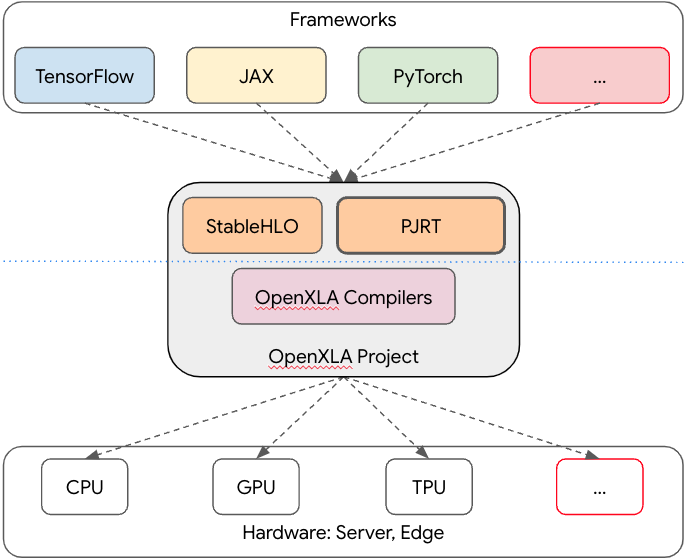
The workflow to enable this vision with PJRT is as follows (shown in Figure 1):

  1. The hardware-specific compiler and runtime provider implement the PJRT API, package it as a plugin containing the compiler and runtime hooks, and register it with the frameworks. The implementation can be opaque to the frameworks.
  2. The frameworks discover and load one or multiple PJRT plugins as dynamic libraries targeting the hardware on which to execute the workload.
  3. That’s it! Execute the workload from the framework onto the target hardware.

The PJRT API will be backward compatible. The plugin would not need to change often and would be able to do version-checking for features.

Diagram of PJRT architecture
Figure 1: To target specific hardware, provide an implementation of the PJRT API to package a compiler and runtime plugin that can be called by the framework.

Cohesive Ecosystem

As a foundational pillar of the OpenXLA Project, PJRT is well-integrated with projects within the OpenXLA Project including StableHLO and the OpenXLA compilers (XLA, IREE). It is the primary interface for TensorFlow and JAX and fully supported for PyTorch through PyTorch/XLA. It provides the hardware interface layer in solving the combinatorial framework x hardware ML infrastructure fragmentation (see Figure 2).

Diagram of PJRT hardware interface layer
Figure 2: PJRT provides the hardware interface layer in solving the combinatorial framework x hardware ML infrastructure fragmentation, well-integrated with OpenXLA.

Toolchain Independent

PJRT is hardware and framework independent. With framework integration through the self-contained IR StableHLO, PJRT is not coupled with a specific compiler, and can be used outside of the OpenXLA ecosystem, including with other proprietary compilers. The public availability and toolchain-independent architecture allows it to be used by any hardware, framework or compiler, with extensibility for unique features. If you are developing an ML hardware accelerator, compiler, or runtime targeting any hardware, or converging siloed toolchains to solve infrastructure fragmentation, PJRT can minimize bespoke hardware and framework integration, providing greater coverage and improving time-to-market at lower development cost.

Driving Impact with Collaboration

Industry partners such as Intel and others have already adopted PJRT.

Intel

Intel is leveraging PJRT in Intel® Extension for TensorFlow to provide the Intel GPU backend for TensorFlow and JAX. This implementation is based on the PJRT plugin mechanism (see RFC). Check out how this greatly simplifies the framework and hardware integration with this example of executing a JAX program on Intel GPU.

"At Intel, we share Google's vision of modular interfaces to make integration easier and enable faster, framework-independent development. Similar in design to the PluggableDevice mechanism, PJRT is a pluggable interface that allows us to easily compile and execute XLA's High Level Operations on Intel devices. Its simple design allowed us to quickly integrate it into our systems and start running JAX workloads on Intel® GPUs within just a few months. PJRT enables us to more efficiently deliver hardware acceleration and oneAPI-powered AI software optimizations to developers using a wide range of AI Frameworks." - Wei Li, VP and GM, Artificial Intelligence and Analytics, Intel.

Technology Leader

We’re also working with a technology leader to leverage PJRT to provide the backend targeting their proprietary processor for JAX. More details on this to follow soon.

Get Involved

PJRT is available on GitHub: source code for the API and a reference openxla-pjrt-plugin, and integration guides. If you develop ML frameworks, compilers, or runtimes, or are interested in improving portability of workloads across hardware, we want your feedback. We encourage you to contribute code, design ideas, and feature suggestions. We also invite you to join the OpenXLA mailing list to stay updated with the latest product and community announcements and to help shape the future of an interoperable ML infrastructure.

Acknowledgements

Allen Hutchison, Andrew Leaver, Chuanhao Zhuge, Jack Cao, Jacques Pienaar, Jieying Luo, Penporn Koanantakool, Peter Hawkins, Robert Hundt, Russell Power, Sagarika Chalasani, Skye Wanderman-Milne, Stella Laurenzo, Will Cromar, Xiao Yu.

By Aman Verma, Product Manager, Machine Learning Infrastructure

How to integrate your web app with Google Ads

Tuesday, March 15, 2022

TL;DR: You can now have a web application integrated with Google Ads in just a few minutes!

Google Ads
Google Ads is an online advertising platform where advertisers can create and manage their Google marketing campaigns. The Google Ads API is the modern programmatic interface to Google Ads and the next generation of the AdWords API. It enables developers to interact directly with the Google Ads platform, vastly increasing the efficiency of managing large or complex Google Ads accounts and campaigns.

A typical use case is when a company wants to offer Google ads natively on their platform to their users. For example, customers who have an online store with Shopify can promote their business using Google ads, with just a few clicks and without needing to go to the Google Ads platform. They’re able to do it directly on Shopify’s platform—the Google Ads API makes this possible.

Demo App
Francisco Blasco, Strategic Technical Solutions Manager at Google, designed and built an open source web application that is integrated with Google Ads and Business Profile (aka Google My Business).

Anyone can use the app, called Fran Ads, to save significant time on product development. Just follow the simple installation steps in the README files (frontend README file and backend README file) on the GitHub repo! The app uses React for the frontend, and Django for the backend; two of the most popular web frameworks.

App's Logo


Check out a product demo here! You can have this app running in your local machine in a few minutes. To learn how, check out the video tutorial.

Blasco acts as an external Product Manager for Google’s strategic partners, driving the entire product development lifecycle. He created this project to help Google’s partners and businesses seeking to offer Google Ads to their users.

The goal is to accelerate the Google Ads integration process and decrease associated development costs. Some companies are using Fran Ads to see what an integration looks like, while others are using the technical guide to learn how to start using the Google Ads API.

In general, companies can use Fran Ads as an SDK to begin working with elements within the Google Ads API, and serve as a guidance system for integrating with Google. This project will minimize the number of times the wheel needs to be reinvented, accelerating innovation and facilitating adoption. Developers can clone the code repositories, follow the steps, and have a web app integrated with Google Ads in just a few minutes. They can adapt and build on top of this project, or they can just use the functions they need for the features they want to develop


App Architecture

Furthermore, you will learn how to create credentials to consume Google APIs; specifically, the README files show how to create a project on Google Cloud Platform (GCP), and how to set it up correctly so a web app can consume Google Ads API and Business Profile APIs.

Also, you will learn how refresh tokens work for Google APIs, and how to manage them for your web application.

Francisco wrote a detailed technical guide explaining how to build every feature of the app. Some of the most important features are:
        1. Create a new Google Ads account
        2. Link an existing Google Ads account
        3. OAuth authentication & authorization
        4. Refresh token management
        5. List of Google Ads accounts associated with Google account
        6. Reporting on performance for all campaign types
        7. Create Smart Campaign (automated ads on Google and across the web)
        8. Edit Smart Campaign settings

As you can see from the list above, the app will create Smart Campaigns — a simplified, automated campaign designed for new advertisers and SMBs

Google made public the suggestion services through the Google Ads API. Fran Ads uses those services to recommend keyword themes, headlines & descriptions for the ad, and budget. These recommendations are specific for each advertiser, depending on several factors such as type of business, location, and keyword themes.


An example of three Google recommendations for an advertiser.


The image above shows the final step of creating a Smart Campaign on Fran Ads. In this step, users have to set a daily budget for the campaign. Not only will you receive recommendations for the budget, but an estimate of how many ad clicks you will get per month. This is a great feature for users who are new to digital marketing and aren’t aware of their spending needs.

You can also see an alert message that the budget can be changed anytime, so users can pause spending on the campaign. This is important because many new users, especially SMBs, have doubts about spending on something new. Therefore, it is important to communicate to them that the decision they are making at that moment is not set in stone.

When you start using Fran Ads, you will see there is guidance so users complete the tasks they want.


Guidance on how to complete tasks based on Google’s best practices.


Furthermore, the app is designed based on Google’s best practices. For example, when users are creating a Smart Campaign, in step three (see the above image) they need to select keyword themes (group of keywords). If you choose “bakery” as the keyword theme, your ad is eligible to show when people search for “bakery near me”, “local bakery”, and “cake shop”.

Google’s best practices suggest that advertisers use between seven and ten keyword themes per campaign. Therefore, Fran Ads is designed for users to select up to seven keyword themes. Refer to the image of step three when creating a Smart Campaign on Fran Ads. However, you can set it to ten if you like.

The technical guide also provides:

        1. Production-ready code for both the frontend and backend
        2. Engineering flow diagrams
        3. Best practices
        4. High-fidelity mockups
        5. App architecture and structure diagrams
        6. Workarounds to current bugs on Google Ads API v9
        7. Important information on how to handle important tasks necessary for integrating your platform with Google Ads
        8. Help with the design strategy for the UX and design elements of the UI.

Important resources

See below the list summarizing the important resources that will help you integrate with Google Ads easier, faster, and better.
        1. Frontend repo: all the code for the frontend of Fran Ads.
        2. Backend repo: all the code for the backend of Fran Ads.
        3. Technical guide: 3 sections: ‘Before Starting’, ‘Configurations & Installation’, and ‘Build web              app’. In section 3, you have explanations on how to build all the features of the app.
        4. Product demo: 15-minute demo of Fran Ads showing many core features.
        5. Video tutorial: 17-minute tutorial on how to set up and run Fran Ads.


By Francisco Blasco – Launch, Channel Partners

The API Registry API

Friday, January 8, 2021

We’ve found that many organizations are challenged by the increasing number of APIs that they make and use. APIs become harder to track, which can lead to duplication rather than reuse. Also, as APIs expand to cover an ever-broadening set of topics, they can proliferate different design styles, at times creating frustrating inefficiencies.

To address this, we’ve designed the Registry API, an experimental approach to organizing information about APIs. The Registry API allows teams to upload and share machine-readable descriptions of APIs that are in use and in development. These descriptions include API specifications in standard formats like OpenAPI, the Google API Discovery Service Format, and the Protocol Buffers Language.

An organized collection of API descriptions can be the foundation for a wide range of tools and services that make APIs better and easier to use.
  • Linters verify that APIs follow standard patterns
  • Documentation generators provide documentation in consistent, easy-to-read, accessible formats
  • Code generators produce API clients and server scaffolding
  • Searchable online catalogs make everything easier to find
But perhaps most importantly, bringing everything about APIs together into one place can accelerate the consistency of an API portfolio. With organization-wide visibility, many find they need less explicit governance even as their APIs become more standardized and easy to use.

The Registry API is a gRPC service that is formally described by Protocol Buffers and that closely follows the Google API Design Guidelines at aip.dev. The Registry API description is annotated to support gRPC HTTP/JSON transcoding, which allows it to be automatically published as a JSON REST API using a proxy. Proxies also enable gRPC web, which allows gRPC calls to be directly made from browser-based applications, and the project includes an experimental GraphQL interface.

We’ve released a reference implementation that can be run locally or deployed in a container with Google Cloud Run or other container-based services. It stores data using the Google Cloud Datastore API or a configurable relational interface layer that currently supports PostgreSQL and SQLite.

Following AIP-181, we’ve set the Registry API’s stability level as "alpha," but our aim is to make it a stable base for API lifecycle applications. We’ve open-sourced our implementation to share progress and gather feedback. Please tell us about your experience if you use it.

By Tim Burks, Tech Lead – Apigee API Lifecycle and Governance
.