Online Dungeon Master

December 26, 2011

Madness at Gardmore Abbey: Session Two

Filed under: 4e D&D, Adventures, Play — Tags: , , — OnlineDM @ 7:30 AM

Earlier sessions: Session One

My party of three recovered from their run-in with giant spiders in the feygrove of Gardmore Abbey and continued making their way toward the orc village. Before long, they came upon a spring populated by a number of eladrin warriors. The leader of the eladrin ordered his soldiers to surround the party, which they did via teleportation. The leader demanded to know who they PCs were and what business they had here.

Homer the elf hunter (played by my brother-in-law) quickly explained that the PCs had been sent by Lord Padraig of Winterhaven to scout the orc threat, and they meant the eladrin no harm. Deciding that enemies of the orcs couldn’t be all bad, the eladrin leader introduced himself as Berrian Velfarren and invited the party to come to the spring to join him in a glass of high-quality feywine.

Berrian explained that he had come to the region of Gardmore Abbey in search of his father, but that the trail had gone cold. Making matters worse, his sister Analastra had gone off on her own and hadn’t reported back yet. Berrian said that he would appreciate help in locating her, which the party agreed to do. Berrian explained that he planned to stay by the spring, trying to understand more about its magical properties.

Stasi the half-elf warpriest (played by my sister-in-law) talked to Berrian and examined the fountain and determined that drinking from it could give visions of the history of the region. Only Homer the hunter was brave enough to take a sip, and he experienced a vision of a valorous knight of Bahamut defending himself against an onrushing horde of ten orcs, slaying them all in swift order and emerging victorious. This vision of heroism left Homer with the ability to get some extra minor actions in a future battle.

The party then left the Font of Ioun and moved toward the orc village, eventually coming upon the sounds of struggle in the woods ahead. An eladrin woman was fleeing from a pair of displacer beasts, and the beasts caught up to her and knocked her to the ground, unconscious, as the PCs entered the grove. A dire stirge emerged from a nearby ruined bell tower, and the party moved to attack. Thus began Encounter 11: Bell Tower.

Since there are only three PCs in my party, scaling the battles down is always a little bit tricky. I decided to let this one be a challenge, and I only removed one dire stirge instead of removing a displacer beast (or a displacer beast AND a dire stirge). All I can say is wow, displacer beasts sure are annoying to fight! Rolling a 17 or 19 on the attack die and finding out that you missed is a major bummer.

I scaled things a little bit on the fly. I had a stirge go after a bloodied displacer beast. I had a surge die when it was knocked down to about 10 hit points, and I did something similar with one of the displacer beasts. I was planning on having the other displacer beast flee when it was badly bloodied, but the PCs REALLY wanted to kill that thing (it did eventually escape with 9 hit points). The battle ended with Stasi unconscious (but stable) and Homer only on his feat because he got a 20 on a death save. Whew!

After the battle, the PCs were able to revive Analastra, the fallen eladrin. She thanked them, but was clearly embarrassed to have needed their help. She asked them to come with her to meet her brother, whom the PCs revealed they had already met.

Berrian was grateful to see his sister again, and thanked the party by asking what he could do for them. They mentioned that they wanted information about the orcs, and Berrian obliged by telling them what he knew. He also let the party rest in his grove while his soldiers stood guard and Analastra regained her strength (an extended rest – they needed it!).

In the morning, Analastra escorted the party to the garden hedge maze that marked the end of the feygrove, from which point the party could see much of the orc village for themselves. They also noted the wizard’s tower, and the fact that the keep seemed to be the headquarters for the orcs, based on the foot traffic in and out.

As the adventurers made their way back through the feygrove to head back to Winterhaven, Berrian gave Sora the dragonborn swordmage (played by my wife, and the only PC to have made it through the displacer beast encounter without falling unconscious) with a Giantslayer Broadsword +2. Yay for Mordenkainen’s Magnificent Emporium (the first time I’ve actually used the book).

Back in Winterhaven, the party settled in at Wrafton’s Inn and sent word to Lord Padraig that they were back and ready to report. Padraig came to see them in the inn, and they showed him the map of the orc village they had created with their notes about the strength of the orc troops. I asked the party if they were telling Padraig about the eladrin the feygrove, and they said no.

Padraig expressed dismay at the size of the orc force and said that he would need allies in order to chase off the orcs. Still no mention of the eladrin. He asked about the wooded area on the map. Still mention of the eladrin.

Shrug.

Padraig did at least note that the wizard’s tower the party had seen would probably be of interest to Valthrun the Prescient. He also paid the party some gold as a reward for their scouting report.

After Padraig left, the party was approached by a paladin in full-on shiny armor with the device of Bahamut prominently displayed. He introduced himself as Sir Oakley and said that he had heard that the party had been to Gardmore Abbey. He explained that he was a direct descendant of Gardrin the Hammer, founder of the Abbey, and that he wanted to cleanse the Abbey of evil and set it as a beacon of good in the world before he died.  Also, he knew of a secret stair that would lead straight to the top of Dragon’s Roost, bypassing the orcs. He asked the heroes to help him, and they readily agreed.

They stopped off to talk with Valthrun before leaving town the next day, and he was excited to hear about the tower. He’d been researching the Abbey in the week the party had been gone, and he asked them to be on the lookout for a book bound in white dragon scales, which his research indicated had been owned by the last wizard to use the tower before the fall of Gardmore Abbey.

Thus ends session two. I hadn’t put together the encounters on Dragon’s Roost in MapTool yet, so we had to cut things a little bit short. We should be able to play again before the end of 2012.

Later sessions: Session three, Session four

December 21, 2011

Madness at Gardmore Abbey: Session One

Filed under: 4e D&D, Adventures, Play, Reviews & Culture — Tags: , , — OnlineDM @ 7:30 AM

At Christmas 2010, my wife’s brother and his wife came to visit us for a couple of weeks. During that time, I introduced them to Dungeons and Dragons, and they were hooked right away.

We started off with a Living Forgotten Realms module I had run at my friendly local game store, and they wanted to know what came next. So, I spent the next day crafting an LFR-style adventure that was the sequel (I really should post about my LURU 2-3 sequel one of these days – Deeper Into the Crypts). I ran it that night, and they loved it. I ran them through two or three more adventures that week before they had to go home. Good times.

Once they were back in Texas, they wanted to keep playing. No problem – MapTool to the rescue! I had heard such good things about Reavers of Harkenwold that I decided to run them through it next, followed by Cairn of the Winter King.

Now that we’re on the standard post-Essentials adventure path, I figured I might as well go with the next adventure: Madness at Gardmore Abbey. I got the box months ago, read through the first two books, and started building monsters in MapTool. Once we figured out when we’d actually be able to play again, I re-read the books, formatted the maps from WotC to fit to a 50 pixel grid, and put a few more monsters together. I randomly determined the positions of the cards from the Deck of Many Things and all of the consequences of those positions. And now, off we go!

SPOILERS AHEAD

Session one began with the party in Fallcrest, relaxing after their voyage to the Cairn of the Winter King. A messenger from Winterhaven rode to town, seeking the adventurers whose reputation was growing as problem solvers. Her name was Elaine (though no one asked). She knew the party by name: Sora the dragonborn swordmage (played by my wife), Homer the drow hunter (played by my wife’s brother) and Stasi the half-elf warpriest (played by my sister-in-law). The messenger explained that Lord Padraig of Winterhaven had a bit of an orc problem that needed solving, and his regular troops weren’t up to the task. He’d heard good things about the adventurers, and decided to send the messenger to hire them.

Being the easygoing, “Where’s the next fight?” group that they are, they eagerly agreed to travel with Elaine to Winterhaven. Lord Padraig had arranged for the party to be put up at Wrafton’s Inn at no charge during their time helping the town. They tried to catch a whiff of rumor about the orcs from the patrons who were there in the early afternoon (Rond Kelfem, Valthrun the Prescient, a few peasants and of course Salvana Wrafton), but their Streetwise was lousy. So, they waited for Padraig to show up.

The Lord came to the Inn around dinner time, and waved for Salvana to bring him his regular mug of ale. He bowed slightly to the party with a few words of flattery and asked to sit with them. He explained the orc problem and what he wanted the group to do (the Scout the Abbey quest from page 8 of book 2). Again, they readily agreed.

After Padraig left, the group tried to pick up some more information, which they got from Valthrun and Eilian the Old at a corner table. They learned about the sacking of Gardmore Abbey 150 years prior and the orcs who lived there ever since. Eilian had seen the ruins as a boy, but never ventured too close. Valthrun expressed interest in the grounds – surely there must be some intriguing mysteries within. He asked the party to let him know if they found anything mysterious.

And with that, they set off to Gardmore Abbey. After three days’ travel, they arrived at the place where a path left the King’s Road to head up to the wall around the abbey’s hill. Their keen eyes spotted some orcs manning (well, orcing) the guard towers by the main gate, so they decided to head south, where trees could be seen on the opposite side of the wall. Finding a gap in the wall, they decided to head on through.

At this point, I decided they needed a fight, so I tossed them into Encounter 9 against the spiders (even though they weren’t coming at the Feygrove via the village). The three of them fought off five deathjump spiders without trouble.

During a short rest after the battle, the adventurers noticed an armor-clad skeleton tangled up in some webs in the trees. Armor might mean treasure, so they climbed up and cut the body down. They were able to figure out that this was the body of a paladin of Bahamut, and in addition to a faint magic aura from the paladin’s sword, they also discovered a thin plate of ivory, about the size of the palm of a hand, blank on one side, and with an etched image of key on the other side (which I described as being similar to scrimshaw). Stasi, the Arcana-trained warpriest, was able to figure out that this was a card from the Deck of Many Things, a legendary artifact known as a force for chaos in the universe. She was also able to determine what effect the Key card would have in battle. Intrigued, she decided to hang onto the card.

And thus ends session one. I’m excited about how things have gone so far. It didn’t take much encouragement for my group to decide to check out the Abbey, and now they’ve found one of the cards of the Deck of Many Things. They’re in the Abbey to scout the orcs, but have taken a circuitous route to get there – and that’s okay! Madness at Gardmore Abbey allows for a lot of freedom, which I appreciate.

Now I need to put some more encounters together – I only have 1 through 14 done!

Future sessions:

Session two

Session three

Session four

November 21, 2011

OnlineDM Mailbag #1: Simple IF statements in MapTool

Filed under: Advice/Tools, Macros, Mailbag — Tags: , — OnlineDM @ 7:25 AM

A suggestion from Benoit (who, based on this blog post, seems to be the person behind Roving Band of Misfits) prompted me to start a mailbag series. Welcome to issue #1! I’d love to get more mailbag questions, so if you have an issue you’d like to see me address, please drop me a line at [email protected].

Question from Benoit:

I have a lot of trouble with simple “If” statements. I found a few examples in the forums, but I can’t seem to write my own.

Answer from OnlineDM:

Thanks for the question, Benoit! IF statements are an important part of most programming languages, including MapTool. Let’s do some examples

Concept #1: There are two different IF statements in MapTool

MapTool is a bit of an odd language in that you can have two different structures for the same thing. An IF statement, for instance, can either be a roll option or a function.

IF statement roll option

A roll option comes “before the colon” in MapTool macros. One common roll option is h: which causes the result of the line of code to be hidden (useful for assigning a value of a variable without printing anything to the chat window).

The syntax for an IF statement roll option is:

  • [if(Foo>Bar): Thing you do if Foo is greater than Bar; Thing you do if Foo is not greater than Bar]

For instance, here’s a very simple two-line macro

[h: Variable=InputVariable]
[if(Variable>10): "The variable is greater than ten"; "The variable is not greater than ten"]

The first line brings up an input box that asks the user to type in a number, which is assigned to Variable. The second line uses the IF roll option to see if Variable > 10 and then displays the appropriate message.

Note that you don’t have to specify the “if not” part of this second line if you don’t want to. If I want to display a message if Variable>10 but do nothing otherwise:

[h: Variable=InputVariable]
[if(Variable>10): "The variable is greater than ten"]

In this particular case, I’d output a blank line to the chat window if Variable is less than or equal to ten. This is more useful in cases where I’m doing things behind the scenes that are hidden rather than outputting them to the chat window.

Note that if you have another roll option you want to use at the same time as the IF roll option (such as the h: roll option to make the output hidden), you’ll put that other roll option before the IF statement, separated by a comma:

[h: Variable=InputVariable]
[h, if(Variable>10): "The chat window won't actually display this because I used the h roll option, too!"]

If you want to do just one thing in the case where a particular condition is true, the simple IF roll option is a good way to do it.

The IF roll option with the CODE roll option

What if you want to do multiple things if a particular condition is true? Then you want to use the CODE roll option alongside the IF roll option.

[h: Variable=InputVariable]
[if(Variable>10), CODE:
 {
 Can you believe the variable is greater than 10?
 [h: DoubleVariable=Variable*2]
 And if you double the variable, you get [DoubleVariable]!
 };
 {
 What do you know? The variable is not greater than 10.
 [h: HalfVariable=Variable/2]
 And if you cut the variable in half, you get [HalfVariable].
 }
]

Now instead of just doing one thing when a particular condition is true, I can do several. I accomplish this by sticking the CODE statement after the IF statement (separated by a comma) and then the colon. Then I have the code to execute for the “true” case of the IF statement enclosed in curly braces, followed by a semicolon and then the code to execute for the “false” case of the IF statement inside another set of curly braces.

I can do as much stuff as I like within those curly braces. Note that once I’m in curly braces, it’s just like being outside of square brackets. Text typed normally will be printed straight to the chat window, and any code I want to execute (such as assigning variables or printing their values) is enclosed in square brackets. I can even do more IF statements and CODE blocks inside these curly braces if I need to (though you can only go two layers of curly braces deep in MapTool).

The IF function

The other way to test a condition using an IF statement is to use the IF function. Functions in MapTool come “after the colon”.

[h: Variable=InputVariable]
[h: NewVariable=if(Variable>10, Variable*2, Variable/2)]
The new variable is [NewVariable].

In this example, the IF statement comes after the colon. I’m specifically using the IF function here to assign the value of a new variable, conditional on an existing variable. The syntax is completely different:

  • [NewFoo = IF(Foo>Bar, Value of NewFoo if Foo is greater than Bar, Value of NewFoo if Foo is not greater than Bar)]

You’ll note that now the “what to do” part for both the true and false cases are within the parentheses of the IF statement instead of outside the parentheses as they were for the IF roll option. They’re separated from the condition being tested by a comma (instead of a closed parenthesis and colon as in the roll option), and the “true” and “false” options are separated from one another by a comma as well (instead of a semicolon as in the roll option).

There’s no way to use CODE blocks here. So far in my own MapTool programming, I’ve only used the IF function for the particular purpose of assigning the value of a variable or other very simple tasks. I use the IF roll option much more frequently.

Concept #2: How to test conditions

I’ll wrap up with some notes on syntax. The syntax to check whether Foo is greater than Bar, Foo is less than Bar, Foo is greater than or equal to Bar and Foo is less than or equal to Bar is all exactly what you would expect:

[If(Foo>Bar): ... ]
[If(Foo<Bar): ... ]
[If(Foo>=Bar): ... ]
[If(Foo<=Bar): ... ]

Less obvious is how to check whether Foo is not equal to Bar – you use an exclamation point followed by an equals sign:

[If(Foo!=Bar): ... ]

The worst of all comes on the check you’ll likely use most often: Seeing whether Foo is equal to Bar. For this, you need to use a double equals sign:

[If(Foo==Bar): ... ]

If you try what you’ll no doubt try at some point [if(Foo=Bar):…], you’ll get an error message from MapTool.

I’ll also note that you might want to check to see whether a variable is equal to a particular string (some text rather than a number). In that case, you need to make sure the value you’re checking for is enclosed in quotes.

[h: Variable=FavoriteColor]
[if(Variable=="Blue"): "My favorite color is blue, too!"; "I see. Well, I prefer blue."]

Note the syntax. First, I’m using the IF roll option (before the colon), not the function. Second, I’m using the double equals sign to check for equality. Third, I’m enclosing “Blue” in quotes to see if that’s what’s been entered for Variable. If I enter Red or Nothing or 75 into the input box, I’ll get a message in the chat window saying “I see. Well, I prefer blue.” But if I enter Blue into the input box, I’ll get a message in the chat window saying “My favorite color is blue, too!”

If I forget the quotes around the word Blue in parentheses, I’ll get a second input box asking me for the value of Blue. MapTool will think that Blue is a variable that I haven’t assigned a value to, instead of a string that I want to check Variable against.

Wrap-up

Well Benoit, I hope you found this to be helpful! MapTool is a bit of a wonky language, but it can get you where you need to go most of the time. Understanding the ins and outs of the IF roll option and the IF function will take you a long way.

Remember everyone, send me your future mailbag questions at  [email protected].

-Michael the OnlineDM

OnlineDM1 on Twitter

November 7, 2011

Death of a PC after a year and a half

Filed under: 4e D&D, Online games — Tags: , , , — OnlineDM @ 7:30 AM

I’m not a killer DM, but I’ve offed a few PCs in my time. Off the top of my head, I can remember the following deaths:

  • In the first Living Forgotten Realms game I ran, a low-level striker rushed into a room full of bad guys and got chomped on by two Guard Drakes, taking him below his negative bloodied value.
  • In the first game I ever ran for my wife’s brother and his wife, my brother-in-law’s character died in the first combat. He got better.
  • One party in an LFR game let the bulk of the party become separated from their healer, resulting in a dead seeker
  • I destroyed a PC in memorable fashion when the foolish thief rode a beholder into a river of lava after hanging on a little too long for the ride.
  • I’m pretty sure I killed off another PC played by the same player whose PC I killed off with the guard drakes in the first example, but I don’t remember when that was.

Now, in my longest-running campaign, my Friday night War of the Burning Sky campaign via MapTool and Skype, I had never killed a PC through 15 levels of play. They had some very close calls, but the numbers always seemed to come up in their favor when the chips were down. The characters had reached 15th level with no PC deaths.

That all ended with our most recent game.

SPOILERS AHEAD FOR ADVENTURE SIX OF WAR OF THE BURNING SKY

After the session last week with the Storm Titan and friends, the party was ready to burst into a mysterious laboratory. The lone healer in the party (a pacifist cleric optimized for massive healing) wasn’t around for the night’s game, so we pressed on with a party of four PCs.

The first fight was against a flying minotaur and some freaky creatures from vats of goo, and the party was definitely up to the challenge. They blew through the bad guy without much trouble.

The second fight of the night (which was the fourth fight of the adventuring day) started when the PCs opened the doors to a fancy two-story library/office room with a glass-domed ceiling and an opulent rug inside the door. Thorfin the fighter marched into the room and just barely jumped out of the way in time as the rug itself tried to reach up and grab him. With that attack having missed, an invisible flying monk tossed him across the room and into a wall, beginning the combat.

The party was at level 15, and the monk was a level 19 solo. I updated her stats to be more in line with modern solos, but since there were only four PCs instead of five, I lowered her hit points from 718 to 450.

This was one bad-ass monk, and the party had a hard time with her. They tried throwing out various controlling effects, but she had the ability to shake off a condition once per round, which made a big difference. It didn’t help that the adventurers’ dice turned ice cold on them for long stretches. If it weren’t for the fact that Hammer Rhythm let the fighter deal 5 damage even on a miss, things would have been far worse.

Vena, our elf seeker, found herself knocked unconscious by the monk’s lightning hands. Faebs, the human wizard/swordmage hybrid, managed to deactivate the man-eating rug and knock Vena off the suspended sculpture where she had fallen unconscious so she could let Vena spend her second wind. Shortly after getting back on her feet, Vena was knocked down once more. She failed a couple of death saving throws and then rolled a 19 – which, using a bonus point, turned into a 20 and let her spend a healing surge! Boy, were they missing their cleric.

When the monk darted out of the room, the party decided to close the doors of the library and barricade themselves inside. They created a hole in the glass-dome ceiling so they could climb out. The monk huffed and puffed and blew a hole in the door, by which time two of the PCs were on the roof with the other two on the rope on their way up.

The monk’s teleport power failed to recharge, so she couldn’t pop into the room that way.

The monk’s power to summon a magical fist inside the room to attack the climbing PCs failed to recharge.

But the monk’s “turn into lightning and zap a bunch of PCs” power DID recharge. Up the rope she went, zapping the climbers and ending on the roof.

Vena the seeker tried to take care of the frightening monk, but her dice betrayed her once more. She found herself stuck next to the monk when the monk’s bonus turn to make a free basic attack came up – and the lightning hand dropped Vena to the ground.

Whereupon Vena promptly failed her third death saving throw, in round 14 of the fight.

Things were looking grim for the party, when all of a sudden the player of our pacifist cleric showed up! His character was on the opposite side of the battlefield and spent the first round and a half rushing over to the fray – in time to resurrect Thorfin, who had fallen unconscious, but too late for Vena.

With the battle teetering on the brink, the cleric made the monk vulnerable to damage, and the wizard finished the monk off with a super-powered magic missile. The party got away from the lab (with the body of their fallen comrade) just in time to watch a magical storm destroy the building.

Thus ends the tale of fair Vena the elf seeker. Her character’s paragon path was Twilight Guardian, which to her meant that she respected the natural cycle of life, and therefore would not want to be resurrected (despite the cleric’s attempts to make it happen). We’ll work on a new character for Vena’s player; we may very well end up with the first Pixie PC I’ve seen in action!

RIP Vena.

November 3, 2011

D&D Encounters – Neverwinter week 13

Filed under: 4e D&D, Adventures, Maps — Tags: , , , , — OnlineDM @ 7:30 AM

I loved DMing D&D Encounters over the summer, but once the fall came and my Wednesday night bowling league started up again, I had to bow out. However, I still agreed to be the backup DM when needed. I ran a table in week 8 with several weeks’ notice, and tonight I ran another table with about 24 hours’ notice.

Being out of the loop and then jumping in to run a session of Encounters in a hurry is a little bit tricky. I had read the synopsis of the whole adventure when it first came out, but I certainly hadn’t read every session. I did my best to glance over what had happened in weeks 11 and 12, and then dug into prep for week 13.

SPOILERS AHEAD

Since I run my games using MapTool on my laptop and a projector to put the map on the table, my first order of business was to create the map for this session. It would be lovely if WotC would make the D&D Encounters maps available to DMs in high-resolution JPG format rather than just as physical posters in the Encounter packet, but I’m up for the challenge of creating the maps on my own as needed. Here is my version of the Week 13 map:

The session begins with the party having chased the Lost Heir of Neverwinter through the streets of town, following the blue flames the Heir has left behind. They discovered last session that the Heir is evidently female, and in this session came the big reveal:

The Lost Heir is actually Seldra.

And moreover, Seldra was causing trouble. She had put up a magical dome of blue fire in the middle of the town square, surrounding herself and the dragon-turned-statue. She seemed to be doing something to mess with that dragon, and the PCs couldn’t do anything about it until they got the dome of flames out of the way.

I had one brand-new D&D player at the table tonight, along with one person in his second-ever session, plus four regulars. The new guy was playing a Binder Warlock, and he jumped right in by using his arcane knowledge to start disrupting the dome of fire. The rest of the party joined the effort as well, some of them physically hacking at the dome, one warpriest praying to his god for assistance, and so on.

Ultimately, the dome was brought down, and the party attacked right away. Seldra summoned some fire elementals and the fight began.

The fire elementals were a little bit strange in that their attacks simply gave the PCs ongoing damage. Being hit by three elementals was no different than being hit by one (since multiple instances of the same ongoing damage don’t stack). The one exception I made was for a critical hit, which I ruled would deal 5 damage right away and ongoing 5 damage (save ends).

Pretty soon, most of the party was on fire. The new guy playing the Binder asked if jumping into the fountain in the square would put out the flames – you betcha! Great idea; I love it when players think creatively.

The Bladesinger in the party was surrounded by elementals and Seldra, and soon found himself in deep trouble. Fortunately, the party has two healers, who kept the Bladesinger up. Unfortunately, the Bladesinger ended the battle without any healing surges left.

Seldra made for a fun foe. I waited until round 3, when she was bloodied, for her to both use her action point and to start sucking the life force out of the elementals – a truly fun mechanic. The dwarf warpriest in the party prevented a ton of damage in one round by using a power that gave everyone Resist 5 All, nicely negating both the ongoing damage from the elementals and Seldra’s fiery aura.

After six rounds of fighting the Bladesinger dropped Seldra with a Magic Missile, and the PCs decided to spare her, since it was clear she wasn’t in her right mind.

Best of all, the session wrapped up in about an hour and a half, which let me get to my bowling league on time. I had no time to warm up, but I guess that’s good for me since I bowled a 227, a 218 and a 200. For a guy whose average was 182 coming into this week, that’s a heck of a series!

So, victory for the party and victory (at bowling) for the DM. Huzzah for everyone!

-Michael, the OnlineDM (OnlineDM1 on Twitter)

November 2, 2011

MapTool states: Tons of useful D&D 4e conditions

Filed under: 4e D&D, Macros, Online games — Tags: , , — OnlineDM @ 7:30 AM

In polishing my campaign framework for D&D 4th Edition in MapTool (see my earlier post about tracking conditions if you missed it), I ended up creating a lot of icons to represent various states in MapTool. I love the states that came with the torrent of images over at rptutorials.net, but I needed to create some of my own, too.


Most of the icons I created are for numeric states. For instance, I already had -10 through +10 in both red and blue squares to represent attack penalties/bonuses and defense penalties/bonuses. I realized at some point that I really ought to have separate states for damage penalties/bonuses, so I created orange squares with those numbers (once again -10 to +10).


I also thought it would be nice to have a visual way to represent vulnerability and resistance. Now, I didn’t take it to the level of vulnerability/resistance to various TYPES of damage, but it’s rare to have to worry too much about that in practice. I decided that a black square with a white number in it would represent vulnerability while a white square with a black number in it would represent resistance.


Finally, I’ve long had a state for ongoing damage, but I thought it would also be useful to have a NUMBER associated with it (ongoing 5, ongoing 10, etc.). So, I created some green triangles with black numbers to represent ongoing damage.


Given all of these new states, I had to create macros to handle them; not too hard since I could base them on work I’d already done for the attack and defense modifier macros. I also thought it would be a nice touch to have a reminder pop up in the “Take damage” macro if a character had resistance or vulnerability:

[h: VulnerableReminder=if(VulnerableState==0, "", add(" (note Vulnerable ", VulnerableState,")"))]
[h: ResistReminder=if(ResistState==0, "", add(" (note Resist ", ResistState, ")"))]
[h: DamageString=add("Amount of damage taken", VulnerableReminder, ResistReminder)]
[h: x=input("Dmg|0|"+DamageString)]
[h: abort(x)]

If the character is both Vulnerable 5 and Resist 5, the message will look like this:

Anyway, all of these states are included in my campaign framework. If you’d like a ZIP file with the images for all of the states that I use, plus some additional states that come with the big torrent, you can download that ZIP file here.

What’s missing? What additional states should I include that aren’t already here?

-Michael the OnlineDM (OnlineDM1 on Twitter)

October 31, 2011

MapTool macros: Condition tracking for D&D4e

Filed under: 4e D&D, Advice/Tools, Macros — Tags: , , — OnlineDM @ 7:30 AM

At last, the culmination of my advanced MapTool topics from last week: My macros for tracking conditions in D&D 4th Edition!

Let me disclaim once again that there are lots of super-fancy campaign frameworks out there that probably handle this sort of thing far better than I do. But since I actually get pleasure from learning about MapTool macros, I write my own.

Shortcut to the end: Download the campaign file that contains all of these macros.

The goal

I already had macros that would toggle conditions like Dazed or Blinded on and off of tokens. What I wanted was a way of giving players the option of specifying an end time for the condition: Either the beginning of someone’s turn, the end of someone’s turn, or save ends (or no ending time at all, such as for Prone, which ends when you decide to get up). Then I wanted that condition to either automatically end or to see a message reminding you to save against a condition at the appropriate time.

It sounds so simple. For me, at least, it wasn’t. But I got there!

Step 1: Storing information about conditions

I already had a way of knowing whether a condition was on a token or not. MapTool has “states” that can be turned on or off, and if they’re on they display a little icon over the token. What I lacked was a way to track when the condition was supposed to end.

I ultimately went with a JSON array made up of JSON objects, stored as a property on a new library token (see the hyperlinks to understand what the heck that’s all about). I created a library token called Lib:LibToken1 and a new set of properties for it, with a single property called StatesArray. When populated, it looks something like this:

[{"TokenName":"None"},{"TokenName":"Shadow Ape","State":"Blind","EndCount":0,"EndRound":2,"AutoEnd":"1"},{"TokenName":"Torrent","State":"Quarried","EndCount":0,"EndRound":2,"AutoEnd":"1"}]

The first JSON object is just a dummy that I leave there all the time. The next object has five keys with values:

  • The name of the token affected is Shadow Ape
  • The state on it is Blind
  • The count in the initiative order in which this state should end is 0
  • The round in which the state should end is round 2
  • Yes, the state should end automatically

How do I set this up? With macros, of course!

Macro #1: Condition toggles

I already had a bunch of buttons in my campaign window that would toggle a condition on or off of a token. I just repurposed these to work with my new arrangement. Since each button’s name (with a few exceptions) matches the state that I’m turning on or off, they all have the same code, and for this example I’ll assume we’re working with the “Dazed” button.
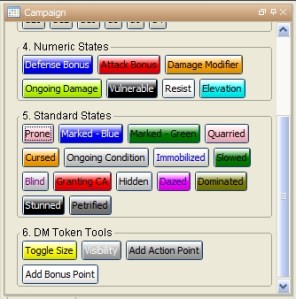
[h: MacroArguments=json.set('{ }', "TokenName", "None", "State", getMacroName(), "EndCount", -2, "EndRound", -2, "AutoEnd", -2)]
[MACRO("ToggleState@lib:LibToken1"): MacroArguments]

The first line sets up a JSON object with two important variables: The first important variable is the name of the state I’m toggling, which is the same as the name of the macro button I’m clicking (Dazed). The second important variable is at the end of the JSON object – AutoEnd=-2. This will show up later on; it will tell my ToggleState macro that I want a pop-up to ask the player when the condition will end. The other three variables in the JSON object (TokenName, EndCound, EndRound) don’t matter for this particular macro right now.

I then use the MACRO roll option to call a macro called ToggleState that lives on a token called Lib:LibToken1, passing it the JSON object I created above.

Macro #2: ToggleState

Brace yourselves: It gets a little deeper now.

[h: SelectedTokens=getSelected()]
[h: StateName=json.get(macro.args, "State")]
[h: EndCount=json.get(macro.args, "EndCount")]
[h: EndRound=json.get(macro.args, "EndRound")]
[h: AutoEnd=json.get(macro.args, "AutoEnd")]

The first line gets a JSON array that contains all of the tokens that are currently selected (this lets me make a whole bunch of tokens Dazed at once by selecting all of them and then running the Dazed macro). The next four lines unpack the elements of the JSON object that I passed over – that JSON object is in the macro.args variable since it was the argument passed to this macro. Note that it’s possible for me to pass meaningful numbers to the macro for EndCount, EndRound and AutoEnd, but in this case the relevant part is the name of the state and AutoEnd=-2.

[h: CurrentStatesArray=getLibProperty("StatesArray","lib:LibToken1")]

I now get the StatesArray property from the library token – that’s the JSON array that contains all of the states that are currently on tokens, along with the times that they end.

[FOREACH(TokenID, SelectedTokens, " "), CODE:
 {
   [h: CurrentTokenName=getName(TokenID)]
   [h: NameAndState=json.set('{ }', "Name", CurrentTokenName, "State", StateName)]

I start looping through each of the selected tokens, running a piece of code on all of them. The first thing I do is to get the name of the first token I’ve selected, and then create a small JSON object that contains the name of the token and the state I’m toggling, for use later.

   [h, if(getState(StateName,TokenID)==0), CODE:
    {

I check to see if the token I’m working on is currently subject to the state in question (Dazed). If it’s not currently dazed, I run some more code (because I want to turn on the Dazed condition). I’ll run some different code (later) if I’m turning OFF the Dazed condition.

      [h: TokenStateObject=add('{"TokenName":"', getName(TokenID), '", "State":"', StateName, '", "EndCount":', EndCount, ', "EndRound":', EndRound, ', "AutoEnd":"', AutoEnd, '"}')]
      [ MACRO("GetExpirationInfo@Lib:LibToken1"): TokenStateObject]

I set up a JSON object that’s the same as the arguments that I passed over to this macro, except that I pop the name of the first token I’m working on into the TokenName slot. I then pass this object over to the GetExpirationInfo macro on the Lib:LibToken1 library token. That macro (which  you’ll see later) will ask the player for information about when the condition is supposed to end (assuming AutoEnd=-2 to start with, as it does here) and then pass that information back to this ToggleState macro.

      [ MACRO("GetExpirationInfo@Lib:LibToken1"): TokenStateObject]
      [h: EndCount=json.get(macro.return, "EndCount")]
      [h: EndRound=json.get(macro.return, "EndRound")]
      [h: AutoEnd=json.get(macro.return, "AutoEnd")]
      [h: TokenStateObject=add('{"TokenName":"', getName(TokenID), '", "State":"', StateName, '", "EndCount":', EndCount, ', "EndRound":', EndRound, ', "AutoEnd":"', AutoEnd, '"}')]

Similar to what we saw above, I now unpack the new JSON object that comes back from the GetExpirationInfo (it’s stored as macro.return). I then rebuild the TokenStateObject JSON with the update information about the end time for the condition.

     [CurrentStatesArray=json.append(CurrentStatesArray,TokenStateObject)]
     [h: setState(StateName,1,TokenID)]
     };

I now stick this JSON object onto the end of the CurrentStatesArray JSON array variable, adding one more token/state/ending time element to the list of all of them that are currently active. I then turn the Dazed state on for the token in question, so that the Dazed icon will appear on it.

This then ends the list of tasks I’m performing specifically for the case where I’m turning the Dazed state ON; I now move on to the case when I’m turning the Dazed state OFF.

    {
     [h, MACRO("FindToken@Lib:LibToken1"):  NameAndState]
     [h: CurrentTokenStateIndex=macro.return]
     [h: CurrentStatesArray=json.remove(CurrentStatesArray, CurrentTokenStateIndex)]
     [h: setState(StateName,0,TokenID)]
    }
   ]
 }
]

I start off by calling another macro called FindToken, passing it the JSON object I created earlier that has the name of the token in question and the state we’re toggling off. That macro (which we’ll look at later on in the post) looks through the current list of tokens and states that are active to figure out where this token/state pair lives in the list, and returns the index of this token/state pair in that array. We then remove that element from the array, and finally turn the state off of the token (so the Dazed icon will no longer appear on the image).

We then close the section of code for the “toggle off” case (first curly brace), close the “if” statement (first square bracket), close the FOREACH code block (second curly brace) and close the FOREACH statement itself (second square bracket).

At this point, the whole toggling process has been run for each selected token, toggling the state itself on or off and modifying the CurrentStatesArray variable to include the token/state/end time JSON objects for the states we’ve toggled ON and to exclude the token/state/end time JSON objects for the states we’ve toggled OFF.

[h: setLibProperty("StatesArray", CurrentStatesArray, "lib:LibToken1")]

We end the whole macro by updating the StatesArray property on the Lib:LibToken1 token to equal the updated array that we’ve been creating. Now the library token will have the correct list of tokens, states and ending conditions. Voila!

Macro #3: GetExpirationInfo

This macro is called from within the ToggleStates macro and asks the user to specify when the condition that we’re applying should end. I’ll give a shout-out here to Paul Baalham; I repurposed some of his code here to create a list of token images for a drop-down.

[h: CurrentTokenName=json.get(macro.args, "TokenName")]
[h: CurrentState=json.get(macro.args, "State")]
[h: AutoEnd=json.get(macro.args, "AutoEnd")]

First, I look at the JSON object that’s been passed to this macro and extract from it the name of the token we’re working on, the state we’re toggling (Dazed) and the value of the AutoEnd variable.

[h, if(AutoEnd==-2), CODE:
{

Here’s where the AutoEnd=-2 comes into play. The following code is only run if I’ve specifically set the AutoEnd variable equal to -2. It’s arbitrary, but it’s what I’ve picked.

 [h: CurrentLabel=add(CurrentState, " condition on ", CurrentTokenName)]
 [h: InitTokens=json.get(getInitiativeList(), "tokens")]

 [h: TokenImageList=""]

I set up a string called CurrentLabel that will say something like “Dazed condition on Goblin 5”.

I create a variable called InitTokens that has the list of tokens that are currently in the initiative order. Note that the output of getInitiativeList is a JSON object, one element of which is called “tokens”, which is ITSELF a JSON object, one of whose elements is the token IDs. Messy stuff.

I also set up an empty variable called TokenImage list that I’ll stick stuff into shortly.

 [h, FOREACH(Thingy, InitTokens, ""), CODE:

I then start a loop that goes through each of the tokens in the initiative window (each one referred to by me as Thingy just for the fun of it).

 {[ThisTokenID=json.get(Thingy, "tokenId")]
   [token(ThisTokenID): CurrentImage=getTokenImage()]
   [TokenImageList=listAppend(TokenImageList, getName(ThisTokenID) + " " + CurrentImage)]
 }
]

I get the token ID for each token, then get its image. Note that I have to use the “token” roll option in order to do this; I can only use the getTokenImage() function on the “active” token, and the token roll option lets me treat whatever token I like as active.

I then append the name of the token and its image to the TokenImageList variable. We’ll be using this in a little while.

 [h:x=input(
  "junkVar | " + CurrentLabel + " | Make selections for | LABEL | SPAN=FALSE",
  "TurnTime | None, Beginning, End, Save | On what part of the turn does the condition end? | RADIO | ORIENT=H SELECT=0 VALUE=STRING",
  "WhichTurn |"+TokenImageList +" | On whose turn does the condition end? | LIST | SELECT=0 ICON=TRUE ICONSIZE=30",
  "EndCurrentTurn | 0 | If end of own turn, does the condition end NEXT round? | CHECK"
 )]
 [h: abort(x)]
Now I bring up a dialog box where include a label that specifies what token and state I'm inquiring about, and I ask the user for three things. First, I have a set of radio buttons that ask whether this is a condition that doesn't end at a particular time, or one that ends at the beginning or end of someone's turn, or one that's "save ends". I save this as the TurnTime variable.

Next, I ask whose turn it ends on. Note that if you pick “save ends” you still need to choose the token’s own picture from the list. This is because I might have 10 goblin warriors on the map, but only Goblin Warrior 1 actually shows up in the initiative window. So, if Goblin Warrior 3 is dazed (save ends), I’d choose Goblin Warrior 1’s image from the drop-down list, since I want the “Make a saving throw” message to pop up at the end of the goblins’ collective turn. Note that the variable saved here, WhichTurn, is going to be the INDEX of the item I picked from the list, with the first token on the list having an index of zero.

Finally, I have a wonky workaround for the situation in which a character is subject to a condition on their own turn that ends at the end of their NEXT turn (such as “you get a +2 bonus to attack rolls until the end of your next turn”). If they check this box, it won’t end the condition at the end of the current turn, instead postponing it for a round.

The abort(x) means that if I clicked the Cancel button in the dialog box, the macro ends.

The pop-up looks something like this:

Next piece of code:

[h: CurrentInit=getCurrentInitiative()]
[h: CurrentRound=getInitiativeRound()]
[h: MaxInit=json.length(json.get(getInitiativeList(), "tokens"))-1]

I figure out what the current initiative count and round are. I then figure out the maximum initiative count. Note that I do this my counting how many things are in the current initiative list and subtracting 1. I do this because, as you may recall from the JSON arrays article, JSON array indexes START AT ZERO. So, if there are three things in the initiative order, the maximum count of the array is 2 (0, 1, 2).

 [SWITCH(TurnTime), CODE:

I now use a SWITCH statement, which will let me do different things depending on what has been selected for the ending time.

  case "None": {
    [h: EndCount=-1]
    [h: EndRound=-1]
    [h: AutoEnd=-1]
                        };

If the player said that the condition doesn’t end at any particular time, then I set EndCount, EndRound and AutoEnd all equal to -1.

  case "Beginning": {
    [h: EndCount=WhichTurn]
    [h: EndRound=if(WhichTurn>CurrentInit,CurrentRound,CurrentRound+1)]
    [h: AutoEnd=1]
                        };

If the player said that the condition ends at the beginning of someone’s turn, then I set the ending initiative count equal to the index of whatever token was picked from the drop-down (WhichTurn). If that token’s turn hasn’t come up yet this round, then the ending round is this round; otherwise, it’s next round. And I set AutoEnd=1 to tell another macro that this condition should end automatically.

  case "End": {
    [h: EndCount=if(WhichTurn<MaxInit,WhichTurn+1,0)]
    [h: EndRound=if(WhichTurn+1>CurrentInit && WhichTurn+1<=MaxInit,CurrentRound+EndNextRound,CurrentRound+EndNextRound+1)]
    [h: AutoEnd=1]
                        };

If this is a condition that ends at the END of someone’s turn, then I make it work the same as ending at the BEGINNING of the NEXT token’s turn. If it ends at the end of someone’s turn who’s not at the very end of the initiative order, then I simply add 1 to the index of the chosen token. On the other hand, if it ends at the end of the turn of the last token in the round, then I have to make it end at the beginning of the FIRST token in the next round (count 0).

As for choosing a round, if it ends at the end of someone whose turn is either ongoing or is coming later in the round, it ends in the current round PLUS the EndNextRound variable (in case it’s this token’s turn and the condition should end at the end of their NEXT turn). If the turn has already passed or if it’s ending at the end of the turn of the LAST token in the initiative order, then it ends another round on.

  case "Save": {
    [h: EndCount=if(WhichTurn<MaxInit,WhichTurn+1,0)]
    [h: EndRound=-1]
    [h: AutoEnd=0]
                        };

If we’re talking about a “save ends” condition, then the EndCount is identical to the “end of turn” logic, but there’s no particular round in which the condition ends (hence the -1 for EndRound). AutoEnd is set to 0 because the condition won’t end automatically at the end of the character’s turn – it will depend on a saving throw.

  default: {[r: "You somehow didn't pick anything!"]}
 ]

I end the SWITCH with the default option, which shouldn’t ever show up, but hey, I could have screwed something up in my code.

 [h: ReturnedVars=json.set("{ }", "EndCount", EndCount, "EndRound", EndRound, "AutoEnd", AutoEnd)]
};

I now create a JSON object that contains the EndCount, the EndRound and the AutoEnd for this particular token for the case in which AutoEnd was equal to -2, and I then close the section of “AutoEnd==-2” code.

{[h: ReturnedVars=MacroArgs]}
]

THIS is the piece of code that’s run if I didn’t set AutoEnd=-2. What’s up with that? Well, this lets me do something like have my Second Wind code automatically specify when the +2 to all defenses condition ends (at the beginning of the character’s next turn) rather than making the player pick this timing from the dialog box. It’s a minor thing, but I like having the ability to bypass the dialog box if I already know when the condition is supposed to end.

[h: macro.return=ReturnedVars]

Finally, no matter whether I popped up the dialog box to get the end timing or I already knew it before coming to this macro, I set the macro.return variable equal to this JSON object, for use back in the ToggleStates macro that called this macro. That’s it!

Macro #4: FindToken

This macro is called in ToggleStates when we’re turning a condition OFF from a token. It sorts through the current JSON array in the StatesArray property of the library token, looking for the JSON object in that array that corresponds to the token and state that we’re trying to turn off, so that the object can be removed from the array.

[h: CurrentTokenName=json.get(macro.args, "Name")]
[h: CurrentTokenState=json.get(macro.args, "State")]

I start off by getting the token name and state that we’re looking for from the JSON object that was passed to this macro as arguments. macro.args represents that JSON object that was passed, and it has two keys: Name and State. Easy enough, now that we understand JSON objects!

[h: CurrentStatesArray=getLibProperty("StatesArray","lib:LibToken1")]
[h: CurrentTokenStateIndex=-1]
[h: StatesArrayLength=json.length(CurrentStatesArray)]

I retrieve the current value of the StatesArray property of the library token. I initialize a variable called CurrentTokenStateIndex to be equal to -1 (so that if I don’t find this token/state pair in the array, the index I return for its location will be -1 – that is, nonexistent). I then figure out how many JSON objects are in the array right now, so that I know how many I need to loop through.

[COUNT(StatesArrayLength, ""), CODE:
 {[h: CurrentObject=json.get(CurrentStatesArray, roll.count)]
  [h: CurrentTokenStateIndex=if(json.get(CurrentObject, "TokenName")==CurrentTokenName && json.get(CurrentObject, "State")==CurrentTokenState, roll.count, CurrentTokenStateIndex)]
 }
]

I use the COUNT roll option to loop through each object in the current states array. Note that COUNT also starts at zero. If I COUNT(3), I will do stuff for roll.count=0, roll.count=1 and roll.count=2 (three times, starting at zero).

I retrieve each object in the JSON array, storing it as CurrentObject, then check to see if the TokenName and the State of that object match the token/state pair that we’re looking for. If there’s a match, then I set CurrentTokenStateIndex equal to the matching index of the array that we’re looking at. Otherwise, I leave CurrentTokenStateIndex where it was. Since it started at -1, if I go through every object in the array and never find a match, it will stay at -1 the whole time.

[h: macro.return=CurrentTokenStateIndex]

The value that I return to the ToggleStates macro is the index in the StatesArray JSON array that contains the token/state pair we’re looking to turn off. Bam!

Step 2: Checking for conditions that need to end at a particular initiative count

That does it for toggling states on and off manually and storing information about them in the StatesArray. What about having them automatically end at the appropriate time in the initiative count, or at least prompting the player for a saving throw?

I love the initiative window in MapTool; I use it even for in-person games when I’m using MapTool with my projector setup. But now I need to create some of my own macros for advancing the initiative count, because I need to check some things at each count. Specifically, are there any token conditions that need to end?

Macro #5: NextInitiative

I created a button in my campaign window called NextInitiative. All this macro does is advance the initiative count and then call another macro to check to see what happens at the new count:

[h: nextInitiative()]
[MACRO("CheckForChanges@lib:LibToken1"):""]

Yes, I have another macro on the library token, this one called CheckForChanges. You’ll note that I’m passing it a set of null arguments; I can’t just leave that part out. Go figure.

Macro #6: CheckForChanges

[h: CurrentInit=getCurrentInitiative()]
[h: CurrentRound=getInitiativeRound()]
[h: CurrentStatesArray=getLibProperty("StatesArray","lib:LibToken1")]
[h: CurrentTokenStateIndex=-1]
[h: StatesArrayLength=json.length(CurrentStatesArray)]

This macro begins with some simple housekeeping. I figure out what initiative count and what round we’re on at the moment. I figure out what’s in the current StatesArray JSON array that’s keeping track of all the conditions on all the tokens and when they need to end. I set a variable called CurrentTokenStateIndex to a -1 value, and I figure out how many objects are in the StatesArray. Yes, another loop is coming.

[COUNT(StatesArrayLength, ""), CODE:
 {[h: CurrentObject=json.get(CurrentStatesArray, roll.count)]
  [h: ObjectTokenName=json.get(CurrentObject, "TokenName")]
  [h: ObjectState=json.get(CurrentObject, "State")]
  [h: ObjectEndInit=json.get(CurrentObject, "EndCount")]
  [h: ObjectEndRound=json.get(CurrentObject, "EndRound")]
  [h: ObjectAutoEnd=json.get(CurrentObject, "AutoEnd")]

I start with the first object in the array and retrieve all five keys from that JSON object: The token name, the state, the initiative count when the state ends, the round when the state ends, and whether the state should end automatically or not.

  [if(CurrentInit==ObjectEndInit && CurrentRound==ObjectEndRound && ObjectAutoEnd==1), CODE:
   {The [ObjectState] condition on [ObjectTokenName] has ended.
    [MACRO("ToggleState2@lib:LibToken1"):CurrentObject]
   };{}
  ]

If we’re at the right initiative count and the right round for a state to end on a token and we’ve said that this state should end automatically, then I display a message in the chat window that explains what state is ending on what token. I then call another macro, called ToggleState2, to turn that state off. It’s a lot like the original ToggleState macro, but it doesn’t require looping through a bunch of tokens (since we’ve already done that).

  [if(CurrentInit==ObjectEndInit && ObjectAutoEnd==0), CODE:
   {[ObjectTokenName] needs to make a saving throw against the [ObjectState] condition.
   };{}
  ]
 }
]

If we’re at the right initiative count for a state to end and the AutoEnd variable is zero, that means it’s time for a “save ends” message to pop up. You’ll note that we don’t actually end the condition – we just display the reminder message. We then end the COUNT loop and the macro itself.

Finally, for the sake of completeness, here is the ToggleState2 macro without comment (because it’s pretty much the same stuff as ToggleState).

Macro #7: ToggleState2

[h: ArgsArray=macro.args]
[h: SelectedTokens=getSelected()]
[h: StateName=json.get(ArgsArray, "State")]
[h: TokenName=json.get(ArgsArray, "TokenName")]
[h, TOKEN(TokenName): TokenID=currentToken()]

[h: CurrentStatesArray=getLibProperty("StatesArray","lib:LibToken1")]
[h, if(getState(StateName,TokenID)==0), CODE:
  {[h, MACRO("GetExpirationInfo@Lib:LibToken1"):""]
    [h: EndCount=json.get(macro.return, "EndCount")]
    [h: EndRound=json.get(macro.return, "EndRound")]
    [h: AutoEnd=json.get(macro.return, "AutoEnd")]
    [h: TokenStateObject=add('{"TokenName":"', getName(TokenID), '", "State":"', StateName, '", "EndCount":', EndCount, ', "EndRound":', EndRound, ', "AutoEnd":"', AutoEnd, '"}')]
   };{}
]

[h: CurrentTokenName=getName(TokenID)]
[h: FindTokenArgs=json.set('{ }', "Name", CurrentTokenName, "State", StateName)]
[h, MACRO("FindToken@Lib:LibToken1"):  FindTokenArgs]

[h: CurrentTokenStateIndex=macro.return]
[h, if(getState(StateName,TokenID)==0), CODE:
 {[NewStatesArray=json.append(CurrentStatesArray,TokenStateObject)]
   [setLibProperty("StatesArray", NewStatesArray, "lib:LibToken1")]
   [h: setState(StateName,1,TokenID)]
   };
  {[h: NewStatesArray=json.remove(CurrentStatesArray, CurrentTokenStateIndex)]
    [h: setLibProperty("StatesArray", NewStatesArray, "lib:LibToken1")]
    [h: setState(StateName,0,TokenID)]
  }
]

Whew!

Okay, so it took me seven different macros to make this work – but it does work! I’m really excited about this, and I hope that this will end the “Oh wait, when does that condition end again?” discussions at the table. We shall see.

The uninterrupted code for the longer macros is below (note that ToggleState2 is above), and if you want to download my campaign file that includes all of these macros, you can do that at this link.

As always, feedback is appreciated!

-Michael, the OnlineDM

ToggleState macro:

[h: SelectedTokens=getSelected()]
[h: StateName=json.get(macro.args, "State")]
[h: EndCount=json.get(macro.args, "EndCount")]
[h: EndRound=json.get(macro.args, "EndRound")]
[h: AutoEnd=json.get(macro.args, "AutoEnd")]

[h: CurrentStatesArray=getLibProperty("StatesArray","lib:LibToken1")]

[FOREACH(TokenID, SelectedTokens, " "), CODE:
 {
   [h: CurrentTokenName=getName(TokenID)]
   [h: NameAndState=json.set('{ }', "Name", CurrentTokenName, "State", StateName)]
   [h, if(getState(StateName,TokenID)==0), CODE:
    {
      [h: TokenStateObject=add('{"TokenName":"', getName(TokenID), '", "State":"', StateName, '", "EndCount":', EndCount, ', "EndRound":', EndRound, ', "AutoEnd":"', AutoEnd, '"}')]
      [ MACRO("GetExpirationInfo@Lib:LibToken1"): TokenStateObject]
      [h: EndCount=json.get(macro.return, "EndCount")]
      [h: EndRound=json.get(macro.return, "EndRound")]
      [h: AutoEnd=json.get(macro.return, "AutoEnd")]
      [h: TokenStateObject=add('{"TokenName":"', getName(TokenID), '", "State":"', StateName, '", "EndCount":', EndCount, ', "EndRound":', EndRound, ', "AutoEnd":"', AutoEnd, '"}')]
     [CurrentStatesArray=json.append(CurrentStatesArray,TokenStateObject)]
     [h: setState(StateName,1,TokenID)]
     };
    {
     [h, MACRO("FindToken@Lib:LibToken1"):  NameAndState]
     [h: CurrentTokenStateIndex=macro.return]
     [h: CurrentStatesArray=json.remove(CurrentStatesArray, CurrentTokenStateIndex)]
     [h: setState(StateName,0,TokenID)]
    }
   ]
 }
]

[h: setLibProperty("StatesArray", CurrentStatesArray, "lib:LibToken1")]

GetExpirationInfo macro:

[h: CurrentTokenName=json.get(macro.args, "TokenName")]
[h: CurrentState=json.get(macro.args, "State")]
[h: AutoEnd=json.get(macro.args, "AutoEnd")]

[h, if(AutoEnd==-2), CODE:
{
 [h: CurrentLabel=add(CurrentState, " condition on ", CurrentTokenName)]
 [h: InitTokens=json.get(getInitiativeList(), "tokens")]

 [h: TokenImageList=""]

 [h, FOREACH(Thingy, InitTokens, ""), CODE:
  {[ThisTokenID=json.get(Thingy, "tokenId")]
    [token(ThisTokenID): CurrentImage=getTokenImage()]
    [TokenImageList=listAppend(TokenImageList, getName(ThisTokenID) + " " + CurrentImage)]
  }
 ]

 [h:x=input(
  "junkVar | " + CurrentLabel + " | Make selections for | LABEL | SPAN=FALSE",
  "TurnTime | None, Beginning, End, Save | On what part of the turn does the condition end? | RADIO | ORIENT=H SELECT=0 VALUE=STRING",
  "WhichTurn |"+TokenImageList +" | On whose turn does the condition end? | LIST | SELECT=0 ICON=TRUE ICONSIZE=30",
  "EndNextRound | 0 | If end of own turn, does the condition end NEXT round? | CHECK"
 )]
 [h: abort(x)]

 [h: CurrentInit=getCurrentInitiative()]
 [h: CurrentRound=getInitiativeRound()]
 [h: MaxInit=json.length(json.get(getInitiativeList(), "tokens"))-1]

 [SWITCH(TurnTime), CODE:
  case "None": {
    [h: EndCount=-1]
    [h: EndRound=-1]
    [h: AutoEnd=-1]
                        };
  case "Beginning": {
    [h: EndCount=WhichTurn]
    [h: EndRound=if(WhichTurn>CurrentInit,CurrentRound,CurrentRound+1)]
    [h: AutoEnd=1]
                        };
  case "End": {
    [h: EndCount=if(WhichTurn<MaxInit,WhichTurn+1,0)]
    [h: EndRound=if(WhichTurn+1>CurrentInit && WhichTurn+1<=MaxInit,CurrentRound+EndNextRound,CurrentRound+EndNextRound+1)]
    [h: AutoEnd=1]
                        };
  case "Save": {
    [h: EndCount=if(WhichTurn<MaxInit,WhichTurn+1,0)]
    [h: EndRound=if(WhichTurn+1>CurrentInit && WhichTurn+1<=MaxInit,CurrentRound,CurrentRound+1)]
    [h: EndRound=-1]
    [h: AutoEnd=0]
                        };
  default: {[r: "You somehow didn't pick anything!"]}
 ]
 [h: ReturnedVars=json.set("{ }", "EndCount", EndCount, "EndRound", EndRound, "AutoEnd", AutoEnd)]
};
{[h: ReturnedVars=MacroArgs]}
]
[h: macro.return=ReturnedVars]

FindToken macro:

[h: CurrentTokenName=json.get(macro.args, "Name")]
[h: CurrentTokenState=json.get(macro.args, "State")]
[h: CurrentStatesArray=getLibProperty("StatesArray","lib:LibToken1")]
[h: CurrentTokenStateIndex=-1]
[h: StatesArrayLength=json.length(CurrentStatesArray)]
[COUNT(StatesArrayLength, ""), CODE:
 {[h: CurrentObject=json.get(CurrentStatesArray, roll.count)]
  [h: CurrentTokenStateIndex=if(json.get(CurrentObject, "TokenName")==CurrentTokenName && json.get(CurrentObject, "State")==CurrentTokenState, roll.count, CurrentTokenStateIndex)]
 }
]
[h: macro.return=CurrentTokenStateIndex]

CheckForChanges macro:

[h: CurrentInit=getCurrentInitiative()]
[h: CurrentRound=getInitiativeRound()]
[h: CurrentStatesArray=getLibProperty("StatesArray","lib:LibToken1")]
[h: CurrentTokenStateIndex=-1]
[h: StatesArrayLength=json.length(CurrentStatesArray)]
[COUNT(StatesArrayLength, ""), CODE:
 {[h: CurrentObject=json.get(CurrentStatesArray, roll.count)]
  [h: ObjectTokenName=json.get(CurrentObject, "TokenName")]
  [h: ObjectState=json.get(CurrentObject, "State")]
  [h: ObjectEndInit=json.get(CurrentObject, "EndCount")]
  [h: ObjectEndRound=json.get(CurrentObject, "EndRound")]
  [h: ObjectAutoEnd=json.get(CurrentObject, "AutoEnd")]
  [if(CurrentInit==ObjectEndInit && CurrentRound==ObjectEndRound && ObjectAutoEnd==1), CODE:
   {The [ObjectState] condition on [ObjectTokenName] has ended.
    [MACRO("ToggleState2@lib:LibToken1"):CurrentObject]
   };{}
  ]
  [if(CurrentInit==ObjectEndInit && ObjectAutoEnd==0), CODE:
   {[ObjectTokenName] needs to make a saving throw against the [ObjectState] condition.
   };{}
  ]
 }
]

October 28, 2011

Advanced MapTool macros part 3: Library tokens and the MACRO roll option

Filed under: Advice/Tools, Macros — Tags: , — OnlineDM @ 7:30 AM

As you may have read in my earlier posts about JSON objects and JSON arrays, I’ve been working on macros to let me better track conditions on tokens for my D&D 4e game in MapTool. I thought it would be simple, but I ultimately needed to learn about some rather advanced topics. This includes today’s topics: library tokens and the MACRO roll option.

What’s a library token?

A library token is pretty much like any other token, except that its name must begin with “Lib:” (including the colon, but not the quotes). For instance, I created a token called Lib:LibToken1. I’m creative like that.

What’s the point?

While there might be tons of cool things you can do with library tokens, I’ve discovered two so far.

First, they’re handy for storing properties that you’ll want to reference across multiple macros. You theoretically could do this with any token, but library tokens are available no matter what map you’re on, and you’re less likely to accidentally delete them if they get killed (since, you know, they’re not intended to actually be in combat).

Second, if you put a macro called onCampaignLoad on a library token, then it will automatically run whenever you open up the campaign (or whenever your players connect to it). I’m not using this right now, but it’s good to know about for the future.

Third, you can call macros on library tokens from other macros. This is where it gets cool.

What is the MACRO roll option?

If you have any experience with programming other than in MapTool, you might be familiar with subroutines. Good programming often means that you’ll separate little pieces of code from one another and then “call” those other pieces of code when you need them. So, if you have a piece of code that sorts a column of data, let’s say, you’ll keep it separated and then “call” that code whenever you need to sort something.

In MapTool, you do this with the MACRO roll option. Note first of all that it is a roll option, not a function. This means that it comes BEFORE the colon within your square brackets of code, just like the “h” roll option for hiding your results. It also means that if you want to hide the results of the entire macro, you’ll format it as “[h, MACRO…” rather than “[h: MACRO…”.

I’ll note that there’s another way you can handle this, via User Defined Functions (UDF) in MapTool. Basically, you can use the defineFunction() function (wow, that sounds weird) to more or less make one of these called macro roll options into a function rather than a roll option, but that’s a topic for another time.

How does it work?

Let’s say I’ve created a macro on my Lib:LibToken1 library token, and I’ve called it ToggleState. This macro will let me toggle a condition (like Dazed) on or off of another token. I need to tell the ToggleState macro what state I’m toggling (Dazed), which is called an argument.

If I want to call the ToggleState macro, passing it the Dazed argument, it will look something like this:

[MACRO("ToggleState@Lib:LibToken1"): "Dazed"]

The roll option itself (MACRO) comes first. Within parentheses, I tell MapTool the name of the macro I’m calling (ToggleState) and where it can find that macro (on the token called lib:LibToken1) with an @ symbol in between. I then close the parentheses and insert a colon, followed by the argument (“Dazed”).

If you want to call a macro without any argument, you still need to include “” as a dummy argument. Without that, MapTool won’t execute the call.

If I want a bunch of different arguments, I can pass them as a string list or – you knew this was coming – a JSON object or array.

How do you use passed arguments?

Now let’s look at a piece of the macro I’ve called – the ToggleState macro.

[h: StateName=macro.args]

This line of code is accessing the argument I passed to the macro; StateName is set equal to the value of the special variable macro.args, which in this case is equal to “Dazed” (because that’s the value of the argument I passed to the macro). From there, the macro can continue to work, knowing the name of the state to toggle.

How do you pass information back from the called macro?

This is lovely and all, but it will often be useful for the macro I’ve called (ToggleStates) to pass some information BACK to the original macro. In order to do that, I use the special variable macro.return.

[h: macro.return="Toggle successful"]

I can include this line near the end of the called macro (ToggleStates). This sets the value of the special variable macro.return to “Toggle successful”. I can then access this information back in the original Dazed macro:

[h: DeliveredMessage=macro.return]
[r: DeliveredMessage]

Naturally, you can also pass back lists of things, often in a JSON object. So, from the called macro:

[h: ValuesToReturn=json.set('{ }', "Message", "Toggle successful", "NumTokensToggled", 3)]
[h: macro.return=ValuesToReturn]

And then in the calling macro:

[h: ReturnedValues=macro.return]
[h: MessageToDisplay=json.get(ReturnedValues, "Message")]
[h: NumTokensAffected=json.get(ReturnedValues, "NumTokensToggled")]
[MessageToDisplay] on [NumTokensAffected] tokens.

Bringing it all together

Now you know about the advanced tools I had to learn in order to write my state-tracking macro:

The final step: Showing you how it all comes together! Stay tuned for the exciting conclusion.

-Michael the OnlineDM

October 27, 2011

Advanced MapTool macros part 2: Intro to JSON arrays

Filed under: Advice/Tools, Macros, Online games — Tags: , — OnlineDM @ 7:31 AM

As I mentioned in the first post in this series, I’ve been working on a set of macros to help me better track conditions on characters for D&D 4th Edition in MapTool. Building those macros has led me deeper into some of the capabilities of the MapTool macro language that I had previously avoided. Part 1 of the series focused on JSON objects; today we talk about JSON arrays.

What is a JSON array?

In any context, an array is basically a list. “1, 2, 3” is an array. A shopping list is an array.

A JSON array is a list enclosed in brackets and separated by commas for use in MapTool. As for what it’s a list OF, well, JSON arrays are flexible on that point.

You can have a JSON array that’s a list of numbers:

[r: MyJSONArray='[12, 3, -44]' ]

You can have a JSON array that’s a list of words:

[r: MyJSONArray='["Red", "Purple", "Yellow"]' ]

You can have a JSON array that’s a mixture of numbers and words:

[r: MyJSONArray='["Red", 3, -44]' ]

More interestingly, you can have a JSON array that’s a list of JSON objects – or even a list of other JSON arrays!

JSONObject1=[r: JsonObject1= '{"Color":"Red", "Number":12}' ]<br>
JSONObject2=[r: JsonObject2= '{"Color":"Purple", "Number":3}' ]<br>
JSONObject3=[r: JsonObject3= '{"Color":"Yellow", "Number":-44}' ]<br>
[h: MyJSONArray=' [ ]' ]
Array step 1=[r: MyJSONArray=json.append(MyJSONArray, JSONObject1) ]<br>
Array step 2=[r: MyJSONArray=json.append(MyJSONArray, JSONObject2) ]<br>
Array complete=[r: MyJSONArray=json.append(MyJSONArray, JSONObject3) ]<br>
<br>Second item = [r: SecondItem=json.get(MyJSONArray, 1)]
<br>Color of second item = [r: SecondItemColor=json.get(SecondItem, "Color")]

How do you build a JSON array?

As you can see from the examples above, you can build a simple JSON array in a manner very similar to building a JSON object. The contents of the array are separated by commas and enclosed in square brackets [ ], and the whole thing is enclosed in single quotes so that MapTool will allow you to use double quotes inside the array (so that it can contain words).

Another option I showed was to use the json.append function in MapTool. You need to start with an existing or blank JSON array (hence the MyJSONArray = ‘[ ]’ bit, creating a blank JSON array). You then append the new item to the end of the array.

What do you do with a JSON array?

As with a JSON object, a JSON array is useful if you store it as a property on a library token and then have it available for other macros to use later. It’s also useful because it’s an array – a list of things. With a list, you can do things like loop through each thing on the list using a FOREACH loop and do something to each thing on the list.

If you want to get some information out of an array, the simplest way to do it is to use the json.get command along with the appropriate index in the array. Each thing in the array has an index number, but you’ll want to keep in mind that the indexes start from zero.

Let me repeat that: The first item in an array is item 0, followed by item 1, and so on.

So, going back to my second array example, if I want to know what the middle of the three elements is, I’d do the following:

[r: MyJSONArray='["Red", "Purple", "Yellow"]' ]<br>
The middle color is [r: json.get(MyJSONArray, 1)]

Which returns:

[“Red”, “Purple”, “Yellow”]
The middle color is Purple

You’ll note that picked index 1 in my json.get statement. If I’d wanted it to say “Red” (the first element of the list), I would have asked for json.get(MyJSONArray, 0). Very important to remember.

If I want to know how many items are in the JSON array, I can use json.length. Keep in mind that my three-item array with have json.length=3, but the highest index number will be 2 (because it starts counting from zero). Confusing, yes.

How do I change what’s in a JSON array?

Technically speaking, you can’t edit a JSON array. However, you can re-save a new array with the same name that’s based off an existing array.

If you have a particular element of the array that you want to set to a new value, you can use the json.set command.

Original array: [r: MyJSONArray='["Red", "Purple", "Yellow"]' ]<br>
I'm changing the array now... [h: MyJSONArray=json.set(MyJSONArray, 1, "Green")]<br>
New array: [r: MyJSONArray]

This returns:

Original array: [“Red”, “Purple”, “Yellow”]
I’m changing the array now…
New array: [“Red”,”Green”,”Yellow”]

What I’ve done is created a new array that is just like the original array except that I’ve set the second element (index 1 is the second element, remember) to the value “Green” instead of whatever it was before. I’ve saved this new array with the SAME NAME as the original array. So, I’ve effectively changed the original array, but I’ve technically created a new array with the same name (which accomplishes the same thing).

Another useful command is json.remove, which gives you the array minus whatever you’ve removed.

Original array: [r: MyJSONArray='["Red", "Purple", "Yellow"]' ]<br>
If I remove the middle element, I get this new array: [r: NewJSONArray=json.remove(MyJSONArray, 1)]

This returns:

Original array: [“Red”, “Purple”, “Yellow”]
If I remove the middle element, I get this new array: [“Red”,”Yellow”]

If I’d used MyJSONArray= instead of NewJSONArray= in the second line, I would have effectively edited the array to remove the second element (index 1).

JSON objects within JSON arrays

Now, keep in mind that you can get fancy with JSON arrays. The things in the array can themselves be JSON objects or, messier still, JSON arrays. My last example in the opening section shows you one of these. It can get a little confusing depending on how deep you want to go, but there are definitely times when it’s useful to have lists of pairs of things (like colors with numbers, or token names with conditions).

Comparing JSON objects and JSON arrays

Bringing it all together, what are these things all about?

JSON objects are enclosed in curly braces { }. JSON arrays are enclosed in square brackets [ ].

JSON objects consist of labels and values (Name: Bob. Age: 23). JSON arrays are just lists of things (Bob, 23). However, you can put objects within arrays. You can also put objects within objects or arrays within objects or arrays within arrays… it can get messy!

To get a value out of an object, you can use json.get and then specify which key you want (PersonName=json.get(MyJSONObject, “Name”)). To get a value out of an array, you can use json.get and then specify the index of the item in the array that you want, with the first item having an index of 0 (PersonName=json.get(MyJSONArray, 0)).

Next step

So what’s next? Well, I keep talking about storing these objects and arrays on library tokens, so I think it’s time I talked about what a library token is.

October 26, 2011

Advanced MapTool macros part 1: Intro to JSON objects

Filed under: 4e D&D, Advice/Tools, Macros, Online games — Tags: , , — OnlineDM @ 9:13 AM

Over the past few weeks, I’ve been working on what I expected would be a not-too-hard MapTool macro project. I wanted to create a macro (or set of macros, as it turned out) for putting conditions on tokens that would also keep track of when those conditions needed to end. Seemed simple enough; after all, I already had nice little macros that would toggle a condition on or off of a selected token or group of tokens. Those looked like this:

[h: SelectedTokens=getSelected()]
[FOREACH(TokenID, SelectedTokens, " "), CODE:
 {[h: NewState=if(getState("Dazed",TokenID)==1,0,1)]
 [h: setState("Dazed",NewState,TokenID)]
 }
]

However, in figuring out how to handle the automatic tracking of the condition end time, I had to delve deeper, trying to avoid Balrogs as I went.

Yes, dear readers: I had to learn about JSON! (Cue horrified screaming)

JSON stands for JavaScript Object Notation, and it’s something I had seen used by the REAL heavy lifters among MapTool macro writers. They had JSONs all over the place in their campaigns, and I tried my best to avoid them. They looked… intimidating.

I’ll warn you all right now, if you’re just looking for casual stuff about MapTool, skip this series of posts. This is heavy-duty macro programming compared to what I’ve written before. It still pales in comparison to the stuff written by the folks who create full-on MapTool frameworks, but it’s more than I’ve done in the past. However, if you need to learn about using JSONs, I hope to present it in an easy-to-follow manner.

What is a JSON object?

There are types of JSON in MapTool: JSON objects and JSON arrays. I’m going to talk about JSON objects today.

A JSON object is a single variable or property enclosed in braces {} that can hold several pieces of information.

For instance, here is a JSON object I ended up creating for my state-tracking macros:

{"TokenName":"Brute 1","State":"Cursed","EndCount":2,"EndRound":1,"AutoEnd":"1"}

This single object contains 5 pieces of information: The TokenName (Brute 1), the State on that token (Cursed), the count in the initiative order when that state will end (2), the round in which it will end (2) and a variable that indicates whether I want the condition to simply end automatically (1 means “yes” in this case) or not.

How do you build a JSON object?

If I wanted to build the object above, I could do it by assigning as a regular variable in MapTool, enclosing the whole thing in single quotes:

[h: MyJSONObject='{"TokenName":"Brute 1","State":"Cursed","EndCount":2,"EndRound":1,"AutoEnd":"1"}']

I could also use the ADD function if I had already created separate variables for, say, TokenName and State:

[h: CurrentTokenName="Brute 1"]
[h: CurrentState="Cursed"]
[h: MyJSONObject=add('{"TokenName":"', Brute 1, '","State":"', Cursed, '","EndCount":2,"EndRound":1,"AutoEnd":"1"}']

There’s also the option of using some of MapTool’s JSON functions, such as json.set:

[h: MyJSONObject=json.set("{ }", "TokenName", CurrentTokenName, "State", CurrentState, "EndCount", 2, "EndRound", 1, "AutoEnd", 1)]

Note that there are no single quotes needed with json.set. I start with the empty braces in quotes to let MapTool know that this will be a JSON object rather than a JSON array. I then list the key/value pairs, separated by commas.

Getting information from JSON objects

Once I’ve created this object, what the heck do I do with it? Well, assuming I save it as the value of a property of some token, I can have other macros refer to this property later to get information out of it. I do this with MapTool’s json.get function.

First, let’s say I have a library token called lib:LibToken1. Great name, right? And let’s say it has a property called StateObject, which starts off being set to 0. Now let’s assume that I assign my new JSON object to this property as follows:

[h: setProperty("StateObject", MyJSONObject, "lib:LibToken1")]

So, I set the StateObject property of the token called lib:LibToken1 equal to MyJSONObject.

In a later macro I can retrieve this property from the token and extract the information:

[h: CurrentStateObject=getProperty("StateObject","lib:LibToken1")]
[h: CurrentTokenName=json.get(CurrentStateObject, "TokenName")]
[h: CurrentState=json.get(CurrentStateObject, "State")]

The first line gets the StateObject property from the lib:LibToken1 token (which, remember, is equal to whatever I put in MyJSONObject) and stores it as CurrentStateObject (so CurrentStateObject=MyJSONObject). Then I can extract the TokenName value from that object and store it as CurrentTokenName using json.get. I do the same for the State value. I could do the same for the EndCount, EndRound and AutoEnd values. And then I can do whatever I like with these values inside my macro.

Why would you use a JSON object?

This is the question that kept me away from learning about JSON stuff for so long. Why do I even need it?

In lots of cases, you don’t actually NEED to use JSON, but it can make life easier. Where I decided I finally needed to use it was when I wanted to have a single property on a token that could hold lots of different stuff (in this case, information about states on tokens and when they end). The JSON object above is an example (actually as a piece of a JSON array) that appears in the StatesArray property of a token I created specifically to hold this kind of thing. Without using JSON, I would need to create a whole bunch of different properties on the token – one each for TokenName, State, EndCount, EndRound and AutoEnd. I could do that, but it would be messier.

And if I wanted to have a varying number of these objects – one for each token and state in the game – I’d need to create a huge multitude of properties, and I’d have to set up enough of them in advance so that I’d never run out. If I have 20 minions each getting slowed by a controller’s blast, well, I’d better have 100 properties set up in advance. If they’re being slowed and blinded, now I need 200 properties.

There’s got to be an easier way, and there is: JSON arrays. That’s the next post!

Older Posts »

Blog at WordPress.com.

Design a site like this with WordPress.com
Get started