
Descripcion
DigitalDive Edge Cache for Cloudflare is a WordPress plugin that adds conservative, SEO-friendly Cloudflare full-page edge caching. It creates and manages Cloudflare cache rules and headers so eligible pages are served from the Cloudflare edge while preserving normal WordPress behavior and compatibility. Faster, more consistent delivery can support performance metrics like Core Web Vitals, page speed, and SEO.
This plugin is not affiliated with or endorsed by Cloudflare.
Built by DigitalDive (https://digitaldive.pro).
Highlights:
- Cloudflare edge caching with safe defaults for logged-in users, POST requests, and common ecommerce flows.
- Simple controls for cache rules, TTL, and exclusions.
- Manual purge tools for entire cache, homepage, or specific URLs.
External services
This plugin connects to the Cloudflare API (https://api.cloudflare.com/client/v4/) to manage Cloudflare cache rules, purge cache, and fetch cache analytics for your zone.
It sends:
– Your Cloudflare account email address and Global API Key (entered in the plugin settings) in request headers.
– Your Cloudflare Zone ID (entered in the plugin settings) in request URLs.
– Cache rule definitions (including your site domain and any exclusion paths you configure) when you deploy rules.
– URLs to purge when you use the purge tools, and when the plugin triggers automatic purges (for example on post publish, approved comments, menu updates, theme switches, or some WooCommerce stock events).
This service is provided by Cloudflare:
– Terms of Service: https://www.cloudflare.com/terms/
– Privacy Policy: https://www.cloudflare.com/privacypolicy/
YouTube (optional)
If you enable « Smart YouTube Previews », the plugin loads a thumbnail from https://i.ytimg.com/ and loads the YouTube embed from https://www.youtube.com/ when a visitor clicks the preview. These requests are made by the visitor’s browser on pages that contain YouTube embeds.
This service is provided by YouTube (Google):
– Terms of Service: https://www.youtube.com/t/terms
– Privacy Policy: https://policies.google.com/privacy
Google Ad services (optional)
If you enable « Boost AdSense RPM », the plugin adds preconnect and dns-prefetch hints for Google ad domains to speed up ad loading. This may cause the visitor’s browser to connect to:
– https://googleads.g.doubleclick.net
– https://pagead2.googlesyndication.com
– https://tpc.googlesyndication.com
– https://adservice.google.com
This service is provided by Google:
– Terms: https://policies.google.com/terms
– Privacy Policy: https://policies.google.com/privacy
Installacion
- Upload the
digitaldive-edge-cache-cloudflarefolder to the/wp-content/plugins/directory. - Activate the plugin through the Plugins menu in WordPress.
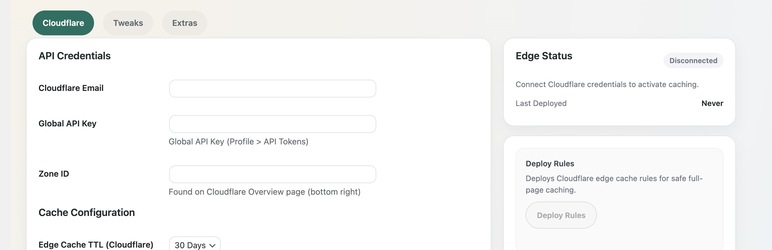
- Go to DigitalDive Edge Cache for Cloudflare and enter your Cloudflare credentials.
FAQ
-
Do I need a Cloudflare account?
-
Yes. This plugin manages Cloudflare cache rules for your zone.
Reviews
There are no reviews for this plugin.
Contributors & Developers
“DigitalDive Edge Cache for Cloudflare” is open source software. The following people have contributed to this plugin.
Contributors
Translate “DigitalDive Edge Cache for Cloudflare” into your language.
Interested in development?
Browse the code, check out the SVN repository, or subscribe to the development log by RSS.
Changelog
1.1.2
- Remove login screen attribution/credit link to comply with WordPress.org guidelines.
1.1.1
- Security: Escape output properly (escape late), including URLs used in inline CSS.
- Code quality: Standardize on a unique prefix (
ddeccf) for functions/classes/constants/options/nonces/AJAX actions. - Meta: Reduce readme tags to 5 to comply with WordPress.org requirements.
1.1.0
- Initial WordPress.org release.