

Skildring
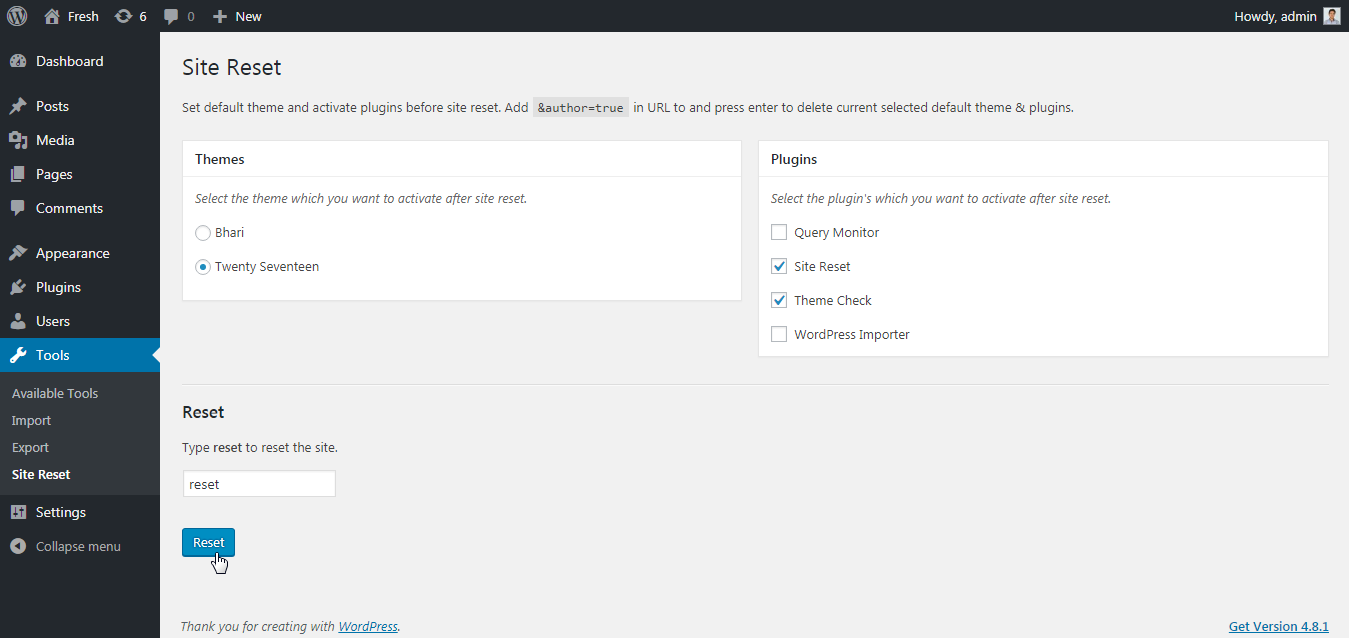
Select your favorite theme and active plugin’s which you want to see after site reset.
Note: «Reset Complete Site» plugin not support multisite.
How to use?
- Goto
tools -> Site Reset. - Select theme which you want to activate after site reset.
- Select plugins which you want to activate after site reset.
- Type
resetin input box - From popup confirmation box select
Ok - Done! Your site will be reset with your selected theme and plugins.
Extend Site Reset plugin on Github
Skjermbilete
Installasjon
- Install the
Site Resetplugin either via the WordPress plugin directory, or by uploading the files to your server atwp-content/plugins. - After activating, you can reset the site from
/wp-admin/tools.php?page=site-reset
Vanlege spm.
-
Multisite Support?
-
No! Currently we not support multisite reset. So, Do not use «Site Reset» on multisite.
Omtalar

15. april 2020
This plugin is magic. It works like a charm. You can reset the complete site and still keep a few plugins and one theme active, so you can set up a new site, while you reset your current site.
Bidragsytarar og utviklarar
“Reset Complete Site” is open source software. The following people have contributed to this plugin.
Contributors
Omset “Reset Complete Site” til ditt eige språk.
Interested in development?
Les kjeldekoden, sjekk SVN-lageret eller abonner på utviklingsloggen med RSS.
Endringslogg
1.2.1
- Improvement – Compatibility to WordPress 5.7.
1.2.0
- New: Added settings page link into the plugin actions link.
1.1.0
- New: Added filter
site_reset_default_settingsto change the default settings.
1.0.1
- Fix: PHP error from plugin listing page.
1.0.0
- Initial release.