

Beschrijving
WP Store Locator is a powerful and easy to use location management system.
You can customize the appearance of the map, and provide custom labels for entry fields.
Users can filter the results by radius, and see driving directions to the nearby stores in
the language that is set in the admin panel.
De functies omvatten:
- Beheer een onbeperkt aantal winkels.
- Provide extra details for stores like the phone, fax, email, url, description and opening hours. There are filters available that allow you add custom meta data.
- Ondersteuning voor aangepaste kaartstijlen .
- Kies uit negen retina klare markering pictogrammen.
- Toon de rijafstanden in km of mijl.
- Shortcodes waarmee je individuele openingstijden, adressen of alleen een kaart met een enkele markering aan elke pagina kunt toevoegen.
- Compatibel met meertalige plugins zoals WPML en qTranslate X.
- Je kunt de marker in de editor naar de exacte locatie op de kaart slepen.
- Show the search results either underneath the map, or next to it.
- Toon Google Maps in verschillende talen, dit beïnvloedt ook de taal voor de routebeschrijving.
- Toon de routebeschrijving naar de winkels.
- Customize the max results and search radius values that users can select.
- Gebruikers kunnen de geretourneerde resultaten filteren op straal, maximale resultaten of categorie.
- Supports marker clusters.
- Pas de kaartinstellingen aan, zoals het terreintype, de locatie van de kaartbesturing en het standaard zoomniveau.
- Gebruik de Geolocation API om de huidige locatie van de gebruiker te vinden en winkels in de buurt te tonen.
- Developer friendly code. It uses custom post types and includes almost 50 different filters that help you change the look and feel of the store locator.
- GDPR – Load Google Maps only after the user agrees to it ( requires the Borlabs Cookie plugin ).
Documentation
Please take a look at the store locator documentation before making a support request.
Premium add-ons
CSV manager
The CSV Manager allows you to bulk import, export and update your locations using a CSV file.
Widget zoeken
The Search Widget enables users to search from any of the widgetized areas in your theme for nearby store locations, and show the results on the store locator page.
Statistieken
The Statistics add-on enables you to keep track of the locations users are searching for and see where there is demand for a new store.
Extenders
The Extenders add-on adds the features needed by power users such as managing location based events, social media information and locations managed by other logged in users.
Schermafbeeldingen

Front-end van de plugin 
De routebeschrijving van de locatie van de gebruiker naar de geselecteerde winkel 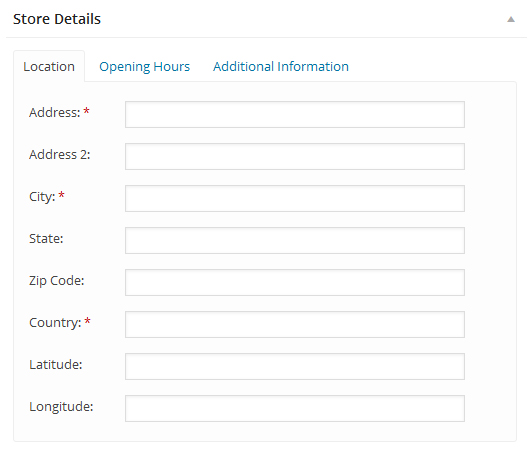
The ‘Store Details’ section 
De plugin instellingen 
Blokken
Deze plugin heeft 2 blokken.
- Map Display a WP Store Locator map for specific store locations by ID or category.
- Store Locator Display a WP Store Locator map with search functionality.
Installatie
- Upload de map
wp-store-locatornaar de folder/wp-content/plugins/ - Activeer de plugin via het ‘Plugins’ menu in WordPress
- Create a Google API Key and set them on the settings page.
- Stel het startpunt in op de instellingen.
- Add your stores under ‘Store Locator’ -> Add Store
- Voeg de kaart toe aan een pagina met deze shortcode: [wpsl]
FAQ
-
How do I add the store locator to a page?
-
Add this shortcode [wpsl] to the page where you want to display the store locator.
-
Er ging iets niet goed
-
You can fix this by setting the browser key on the settings page.
-
There are weird characters in the search results, how do I remove them?
-
This is most likely caused by a plugin like W3 Total Cache that tried to minify the HTML output on the store locator page. You can fix this by excluding the store locator from being minified on the settings page of the caching plugin you’re using. In W3 Total Cache this is done by going to Minify -> Advanced -> Never minify the following pages, and fill in the page you don’t want to have minified. So if your store locator is used on mydomain.com/store-locator, then fill in ‘store-locator’.
-
Kan ik verschillende markeringen gebruiken voor categorieën of individuele winkellocaties?
-
How to use custom markers is described here, you can also only use different markers for a few locations, or just for the categories.
-
De kaart wordt niet goed weergegeven. Hij is in tweeën gebroken of laadt helemaal niet.
-
Zorg ervoor dat je een startpunt voor de kaart hebt gedefinieerd onder instellingen -> Kaartinstellingen.
-
De kaart werkt niet meer na het installeren van de laatste update
-
Als je een caching plugin gebruikt, of een dienst als Cloudflare, zorg er dan voor dat je de cache opschoont.
-
I can’t dismiss the pop up asking me to join the mailing list, how do I fix this?
-
There is probably a JS error in the WP Admin area that prevents the pop up from being dismissed. Try for a second to switch back to a default WP theme, disable all other plugins, and then try to dismiss the newsletter pop up again.
-
Waarom toont het de locatie die ik zocht in het verkeerde land?
-
Some location names exist in more then one country, and Google will guess which one you mean. This can be fixed by setting the correct ‘Map Region’ on the settings page -> API Settings.
-
De winkelzoeker laadt niet, hij toont alleen het nummer 1?
-
This is most likely caused by your theme using ajax navigation ( the loading of content without reloading the page ), or a conflict with another plugin. Try to disable the ajax navigation in the theme settings, or deactivate the plugin that enables it to see if that solves the problem.
If you don’t use ajax navigation, but do see the number 1 it’s probably a conflict with another plugin. Try to disable the plugins one by one to see if one of them is causing a conflict.
If you find a plugin or theme that causes a conflict, please report it on the support page.
De volledige documentatie vind je hier.
-
Where do I report security bugs found in this plugin?
-
Please report security bugs found in the source code of the WP Store Locator plugin through the Patchstack Vulnerability Disclosure Program. The Patchstack team will assist you with verification, CVE assignment, and notify the developers of this plugin.
Beoordelingen


Bijdragers & ontwikkelaars
“WP Store Locator” is open source software. De volgende personen hebben bijgedragen aan deze plugin.
Bijdragers
“WP Store Locator” is vertaald in 19 localen. Dank voor de vertalers voor hun bijdragen.
Vertaal “WP Store Locator” in je eigen taal.
Interesse in ontwikkeling?
Bekijk de code, haal de SVN repository op, of abonneer je op het ontwikkellog via RSS.
Changelog
= 2.3.0
* Added: Two blocks for the [wpsl] and [wpsl_map] shortcodes
* Added: Temporary notice that enables users to sign up for testing the beta version of the 3.0 update
* Changed: Ensured all code follows the latest WordPress Coding Standards
* Fixed: Authenticated stored XSS vulnerability for the [wpsl_map] shortcode
* Fixed: Shortcode option ‘control_position’ not working in the [wpsl_map] shortcode if the option is disabled on the settings page
* Fixed: Styling issues with the Geocode API Response test dialog and the hours in the admin area