

विवरण
Rusnet Interactive Map is a full‑featured solution for integrating Yandex Maps into WordPress. The plugin lets you easily create maps with custom markers, group them into clusters, filter by categories, and display detailed information about each object in a side panel.
Main features
- Custom Post Type “Marker” – all markers are stored as individual posts, managed via the standard WordPress interface.
- Marker Categories – group markers by category, set a custom icon and color for each category.
- Flexible Map Settings – center, zoom, type (scheme, satellite, hybrid), height, set of controls.
- Clustering – automatically group nearby markers into clusters; adjust grid size and cluster color.
- Information Panel – when a marker is clicked, a panel appears showing the title, description, image gallery, and a link.
- Category Filter – buttons for quickly switching between marker categories; fully customisable appearance.
- TinyMCE Shortcode Editor – easily insert and edit maps directly in the visual editor.
- Multilingual – the plugin is fully translation‑ready and respects the WordPress locale.
External services
This plugin uses the Yandex.Maps API to display interactive maps. When a map is loaded, your visitor’s browser connects to api-maps.yandex.ru and transmits the map parameters (center coordinates, zoom level, etc.) and the user’s locale. No personal data is sent by the plugin itself. For more information, please refer to Yandex’s Terms of Use and Privacy Policy.
Requirements
- WordPress 5.0 or higher.
- PHP 7.2 or higher.
- Yandex.Maps API key (JavaScript API and HTTP Geocoder) – enter it in the plugin settings.
Installation
- Upload the plugin folder to
/wp-content/plugins/. - Activate the plugin via the “Plugins” menu.
- Go to Rusnet Map to configure the settings.
- Enter your Yandex.Maps API key (if needed).
- Create markers under the Markers menu.
- Insert the
[rusnetim_map]shortcode into a post or page.
स्क्रिनसटहरू
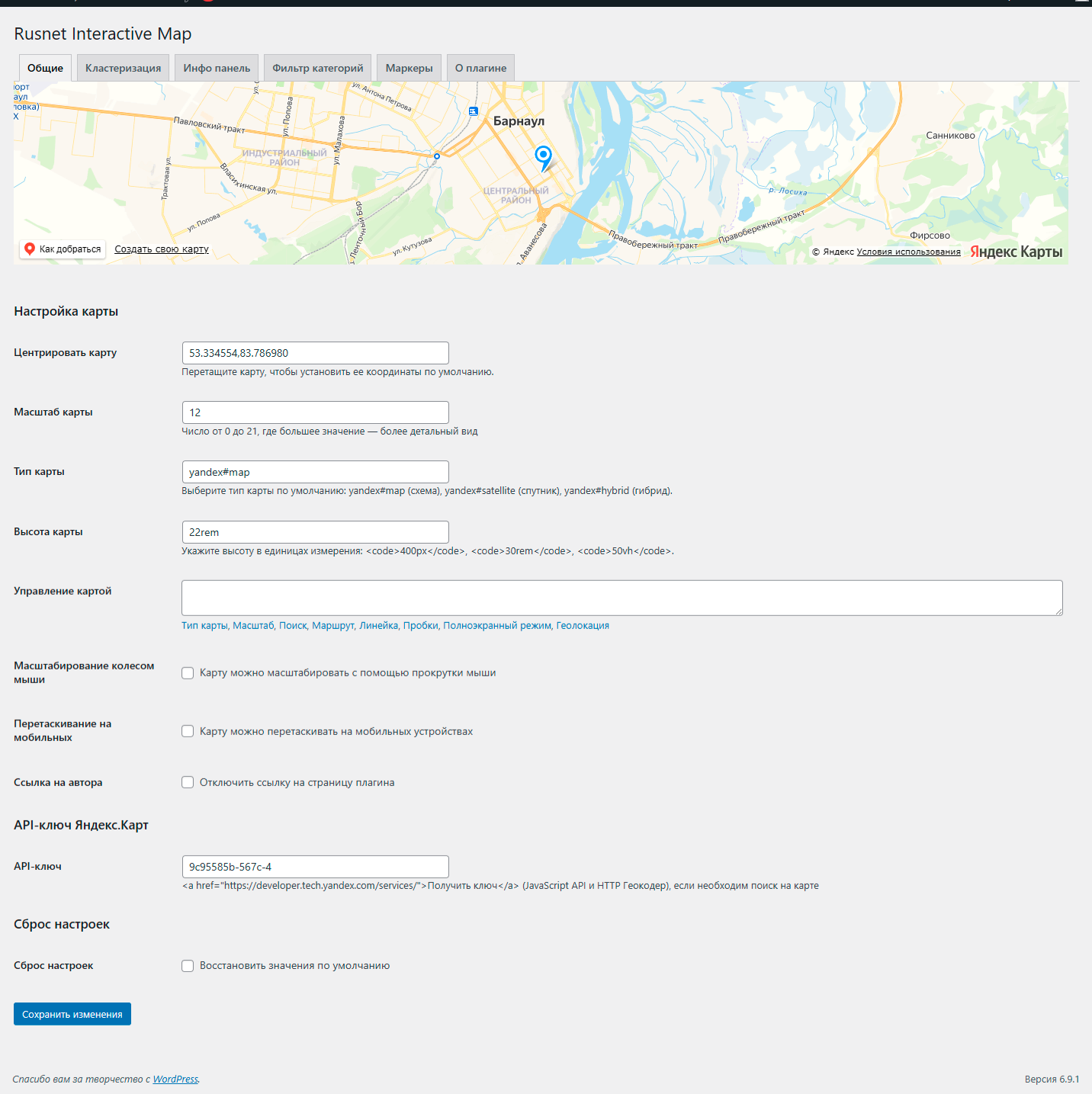
General plugin settings: configure API keys, default map options, and global behavior. 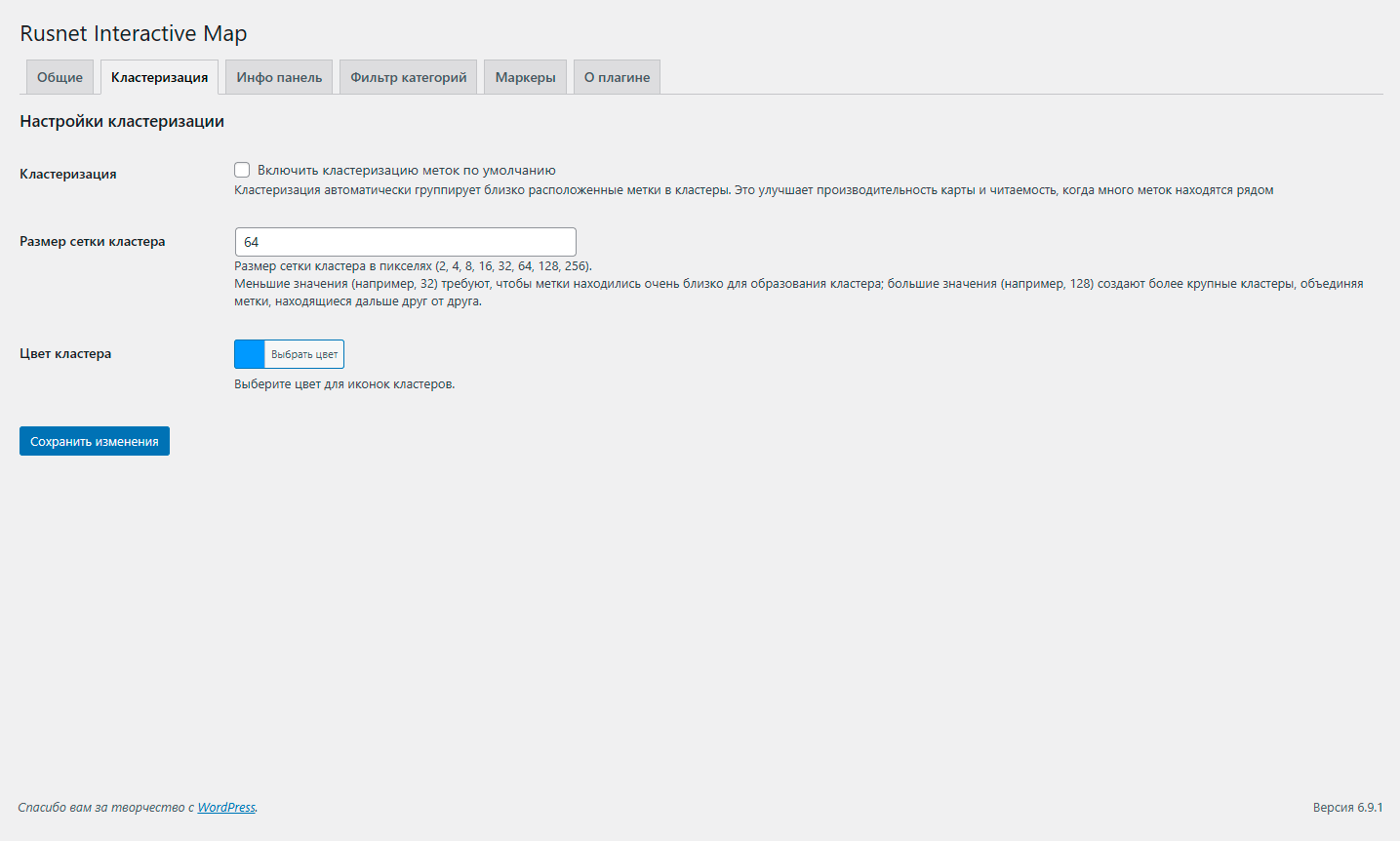
Clustering settings: enable or disable marker clustering, adjust cluster radius, and customize cluster appearance. 
Info panel settings: control the layout, content, and behavior of the info panel that appears on marker click. 
Category filter settings: manage marker categories and filter options to help users navigate markers. 
Marker settings: define default marker icons, sizes, and behaviors for all markers. 
Markers list: overview of all created markers with quick edit, delete, and search functions. 
Add/Edit marker: form to create or modify marker details, including title, description, coordinates, and category. 
Frontend map display: example of how the interactive map appears on the site with markers and clusters.
प्रश्नोत्तर
-
Where do I get a Yandex.Maps API key?
-
Get one from the Yandex Technologies page, choosing “JavaScript API and HTTP Geocoder”.
-
Why doesn’t search work on the map?
-
Search is only available when an API key is provided. Make sure the key is entered correctly in the settings and hasn’t expired.
-
Can I use my own images for icons?
-
Yes, you can upload custom images for markers or use the built‑in “My icon set” to create a collection of icons.
-
Yes, there is an option “Author link” in the settings to disable the link to the developer’s website.
समीक्षाहरू
यस प्लगिनको लागि कुनै समीक्षाहरू छैनन्।
योगदानकर्ता र डेभलपरहरू
“Rusnet Interactive Map for Yandex Maps” खुला स्रोत सफ्टवेयर हो। निम्न व्यक्तिहरूले यो प्लगिनमा योगदान गरेका छन्।
योगदानकर्ताहरू
“Rusnet Interactive Map for Yandex Maps” 1 लोकेलमा अनुवाद गरिएको छ। योगदानको लागि अनुवादकहरूलाई धन्यवाद।
“Rusnet Interactive Map for Yandex Maps” लाई आफ्नो भाषामा अनुवाद गर्नुहोस्
विकासमा रुचि छ?
आरएसएस द्वारा कोड ब्राउज गर्नुहोस्, एसभीएन रिपजिटरी हेर्नुहोस्, वा विकास लग को सदस्यता लिनुहोस्।
चेन्जलग
2.1.4
- Fixed: Lightbox image display – images no longer get cropped and are now scaled correctly while preserving aspect ratio.
- Improved: Synchronization of the active thumbnail in the gallery – when switching images with the arrow keys in the lightbox, the corresponding thumbnail is now highlighted.
- Fixed: Possible duplication of click handlers on gallery thumbnails, which could lead to incorrect behavior.
- Fixed: Marker description formatting – paragraphs, line breaks, and shortcodes are now displayed correctly in the info panel.
- Added: Global padding settings for the info panel – you can now set top, right, bottom, and left padding independently.
- Added: Global border radius settings for the info panel – each corner (top‑left, top‑right, bottom‑right, bottom‑left) can be configured individually.
- Improved: Info panel styling – more flexible control over appearance without the need to write CSS.
- Fixed: Minor compatibility issues with the latest version of WordPress.
- Fixed: Compatibility with third‑party plugins.
- Improved: Info panel styling – more flexible control over appearance without custom CSS.
2.1.3
- Improved info panel layout: the panel now opens beside the map (using flexbox) instead of overlapping it. The map maintains a reasonable minimum width and does not shrink too much.
- Fixed map centering: when a marker is clicked, the map now correctly centers on it after the panel appears, ensuring the marker is visible.
- Enhanced overall user experience with smoother resizing and better handling of the info panel.
- Added: Lightbox for marker image gallery – click on the main image to open a fullscreen slideshow. Navigate through all gallery images using on-screen arrows or keyboard keys (, ). Press Esc to close.
- Improved: The currently displayed image in the gallery is now visually highlighted on its thumbnail.
- Fixed “Undefined variable $wrapper_id” error that occurred when generating maps in some configurations.
- Fullscreen mode now works correctly with the info panel: the custom button toggles fullscreen on the wrapper container containing both the map and the info panel, preserving their layout.
- Improved the appearance of the custom fullscreen button: added styling (blue border, shadow, hover effect) to make it more noticeable and consistent with the interface.
- Improved code structure: all static styles moved to separate CSS files for better performance and easier customization.
2.1.2
- Fixed a critical bug that caused infinite page loading when creating or editing marker categories. The issue was caused by recursive hook calls in the taxonomy field templates, leading to duplicated fields and browser freezing.
2.1.1
- Photo in the info panel is now clickable.
- Fixed filter display: filter is hidden when only one marker is shown.
- Added close button and Escape key support to close the info panel.
- Implemented mouse dragging for the info panel on desktop.
- Implemented search function in settings: searching for an address automatically sets marker coordinates and centers the map.
- Implemented marker dragging in settings: marker can be dragged to a new position, coordinates are saved, and the map centers.
- Added hooks to map settings.
2.1.0
- Added hooks for extensibility (rusnetim_marker_icon_meta_box, rusnetim_save_marker_meta, etc.).
- Removed unused JS file.
2.0.9
- Fixed Version.
2.0.8
- Added delegated handler for “Map controls” buttons.
- Fixed API key link.
- Corrected descriptions and output of settings blocks in General settings.
- All HTML-containing descriptions now use __() and are properly escaped with wp_kses_post().
- Updated Russian translation.
- Markers moved to a separate admin menu item.
- Fixed map display in global settings preview.
2.0.7
- Refactored to meet WordPress.org requirements: unified prefix, renamed CPT and taxonomy, fixed script enqueuing, removed all inline styles/scripts.
- Changed shortcodes to
[rusnetim_map]and[rusnetim_marker]. - Added full Russian translation.
2.0.6
- Fixed display of single markers.
- Improved shortcode usage: single markers can now be displayed using the
marker_idattribute directly, without wrapping the marker shortcode inside the map container. - Minor bug fixes and performance improvements.
2.0.5
- Removed licensing system – all features are now free.
- Fixed script enqueuing to comply with WordPress standards.
- Improved compatibility with WordPress 6.9.
- Added explicit documentation about external Yandex API usage.
2.0.4
- Fixed minor JavaScript bugs.
- Improved compatibility with the latest WordPress versions.