
Beskrivelse
Adding Google Analytics to your website never has been easier. Just add your analytics ID and the correct asynchronous Javascript code is added to every page. No fiddling around anymore with manually pasting the code in your template.
Skjermbilder
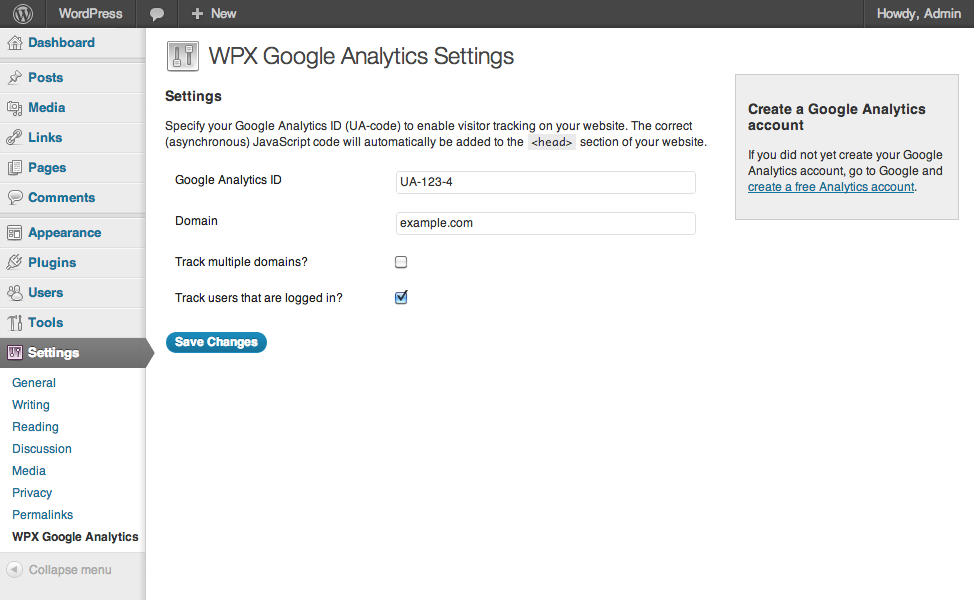
Google Analytics Settings
Installasjon
- Upload
wpx-google-analytics.phpto the/wp-content/plugins/directory - Activate the plugin through the ‘Plugins’ menu in WordPress
- Go to
Settings>WPX Google Analyticsand paste in your analytics ID
Vurderinger
Det er ingen omtaler av denne utvidelsen.
Bidragsytere og utviklere
«WPX Google Analytics» er programvare med åpen kildekode. Følgende personer har bidratt til denne utvidelsen:
Bidragsytere
Oversett «WPX Google Analytics» til ditt språk.
Interessert i utvikling?
Bla gjennom koden, sjekk ut SVN-repositoriet, eller abonner på utviklingsloggen med RSS.
Endringslogg
1.1
- Language support added
1.0.2
- Cleaned up the code, removed debug statements that caused issues on certain installations.
1.0.1
- Added: Forbidden characters are stripped from the domain.
1.0
- First public release of the plugin.