

Description
The Graded Cards System provides a powerful, yet easy way for collectors to manage their graded card collections directly within WordPress. This is a complete solution for building a digital portfolio, adding instant credibility, and allowing visitors to verify card details.
Key Features for Collectors and Hobby Shops:
- Easy Card Management: A simple admin interface to add, view, and delete your graded cards with details like certificate numbers, grades, and images.
- Certificate Lookup Search: Use the
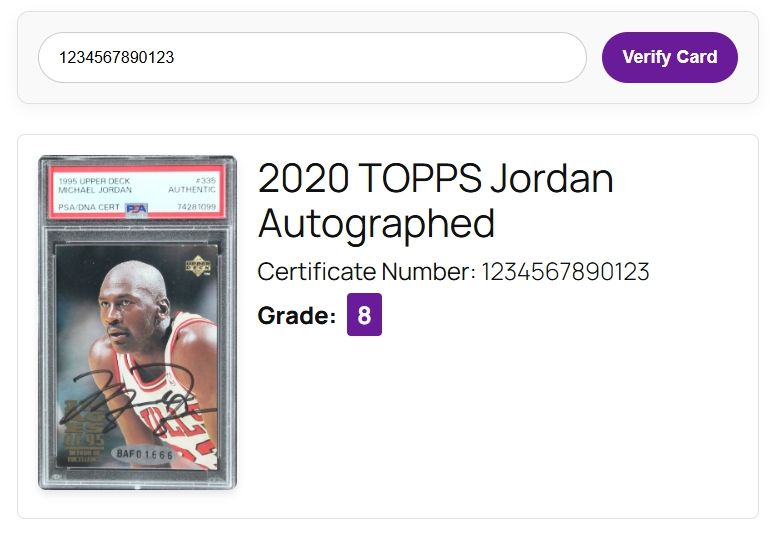
[graded_cards_search]shortcode to add a dedicated search bar that allows users to verify certificate numbers instantly against your database. - Display Your Collection: Use the
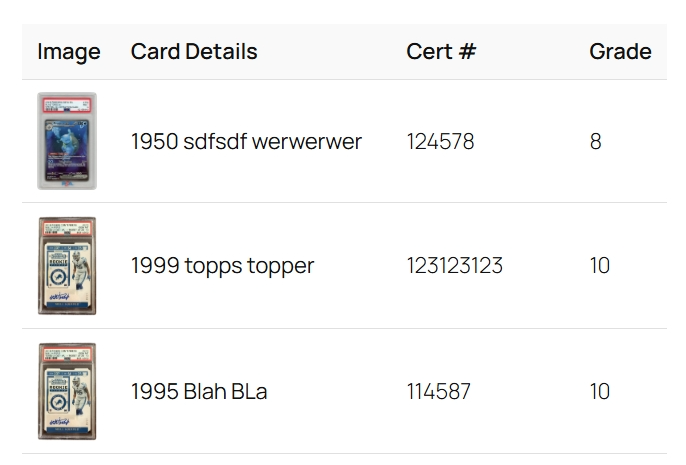
[graded_cards_list]shortcode to showcase your entire trading card or sports card collection in a beautiful, responsive grid or a clean table layout. - Service Compatible: Perfect for cards graded by services like PSA, BGS, SGC, and others.
- Media Uploader Integration: Uses the native WordPress Media Uploader for a seamless image-adding experience.
- Lightweight & Efficient: Built to be fast and not slow down your website.
Screenshots


Installation
Upload the graded-cards-system folder to the /wp-content/plugins/ directory.
Activate the plugin through the ‘Plugins’ menu in WordPress.
Navigate to the “Graded Cards” menu in your admin dashboard to start adding cards.
(Optional) Navigate to “Graded Cards > Settings” to choose your default collection display style.
Use the shortcodes [graded_cards_search] and [graded_cards_list] on any page or post.
FAQ
-
Can I use this for any type of graded card?
-
Yes! While designed with sports cards and trading cards in mind, you can use this for any collectible that has a certificate number and a grade, such as Pokémon cards, Magic: The Gathering, Funko Pops, etc.
-
Will this slow down my website?
-
No. The plugin is designed to be very lightweight. The admin table is paginated to handle large collections without performance issues, and the frontend queries are simple and efficient.
-
What happens to my cards if I delete the plugin?
-
Important: Deleting the plugin via the WordPress admin dashboard will permanently remove the custom database table and all of your card data. This action cannot be undone. If you want to keep your card data in the database, you should deactivate the plugin instead of deleting it.
Reviews
There are no reviews for this plugin.
Contributors & Developers
“Graded Cards System: Collector's Database, Seller Tools & Certificate Lookup” adalah perisian sumber terbuka. Orang-orang berikut telah menyumbang kepada pemalam ini.
Penyumbang
Berminat dalam pembangunan?
Layari kod, periksa repositori SVN, atau langgani log pembangunan dengan RSS.
Changelog
2.2
Security Fix: Added a nonce check to the [graded_cards_search] shortcode form to prevent unauthorized requests.
Security Fix: The do_action hook for saving a card now passes a sanitized data array instead of the raw $_POST variable.
Code Quality: Replaced all gcp_ and gcs_ function, hook, and CSS class prefixes with the more unique gcsys_ prefix to prevent conflicts and ensure full compatibility with the Pro add-on.
Code Quality: Added explicit sanitization for all inputs to comply with WordPress.org standards.
Tweak: Added phpcs:ignore comments to address safe-use warnings for database table variables.
Tweak: Updated plugin version to 2.2.
2.1
Tweak: Added descriptive text to the admin page header for better user guidance.
Tweak: Refined the “Pro Activated” notice for a cleaner user experience.
Tweak: Updated CSS for better responsive handling of the frontend table layout.
2.0
Feature: Added a new “Settings” page under “Graded Cards”.
Feature: Added an option on the Settings page to choose a default layout (Grid or Table) for the [graded_cards_list] shortcode.
Feature: The [graded_cards_list] shortcode now supports a responsive table layout in addition to the grid view.