

Description
Transform your WordPress site with Antimanual, the all-in-one AI powerhouse.
Antimanual isn’t just a plugin; it’s your intelligent assistant. It seamlessly combines a smart Chatbot, Auto-Posting, Documentation Generator, Bulk Rewrite tools, Forum Automation, and AI Search to revolutionize how you manage your site.
Whether you’re a business owner looking to reduce support costs, a content creator needing to scale production, or a developer wanting to streamline documentation, Antimanual is the solution.
Key Features
-
Intelligent AI Chatbot
Train a custom chatbot on your own content—posts, pages, PDFs, and URLs. It delivers instant, accurate answers to your visitors, reducing support tickets and boosting engagement. Now with GPT-5 support! -
Auto-Posting & Content Creation
Put your content strategy on autopilot. Schedule and automatically publish fresh, SEO-optimized posts based on your chosen topics and tone. Keep your blog active without lifting a finger. -
AI Documentation Generator
Instantly generate comprehensive, clean documentation. Select your language, tone, and structure, and let the AI build professional docs for your products or services. -
Bulk Rewrite & SEO Optimization
Refresh your existing content in bulk. Rewrite posts to improve readability, update information, or target new keywords. Automatically generate SEO-friendly excerpts, tags, and terms. -
Forum Automation
Breathe new life into your forums. Automatically convert closed topics into helpful knowledge base posts and generate smart AI replies to keep discussions moving. -
Smart Knowledge Base
Build an organized knowledge system by converting your existing content into structured, searchable resources. Supports PDFs, URLs, and custom text. -
AI-Powered Search
Upgrade your site’s search experience. The customizable AI search block understands user intent and delivers relevant results, complete with editable text and icons.
Why Choose Antimanual?
- Save Time: Automate repetitive tasks like content writing, support responses, and documentation.
- Boost SEO: Keep your site fresh with auto-posting and optimized content rewrites.
- Improve User Experience: Provide instant answers with the chatbot and smart search.
- Easy to Use: A seamless, React-based admin dashboard makes configuration a breeze.
Useful Links
- Get Antimanual Premium – Unlock the full potential.
- Documentation – Learn how to use every feature.
- Support Forum – Get help from our team.
WHAT’S NEXT?
If you like Antimanual, then consider checking out our other WordPress Plugins:
EazyDocs – Powerful knowledge base plugin to easily create and manage professional documentation, wikis, and helpdesk sections.
Advanced Accordion Block – Lightweight Gutenberg block for creating visually appealing, organized accordion sections with extensive styling options.
Changeloger – Transform plain text changelogs into visually stunning, organized representations with pagination and version links.
Forumax – Standalone, feature-rich community forum plugin with voting, private replies, and Elementor integration.
Jobus – Comprehensive job board solution transforming your site into a recruitment platform with dashboards and ATS.
Spider Elements – Versatile library of 20+ creative widgets to enhance Elementor and build professional websites.
Screenshots

AI Chatbot – An intelligent assistant ready to help your visitors. 
Create Documentation – Generate professional docs in seconds. 
Knowledge Base – Organize your content sources effectively. 
Forum Automation – Smart replies and topic management. 
Closed Topic Into Post – Repurpose forum content automatically. 
Bulk Rewrite – Refresh and optimize your content at scale. 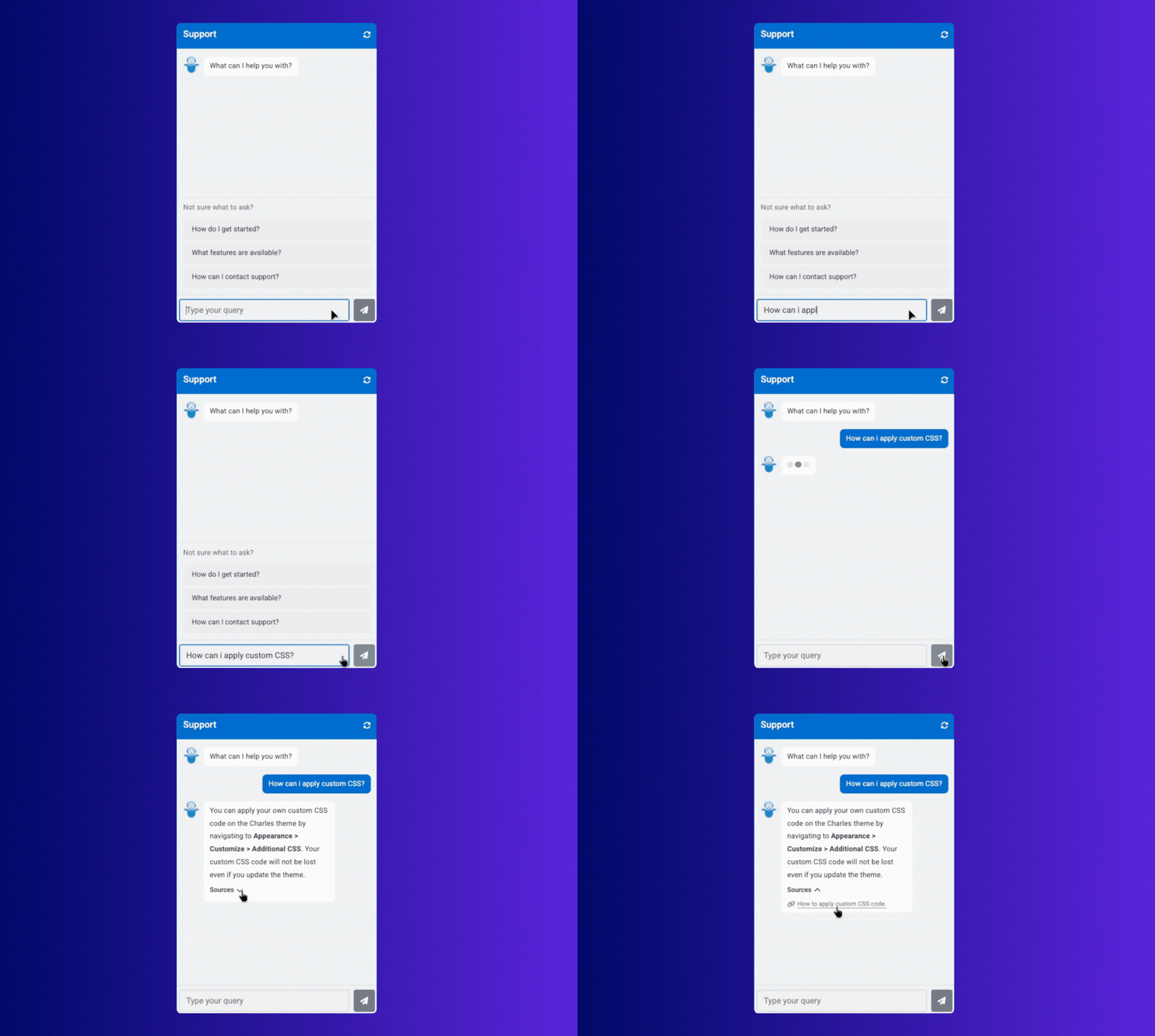
Blocks
This plugin provides 1 block.
- Antimanual Search An AI-powered search block with intelligent results and references.
Installation
- Upload: Upload the
antimanualfolder to the/wp-content/plugins/directory. - Activate: Activate the plugin through the ‘Plugins’ menu in WordPress.
- Configure: Go to Antimanual > Settings in your dashboard.
- Connect: Add your OpenAI API key to enable the AI features.
- Enjoy: Start leveraging AI-powered features!
FAQ
-
What is Antimanual?
-
Antimanual is a comprehensive AI plugin for WordPress that offers features like a custom chatbot, auto-posting, documentation generation, and more to automate and enhance your website.
-
Do I need an OpenAI API key?
-
Yes, Antimanual uses OpenAI’s powerful models (like GPT-4 and GPT-5) to function. You will need to provide your own API key in the settings.
-
Can I train the chatbot on my own data?
-
Absolutely. You can train the chatbot using your website’s posts, pages, custom text, PDFs, and even external URLs.
-
Is the Auto-Posting feature fully automated?
-
Yes! Once you set your topics, tone, and schedule, Antimanual will generate and publish posts automatically according to your plan.
-
Does it work with Forumax?
-
Yes, we have deep integration with Forumax. You can automate replies to forum topics and convert solved topics into permanent documentation or blog posts.
-
Yes, while the free version is powerful, Antimanual Premium offers advanced features and higher limits. Check the “Useful Links” section for more info.
Reviews

Contributors & Developers
“Antimanual – The Ultimate AI Solution for Your Site” adalah perisian sumber terbuka. Orang-orang berikut telah menyumbang kepada pemalam ini.
Penyumbang


“Antimanual – The Ultimate AI Solution for Your Site” telah diterjemahkan ke dalam 1 penempatan. Terima kasih kepada para penterjemah untuk terjemahan mereka.
Translate “Antimanual – The Ultimate AI Solution for Your Site” into your language.
Berminat dalam pembangunan?
Layari kod, periksa repositori SVN, atau langgani log pembangunan dengan RSS.
Changelog
2.2.0 (26 January 2026)
- New: AI Response to Replies – AI suggestions for forum replies with minimum word count filter and role exclusion
- New: AI Search Dashboard – dedicated admin page with Analytics and Query management tabs
- New: Filter by Parent – added dropdown filter for any hierarchical post type
- New: Auto Posting Reliability – added queue system, retry mechanism, and UTC scheduling for robust post generation
- New: Topic Suggestions – added AI-powered “Get topic ideas” button for auto-posting
- New: Auto Posting Status Bar – added last checked, pending, processing status, and manual trigger buttons
- Improved: Redesigned Generated Posts view in Auto Posting – new card-based layout with color-coded status indicators, pagination, and better error display
- Improved: Search block results dismissal UX – replaced click-outside-to-close with an explicit close button
- Improved: Chatbot responsiveness and mobile experience
- Improved: Model selection now validates API key and shows only models available for your key
- Improved: API key settings now display a styled callout with direct links to OpenAI and Google AI Studio dashboards
- Updated: Search block limit now uses lifetime count (100 queries) instead of monthly reset
- Security: API keys encrypted at rest using AES-256-CBC with WordPress security keys
- Security: API keys no longer exposed to frontend – displays masked preview with status indicator
- Fixed: Unwanted characters (markdown code fences, zero-width characters) in AI-generated content
- Fixed: Timezone synchronization issues for scheduled posts
2.1.0 (07 January 2026)
- New: Allowed site admins to set a custom response for irrelevant queries in chatbot settings
- New: Enhanced admin tables with advanced controls across multiple pages
- Implemented search, sort, and pagination functionality
- Synced table state (search, sort, pagination) with page routes to persist data across page refreshes
- Updated: Removed Screen Options from Antimanual admin pages
- Updated: Plugin requirement for forum automation is changed from bbPress to Forumax
- Improved: Disabled the chat reset button when the user has not sent any message yet
- Improved: Show suggested questions when the user has not sent any message yet
- Improved: Adjusted chat reset button position for empty headers in EazyDocs integration
- Improved: Moved the Auto Posting tab after the Bulk Rewrite tab
- Fixed: Monthly conversation usage for the chatbot feature not displaying correctly
- Fixed: Apply button in Screen Options not working
- Fixed: Unable to change the response model in the configuration
- Fixed: Knowledge Base posts not updating correctly and duplicate post issues
2.0.0 (16 December 2025)
- New: Auto-Posting feature – automatically generate and publish WordPress posts based on scheduled topics
- New: Antimanual Search block – intelligent search functionality with query feedback for the block editor
- New: Seamless admin dashboard experience – rebuilt as a React-based SPA for instant loading
- New: Knowledge Base expansion – supports PDF uploads, Website URLs, Custom Text, and existing Posts
- New: Cross Domain Embed – easily embed the AI chatbot on external websites
- New: Chatbot logic upgrades – GPT-5 support, self-reference capability, and access to conversation history
- New: Documentation Generator – generate detailed documentation using AI
- New: bbPress Integration – AI-generated answers for forum topics and topic-to-post conversion
- New: Conversations listed in dashboard – track user interactions with the chatbot
- Updated:Visual overhaul for Admin navigation tabs and Chatbot frontend design
- Updated: Knowledge Base management – now includes table layout, bulk actions, and filters
- Updated: Standalone architecture – removed EazyDocs dependency
- Updated: Enhanced UI for all generator tabs (Terms, Excerpts, bbPress)
- Updated: Chatbot experience – dark mode support, local storage history, and improved mobile UX
- Updated: Performance – switched to SVG icons and optimized asset loading
1.0.0 (05 December 2025)
- Initial release