

Description
Optimal State, also known as WP Optimal State outside the official repository, is the only WordPress performance plugin you’ll ever need. Combining enterprise-grade database optimization, automated backups, intelligent caching, brute force protection, and comprehensive cleanup tools into one unified solution.
Stop paying for multiple plugins. Optimal State replaces UpdraftPlus, WP Rocket, WP-Optimize, Perfmatters, Better Search Replace, Loginizer and more, delivering advanced performance optimization and security hardening without the bloat of additional plugins or the fatigue of multiple subscriptions.
▶ Live Interactive Demo | ✪ Upgrade to Pro
Why WordPress Sites Choose Optimal State
🚀 4X Faster Than Using Separate Plugins
One optimized codebase instead of 4+ conflicting plugins means faster load times, reduced server overhead, and zero compatibility issues.
💰 Save Money on Multiple Plugin Subscriptions
Stop paying for separate plugins like WP Rocket, UpdraftPlus Premium, WP-Optimize Premium, Perfmatters, and Loginizer. Get everything in one place and eliminate subscription fatigue.
🎯 Database Optimization That Actually Works
Unlike basic cleaners, Optimal State performs deep optimization: table defragmentation, autoload optimization, corruption repair, and intelligent cleanup of 20 data types.
📊 Real-Time Health Monitoring
Know exactly when your database needs attention with our proprietary health scoring algorithm—no guesswork, just data-driven optimization.
The Complete Performance Stack
🗄️ Database Optimization & Cleanup
– One-Click Optimization – Comprehensive cleanup in seconds
– Real-Time Health Score – Visual dashboard showing database efficiency (0-100 scale)
– 20 Cleanup Types – Post revisions, spam comments, transients, orphaned data, trashed items, auto-drafts, expired transients, oEmbed cache, WooCommerce sessions, Action Scheduler logs, and more
– Table Optimization – Defragment and compact all database tables
– Autoload Optimization – Reduce autoloaded data for faster page loads (Pro)
– Table Repair & Analysis – Fix corrupted tables automatically (Pro)
– Referential Integrity Scanner – Finds and removes database rows that point to content that no longer exists
– MySQL Index Manager – Scans your database for missing high-impact indexes and fixes them (Pro)
– Database Structure Analysis – Detailed insights into table sizes, indexes, and optimization opportunities
– Remove Old Plugin/Themes Data – Get rid of leftover traces from uninstalled plugins and themes
– Delete Unused Tables – Remove leftover tables from deleted plugins (Pro)
💾 Enterprise-Grade Backup & Restore
– Automated Database Backups – GZIP-compressed with integrity verification
– One-Click Restore – Restore any backup with automatic safety rollback
– Smart Backup Management – Keep up to 10 backups with automatic rotation (Pro: 10, Free: 1)
– Upload & Restore – Restore from any backup file
– Zero-Downtime Restoration – Temporary table swap technology for seamless recovery
– Automatic Safety Backups – Created before all critical operations
– Protected Backup Directory – .htaccess security prevents unauthorized access
⚡ Multi-Layer Caching System
– Server-Side Page Caching – Lightning-fast HTML cache with smart invalidation
– Browser Caching – Automatic .htaccess rules for static assets
– Database Query Caching – Redis/Memcached compatibility (Pro)
– Mobile-Specific Cache – Separate cache for mobile devices (Pro)
– Smart Cache Preload – Sitemap-based automatic preloading (Pro)
– GDPR-Compliant Cookie Detection – Custom consent cookie support (Pro)
– Intelligent Cache Purging – Automatic invalidation on content updates
– Cache Statistics – Real-time hit rates and performance metrics
🔍 Advanced Database Search & Replace
– Serialization-Safe – Handles serialized PHP data correctly (critical for WordPress)
– Dry Run Mode – Preview all changes before execution
– Regex Support – Advanced pattern matching for complex replacements (Pro)
– Table-Specific Operations – Target specific database tables
– Detailed Results – See exactly what was changed and where
🎛️ Performance Optimization Tools
– Bad Bot Blocking – Blocks resource-intensive crawlers and data scrapers
– Font Loading Optimization – Eliminates render-blocking resources
– Lazy Load Images & Iframes – Load media only when visible
– Heartbeat API Control – Reduce admin-ajax.php server load by 60%+
– Post Revisions Limit – Control revision storage (save 30-50% database space)
– Trash Auto-Empty – Automatically purge trash after X days
– Disable XML-RPC – Block brute force attacks via XML-RPC
– Remove Emoji Scripts – Save 12KB+ per page load
– Clean WP Headers – Remove version info, RSD, WLW manifest, shortlinks
– WooCommerce Optimization – Specialized cleanup for online stores
📈 Performance Analytics & Monitoring
– PageSpeed Insights Integration – Core Web Vitals directly in your dashboard
– Performance Metrics Dashboard – Track optimization impact over time
– Database Statistics – Visual charts showing tables, indexes, overhead, and growth
– Activity Logging – Complete history of all optimization operations (last 150)
– Before/After Comparisons – Measure the impact of each optimization
⏰ Automation & Scheduling
– Set-and-Forget Maintenance – Schedule daily, weekly, or monthly optimization (Pro)
– Email Notifications – Receive reports after each automated task (Pro)
– Custom Time Selection – Run maintenance during low-traffic hours (Pro)
– Automatic Backup + Cleanup – Combined scheduled operations (Pro)
🔒 Security & Safety Features
– Emergency Rollback – Automatic restoration if anything goes wrong
– Maintenance Mode – Prevent visitor access during critical operations
– Database Validation – Verify backup integrity before restore
– User Access Control – Restrict plugin access to specific administrators (Pro)
– Settings Export/Import – Backup and migrate your configuration
– Protected Operations – Confirmation dialogs for destructive actions
– Brute Force Prevention – Secure your login page against attacks
Perfect For
✅ E-commerce Sites – WooCommerce optimization, session cleanup, Action Scheduler management
✅ High-Traffic Blogs – Revision control, comment spam removal, transient cleanup
✅ Agency & Developer Sites – Multi-site ready, bulk cleanup, staging/production migrations
✅ Membership Sites – User metadata optimization, scheduled maintenance
✅ Any WordPress Site – Suffering from slow admin, bloated database, or poor performance
Replaces These Popular Plugins
- UpdraftPlus Backup & Restore
- WP Rocket Caching & Performance
- WP Super Cache Page Caching
- WP-Optimize Database Cleanup
- Better Search Replace Database Search & Replace
- Perfmatters Performance Optimization
- Heartbeat Control Heartbeat Management
- WP Revisions Control Revision Limits
- Clearfy Performance Tweaks
- Advanced Database Cleaner Deep Database Cleanup
- Autoptimize Performance Features
- Loginizer Login Page Protection
What Makes Optimal State Different?
Unlike WP-Optimize: We include professional backup/restore and advanced caching—not just basic cleanup.
Unlike UpdraftPlus: We optimize your database for performance, not just backup. Backups are 40-60% smaller due to optimization.
Unlike WP Rocket: We tackle the root cause (database bloat) instead of just caching around the problem. Combined approach = better results.
Unlike Perfmatters: We provide complete database management, automated backups, and intelligent cleanup—not just toggle switches.
Unlike Loginizer: We provide a user-friendly, straightforward control panel that requires no technical expertise.
The Optimal State Advantage: One plugin, one interface, one optimization strategy. No conflicts, no compatibility issues, no subscription fatigue.
Live Preview, Free Version, and Pro Version
This Preview Version allows you to:
✓ Explore the complete interface and dashboard
✓ Review all features and capabilities
✓ Understand the health scoring system
✓ Plan your optimization strategy
✓ See exactly what you’re getting
Full Version (Free & Pro) includes:
✓ All operations fully functional
✓ Actual database optimization and cleanup
✓ Real backup creation and restoration
✓ Working cache system
✓ Search & Replace execution (Pro only)
✓ Automation scheduling (Pro only)
✓ Priority email support
Why offer a live interactive preview? Database optimization is serious business. We want you to be 100% confident in our interface, features, and approach before making any changes to your live site. Test drive everything risk-free, then upgrade when ready.
Technical Specifications
- Minimum Requirements: WordPress 5.5+, PHP 7.4+
- Tested Up To: WordPress 6.9
- Server Compatibility: Shared hosting, VPS, dedicated, cloud (AWS, DigitalOcean, etc.)
- Hosting Compatibility: Bluehost, SiteGround, WP Engine, Kinsta, Cloudways, all major hosts
- Multisite: Not currently supported (coming soon)
- Database Support: MySQL 5.6+, MariaDB 10.1+
- Cache Support: Redis, Memcached, APCu compatible (Pro)
External Services and Resources
Optimal State utilizes the following third-party services and open-source libraries to enhance functionality and user experience:
-
Chart.js – Open-source JavaScript library for creating responsive, interactive data visualizations.
Used in the plugin’s dashboard to display database statistics, performance trends, and health metrics.
Chart.js is licensed under the MIT License and is included locally within the plugin.
For more information, visit: https://www.chartjs.org/ -
Google PageSpeed Insights API – Performance measurement tool that analyzes web page content and generates suggestions to make that page faster.
The plugin’s PageSpeed integration uses this API to fetch and display Core Web Vitals metrics and optimization opportunities.
When you use the PageSpeed feature, your site URL is sent to Google’s servers for analysis.
Use of this API is subject to Google’s Terms of Service and Privacy Policy.- API Documentation: https://developers.google.com/speed/docs/insights/v5/get-started
- Terms of Service: https://developers.google.com/terms
- Privacy Policy: https://policies.google.com/privacy
-
GTranslate Widget – Website translation service that provides automatic language translation functionality.
The plugin loads the GTranslate popup widget from cdn.gtranslate.net to enable multi-language support in the admin interface.
When the widget is loaded, it may connect to GTranslate’s servers to provide translation services.
Use of this service is subject to GTranslate’s Terms of Service and Privacy Policy.- Service Website: https://gtranslate.io/
- Terms of Service: https://gtranslate.io/terms-and-conditions
- Privacy Policy: https://gtranslate.io/privacy-policy
Note: The PageSpeed Insights feature is optional and only activates when you manually request a performance analysis. No data is sent to external services without your explicit action.
Credits
- Developed by Luke Garrison
- Icons by Dashicons (WordPress Core)
- Charts by Chart.js
- Performance metrics based on Google PageSpeed Insights
Contributing: Interested in contributing to Optimal State? Feature requests, bug reports, and code contributions are welcome. Visit our support page for contribution guidelines.
Support and Documentation
Getting Help
- User Manual: Comprehensive documentation built into the plugin (User Manual tab)
- FAQ Section: Common questions answered above
- Live Demo: Interactive preview to explore features before installation
- Email Support: Priority support for Pro version users
Useful Links
Feature Requests
We actively develop Optimal State based on user feedback. If you have a feature request or enhancement idea, please contact us through the support page. Many current features were implemented based on user suggestions.
Screenshots

Database Backup & Restore Operations 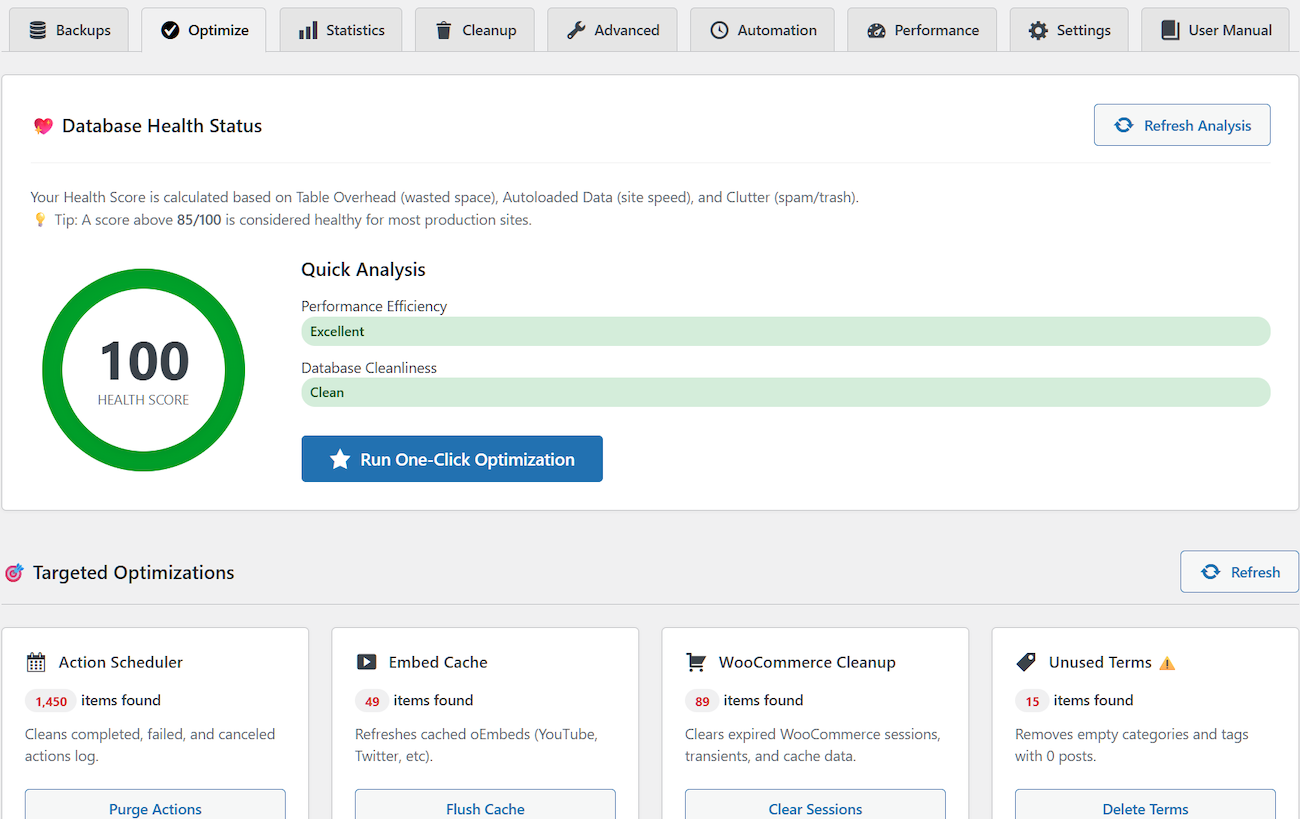
Dashboard Overview – Health score gauge and quick analysis 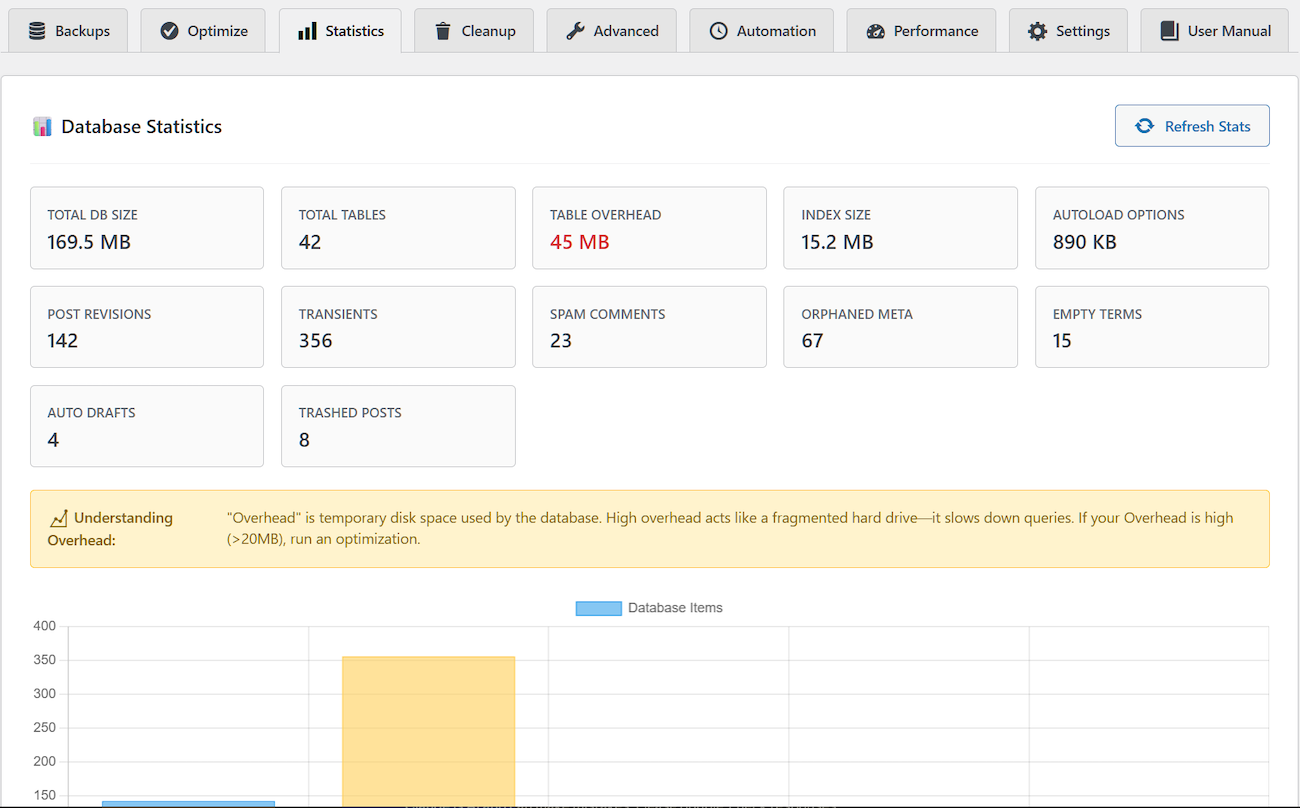
Database Statistics – Visual charts and detailed metrics 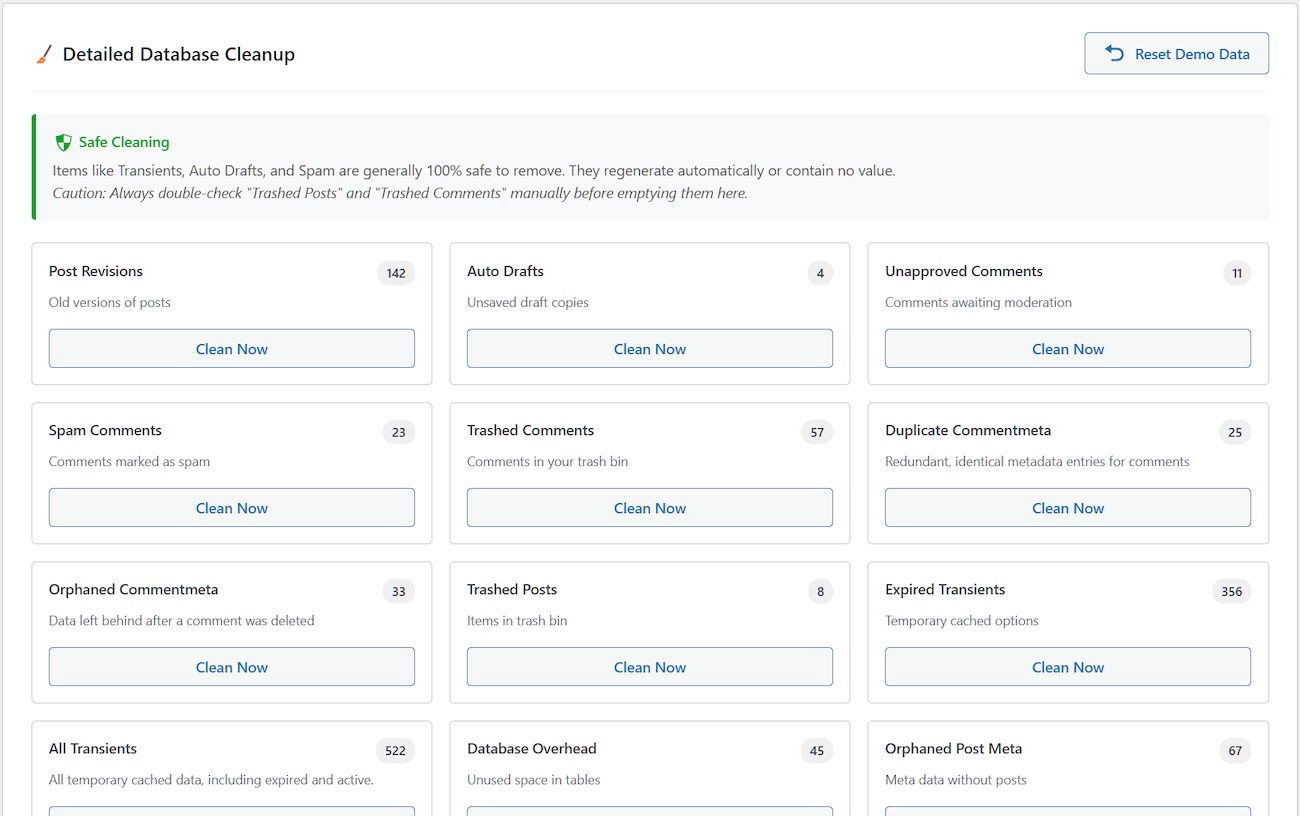
Cleanup Interface – Itemized cleanup options with counts 
Performance Metrics (Google PageSpeed Insights) 
Advanced Database Operations – Defragmentation, Repair, Optimize Autoloaded Data 
Database Search & Replace utility – Replace any string in your database 
Database Structure Analysis – Detailed information on databases and tables 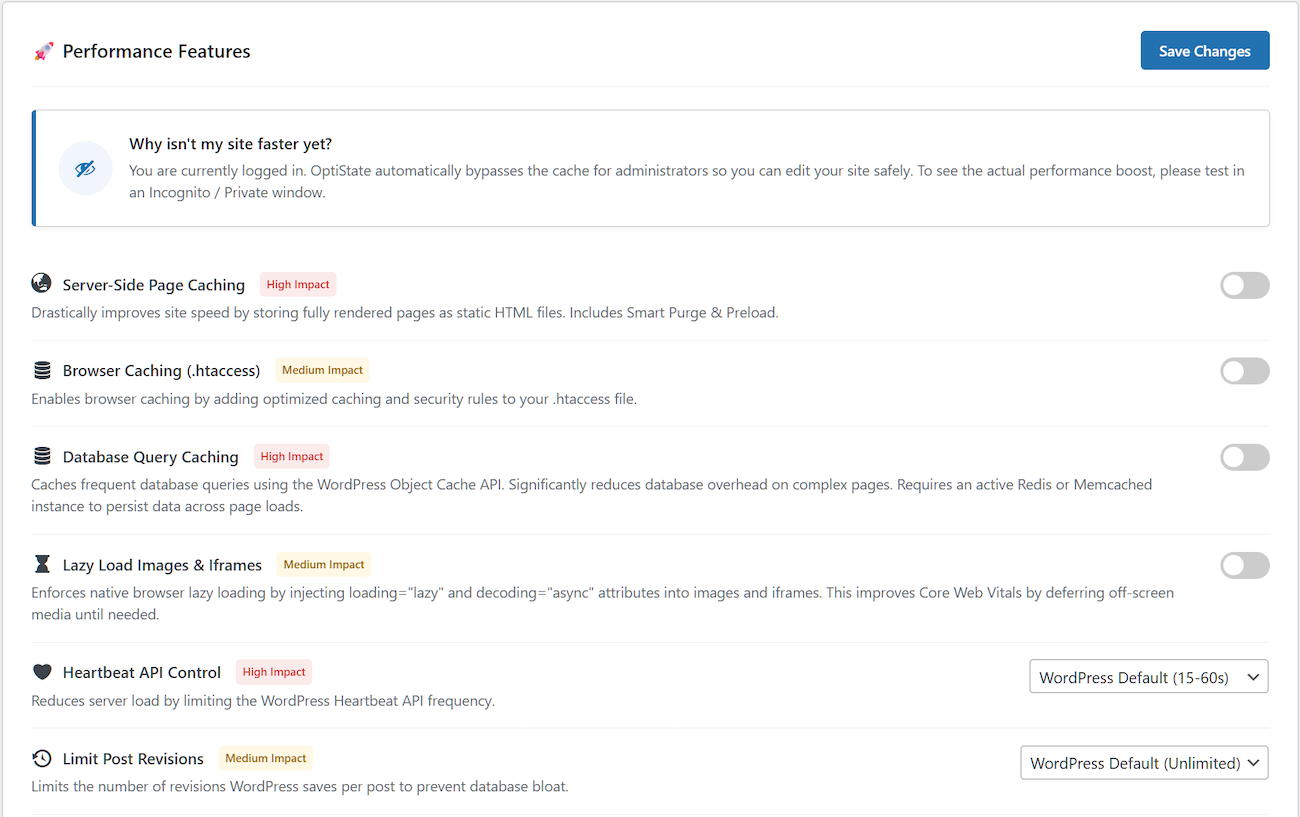
Performance Features – Toggle-based performance enhancements 
Automation Settings – Schedule configuration interface 
User Manual with detailed descriptions and explanations of each feature
Installation
Automatic Installation (Recommended)
- Log into your WordPress dashboard
- Navigate to Plugins Add New
- Search for “Optimal State” or “optistate“
- Click “Install Now” on the Optimal State plugin card
- Click “Activate” after installation completes
- Access Optimal State from your WordPress admin menu
Manual Installation
- Download
optistate.zipfrom WordPress.org - Log into your WordPress dashboard
- Go to Plugins Add New Upload Plugin
- Choose the
optistate.zipfile - Click “Install Now” then “Activate“
- Access Optimal State from your admin menu
First-Time Setup
- Navigate to Optimal State in your admin menu
- Review the Dashboard to see your current database health score
- Check Statistics to identify optimization opportunities
- Create your first backup in the Backups tab
- Run One-Click Optimization from the Optimize tab
- Review the User Manual tab for detailed feature explanations
FAQ
-
What makes Optimal State different from other optimization plugins?
-
Optimal State is an all-in-one solution that replaces 4-6 separate plugins. Instead of installing WP Rocket for caching, UpdraftPlus for backups, WP-Optimize for database cleanup, and Better Search Replace for migrations, you get all these features in a single, unified plugin. This means:
- No plugin conflicts – One codebase eliminates compatibility issues
- Faster performance – Reduced overhead from having multiple plugins active
- Simplified management – One dashboard instead of switching between 4+ plugins
- Cost savings – One purchase instead of multiple subscriptions
Our proprietary health scoring algorithm also provides real-time insights that basic cleaners simply can’t match.
-
Is Optimal State safe to use on production sites?
-
Yes, absolutely. Optimal State includes multiple safety mechanisms:
- Automatic safety backups before scheduled optimization
- Emergency rollback system that triggers if anything goes wrong
- Dry run mode for Search & Replace (preview changes before applying)
- Zero-downtime restoration using temporary table swap technology
- Database validation verifies backup integrity before restore
- Maintenance mode protects your site during critical operations
Hundreds of sites use Optimal State in production without issues. We recommend testing on staging first for enterprise sites, but the built-in safety features make it production-ready out of the box.
-
Will this plugin slow down my website?
-
No, quite the opposite. Optimal State is designed for performance:
- Optimized codebase – Minimal resource usage compared to running 4+ separate plugins
- Efficient query design – Database operations use indexed queries and batch processing
- Smart caching – Statistics are cached to avoid repeated expensive queries
- Conditional loading – Admin features only load on relevant pages
- No external dependencies – Chart.js and other libraries are served locally
Most users see a 20-40% improvement in admin dashboard speed and database query performance after optimization. The caching features alone typically reduce page load times by 50-80%.
-
What types of data does the cleanup remove?
-
Optimal State safely removes 20 different types of database bloat:
Content Cleanup:
* Post revisions (keeps latest version)
* Auto-drafts and abandoned content
* Trashed posts and pages
* Orphaned post metadata
* Duplicate Post MetaComment Cleanup:
* Spam comments
* Trashed comments
* Duplicate Comment Meta
* Orphaned comment metadata
* Orphaned User Meta
* Unapproved comments
* Pingbacks and trackbacksSystem Cleanup:
* Action Logs
* Expired transients
* Empty Taxonomies
* oEmbed cache data
* Orphaned term relationships
* Duplicate metadata entriesWooCommerce Specific:
* Abandoned cart sessions
* Completed Action Scheduler logs
* Order transientsAdvanced:
* Autoload optimization (moves non-critical data to standard loading)
* Table defragmentation (recovers wasted disk space)
* Unused database tables from deleted plugins (Pro)All cleanup operations are reversible via backup, and nothing is deleted without your explicit confirmation.
-
How do backups work? What gets backed up?
-
Optimal State creates complete database backups in standard SQL format:
What’s Included:
* All database tables (structure + data)
* GZIP compression for space efficiency
* Integrity checksums for validation
* Compatible with phpMyAdmin and other MySQL toolsWhat’s Not Included:
* WordPress files (themes, plugins, uploads)
* wp-config.php and other core filesThis is intentional – database corruption and data loss are the most common issues affecting WordPress sites. For full-site backups including files, we recommend combining Optimal State with a file backup solution like UpdraftPlus or BackWPup.
Backup Features:
* One-click creation and restoration
* Automatic safety backups before restore operations
* Rotation management (keeps latest N backups)
* Upload and restore from external backup files
* Protected storage directory (.htaccess secured) -
Can I restore a backup from another plugin like UpdraftPlus or phpMyAdmin?
-
Yes (Pro feature). The “Upload & Restore” feature accepts:
- Standard SQL dump files (.sql)
- GZIP compressed SQL files (.sql.gz)
- phpMyAdmin exports
- UpdraftPlus database backups (extract the .gz file first)
- Most MySQL backup formats
The restore engine automatically detects file format, handles DEFINER statements, adjusts table names for safety, and validates structure before importing. If you’re migrating between domains, use the Search & Replace feature after restoring to update URLs.
-
Does this work with WooCommerce?
-
Yes, Optimal State has specialized WooCommerce optimization:
- Session cleanup – Removes abandoned cart data
- Action Scheduler optimization – Purges completed background tasks
- Order transients – Clears temporary calculation data
- Smart cache invalidation – Automatically clears cache when orders are placed
- Database indexes – Adds high-impact indexes for product queries (Pro)
Many WooCommerce stores see dramatic performance improvements after cleanup, especially if you have thousands of products or orders. The plugin is tested and fully compatible with WooCommerce 7.0+.
-
What’s the difference between Free and Pro versions?
-
DATABASE BACKUP & RESTORE
……………………………………………….Free Version ……Pro Version
• Create Backups……………………………… ✓…………………. ✓
• Maximum Backups Kept……………….. [1]…………… [Up to 10]
• Download Backups……………………….. ✓…………………. ✓
• Restore from Existing Backups……… ✓…………………. ✓
• Restore from Uploaded File……….. [50MB]…………. [5GB]
• Backup Verification (Checksum)……. ✓…………………. ✓DATABASE CLEANUP & OPTIMIZATION
…………………………………………….Free Version ……Pro Version
• One-Click Optimization………………. ✓…………………. ✓
• Database Health Score………………. ✓…………………. ✓
• Database Statistics…………………….. ✓…………………. ✓
• Detailed Cleanup (20 types)………… ✓…………………. ✓
• Optimize All Tables…………………….. ✓…………………. ✓
• Analyze & Repair Tables…………….. ✗…………………. ✓
• Optimize Autoloaded Options…….. ✗…………………. ✓
• Database Structure Analysis………. ✓…………………. ✓
• MySQL Index Manager……………….. ✗…………………. ✓
• Referential Integrity Scanner………. ✓…………………. ✓
• Database Search & Replace……….. ✗…………………. ✓
• Legacy Plugin Data Scanner……….. ✓…………………. ✓
• Delete Unused Tables………………… ✗…………………. ✓AUTOMATION FEATURES
………………………………………………….Free Version ……Pro Version
• Scheduled Backup/Cleaning……………. ✗…………………. ✓
• Email Notifications…………………………… ✗…………………. ✓
• Customizable Schedule……………………. ✗…………………. ✓PERFORMANCE FEATURES
……………………………………………………………..Free Version ……Pro Version
• Server-Side Page Caching……………………………. ✓…………………. ✓
• Browser Caching (.htaccess Rules)………………. ✓…………………. ✓
• Cache Purging……………………………………………… ✓…………………. ✓
• Cache Statistics…………………………………………… ✓…………………. ✓
• Automatic Cache Preload (Sitemap-Based)….. ✗…………………. ✓
• Mobile-Specific Cache…………………………………. ✗…………………. ✓
• Custom Consent Cookie Support…………………. ✗…………………. ✓
• Query String Handling Modes (3 Options)……. ✓…………………. ✓
• Smart Cache Invalidation on Updates………….. ✓…………………. ✓
• Database Query Caching……………………………. ✗…………………. ✓
• Font Loading Optimization………………………….. ✗…………………. ✓
• Lazy Load Images & Iframes……………………….. ✓…………………. ✓
• Bad Bot Blocker…………………………………………… ✓…………………. ✓
• Post Revisions Limit Control………………………… ✓…………………. ✓
• Trash Auto-Empty Control…………………………… ✓…………………. ✓
• Heartbeat API Control………………………………… ✓…………………. ✓
• Disable XML-RPC……………………………………….. ✓…………………. ✓
• Remove Emoji Scripts…………………………………. ✓…………………. ✓
• Remove Unused WordPress Headers…………. ✓…………………. ✓
• Integrated PageSpeed Metrics…………………… ✓…………………. ✓SECURITY & SAFETY
………………………………………………….Free Version ……Pro Version
• Safety Backup Before Restore…………… ✓…………………. ✓
• Emergency Rollback………………………….. ✓…………………. ✓
• Zero-Downtime Restore…………………….. ✓…………………. ✓
• Database Validation Before Restore…… ✓…………………. ✓
• Maintenance Mode During Restore……. ✓…………………. ✓
• Protected Backup Directory……………….. ✓…………………. ✓
• User Management (Restrict Access)….. ✗…………………. ✓
• Settings Export/Import………………………. ✓…………………. ✓
• Brute Force Protection……………………….. ✓…………………. ✓LOGGING & MONITORING
…………………………………………………….Free Version ……Pro Version
• Optimization History (Last 200 ops)…… ✓…………………. ✓
• Detailed Operation Results………………… ✓…………………. ✓
• Real-Time Progress Tracking……………… ✓…………………. ✓SUPPORT & DOCUMENTATION
………………………………………………..Free Version ……Pro Version
• Comprehensive Manual…………………. ✓…………………. ✓
• Multi-Language Interface………………. ✓…………………. ✓
• In-Dashboard Help & Tooltips………… ✓…………………. ✓The free version is fully functional and sufficient for most sites. Pro unlocks automation, advanced safety features, and enterprise-level optimization tools.
-
How often should I optimize my database?
-
It depends on your site activity:
- High-traffic blogs (10+ posts/day, heavy comments): Weekly
- E-commerce stores (active orders, heavy traffic): Weekly
- Membership sites (frequent user activity): Bi-weekly
- Standard blogs (occasional posts): Monthly
- Brochure/static sites (minimal changes): Quarterly
The health score dashboard provides real-time guidance – if your score drops below 70, it’s time to optimize. Pro users can schedule automatic maintenance to run during low-traffic hours (e.g., 2 AM daily).
Warning signs you need optimization:
* Admin dashboard loads slowly
* Health score below 70
* Autoload size over 800KB
* 500+ post revisions
* Table overhead over 5% -
Is my data sent to external servers?
-
No tracking or data collection. Optimal State operates entirely on your server with two optional exceptions:
-
PageSpeed Insights (optional) – When you manually request a performance analysis, your site URL is sent to Google’s PageSpeed API for evaluation. This only happens when you click “Run Audit” – never automatically.
-
GTranslate Widget (optional) – The admin interface includes a translation widget that loads from cdn.gtranslate.net to help non-English speakers. This is cosmetic only and doesn’t affect plugin functionality.
No usage statistics, analytics, or telemetry data is ever collected or transmitted. All optimization operations happen locally on your WordPress database.
-
-
Will this plugin conflict with my caching plugin?
-
It depends on the plugin:
Compatible:
* Object cache plugins (Redis, Memcached) – Actually complement each other
* CDN services (Cloudflare, BunnyCDN) – Work together seamlessly
* Litespeed Cache (if you disable Optimal State’s page caching)May Conflict:
* WP Rocket – Both provide page caching; choose one
* WP Super Cache – Both provide page caching; choose one
* W3 Total Cache – Both provide page caching; choose one
* Swift Performance – Both provide page caching; choose oneIf you’re already using a premium caching plugin you’re happy with, simply disable Optimal State’s caching features and use it exclusively for database optimization and backups. The features are modular – use what you need.
-
Can I use this on WordPress Multisite?
-
No, Optimal State is designed specifically for single-site installations. Running database optimization operations across an entire multisite network would be risky and could affect multiple sites simultaneously. We intentionally block activation on multisite to prevent data integrity issues.
For multisite networks, we recommend using network-appropriate tools designed for that architecture.
-
Does this require coding knowledge?
-
No. Optimal State is designed for users of all skill levels:
- One-click operations for most common tasks
- Visual dashboard with real-time health scoring
- Clear explanations for every feature
- Built-in user manual with step-by-step guides
- Confirmation dialogs before destructive actions
- Undo capability via automatic backups
Advanced users will appreciate features like regex search & replace, database structure analysis, and custom SQL optimization, but these are optional. Most users simply click “Optimize Database” monthly and enjoy the performance improvements.
-
What happens if a restore fails mid-process?
-
Optimal State uses a sophisticated safety system:
- Temporary table method – Restored data goes into temporary tables first
- Validation check – Data is verified before becoming live
- Atomic swap – Old tables are renamed, new tables activated in one transaction
- Emergency rollback – If anything fails, the system automatically reverts
- Maintenance mode – Visitors see a friendly message during restoration
If the worst happens (power failure, server crash during restore), the original tables remain untouched with an
optistate_old_prefix. You can either:- Contact support for guided recovery (Pro users)
- Use the manual recovery instructions in the User Manual
- Ask your hosting provider to drop the temp tables and rename the old ones back
The plugin is designed so that total data loss is virtually impossible – there’s always a recovery path.
-
How much disk space will I save?
-
Results vary dramatically based on site age and maintenance history:
Typical Results:
* New sites (<6 months): 5-15% space savings
* Medium sites (1-3 years): 15-35% space savings
* Neglected sites (3+ years, never optimized): 40-70% space savingsLargest gains come from:
* Deleting thousands of post revisions
* Purging spam comments (some sites have 50,000+)
* Removing orphaned metadata
* Defragmenting tables (recovers “overhead”)
* Cleaning WooCommerce session dataOne user reported recovering 1.7GB from a 3GB database (60% reduction) on a site that had never been optimized. View detailed statistics to know how many items will be cleaned up.
-
Can I schedule automatic optimization?
-
Yes (Pro feature). The automation system includes:
- Flexible scheduling – Daily, weekly, or monthly intervals
- Custom time selection – Run during low-traffic hours (e.g., 2 AM)
- Email notifications – Receive reports after each run
- Combined operations – Backup + Optimize in one job
- Safety backups – Automatic backup before each scheduled optimization
Most Pro users set weekly optimization at 2 AM Sunday with email confirmations. This “set and forget” approach keeps databases healthy without manual intervention.
-
Does this work with managed WordPress hosting?
-
Yes, but with platform-specific considerations:
Fully Compatible (All Features):
* SiteGround
* Bluehost
* HostGator
* DreamHost
* A2 Hosting
* InMotion Hosting
* Most cPanel/traditional hostingDatabase Features Only (Disable Page Caching):
* WP Engine – Database optimization, backups, and cleanup work perfectly. Disable Optimal State’s page caching (WP Engine has mandatory server-level caching). Browser caching rules also conflict with WP Engine’s system.
* Kinsta – Database optimization, backups, and cleanup work perfectly. Disable Optimal State’s page caching (Kinsta uses FlyCache and edge caching). The Kinsta MU plugin handles caching automatically.
* Flywheel – Database optimization, backups, and cleanup work perfectly. Disable Optimal State’s page caching (Flywheel uses FlyCache). You may need to enable WP_CACHE in Flywheel’s dashboard to use other optimization features.Requires Testing:
* Pantheon – Database operations work; caching may require custom configuration
* WordPress.com Business/eCommerce – Limited plugin access; test thoroughly in staging
* Cloudways – Works well; may need to coordinate cache clearing with platform cacheWhy the restrictions?
Managed WordPress hosts implement their own server-level caching (WP Engine uses proprietary caching, Kinsta uses FlyCache + Cloudflare edge caching, Flywheel uses FlyCache). Running multiple page caching systems simultaneously causes conflicts and can actually slow down your site.Recommended approach for managed hosting:
1. Keep Optimal State’s database optimization, backup, and performance features active
2. Disable “Server-Side Page Caching” in Optimal State’s Performance Features
3. Use the host’s native caching system for page caching
4. Browser caching rules may need to be disabled on some platformsThe database optimization, backup, Search & Replace, and cleanup features work universally across all hosting providers.
-
How do I migrate my site to a new domain?
-
Follow this workflow:
- Create a backup on the old site
- Download the backup file (.sql.gz)
- Install WordPress on the new domain
- Install Optimal State on the new site
- Upload & restore the backup
- Use Search & Replace to change URLs:
- Search:
https://olddomain.com - Replace:
https://newdomain.com - Enable “Dry Run” to preview changes
- Execute replacement
- Search:
- Clear all caches
- Test thoroughly
The Search & Replace feature handles serialized PHP data correctly, which is critical for WordPress migrations.
-
What PHP and WordPress versions are required?
-
Minimum Requirements:
* WordPress 5.5 or higher
* PHP 7.4 or higher
* MySQL 5.6+ or MariaDB 10.1+
* 128 MB PHP memory limit (256 MB recommended)Recommended Setup:
* WordPress 6.4+
* PHP 8.1 or 8.2
* MySQL 8.0+ or MariaDB 10.6+
* 256 MB PHP memory limitThe plugin uses modern PHP features for performance and security. If you’re still on PHP 7.3 or earlier, contact your host about upgrading – outdated PHP versions are a security risk.
-
Does this plugin support translations?
-
Yes, Optimal State is translation-ready with:
- All strings wrapped in translation functions
- POT file included for translators
- Text domain:
optistate - RTL language support
- GTranslate widget for admin interface (optional)
Currently Available:
* English (native)To contribute a translation, contact us through the support page. We offer free Pro licenses to community translators.
-
Where are backups stored?
-
Backups are stored in your WordPress uploads directory:
Location:
/wp-content/uploads/optistate/db-backups/Security Features:
*.htaccessfile blocks direct web access
* Index file prevents directory listing
* Files named with timestamps:BACKUP-YYYY-MM-DD_random-string.sql.gz
* Directory permissions set to 755Important Notes:
* For off-site redundancy, download critical backups via the admin interface
* Pro users can store up to 10 backups; free version keeps 1 (rotates automatically)If your hosting plan has limited disk space, monitor backup folder size. A 500MB database creates roughly 100MB compressed backups.
-
Can I import backups from cPanel or phpMyAdmin?
-
Yes (Pro feature). The “Restore Database from File” feature accepts standard MySQL dump files created by:
- cPanel backup wizard
- phpMyAdmin export
- MySQL command line (
mysqldump) - Other backup plugins (UpdraftPlus, BackWPup, etc.)
Supported formats:
* Plain SQL (.sql)
* GZIP compressed (.sql.gz, .gz)
* Must be database-only (not full site backups)Import process:
1. Navigate to Backups tab
2. Click “Choose Backup File”
3. Select your .sql or .sql.gz file
4. Plugin validates structure
5. Confirm restoration
6. Automatic safety backup created
7. Import executes with progress trackingThe restore engine automatically handles common compatibility issues like DEFINER statements and table prefix mismatches.
-
What is the Health Score based on?
-
The proprietary health scoring algorithm (0-100 scale) analyzes three categories:
Performance (40% weight):
* Autoload data size (should be <800KB)
* Table fragmentation/overhead
* Expired transients countCleanliness (35% weight):
* Junk content (revisions, spam, trash)
* Orphaned metadata
* WooCommerce/plugin bloatEfficiency (25% weight):
* Index-to-data ratio
* Total table count
* Empty taxonomy termsScore Interpretation:
* 90-100 – Excellent, fully optimized
* 70-89 – Good, minor optimization recommended
* 50-69 – Fair, optimization needed soon
* 30-49 – Poor, optimize immediately
* 0-29 – Critical, database needs urgent attentionMost sites start at 40-60 before optimization and reach 85-95 after cleanup. The score updates in real-time based on current database state.
-
Is there a staging/development mode?
-
While there’s no specific “staging mode” toggle, Optimal State is safe for development environments:
Recommended workflow:
1. Test all operations on staging first
2. Create backup before deployment
3. Deploy to production
4. Verify health score
5. Run optimization if neededDevelopment-friendly features:
* Search & Replace with dry run (perfect for localhost staging production)
* Export/import settings (sync configuration across environments)
* Manual backup before risky operations
* Full activity loggingMany developers use Optimal State to keep staging databases lean – production databases often accumulate bloat that you don’t want in staging copies.
-
How can I contribute or request features?
-
We actively develop based on user feedback:
Feature Requests:
1. Visit the Support Page
2. Describe your use case and desired feature
3. We evaluate all requests for future releasesBug Reports:
* Include WordPress version, PHP version, and error messages
* Describe steps to reproduce
* Screenshots are helpful
* Priority support for Pro usersContributing Code:
* We’re exploring open-source collaboration for future versions
* Contact us to discuss potential contributionsMany current features (WooCommerce optimization, Action Scheduler cleanup, mobile caching) were implemented based on user suggestions. Your feedback shapes the product roadmap.
-
What support is available?
-
Free Version:
* WordPress.org support forums
* Built-in user manual (comprehensive documentation)
* FAQ section (this page)
* Community supportPro Version:
* Priority email support (24-48 hour response)
* Advanced troubleshooting assistance
* Migration guidance
* Configuration recommendations
* Direct developer contactMost questions are answered in the built-in User Manual, which includes:
* Feature explanations
* Step-by-step tutorials
* Troubleshooting guides
* Best practices
* Technical deep divesThe manual is searchable, and you can download it to access it offline.
Reviews


Contributors & Developers
“Optimal State – Database Cleaner, Speed Optimization & Backup Manager” is open source software. The following people have contributed to this plugin.
Contributors
Interested in development?
Browse the code, check out the SVN repository, or subscribe to the development log by RSS.
Changelog
1.2.1 – February 2026
New Feature: Legacy Plugin Data Scanner
* Detects data left behind by plugins/themes you have uninstalled
* Includes accurate security measures to avoid false positives
* The most powerful and comprehensive tool available in this category
Database Restore System Refinements:
* Full disabling on WordPress Multisite installations
* Enhanced efficiency of several core functions
* Increased protection against SQL injection vulnerabilities
* Added detailed how-to instructions for stuck restore processes
* Compatibility with phpMyAdmin exports increased to 100%
* Optimized server resource management to minimize errors and crashes
Security & Performance Improvements:
* Refined login page protection against brute force attacks
* Minimized memory and CPU waste during massive attack scenarios
* Improved security and behavior of cleanup operations related to:
– WooCommerce data
– Duplicate post meta
– Duplicate comment meta
Enhanced Analytics & Features:
* Improved accuracy of database statistics
* Enhanced efficiency of database queries for statistical retrieval
* Added new performance feature: Font Loading Optimization
* Improved efficiency and reliability of Bad Bot Blocker on Nginx servers
Documentation Updates:
* Expanded user manual with new sections
* Updated existing documentation for better user-friendliness
* Enhanced clarity for technical operations
1.2.0 – January 2026
- Modal Confirmations: Added user-friendly confirmation dialogs for all critical database operations including Create Backup, One-Click Optimization, Table Defragmentation, Repair Corrupted Tables, Optimize Autoloaded Data, and all cleanup operations (both detailed and targeted). Each modal displays operation-specific details and item counts to ensure informed decisions before execution.
- Print & Export: New functionality to print the manual or export it as a PDF for offline reference.
- Navigation Enhancements: Integrated a “Back to Top” smooth-scroll button and a detailed Table of Contents for easier navigation of technical sections.
- Persistent Tabs: The interface now uses sessionStorage in admin.js to remember your last active tab, ensuring you stay where you left off after a page refresh.
- Preview Branding: Updated the header section with new “Preview” and “Free Version” badges for better version clarity.
- Enhanced Modal Styling: Improved modal dialog appearance with better typography, spacing, and close button functionality for a more polished user experience.
- Expanded Sanitization: Updated optistate.php with more robust sanitization for cache settings, including specific handling for cache_lifetime and query_handling.
- Optimized Asset Loading: Modified admin.js to use passive scroll listeners, improving the responsiveness of the admin dashboard.
- Code Refactoring: Migrated inline CSS styles from admin-interface.php to admin.css to improve performance and code maintainability.
- Safety Features: All destructive operations now require explicit confirmation with clear warnings about permanent data deletion and backup recommendations where appropriate.
1.1.9 – January 2026
- Added comprehensive user manual with detailed feature explanations
- Expanded cleanup operations to 20 distinct types
- Improved performance metrics display with Core Web Vitals
- Enhanced toast notification system with detailed operation results
- Replaced remote Font Awesome dependency with local Dashicons for faster loading
- Localized Chart.js library to eliminate CDN dependency and improve privacy
- Optimized database query efficiency for faster health score calculations
- Fixed minor UI inconsistencies in mobile responsive design
- Updated security recommendations based on WordPress 6.9 best practices
1.1.8 – November 2025
- Added settings export/import functionality for configuration backup and migration
- Enhanced PageSpeed Insights integration with detailed Core Web Vitals breakdown
- Improved database structure analysis with index optimization recommendations
- Fixed edge case where cache statistics displayed incorrect numbers
- Updated security hardening recommendations for WordPress 6.8
- Optimized backup compression algorithm for 15-20% smaller file sizes
1.1.7 – October 2025
- Added specialized WooCommerce optimization targets (sessions, Action Scheduler, transients)
- Enhanced caching configuration with mobile-specific options and GDPR cookie support
- Improved automation scheduling interface with custom time selection
- Added comprehensive activity logging for all optimization operations (last 150 actions)
- Implemented smart cache invalidation on WooCommerce order updates
- Fixed compatibility issue with WooCommerce 8.5+ database structure
- Performance improvements in cleanup operation speed (30% faster)
1.1.6 – July 2025
- Core database optimization features: 14 cleanup types, table optimization
- Basic server-side and browser caching implementation
- Security hardening tools: XML-RPC disable, emoji removal, header cleanup
- Automated backup system with GZIP compression
- Health score algorithm and visual dashboard
- Performance features: lazy load, heartbeat control, revision limits