
वर्णन
Published Posts Exporter is a simple and powerful WordPress plugin that allows you to export all your published blog posts to CSV format. Perfect for marketing teams, data analysis, and bulk operations.
Key Features:
- Export directly from your WordPress database
- Process WordPress XML export files (WXR format)
- Generate CSV file with URL, title, content, tags, and categories
- Generate TXT file with URLs only (bonus feature)
- Accessible from multiple locations: Tools menu, Settings page, and Dashboard widget
- Secure file downloads with proper validation
- Clean, user-friendly interface
Use Cases:
- Marketing teams need post URLs and metadata for campaigns
- Content audits and inventory management
- Data migration and backup preparation
- SEO analysis and link building
- Content strategy planning
The plugin exports only published posts, excluding drafts, scheduled, and private posts. All exported data is properly formatted and ready for use in spreadsheets, databases, or other tools.
स्क्रीनशॉट

Main export page with database and XML export options – choose between exporting directly from your WordPress database or uploading an XML file 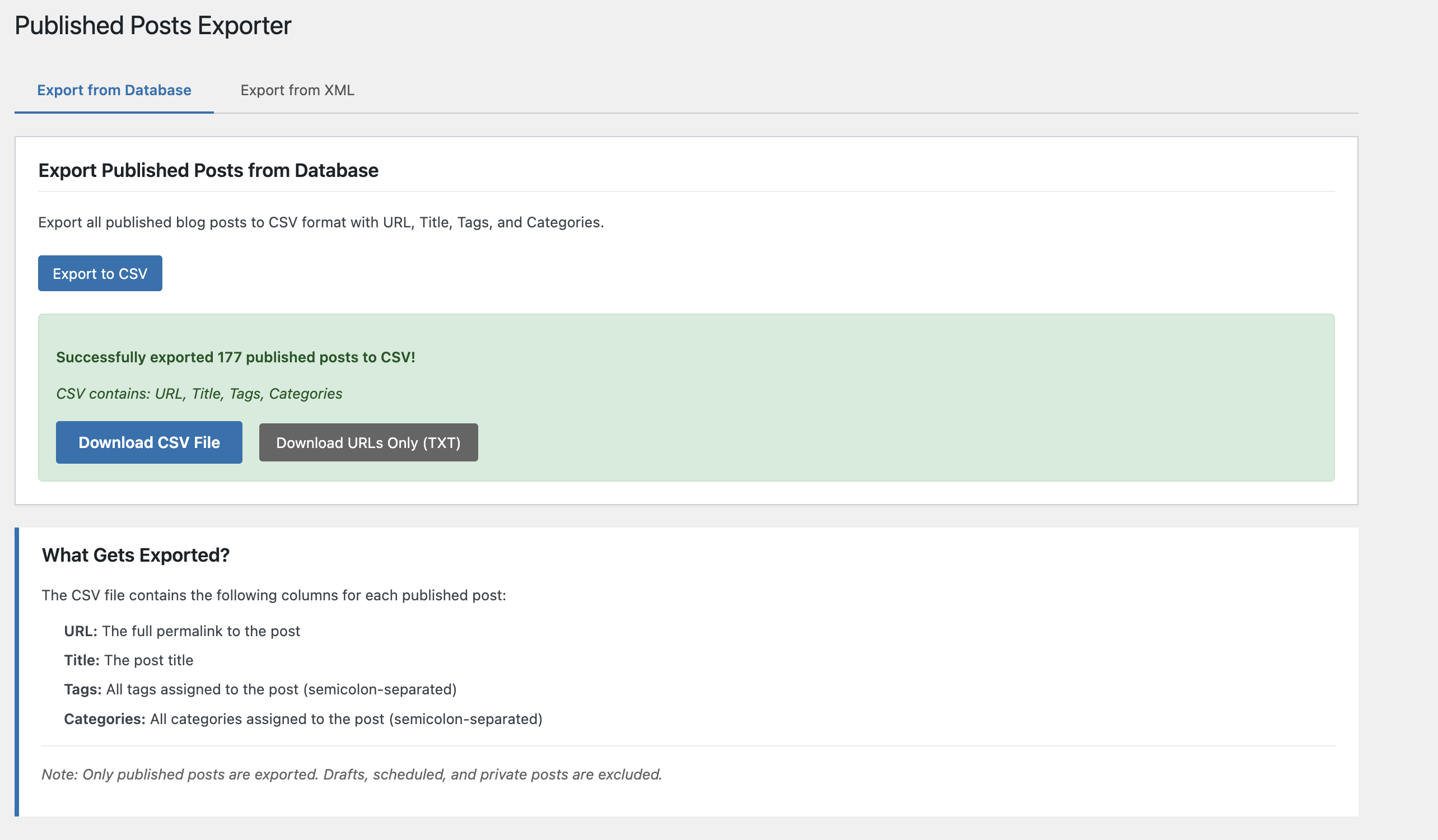
Dashboard widget for quick access – export your posts directly from the WordPress dashboard 
Export results with download links – after export, download your CSV and TXT files with one click
स्थापना
- Upload the
published-posts-exporterfolder to the/wp-content/plugins/directory - Activate the plugin through the ‘Plugins’ menu in WordPress
- Navigate to Tools Posts Exporter to start exporting
नेहमी विचारले जाणारे प्रश्न
-
Can I export posts from an XML file?
-
Yes! The plugin supports both direct database export and XML file processing. Simply upload your WordPress XML export file (.xml or .wxr format) in the XML tab, and the plugin will extract all published posts.
-
What file formats are generated?
-
The plugin generates two files:
* CSV file: Contains URL, title, content (full post content with HTML), tags (semicolon-separated), and categories (semicolon-separated) – perfect for spreadsheets and content analysis
* TXT file: Contains URLs only, one per line – useful for bulk operations -
Where are the exported files saved?
-
Files are temporarily saved in your WordPress uploads directory and can be downloaded directly through your browser. Files are automatically cleaned up after download.
-
Do I need special permissions?
-
Yes, you need administrator privileges (manage_options capability) to use this plugin. This ensures only authorized users can export your content.
-
Can I export specific posts or filter by date?
-
Currently, the plugin exports all published posts. Future versions may include filtering options for date ranges, categories, or tags.
-
What happens to draft or scheduled posts?
-
Only published posts are exported. Drafts, scheduled posts, and private posts are excluded from the export.
समीक्षा
ह्या प्लगइनसाठी कोणतेही समीक्षण नाही.
योगदानकर्ते आणि विकसक
“Published Posts Exporter” हे मुक्त स्रोत सॉफ्टवेअर आहे. पुढील लोक या प्लगइनच्या निर्मितीत योगदान केले आहे.
योगदानकर्ते
भाषांतर करा “Published Posts Exporter” तुमच्या भाषेत.
विकासातील आग्रह?
कोड ब्राउझ करा, SVN संग्रहालय तपासा, किंवा विकास लॉग च्या RSS द्वारे सदस्यता घ्या.
बदलांची यादी
1.2.0
- Added post content export to CSV file
- Content column now includes full post content with HTML formatting
- Updated CSV format: url, title, content, tags, categories
- Enhanced XML parsing to extract content from WordPress export files
- Improved documentation and user interface descriptions
1.1.0
- Fixed WordPress coding standards compliance
- Improved security with proper input validation and output escaping
- Fixed naming conventions (proper prefixes for constants, functions, classes)
- Enhanced file upload validation for XML/WXR files
- Added translators comments for better internationalization
- Replaced unlink() with wp_delete_file() for better WordPress compatibility
- Reduced README tags to meet WordPress.org requirements
1.0.0
- Initial release
- Database export functionality
- XML file processing (.xml and .wxr formats)
- TXT and CSV file generation
- Admin menu, settings page, and dashboard widget
- Secure file downloads with nonce verification