

वर्णन
Want to simplify your WordPress email management across all your sites? If your answer is yes, then you need ✨ MainWP Post SMTP Extension! ✨
MainWP Post SMTP Extension is a powerful and easy-to-use add-on that allows you to set up and control the SMTP configuration for all your sites from your MainWP dashboard.
Whether you want to use an API key or SMTP credentials, you can configure SMTP once on your main site and apply them to all your child sites with a single click.
No more hassle of setting up each site individually! 😀
Additionally, you can monitor the email delivery status, troubleshoot any issues, and get notified of any email failures for all your sites in one place. 🎉
With MainWP Post SMTP Extension, you can save time, avoid errors, and improve your email deliverability.
5 Reasons Why You Should Install MainWP Post SMTP Extension
✅ Reason #1:
1-Click SMTP Configuration Across All Sites
No need to configure your SMTP settings for each site individually. 🤯
With MainWP Post SMTP Extension, just set up your SMTP server on your main site and sync it with all your child sites with a single click.
🎉 This way, you can save the time and hassle of setting up SMTP for each site individually.
✅ Reason #2:
Reliable Email Delivery with Backup SMTP Connection
In any case, if your primary SMTP service provider fails to deliver your emails, MainWP Post SMTP Extension automatically switches to a secondary SMTP service provider to ensure your emails always reach your recipients.
🎉 Consequently, it increases your site’s email delivery rate and makes email communication much more efficient.
✅ Reason #3:
Instant Email Failure Alerts – The Way You Like!
You can set up email delivery failure alerts during the Post SMTP configuration of your main site to get instant notifications whenever an email delivery fails on any of your sites.
There are four options to get email failure alerts:
✔️ Admin (Email): You’ll receive an email alert to your admin account
✔️ Pushover: Receive a push notification on your mobile device
✔️ Slack: Direct message (DM) via Slack or Slack channel alert
✔️ Twilio (SMS): Receive an SMS on your phone
🎉 BONUS: FREE Chrome Extension to get email failure notifications right in your Chrome browser.
✅ Reason #4:
Dedicated Post SMTP Mobile App – 100% FREE 🤯
🎉 Keep Track of Your WordPress Emails, Anywhere Anytime…!!!
Post SMTP Mobile App empowers you to:
✔️ Easily check the status of your WordPress emails
✔️ Get instant notification on every email failure
✔️ Resend any failed email again with a single click
✔️ View the content of your email in detail
✔️ Connect multiple WordPress sites to receive failure alerts.
✔️ Diagnose email failure with a detailed error message
🎉 On top of that, you can easily Contact Post SMTP support directly from the app.
✅ Reason #5:
Detailed Email Logs of All Your Sites in One Place
🎉 Access a comprehensive and searchable log viewer in the MainWP dashboard to check email delivery status, view email content, error details, and much more for all your sites.
Within the log screen, you can:
✔️ Filter the email logs by date and subject for a quick search
✔️ Easily sort emails by Status, Subject, Sent To, Status, or Delivery Time
✔️ View email attachments and resend them with a single click.
So, what’s holding you back❓ 🤷
Make A Smart Choice 😎 by downloading the MainWP Post SMTP Extension TODAY to manage your WordPress Emails with EASE!!! 😃
Prerequisites to Install MainWP Post SMTP Extension
✔️ MainWP Dashboard and Post SMTP plugins installed on your main (parent) site
✔️ MainWP Child and Post SMTP plugins installed on all your child sites
✔️ MainWP Dashboard Version 4.5.3.2 or higher
✔️ MainWP Child Version 4.5.3 or higher
✔️ WordPress version 6.4.2 or higher
How to Install MainWP Post SMTP Extension
Once you’ve installed the MainWP Dashboard, MainWP Child, and Post SMTP plugins on the parent and all the child sites, respectively, then simply download and install the MainWP Post SMTP Extension on the main (parent) site.
After that, follow our step-by-step documentation of the MainWP Post SMTP Extension to set up and manage SMTP settings across all your sites.
Need Help? Get On-Demand SMTP Configuration Support
Can’t figure out how to configure MainWP Post SMTP Extension? Don’t worry; We’ve got you covered!
Our team of WordPress experts is always ready to help you with any email delivery issues or WordPress SMTP configuration. All you need to do is click here, fill out the form, and relax while we take care of everything for you.
Our SMTP Configuration Support is your one-stop solution for all your WordPress email delivery problems.
स्क्रीनशॉट

Access the MainWP Post SMTP Extension from your parent site’s MainWP dashboard. 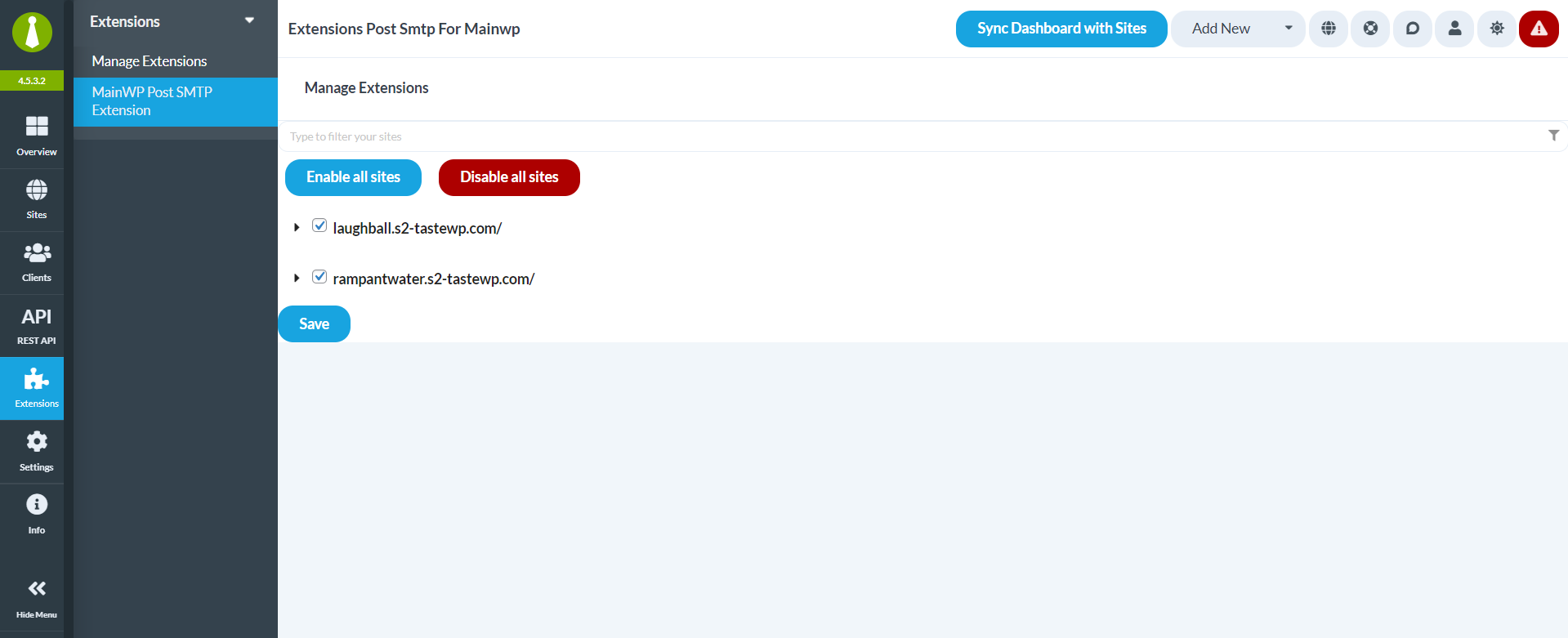
Enable quick SMTP configuration on all or selected child sites using MainWP dashboard. 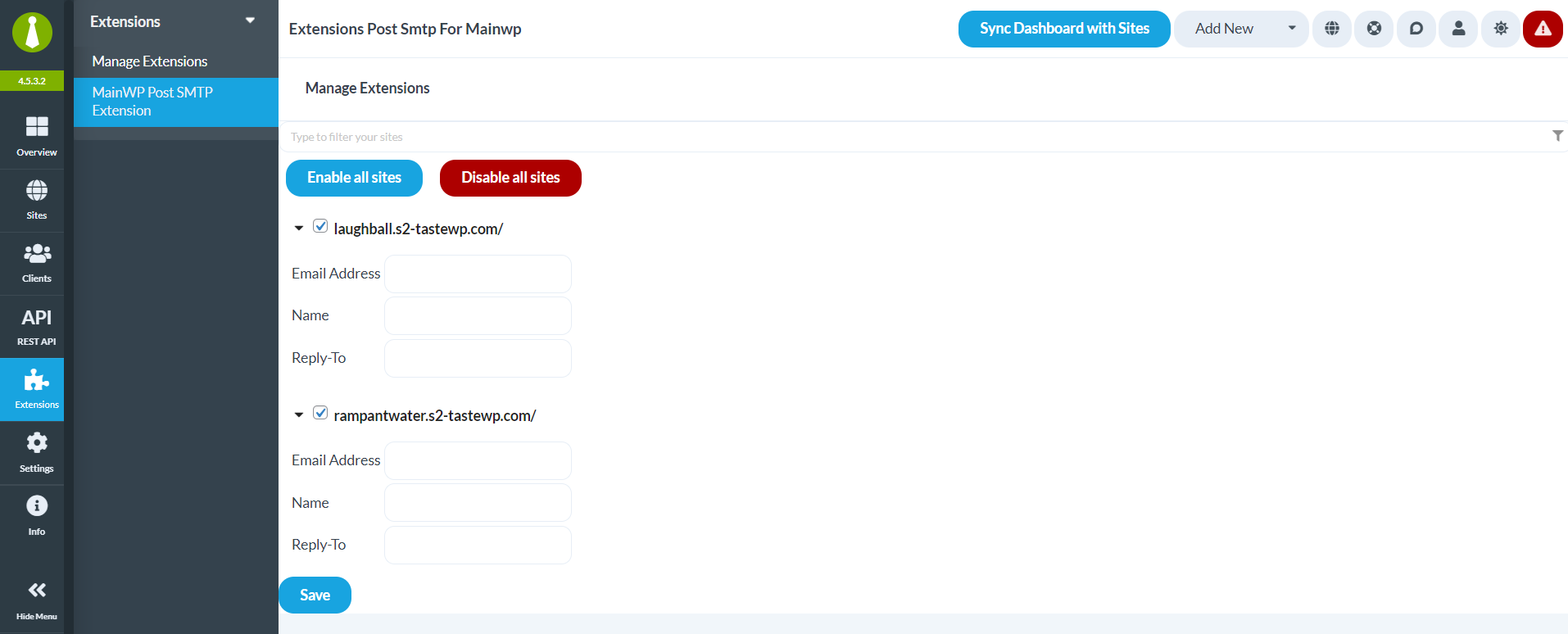
Set Email Address, Name, and Reply-To for your child sites directly from the MainWP dashboard if needed. 
View first child site’s Post SMTP dashboard showing that Post SMTP is being used from the MainWP dashboard. 
View second child site’s Post SMTP dashboard showing that Post SMTP is being used from the MainWP dashboard.
समीक्षा


योगदानकर्ते आणि विकसक
“MainWP Post SMTP Extension – Easily Manage WP SMTP Setup for All Sites in One Place” हे मुक्त स्रोत सॉफ्टवेअर आहे. पुढील लोक या प्लगइनच्या निर्मितीत योगदान केले आहे.
योगदानकर्ते

“MainWP Post SMTP Extension – Easily Manage WP SMTP Setup for All Sites in One Place” 1 लोकॅलमध्ये भाषांतरित केले आहे. अनुवादकांना त्यांच्या योगदानाबद्दल धन्यवाद.
विकासातील आग्रह?
कोड ब्राउझ करा, SVN संग्रहालय तपासा, किंवा विकास लॉग च्या RSS द्वारे सदस्यता घ्या.
बदलांची यादी
1.0.3 Feb 14, 2024
- FIX – Pro conflict with free Add-ons.
1.0.2 Feb 07, 2024
- Added support for Pro Add-ons.
1.0.1 Jan 01, 2024
- FIX – Sites’ logs switching drop down was not rendering properly.
1.0.0 December 18, 2023
- Initial Release