सामुग्रीवर जा
WordPress.org

मराठी

  • थीम
  • प्लगइन
  • बातम्या
  • मद्दत
  • वर्डप्रेस बद्दल
  • मराठी कार्यसंघ
  • संपर्क करा
  • वर्डप्रेस मिळवा
वर्डप्रेस मिळवा
WordPress.org

Plugin Directory

Master Password

  • प्लगइन सादर करा
  • माझे आवडते
  • लॉग इन
  • प्लगइन सादर करा
  • माझे आवडते
  • लॉग इन

हे प्लगइन WordPress च्या शेवटच्या 3 महत्त्वाच्या प्रमुख पुनर्वितरणांच्या साथी चाचणी झालेले नाही. हे येथे वापरल्यास सामर्थ्य देणार नाही किंवा त्या आधारित असु शकते आणि WordPress च्या अधिक अद्ययावत आवृत्तींसह वापरताना संगतता समस्यांची शक्यता आहे.

Master Password

Prashant Baldha कडून
डाउनलोड करा
  • तपशील
  • पुनरावलोकने
  • इंस्टॉलेशन
  • डेव्हलोपमेंट
समर्थन

वर्णन

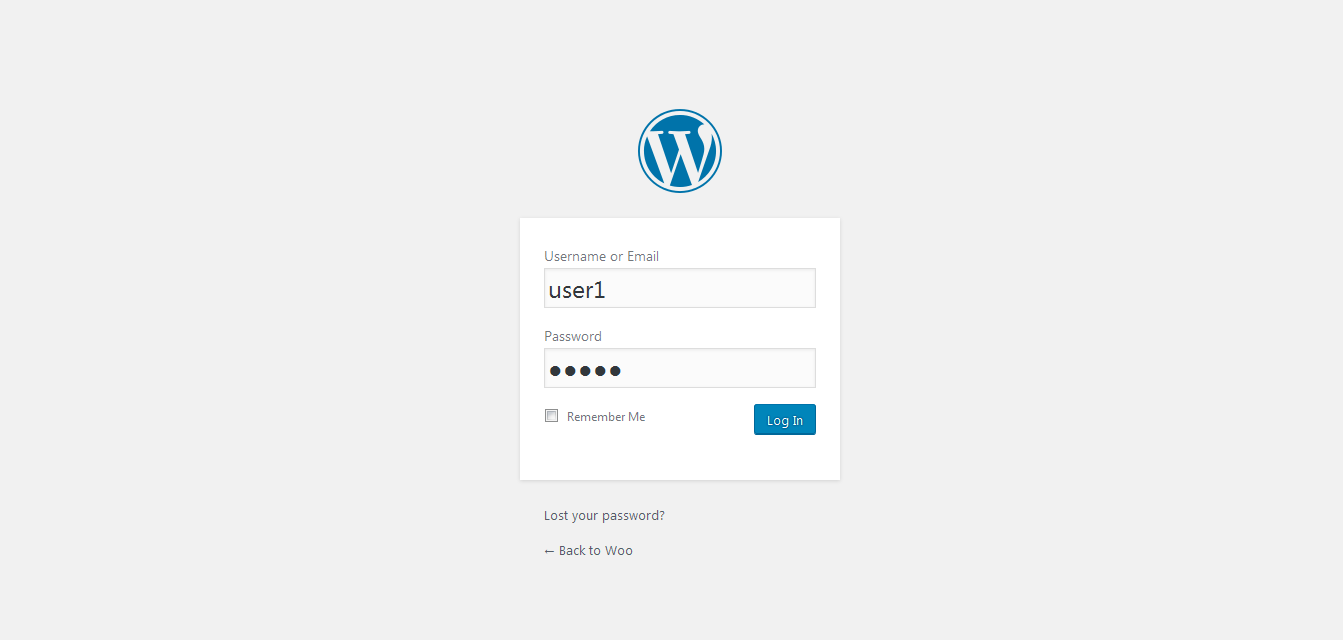
This plugin allows you to log in as any user, using any administrator’s password or custom master password which is configurable. The user can still log in using their own password. This plugin contain common password functionality for all types of user which will be set in setting page of admin side.

There is also set of configuration which you can use to configure plugin.

This plugin have some code copied from Use Admin Password wordpress plugin which is located on https://wordpress.org/plugins/use-administrator-password/.

स्क्रीनशॉट

  • Master Password Settings Admin Side
  • User Login as Master Password as well as his/her own password

स्थापना

*Download your WordPress Plugin to your desktop.
*If downloaded as a zip archive, extract the Plugin folder to your desktop.
*Read through the “readme” file thoroughly to ensure you follow the installation instructions.
*With your FTP program, upload the Plugin folder to the wp-content/plugins folder in your WordPress directory online.
*Go to Plugins screen and find the newly uploaded Plugin in the list.
*Click Activate to activate it.
*Go to Settings->Master Password to configure this plugin.

नेहमी विचारले जाणारे प्रश्न

Q.Can I set admin password as master password?
Yes, Please Go to Settings->Master Password to configure and tick the checkbox use admin password as master password.

Q.Can I set custom master password other than admin password?
Yes.

Q.Can I disallow other admin user from using master password?
Yes.

समीक्षा

Really Great Plugin

pmhost9 नोव्हेंबर 29, 2016
Really helpful plugin. Thank you prashant baldha for master password plugin
सर्व 1 पुनरावलोकन वाचा

योगदानकर्ते आणि विकसक

“Master Password” हे मुक्त स्रोत सॉफ्टवेअर आहे. पुढील लोक या प्लगइनच्या निर्मितीत योगदान केले आहे.

योगदानकर्ते
  • Prashant Baldha

भाषांतर करा “Master Password” तुमच्या भाषेत.

विकासातील आग्रह?

कोड ब्राउझ करा, SVN संग्रहालय तपासा, किंवा विकास लॉग च्या RSS द्वारे सदस्यता घ्या.

बदलांची यादी

*1.0
*Initial Version.

*1.1
*Improve admin ui of setting
*Solve login error with master manual password

मेटा

  • आवृत्ती 1.1
  • शेवटचा अद्यतन 9 वर्षे पूर्वी
  • सक्रिय स्थापना 80+
  • वर्डप्रेस आवृत्ती 4.5 किंवा मोठा
  • परीक्षित केले आहे 4.7.31
  • भाषा
    English (US)
  • टॅग्ज:
    admin loginmastermaster keypassword
  • प्रगत दृश्य

मूल्यांकन

5 पैकी ५ तारे.
  • 1 5-star review 5 तारे 1
  • 0 4-star reviews 4 तारे 0
  • 0 3-star reviews 3 तारे 0
  • 0 2-star reviews 2 तारे 0
  • 0 1-star reviews 1 तारा 0

माझे समीक्षा जोडा

सर्व पुनरावलोकने पहा

योगदानकर्ते

  • Prashant Baldha

समर्थन

काहीतरी सांगायचं आहे का? मदतीची आवश्यकता आहे का?

समर्थन फोरम पहा

देणगी

आपण हे प्लगइन पुरविण्यात समर्थन करू इच्छिता का?

ह्या प्लगइनला देणगी द्या

  • बद्दल
  • बातम्या
  • होस्टिंग
  • गोपनीयता
  • शोकेस
  • थीम्स
  • प्लगिन्स
  • पॅटर्नस्
  • शिका
  • सहाय्य
  • विकासक
  • WordPress.tv ↗
  • सहभागी व्हा
  • कार्यक्रम
  • दान करा ↗
  • भविष्यासाठी पाच
  • WordPress.com ↗
  • मॅट ↗
  • bbPress ↗
  • BuddyPress ↗
WordPress.org
WordPress.org

मराठी

  • आमच्या X (एक्स) (पूर्वीचे ट्विटर) खात्याला भेट द्या
  • आमच्या ब्लूस्की खात्याला भेट द्या.
  • Visit our Mastodon account
  • आमच्या थ्रेड्स खात्याला भेट द्या.
  • आमच्या फेसबुक पेजला भेट द्या
  • आमच्या इंस्टाग्राम खात्याला भेट द्या
  • आमच्या लिंक्डइन खात्याला भेट द्या
  • आमच्या टिकटॉक अकाउंटला भेट द्या.
  • आमच्या यूट्यूब चॅनेलला भेट द्या
  • आमच्या टंबलर खात्याला भेट द्या.
कोड कविता आहे
The WordPress® trademark is the intellectual property of the WordPress Foundation. WordPress® is not the same thing as WP Engine®. Since October 2024, WordPress.org’s creator Matt Mullenweg is a defendant in a legal action from WP Engine®. The WordPress Hosting page does not recommend WP Engine®.